Table of Contents
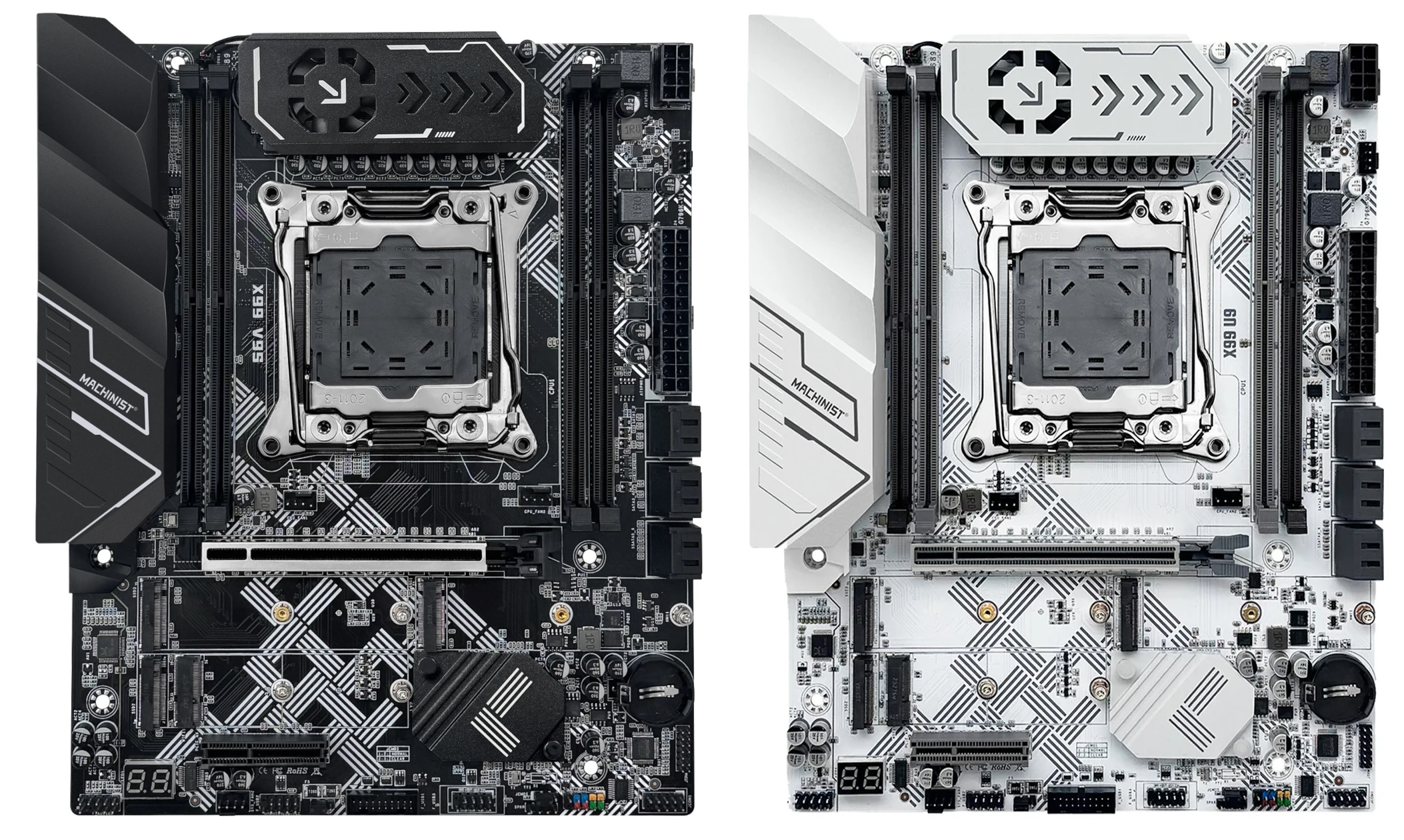
The Machinist X99‑U9 and Machinist X99‑V9s motherboards are promising late‑2025 releases. The PCBs are labeled G796K‑V.1.0 and, aside from the name, differ only by color.
Unlike many copy‑paste designs out there, these boards were clearly engineered to make far better use of the platform’s capabilities.
Specifications
| Model | Machinist X99-U9 \ X99-V9s |
|---|---|
| Socket | LGA 2011-3 |
| Chipset | C612 |
| Supported Processors | Intel Core i7 (5000, 6000 series, Haswell-E/Broadwell-E) Intel Xeon E5-1600 v3/v4, E5-2600 v3/v4, E5-4600 v3/v4 (Haswell-EP/Broadwell-EP) |
| VRM Configuration | 6 phase Total MOSFETs: 12 (6 high-side + 6 low-side) |
| Supported Memory | 4 x DDR4 DIMM (quad-channel) with ECC and non-ECC support Maximum capacity: 128 GB |
| (S3) Sleep Mode Support | Yes |
| Expansion Slots | 1 x PCI-e x16 (Gen 3.0) 1 x PCI-e x4 (Gen 3.0) |
| Storage | 6 x SATA 3.0 3 x M.2 (NVME, Gen 3.0 x4) |
| Fan Connectors | 1 x CPU cooler (4pin) 3 x Case fan (4pin) |
| PS/2 Ports | 2 (mouse + keyboard) |
| USB 3.0 Ports | 4 (+ front panel support) |
| USB 2.0 Ports | 4 (+ front panel support) |
| Network | Gigabit LAN (RTL8111 \ RTL8168) |
| Audio | 5.1 channel (ALC897) |
| Extra | Active VRM cooling M.2 Wi-Fi port Post code display Metal‑reinforced X16 slot |
| JLPC1 header | No |
| TPM 2.0 header | LPC 14 Pin |
| Form Factor & Dimensions | ATX 245 x 197 mm |
| Approximate Price | AliExpress: $60 - $75 Check Price (Machinist X99‑U9) AliExpress: $60 - $75 Check Price (Machinist X99‑V9S) |


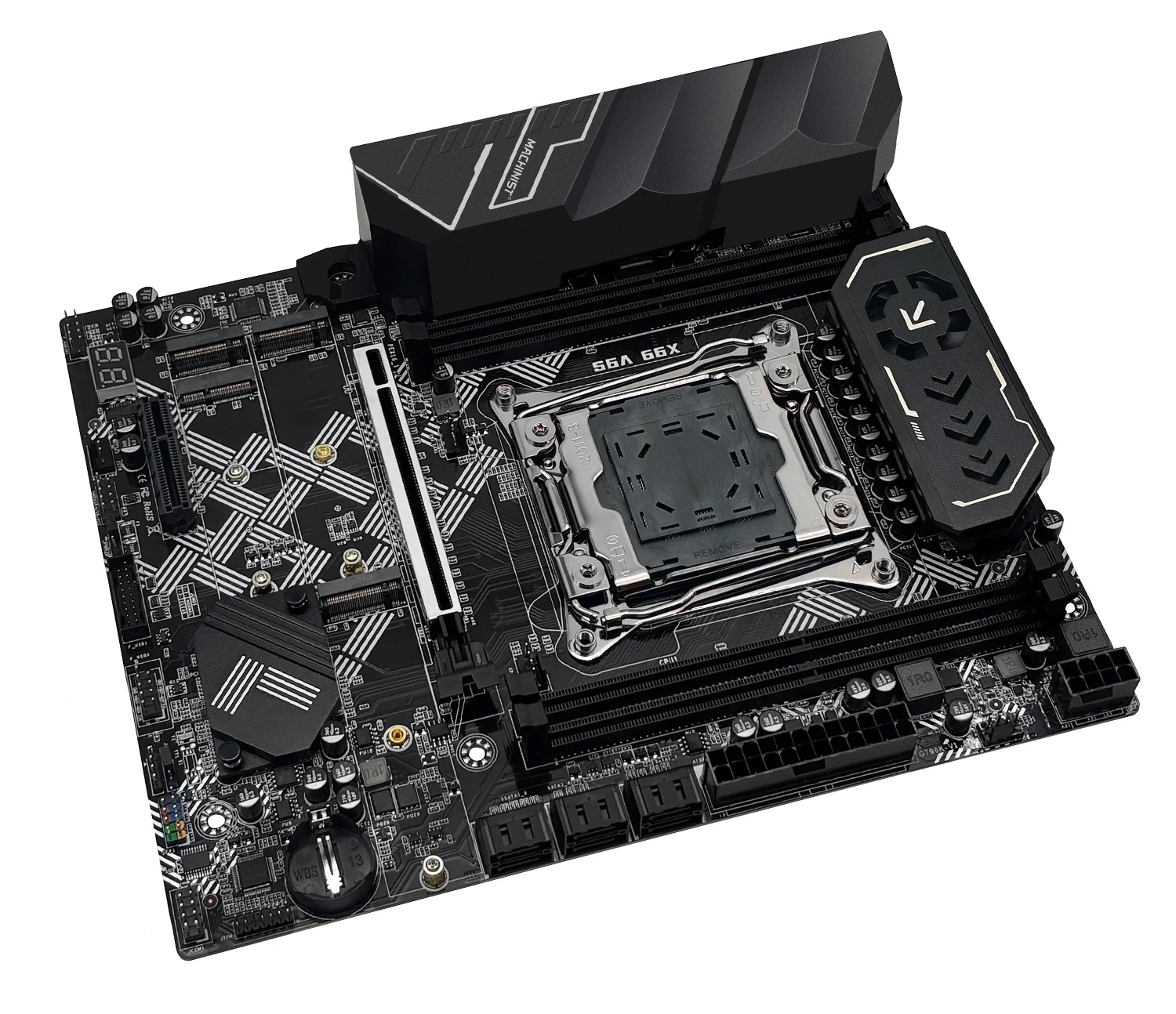
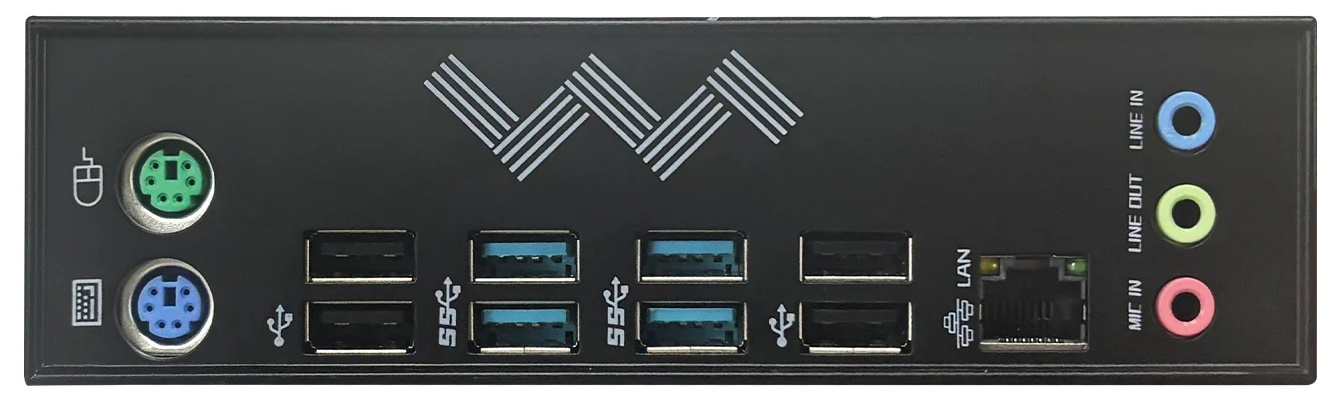
The first thing that stands out is the look and build quality—well above typical budget boards for this platform. Colors across the PCB are matched tastefully, and the integrated I/O shield is well made and looks the part. Visually, these are among the best‑looking LGA2011‑3 boards.
The server‑grade Intel C612 chipset was chosen, so neither model is short on modern I/O. At long last, the many PCIe lanes on Xeon E5 are used properly. The lanes for all PCIe slots and all three M.2 slots come from the CPU (PCIe 3.0); the chipset lanes (PCIe 2.0) appear to be unused.

Power delivery uses a six‑phase design with two MOSFETs per phase. It employs the ISL6376 PWM controller, and the overall VRM configuration closely resembles what we’ve seen on Huananzhi boards like the X99‑QD4. MOSFETs: 3NA7R2 (52 A / 7.2 mΩ) on the high side (×6) and 3NA3R4 (75 A / 3.4 mΩ) on the low side (×6). This setup is well suited to mid‑range CPUs, but it’s still on the light side for top‑end many‑core parts. Thanks to active cooling—a small fan running at a fixed 5 V—you can safely use CPUs up to approximately 135 W TDP.

Care also went into other details. The TPM 2.0 header sits next to the CMOS battery, so large graphics cards no longer block the module. You get four fan headers, and all of them are 4‑pin. Even the ubiquitous ALC897 audio codec gets four filtering capacitors, improving analog output quality.

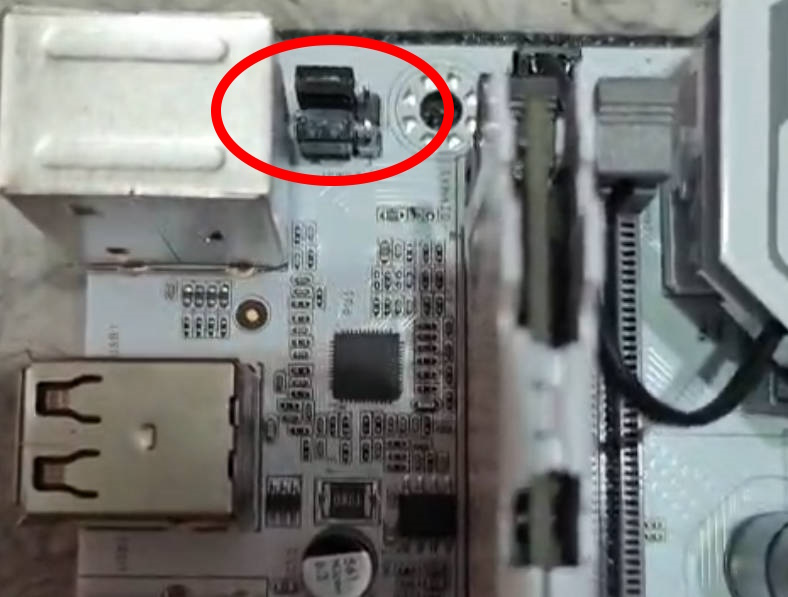
USB connectivity received attention as well. There are now two USB 2.0 headers and—most importantly—you can enable or disable port power while the PC is off. Several JPWR jumpers are provided for this: one next to the USB 3.0 header, and two more hidden under the plastic rear I/O shroud (you’ll need to remove it for access).

And the icing on the cake: working CPU power telemetry and a functional sleep mode (S3)—features many users of budget boards had all but forgotten.
BIOS Capabilities
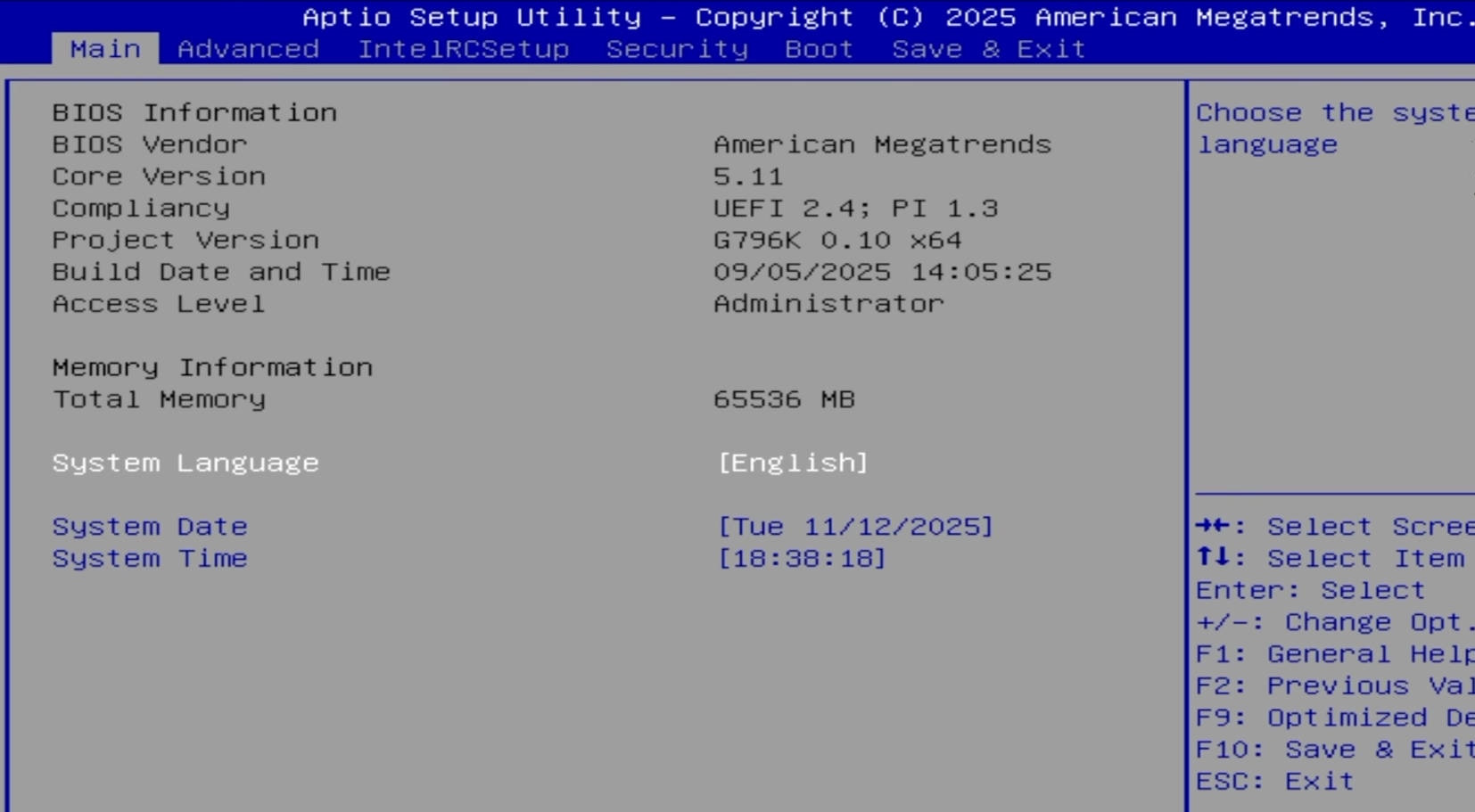
The board runs a familiar Aptio V‑based UEFI/BIOS. The firmware lacks a modern GUI and mouse support, but it includes virtually everything you need. Out of the box, you can adjust RAM timings, and both Resizable BAR and Above 4G Decoding work. Secure Boot is present, as is a configuration module for TPM 2.0 devices; the only missing piece is overclocking support for unlocked CPUs.
Unfortunately, the usual rough edges are here as well—an incorrect motherboard temperature sensor reading, quirky Smart Fan behavior, a huge number of options (some of which don’t work), and, oddly enough, no ECC support in the BIOS. ECC memory modules will still work, but only in non-ECC mode without error correction. The stock firmware is still fine for daily use, but we recommend using an external fan controller or PWM hub for case fans rather than relying on Smart Fan.
Not critical, but annoying: we observed a noticeable increase in boot time after disabling CSM. We hope this will be fixed in future BIOS versions.
Simple BIOS Flashing Guide (Windows)
| BIOS version & date | Ram Timings | ReBAR | Unlocked CPU OC | Turbo Boost unlock | Undervolt | Secure Boot & TPM2.0 | Notes & Link |
|---|---|---|---|---|---|---|---|
| (09/05/2025)X99 | + | + | - | - | - | + | Stock BIOS [Download] |
| (09/05/2025)X99 | + | + | - | + | -50 mV | + | Stock BIOS + TBU for v3 CPUs [Download] |
| (09/05/2025)X99 | + | + | + | - | - | + | Stock BIOS with overclocking capability for unlocked CPUs [Download] |
- Download Intel Flash Programming Tool (FPTW) 9.1.10 from this page.
- Open Command Prompt as Administrator.
- Copy your BIOS file (
bios.binorbios.rom) into the same folder as FPTW. - In Command Prompt, navigate to the FPTW folder using the
cdcommand. - Back up first:
fptw64 -d backup.bin - Flash the BIOS:
fptw64 -f bios.bin
Notes: Replace bios.bin with the actual name of your BIOS file.
After flashing, we recommend resetting settings or clearing CMOS.

Frequently Asked Questions
How do I connect the front panel?
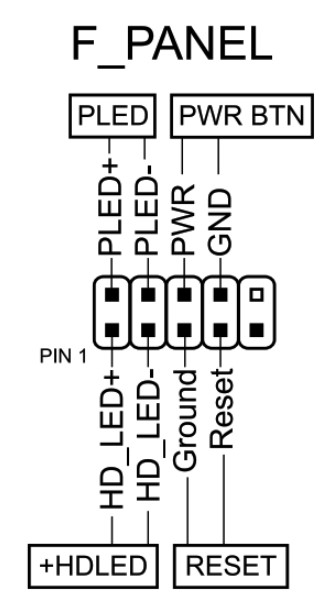
The board won’t boot—black screen, etc. What should I do?
See our article about the most common LGA2011‑3 issues.
Is Turbo Boost Unlock possible on this board?
Yes. You can perform the unlock using S3TurboTool by following our guide, or wait for a ready‑made BIOS with the unlock applied.
Where can I find drivers for this board?
The page with current drivers for socket 2011‑3 boards is located here.
Which TPM 2.0 module is compatible with this board?
You need an ASUS 14‑pin LPC TPM 2.0 module—for example, this one.

Conclusion
OldRigRevive Review
5.0
4.0
4.6
4.3

Written by
Senior Hardware Specialist proving you don't need top-tier gear to game. Expert in smart upgrades and budget-friendly PC restoration.
Hello, I’m Sebastián, I would like to know How to active wake on lan on the bios. I wasn’t able to find it. Thank you
Check IntelRCSetup > PCH Configuration > Networking. There should be a Wake On LAN option. If it is not there, you may need to open it via AMIBCP.