
Table of Contents
X99 MR9A PRO is one of the most successful motherboards produced by Machinist. It’s a full‑size ATX model with plenty of ports and a power delivery subsystem capable of handling the most powerful processors for this socket.
Specifications
| Model | Machinist X99-MR9A PRO |
|---|---|
| Socket | LGA 2011-3 |
| Chipset | B85 / Q87 / C226 |
| Supported Processors | Intel Core i7 (5000, 6000 series, Haswell-E/Broadwell-E) Intel Xeon E5-1600 v3/v4, E5-2600 v3/v4, E5-4600 v3/v4 (Haswell-EP/Broadwell-EP) |
| VRM Configuration | 4 phase (8 virtual via doublers) Total MOSFETs: 24 (8 high-side + 16 low-side) |
| Supported Memory | 4 x DDR4 DIMM (quad-channel) with ECC and non-ECC support Maximum capacity: 128 GB |
| Sleep Mode Support | Yes |
| Expansion Slots | 2 x PCI-e x16 (Gen 3.0) 1 x PCI-e x4 (Gen 3.0) 1 x PCI-e x1 (Gen 2.0) |
| Storage | 4 x SATA 3.0 2 x SATA 2.0 2 x M.2 (NVME, Gen 3.0 x4) |
| Fan Connectors | 1 x CPU cooler (4pin) 1 x Case fan (4pin) 2 x Case fan (3pin) |
| PS/2 Ports | 2 (mouse + keyboard) |
| USB 3.0 Ports | 2 (+ front panel support) |
| USB 2.0 Ports | 6 (+ front panel support) |
| Network | Gigabit LAN (RTL8111 \ RTL8168) |
| Audio | 5.1 channel (ALC897) |
| Extra | M.2 Wi-Fi port Post code display |
| Bios Chip | W25Q128FV |
| JLPC1 header | Yes |
| TPM 2.0 header | LPC 14 Pin (Only in TPM2.0 Revision) |
| Form Factor & Dimensions | ATX 280 x 215 mm |
| Approximate Price |


The standout feature of this model is its 8-virtual-phase VRM, which allocates three MOSFETs per phase. The power delivery relies on SM4503NHKP (80 A / 3 mΩ) high-side and SM4508NHKP (49 A / 6.8 mΩ) low-side MOSFETs, driven by four uP1961S doublers/drivers and managed by the uP1649Q PWM controller — a staple component on Chinese X99 motherboards. This configuration, especially with active cooling, can handle powerful CPUs such as the Xeon E5‑2699 v3.

The storage subsystem offers 6 SATA ports (only 4 of them are SATA 3) and two M.2 slots running at PCIe 3.0 x4. There are plenty of PCIe slots as well: the x16 and x4 slots are wired to the CPU, while the x1 slot is wired to the chipset and limited to PCIe 2.0.

Perks include a thick 10‑layer PCB, an integrated POST code display with a buzzer, and a pre-installed plastic I/O shield that gives the board a modern look.
The biggest compromise here is the use of a desktop rather than a server-grade chipset. Most commonly it’s B85, but variants with Q87 and even C226 exist. Functionally these variants are the same, but all of them have a limited number of USB 3.0 ports.
In addition, the board has all the traditional drawbacks:
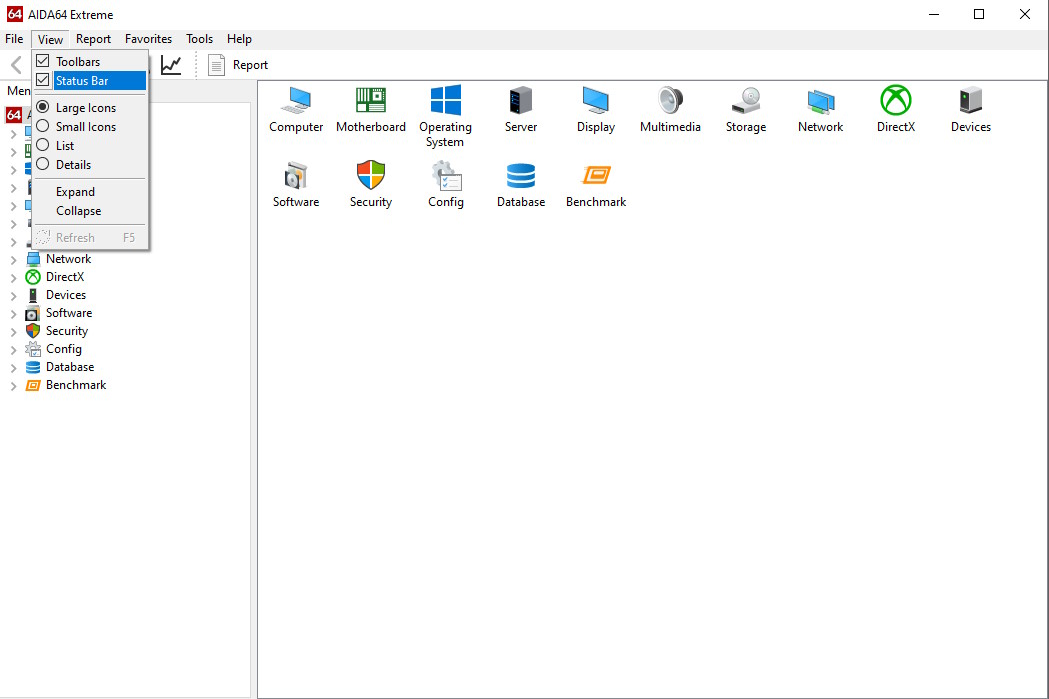
- Turn on the status bar: Go to View → Status Bar
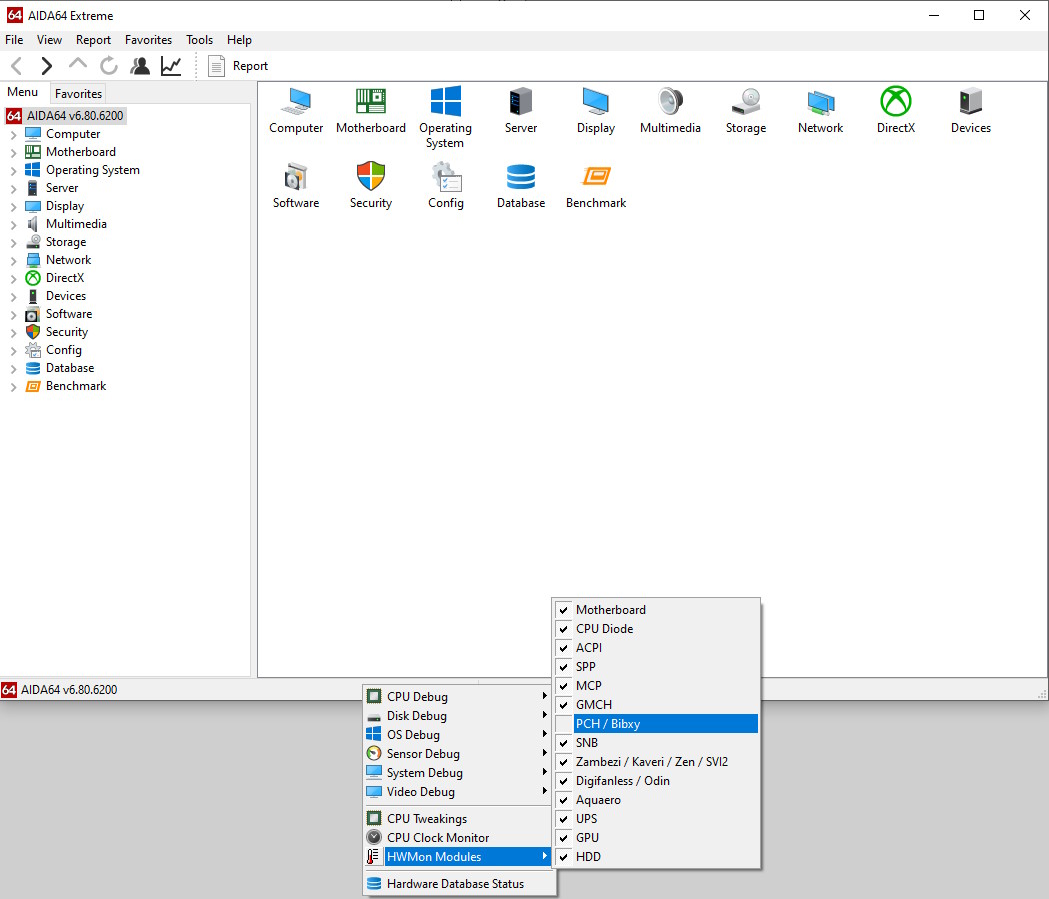
- Right-click the status bar at the bottom → HWMon Modules → uncheck PCH / Bibxy
- If this doesn’t work, disable all sensors and enable them one by one to identify the culprit.
Revisions
This motherboard has been in production for several years, during which the manufacturer rolled out multiple hardware revisions. The initial release featured a stripped-down VRM and a simpler audio chip. However, all subsequent builds upgraded to the full 8-phase power delivery and the familiar ALC897 codec. Beyond that, no other significant changes were made, and the firmware remains cross-compatible across all production runs.

Although early versions do not have a TPM 2.0 header, they all have a JLPC1 header, so getting a working TPM 2.0 is still possible. Learn more about TPM 2.0 on Chinese X99 motherboards — here.

Revision with TPM 2.0 support


A later revision with a 14-pin TPM 2.0 header is also on sale; full operation only requires inserting a compatible module—no board mods needed.
BIOS Capabilities

Stock firmware has never been a strong suit of Machinist boards, and the MR9A PRO is no exception. The BIOS provides no access to memory timings, cannot overclock unlocked CPUs, and includes the usual shortcomings: inaccurate board temperature and power readings, a non‑functional Smart Fan for all headers except the 4‑pin CPU header. Naturally, extras like Resizable BAR are also absent.
Fortunately, most of these shortcomings can be fixed by flashing BIOS images from third‑party vendors or other Chinese boards.
Simple BIOS Flashing Guide (Windows)
| BIOS version & date | Ram Timings | ReBAR | Unlocked CPU OC | Turbo Boost unlock | Undervolt | TPM2.0 Support | Notes & Link |
|---|---|---|---|---|---|---|---|
| X9R9P Ver:005 03/22/2023 19:30:19 | - | - | - | - | - | + | Stock BIOS from revision 1.2 [Download] |
| X9R9P Ver:005 03/22/2023 19:30:19 | + | + | - | - | - | + | Stock BIOS + Ram Timings + BCLK 100.00MHz [Download] |
| X9R9P Ver:003 30/08/2022 16:30:35 | - | - | - | - | - | + | Stock BIOS from revision 2.2 [Download] |
| X9R9P Ver:003 30/08/2022 16:30:35 | + | - | - | - | - | + | Stock BIOS + Ram Timings + BCLK 100.00MHz [Download] |
| 10/15/2020 14:21:26 Ver: X99MA011 | + | - | - | + | -50 mV | + | BIOS from Huananzhi x99 8m-f. Timings + TBU + Undervolt. [Download] |
| BX99DA04 | + | + | + | - | - | + | Custom BIOS from iEngineer. Timings + ReBAR + Unlocked CPU overclock... [Link] |
- Download FPTW 9.1.10 from this page.
- Open Command Prompt as Administrator.
- Copy your BIOS file (
bios.binorbios.rom) into the same folder as FPTW. - In the Command Prompt, navigate to the FPTW folder using the
cdcommand. - Flash the BIOS with the following command:
fptw64 -f bios.bin
Note: Replace bios.bin with the actual name of your modded BIOS file, if it’s different.
If you encounter an error where FPT cannot access specific regions, reboot your system, enter the setup utility, and disable the flash protection under: IntelRCSetup → PCH Configuration → Security Configuration → BIOS Lock: Disabled.
After flashing, we recommend performing a settings reset.

Frequently Asked Questions
The board won’t boot, black screen, etc. What should I do?
See our article about the most common LGA2011-3 issues.
Where can I find drivers for this board?
You can grab up-to-date drivers for LGA2011-3 platforms on this dedicated page.
I can’t install the audio drivers.
If none of the audio drivers worked, try a manual installation via Device Manager. To do this, extract the contents of the .cab files, which you can download here.
Conclusion
OldRigRevive Review
4.5
4.5
4.5
3.0

Written by
Senior Hardware Specialist proving you don't need top-tier gear to game. Expert in smart upgrades and budget-friendly PC restoration.