
Table of Contents
The Machinist X99‑PR9 is a decent entry‑level board based on X99H v1.41. It’s not a perfect model, but it’s fairly well known and has earned good reviews thanks to its stable operation.
There are several similar boards from the same manufacturer: Machinist X99‑PR8 (DDR3 version with limited CPU compatibility) and Machinist X99‑PR9‑H (a simplified model based on 5‑series chipsets).
Specifications
| Model | X99-PR9 |
|---|---|
| Socket | LGA 2011-3 |
| Chipset | B85 / Q87 / Z97 / C222 |
| Supported Processors | Intel Core i7 (5000, 6000 series, Haswell-E/Broadwell-E) Intel Xeon E5-1600 v3/v4, E5-2600 v3/v4, E5-4600 v3/v4 (Haswell-EP/Broadwell-EP) |
| VRM Configuration | 3 phase (6 virtual via doublers) Total MOSFETs: 12 (6 high-side + 6 low-side) |
| Maximum Recommended TDP | ≤110W (v3 processors) ≤120W (v4 processors) |
| Supported Memory | 4 x DDR4 DIMM (dual-channel) with ECC and non-ECC support Maximum capacity: 128 GB |
| Sleep Mode Support | No |
| Expansion Slots | 1 x PCI-e x16 (Gen 3.0) 1 x PCI-e x1 (Gen 2.0) |
| Storage | 3 x SATA 3.0 1 x M.2 (NVME/NGFF, Gen 3.0 x4) |
| Fan Connectors | 1 x CPU cooler (4pin) 1 x case fans (4pin) |
| PS/2 Ports | 2 (mouse + keyboard) |
| USB 3.0 Ports | 2 (+ front panel support) |
| USB 2.0 Ports | 6 (+ front panel support) |
| Network | Gigabit LAN (RTL8111 \ RTL8168) |
| Audio | 5.1 channel (ALC897) |
| TPM 2.0 header | No |
| Form Factor & Dimensions | mATX 215 x 185 mm |
| Approximate Price |


The board is built around desktop B85, Q87, or Z97 chipsets, though some units ship with the server‑grade C222. Regardless of the PCH, the overall functionality remains identical.
Like most budget boards, the X99‑PR9 features a VRM design with three doubled phases (3×2) and two MOSFETs per phase. It employs SM4377NHKP (50 A / 7 mΩ) and SM4522NHKP (110 A / 2.65 mΩ) MOSFETs, uP1961S (×3) drivers, and a uP1649Q controller. This setup handles entry‑ and mid‑range CPUs without issues. Higher‑TDP models (~120 W+) are possible, but we recommend extra airflow across the VRM in those cases.
There’s a 2‑pin fan header next to the VRM heatsink where you can attach a small blower — handy for adding localized cooling.
Storage consists of three SATA 6 Gb/s (SATA III) ports and one M.2 slot. The M.2 slot supports both NVMe (default) and SATA modes — switching between them requires adjusting the jumpers shown in the image below.

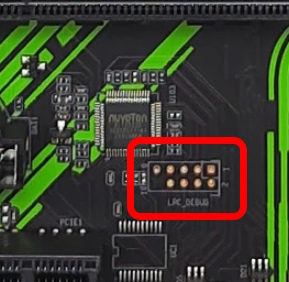
The PR9 has no native port for TPM 2.0 modules. A debug port, like the COM port, is present on the PCB, but the pins are unpopulated. If connecting a TPM 2.0 module to this board is critical for you, solder pins onto the DEBUG port and look for a module compatible with its pinout. Keep in mind this connector has a 2.0 mm pitch, which will make the search somewhat harder. You can read more about TPM 2.0 on Chinese X99 boards in this article.
Beyond that, this model doesn’t drift far from other budget options and inherits most of the traditional drawbacks common to Chinese LGA2011-3 boards:
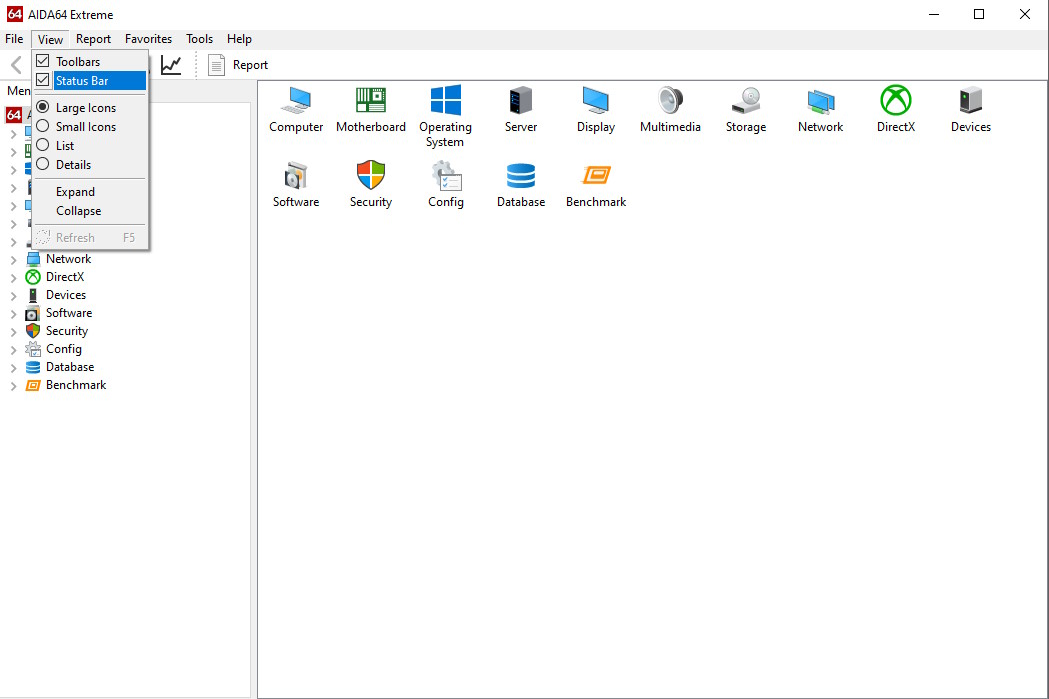
- Turn on the status bar: Go to View → Status Bar
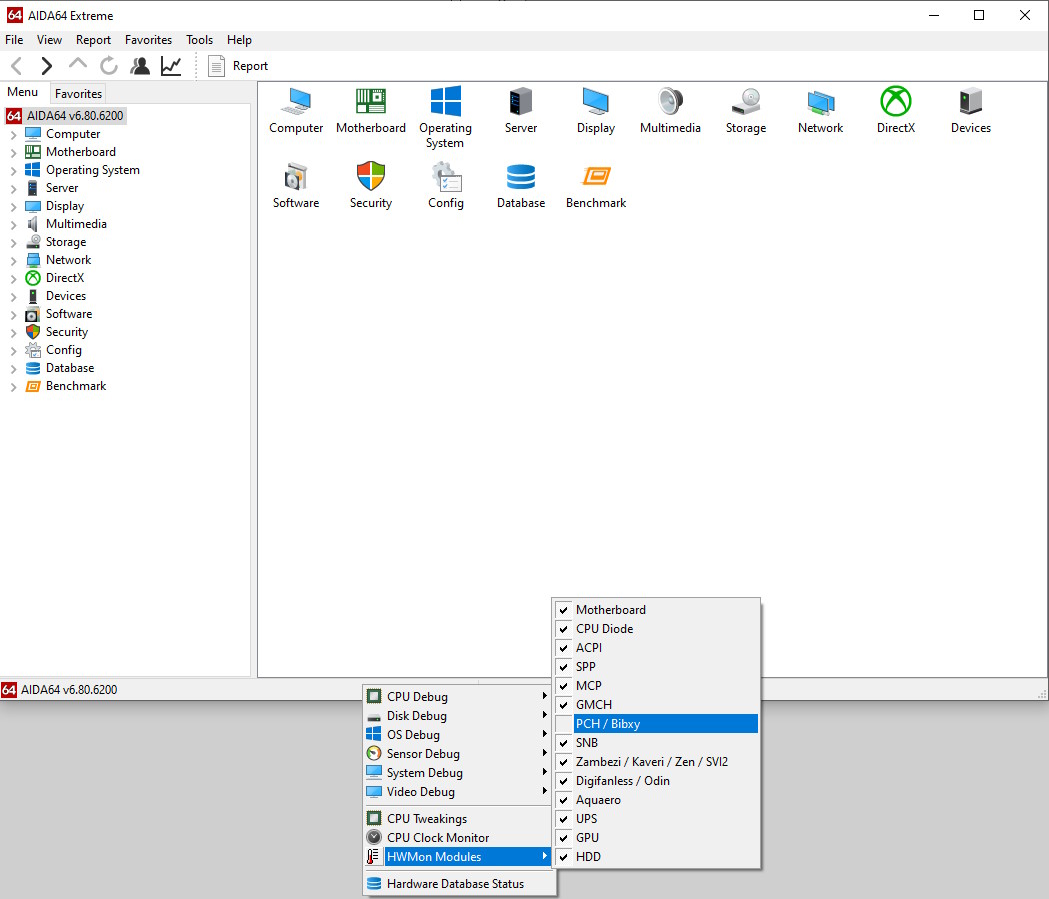
- Right-click the status bar at the bottom → HWMon Modules → uncheck PCH / Bibxy
- If this doesn’t work, disable all sensors and enable them one by one to identify the culprit.
Revision 2.21
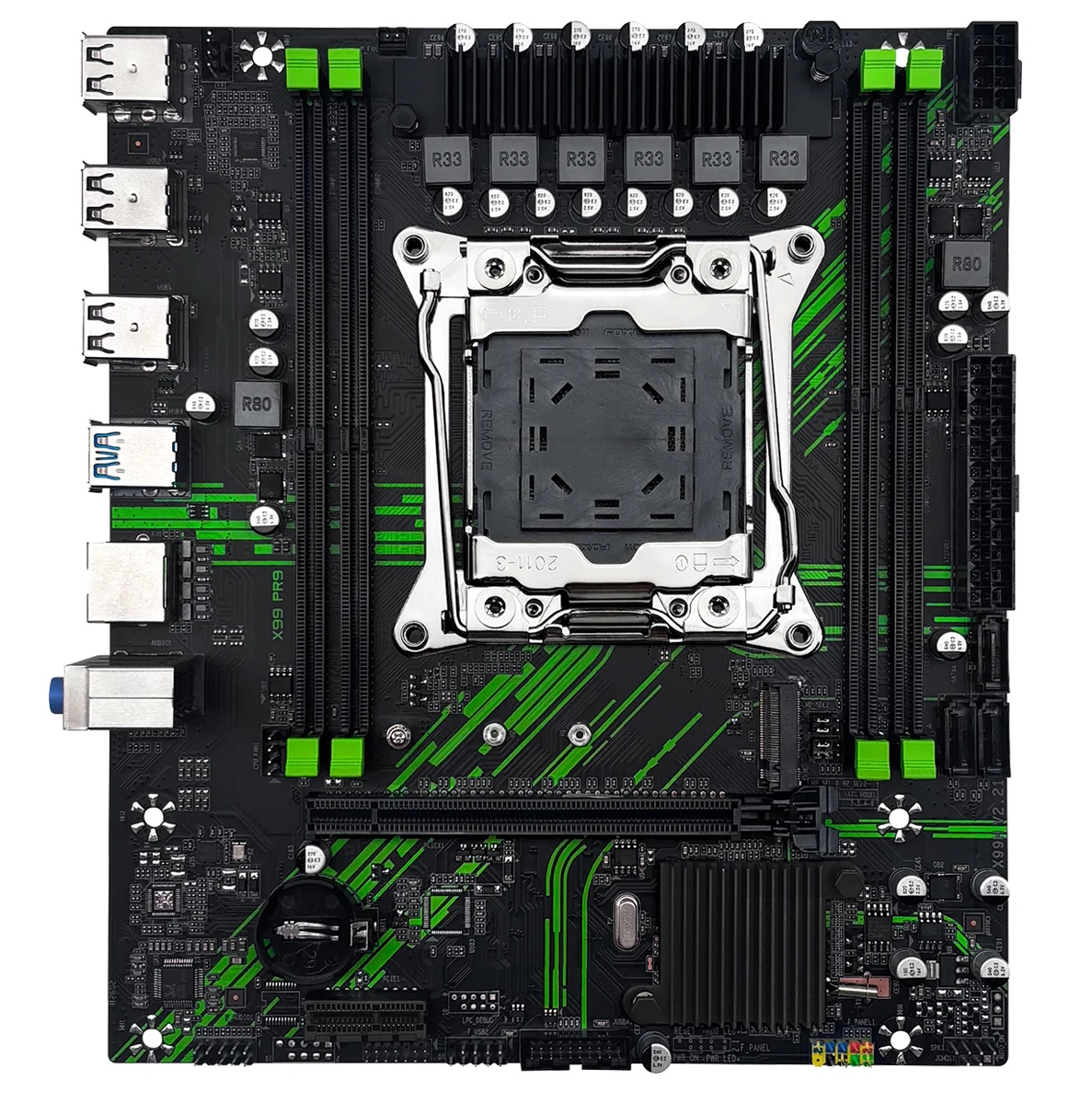
In 2026, a new revision of the board appeared, which is actually a completely different product. This revision is labeled X99H v2.21 and appears to be based on the X99H revision of the same name.
Like its predecessor board, this version differs significantly from the original. It lacks a Super I/O controller and PS/2 ports. The absence of the Super I/O controller made the board cheaper to produce, but it also made fan control, voltage monitoring, and some other functionality completely impossible. Although this version does get a native TPM 2.0 port compatible with ASUS LPC‑14pin modules, we still recommend holding off on buying this board for now.
The BIOS files for this revision are not compatible with the original PR9.
BIOS Capabilities (original PR9)

The board runs on the BIOS typical of all Chinese X99 boards, based on code from American Megatrends. The firmware itself also appears to have been borrowed from the X99H. Memory timing control is available, and ReBAR works, but that’s where the positives end. The stock firmware doesn’t include Secure Boot and can’t work with TPM2.0 modules (assuming you manage to connect one). On the plus side, there’s separate control for the second 4‑pin fan header and general stability.
| Chipset | BIOS version & date | Ram Timings | ReBAR | Secure Boot & TPM2.0 | Turbo Boost unlock | Undervolt | Notes & Link |
|---|---|---|---|---|---|---|---|
| 8 Series PCH | 10/10/2023 Ver: X99HA00Q | + | + | - | - | - | Stock BIOS [Download] |
| 8 Series PCH | 10/10/2023 Ver: X99HA00Q | + | + | - | + | -50 mV | Stock BIOS + TBU [Download] |
| 8 Series PCH | 08/11/2022 X9MRA Ver:002 | + | - | + | + | -40 mV | Mod BIOS from Machinist X99-MR9A. Flash this firmware at your own risk; recovery is only possible using an SPI programmer. |
Simple BIOS Flashing Guide (Windows)
- Download FPTW 9.1.10 from this page.
- Open Command Prompt as Administrator.
- Copy your BIOS file (
bios.binorbios.rom) into the same folder as FPTW. - In the Command Prompt, navigate to the FPTW folder using the
cdcommand. - Flash the BIOS with the following command:
fptw64 -f bios.bin
Note: Replace bios.bin with the actual name of your modded BIOS file, if it’s different.
After flashing, reset settings to defaults (Clear CMOS) before first boot.

Frequently Asked Questions
The board won’t boot, black screen, etc. What should I do?
See our article about the most common LGA2011‑3 issues.
Where can I find drivers for this board?
You can find up-to-date drivers for LGA2011-3 platforms on this dedicated page.
Is there a manual available, maybe a PDF?
The official Machinist manual can be downloaded here.
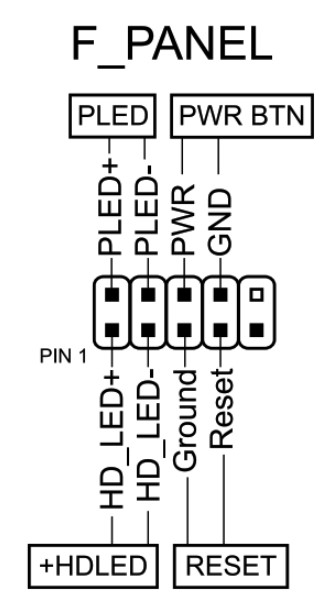
How do I connect the front panel?
Conclusion
OldRigRevive Review
4.5
3.5
3.9
4.3

Written by
Senior Hardware Specialist proving you don't need top-tier gear to game. Expert in smart upgrades and budget-friendly PC restoration.