
Table of Contents
Frankenstein CPUs are laptop processors mounted on an adapter board so they fit a desktop LGA1151 socket. The best of them give you 8 cores and an unlocked multiplier for far less than a comparable desktop chip — but only after you modify and flash your board’s BIOS.
This guide covers which models exist, which boards they work on, how to prepare the BIOS, how to install the CPU and what usually goes wrong.
What are Frankenstein processors?
Frankenstein processors (also called mutants) first appeared on LGA1150, but LGA1151 is where they really took off. The same idea came back on LGA1700 — see our guide to LGA1700 mutant HX processors.
The donors are BGA1440 laptop chips, and Frankensteins exist for every LGA1151 generation: Skylake, Kaby Lake and Coffee Lake (including Refresh).
Their main appeal is strong performance for little money. The catch is a high barrier to entry: a Frankenstein won’t boot on a stock board. You have to mod the BIOS first and then flash it, which on most boards means using an SPI programmer. Installing one is also more involved than with a regular desktop CPU, though there’s no pin mod to do, as there is in a regular Coffee Mod build.


Are Frankensteins right for you?
A good fit if you:
- have modded and flashed a BIOS before, ideally with an SPI programmer
- want the most cores and clock speed for your money
- enjoy experimenting and don’t mind troubleshooting
Better avoid them if:
- you’ve never modded a BIOS
- your board is a B360, H310 (not H310C), H370, Q370 or Z390
- the PC is a work machine that can’t afford downtime
- you want a CPU you can install and forget
What you need to know about Frankensteins
- There’s no guarantee a given Frankenstein will work on a given board, whether it’s built from a retail chip or an engineering sample.
- Most popular models are now sold either as a bare die (no IHS) or with an aftermarket lid. Either way, you’ll need to remove the stock socket retention frame to install them.
- Models with an unlocked multiplier can be overclocked on any board, H110 or B250 included, and memory overclocking works too. Desktop CPUs are locked out of overclocking on non-Z chipsets, but that lock doesn’t apply to these laptop chips.
- Depending on the board, you overclock in the BIOS or with Intel XTU or ThrottleStop. Keep in mind that a board not built for this kind of load can be damaged by a heavy overclock.
- Most models are rated at a modest 35–45 W, but real power draw can be much higher, especially on unlocked parts. A well-overclocked 8-core can pull over 200 W under heavy load and needs a high-end cooler.
- Some models have a memory speed limit built into the memory controller: many Xeon-based Frankensteins top out at 2666 MHz.
- Models without such a limit are often reluctant to overclock memory. Expect to spend time tuning timings to get what a regular desktop CPU does in a few clicks. 2666–2800 MHz is typical; 3000–3200 MHz is possible but rare. Frankensteins built from retail chips tend to reach slightly higher memory speeds than ES-based ones.
Update: newer Frankenstein revisions seem to overclock memory noticeably better. With them, 3000 MHz is a realistic target rather than a lucky exception.
All models and their specifications
Donor chips are plentiful, so there are lots of models to choose from, built on both retail and engineering-sample laptop CPUs.
Engineering samples (ES)
| MODEL | Closest Retail Equivalent | Architecture | Stepping | Cores \ Threads | Base Frequency | Max Turbo Boost Frequency | L3 Cache | TDP | Multiplier | Graphics |
|---|---|---|---|---|---|---|---|---|---|---|
| QPH7 QHR7 | - | Sky Lake, 14 nm | Q0 | 4 \ 8 | 1600 MHz | 2600 MHz | 8 MB | 35 W | Locked | HD Graphics 530 |
| QHPW | - | Sky Lake, 14 nm | Q0 | 4 \ 8 | 2200 MHz | 3000 MHz | 8 MB | 45 W | Locked | HD Graphics 530 |
| QL3X | Core i7-7820HK | Kaby Lake, 14 nm | A0 | 4 \ 8 | 2400 MHz | 3500 MHz | 8 MB | 45 W | Unlocked | HD Graphics 630 |
| QL2X | Core i7-7820HK | Kaby Lake, 14 nm | A0 | 4 \ 8 | 2700 MHz | 3800 MHz | 8 MB | 45 W | Unlocked | HD Graphics 630 |
| QNCT | Core i7-8850H | Coffee Lake, 14 nm | U0 | 6 \ 12 | 2400 MHz | 3600 MHz | 9 MB | 45 W | Locked | UHD Graphics 630 |
| QNVH | Core i7-8850H | Coffee Lake, 14 nm | U0 | 6 \ 12 | 2000 MHz | 3600 MHz | 9 MB | 45 W | Locked | UHD Graphics 630 |
| QRRZ QP87 | Core i7-8750H | Coffee Lake, 14 nm | U0 | 6 \ 12 | 2200 MHz | 4100 MHz | 9 MB | 45 W | Locked | UHD Graphics 630 |
| QP87 | Core i7-8750H | Coffee Lake, 14 nm | U0 | 6 \ 12 | 2200 MHz | 4100 MHz | 9 MB | 45 W | Locked | UHD Graphics 630 |
| QQLT | Core i9-9850HK | Coffee Lake, 14 nm | P0 | 6 \ 12 | 2400 MHz | 4100 MHz | 12 MB | 45 W | Unlocked | UHD Graphics 630 |
| QQLS | Core i9-9880HK | Coffee Lake, 14 nm | P0 | 8 \ 16 | 2100 MHz | 4400 MHz | 16 MB | 45 W | Unlocked | UHD Graphics 630 |
| QS0P | Core i9-9980HK | Coffee Lake, 14 nm | R0 | 8 \ 16 | 2300 MHz | 4800 MHz | 16 MB | 45 W | Locked | UHD Graphics 630 |
| QPQG | Core i9-8950HK | Coffee Lake, 14 nm | U0 | 6 \ 12 | 2900 MHz | 4800 MHz | 12 MB | 45 W | Unlocked | UHD Graphics 630 |
| QRZQ | Xeon E-2276M | Coffee Lake, 14 nm | R0 | 6 \ 12 | 2800 MHz | 4700 MHz | 12 MB | 45 W | ? | UHD Graphics 630 |
| QTJ2 | Core i7-9850H | Coffee Lake, 14 nm | R0 | 6 \ 12 | 2400 MHz | 4300 MHz | 12 MB | 45 W | Locked | UHD Graphics 630 |
| QTJ1 | Core i9-9880HK | Coffee Lake, 14 nm | R0 | 8 \ 16 | 2100 MHz | 4600 MHz | 16 MB | 45 W | Unlocked | UHD Graphics 630 |
| QTJ0 | Core i9-9880HK | Coffee Lake, 14 nm | R0 | 8 \ 16 | 2800 MHz | 4700 MHz | 16 MB | 65 W | Unlocked | UHD Graphics 630 |
Retail versions
| MODEL | Architecture | Stepping | Cores \ Threads | Base Frequency | Max Turbo Boost Frequency | L3 Cache | TDP | Multiplier | Graphics |
|---|---|---|---|---|---|---|---|---|---|
| SR3YY Core i7-8750H | Coffee Lake, 14 nm | U0 | 6 \ 12 | 2200 MHz | 4100 MHz | 9 MB | 45 W | Locked | UHD Graphics 630 |
| SR3YZ Core i7-8850H | Coffee Lake, 14 nm | U0 | 6 \ 12 | 2600 MHz | 4300 MHz | 9 MB | 45 W | Locked | UHD Graphics 630 |
| SRDEC Core i3-8100B | Coffee Lake, 14 nm | U0 | 4 \ 4 | 3600 MHz | 3600 MHz | 6 MB | 65 W | Locked | UHD Graphics 630 |
| SRCX3 Core i5-8500B | Coffee Lake, 14 nm | U0 | 6 \ 6 | 3000 MHz | 4100 MHz | 9 MB | 65 W | Locked | UHD Graphics 630 |
| SRCX2 Core i7-8700B | Coffee Lake, 14 nm | U0 | 6 \ 12 | 3200 MHz | 4600 MHz | 12 MB | 65 W | Locked | UHD Graphics 630 |
| SRF6X Core i5-9300H | Coffee Lake, 14 nm | U0 | 4 \ 8 | 2400 MHz | 4100 MHz | 8 MB | 45 W | Locked | UHD Graphics 630 |
| SRFD0 Core i9-9980HK | Coffee Lake, 14 nm | R0 | 8 \ 16 | 2400 MHz | 4900 MHz | 16 MB | 45 W | Unlocked | UHD Graphics 630 |
| SRF6U Core i7-9750H | Coffee Lake, 14 nm | U0 | 6 \ 12 | 2600 MHz | 4500 MHz | 12 MB | 45 W | Locked | UHD Graphics 630 |
| SRFCP Core i7-9750H | Coffee Lake, 14 nm | R0 | 6 \ 12 | 2600 MHz | 4500 MHz | 12 MB | 45 W | Locked | UHD Graphics 630 |
| SR32K Xeon E3 1505M v6 | Kaby Lake, 14 nm | B0 | 4 \ 8 | 3000 MHz | 4000 MHz | 8 MB | 45 W | Locked | HD Graphics P630 |
| SRFCZ Xeon E-2286M | Coffee Lake, 14 nm | R0 | 8 \ 16 | 2400 MHz | 5000 MHz | 16 MB | 45 W | Locked | UHD Graphics P630 |
| SRFCK Xeon E-2276M | Coffee Lake, 14 nm | R0 | 6 \ 12 | 2800 MHz | 4700 MHz | 12 MB | 45 W | Locked | UHD Graphics P630 |
| SRCKQ Xeon-E 2186M | Coffee Lake, 14 nm | U0 | 6 \ 12 | 2900 MHz | 4800 MHz | 12 MB | 45 W | Locked | UHD Graphics 630 |
| SR3YX Xeon-E 2176M | Coffee Lake, 14 nm | U0 | 6 \ 12 | 2700 MHz | 4400 MHz | 12 MB | 45 W | Locked | UHD Graphics 630 |
Top 5 most interesting models
- QNCT / QNVH. 6 cores, locked multiplier. A good match for entry-level boards with weak VRM.
- QQLT. 6 cores, unlocked. A solid choice for mid-range boards.
- QQLS. 8 cores, unlocked. Performance similar to a Core i9-9900K, but on the older P0 stepping. For boards with strong power delivery.
- QTJ0 / QTJ1. Close to QQLS, but on a newer stepping, and they usually clock a little higher. The pick if you’re after maximum overclock.
- SRFD0. Retail 8-core (Core i9-9980HK). Worth it if you want better memory overclocking on top of high core clocks.
Compatibility
Where Frankensteins run today, by chipset:
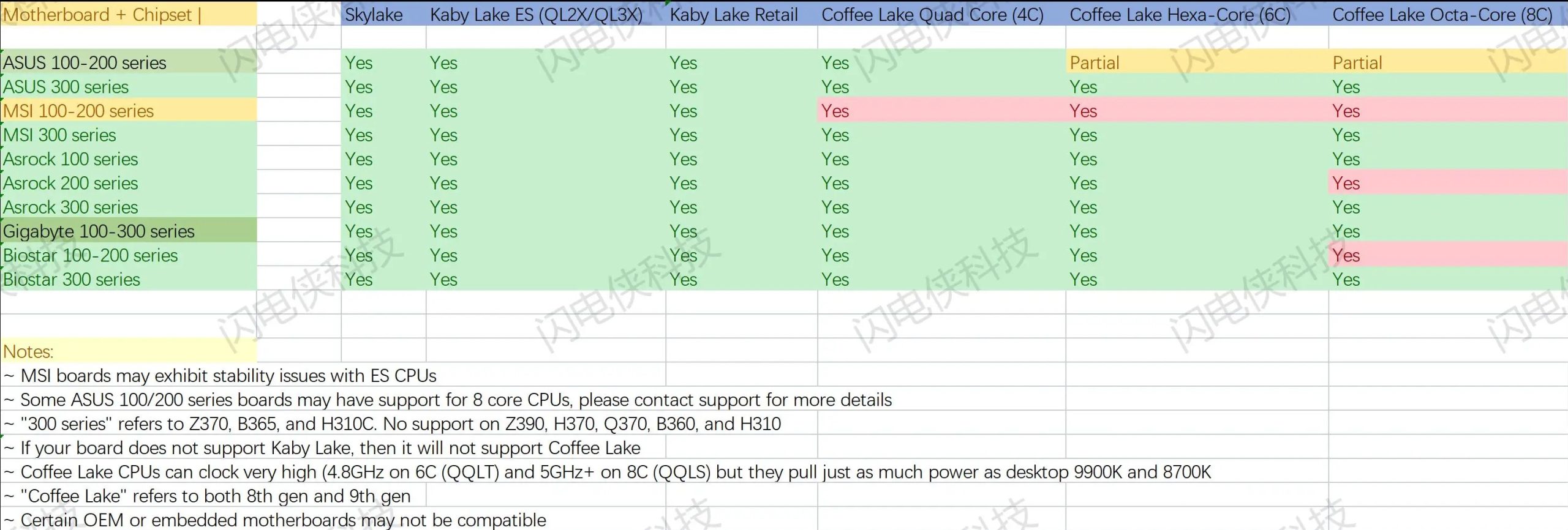
On B360, H310, H370, Q370 and Z390 boards the odds are poor. If you have one of these, look at alternatives like Intel CC150, which runs out of the box on 300-series chipsets.
Z370, B365 and H310C are a different story. They’re 300-series in name only: like the 200-series chipsets, they’re made on Intel’s 22 nm process, while the rest of the 300 series is 14 nm. With Frankensteins, they behave like 200-series boards.
OEM boards (the ones inside prebuilt PCs) are a gamble regardless of chipset. Most boards sold separately can use these CPUs to the full, though some ASUS 100/200-series models need a few BIOS settings changed first.
How to run Frankensteins on LGA1151 boards
WARNING: These modifications void your warranty and can permanently damage your hardware. Even if you do everything right, success isn’t guaranteed. Proceed at your own risk.
The BIOS side of this is Coffee Mod. For what it is and what else it can do, see our Coffee Mod guide.
BIOS preparation
You can get a modified BIOS in two ways: make it yourself or get one from a seller (for popular boards, ready-made mods are often available online).
A short walkthrough with CoffeeTime 0.99:
- Get the BIOS image. Either dump it from your board (best if you want to keep the MAC address and other board data) or download it from the manufacturer’s website.
- Download CoffeeTime_0.99.
- Open the BIOS image in CoffeeTime. You’ll see the main window.

- Change Intel ME from Consumer to Corporate and disable it. Available versions: Corporate 11.7.0.3307 and 11.8.77.3664. For ASUS boards, 11.7.0.3307 is recommended due to possible bricking when downgrading ME later. If no downgrade is planned, and for other vendors, 11.8.77.3664 is recommended.
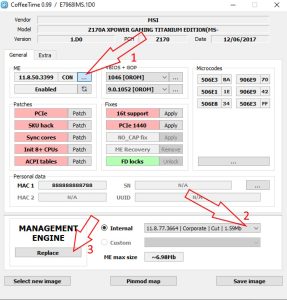
- After changing the version, disable ME using the toggle/button.

- Update vBIOS and GOP versions.
- Apply all available patches. Once applied, they turn green.
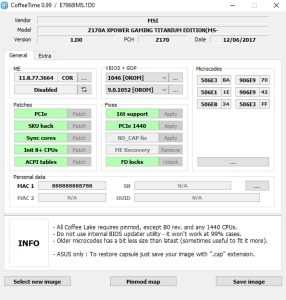
- Make sure the BIOS has the microcode your CPU needs and add any that are missing. Quick reference below.


- (Optional) Transfer board-specific data, such as the MAC address (and DMI data on some ASUS boards).
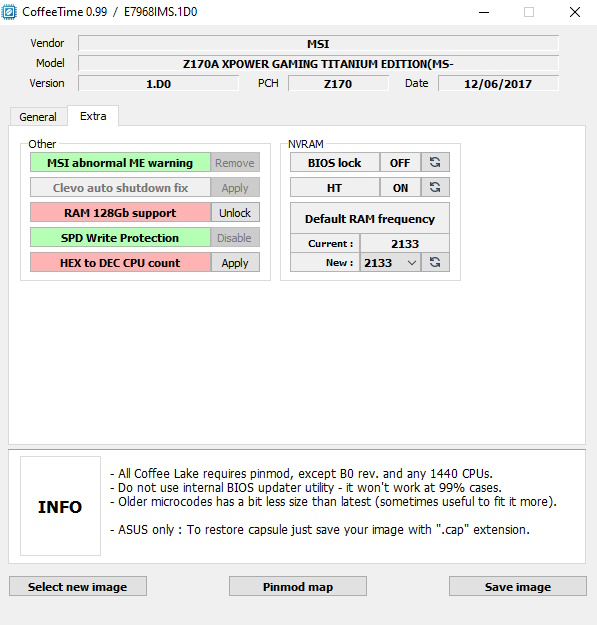
- (Optional) On the EXTRA tab, apply vendor-specific patches (notably MSI/Clevo) and set memory frequency to 2133 MHz to avoid RAM issues on first boot.

- Save the modified BIOS and move on to flashing.


BIOS flashing
Some boards can be flashed from software (MSI and Gigabyte often can), but most will need a programmer and the know-how to use it.
Even if your board supports software flashing, a programmer is worth having for recovery and future projects. A basic CH341A will do; more advanced options include the RT809H and TL866II Plus. Note that some SPI flash chips need a 1.8 V adapter.
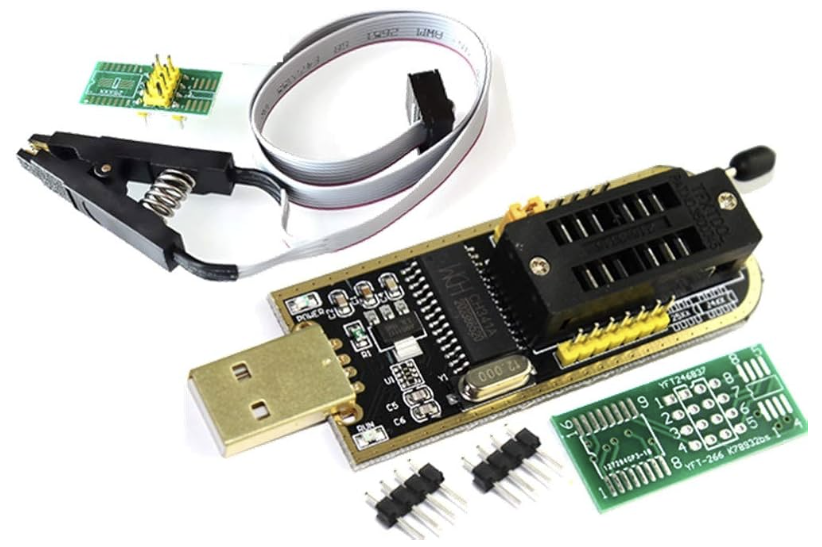
There’s no universal flashing procedure: it depends on the vendor and the specific board. If it looks too daunting, a repair shop can do it for you.
Installing the CPU
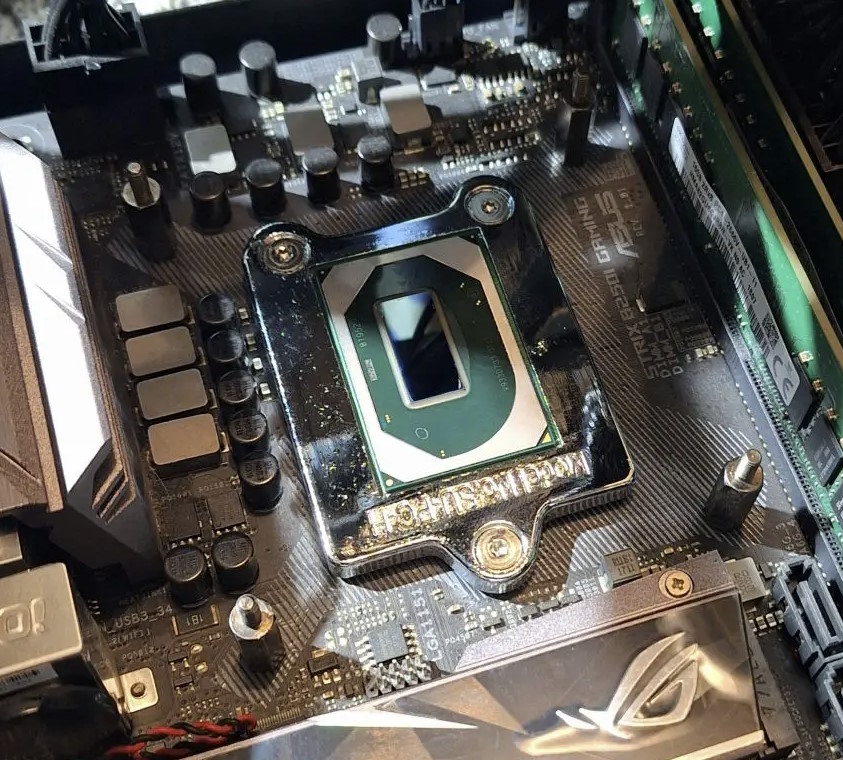
Remove the stock socket retention frame and mount the CPU with the special screws that come with the kit. Keep the original socket hardware in case you go back to a regular desktop CPU. Align the package carefully and tighten the screws evenly so it doesn’t tilt.
Bare-die versions need extra care with the cooler, because the exposed die is easy to crack. Tighten the cooler gradually in a cross pattern, avoid excessive mounting pressure, and use a shim around the die if you have one.
First boot and testing
Do the first boot with a single memory module at JEDEC speed. The system may restart several times and the first boot can take a while — that’s normal.
If the screen stays black for a long time, power down, check that the CPU is seated properly, clear CMOS and try again.
Common problems
Most problems come down to poor contact between the CPU and the socket. Symptoms include a missing memory channel, PCIe issues, instability or a black screen. Reseat the CPU and make sure the screws and the cooler press evenly.
The second usual suspect is the BIOS. Try the other Intel ME Corporate version and check that the right microcode is in place. Sometimes starting from a different stock BIOS version helps.
Where to buy
Main platforms:
- AliExpress — the most popular choice
- Taobao via a buying agent — wider selection and better prices
- eBay — also an option

Written by
Senior Hardware Specialist proving you don't need top-tier gear to game. Expert in smart upgrades and budget-friendly PC restoration.
Hello, I just bought a used xeon e-2286m, im actually using it to write this comment but I wanted to know if I can overclock it on my motherboard? Here are the specs of my rig:
Xeon E-2286m
Gigabyte Z370-HD3P
2x16GB 2133mhz (Dual-Rank)
Nvidia Geforce GTX 1080 Ti
The multiplier is locked, so you’re unlikely to raise the core frequency. Try increasing the memory frequency — this model should support memory speeds up to 2666 MHz. Adjusting the timings can also improve overall performance. Other than that, there’s nothing you can really do with the E-2286M.
Hello, I have a few ASUS Prime B250M-C boards that I’m hoping to setup mutants in.
I’ve tried running a QTJ1 in a few of them with modded bios and none of them post, or react if I run them with no ram; the modded bios run fine with the stock CPUs though. Is there any way I can definitively figure out if the QTJ1 is a dud?
No, I’m afraid there’s no precise way to determine whether your QTJ1 is dead (unless it doesn’t heat up when powered on). Try other BIOS versions or adjust some settings in CoffeeTime. You can also try different RAM modules — these mutants are quite picky about memory.
It looks like your ASUS Prime B250M-C has a removable BIOS chip, so dealing with firmware should be easier for you.