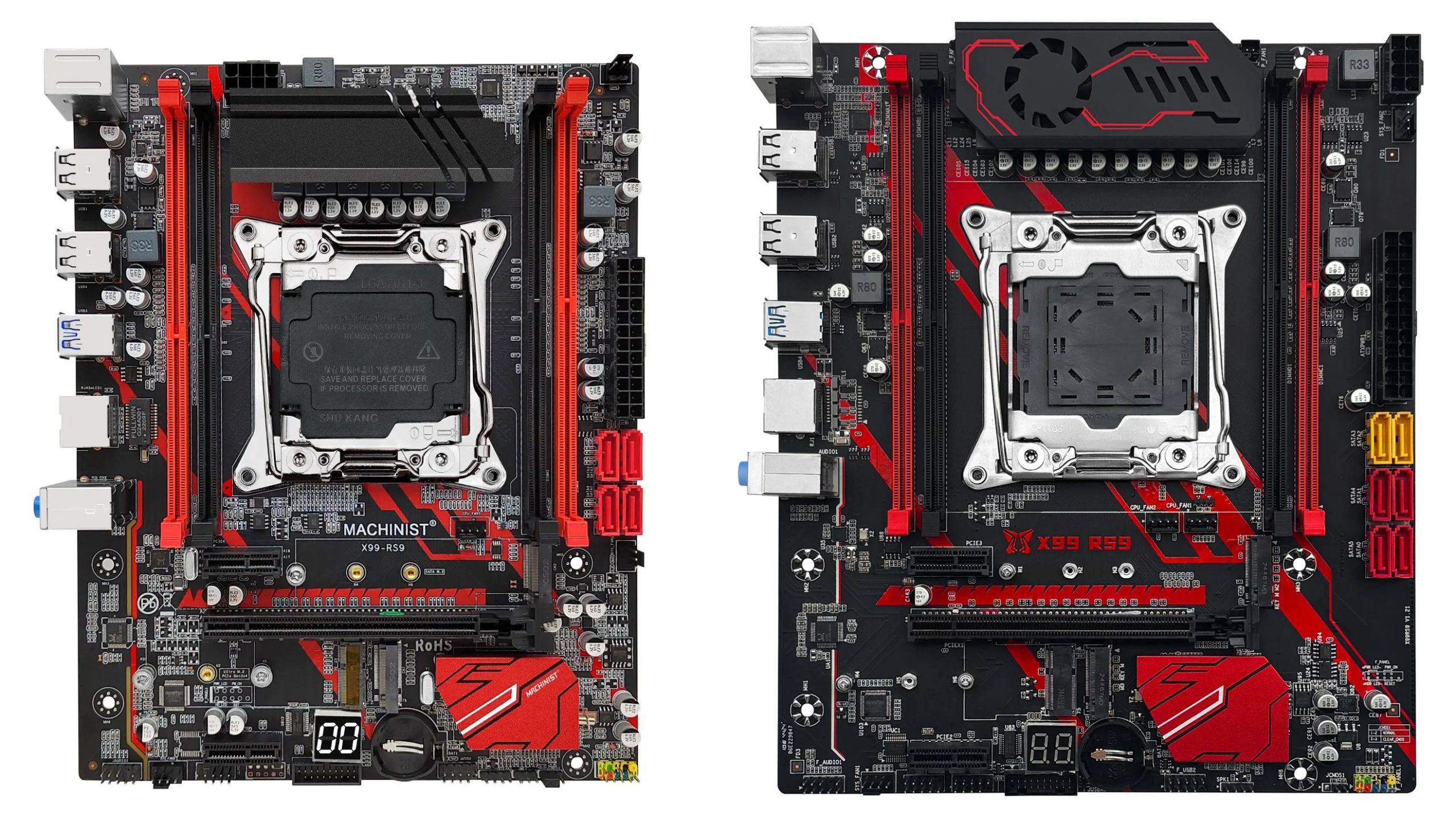
The X99‑RS9 is one of Machinist’s oldest boards, with the first version dating back to 2020. Since then, several new revisions have been released, and the board has earned a reputation as a budget‑friendly yet fairly reliable model.
In 2025 the board received a major update — a new revision with 8-phase power delivery is now available.
Table of Contents
Specifications
Machinist X99-RS9 |
||
|---|---|---|
| Revision | 6-phase version | 8-phase version |
| Socket | LGA 2011-3 |
|
| Chipset | B85 / Q87 / C226 |
|
| Supported Processors | Intel Core i7 (5000, 6000 series, Haswell-E/Broadwell-E) Intel Xeon E5-1600 v3/v4, E5-2600 v3/v4, E5-4600 v3/v4 (Haswell-EP/Broadwell-EP) |
|
| VRM Configuration | 3 phase (6 virtual via doublers) Total MOSFETs: 12 (6 high-side + 6 low-side) | 4 phase (8 virtual via doublers) Total MOSFETs: 16 (8 high-side + 8 low-side) |
| Maximum Recommended TDP | ≤100W (v3 processors) ≤110W (v4 processors) | To Be Determined |
| Supported Memory | 4 x DDR4 DIMM (quad-channel) with ECC and non-ECC support Maximum capacity: 128 GB |
|
| Sleep Mode Support | No | To Be Determined |
| Expansion Slots | 1 x PCI-e x16 (Gen 3.0) 2 x PCI-e x1 (Gen 2.0) |
|
| Storage | 4 x SATA 3.0 1 x M.2 (NVME, Gen 3.0 x4) 1 x M.2 Sata (NGFF) | To Be Determined |
| Fan Connectors | 1 x CPU cooler (4pin) 1 x Case fan (4pin) 2 x Case fan (3pin) |
|
| PS/2 Ports | 2 (mouse + keyboard) | 1 (mouse \ keyboard) |
| USB 3.0 Ports | 2 (+ front panel support) |
|
| USB 2.0 Ports | 4 (+ front panel support) | 6 (+ front panel support) |
| Network | Gigabit LAN (RTL8111 \ RTL8168) |
|
| Audio | 5.1 channel (ALC662\ALC897) | 5.1 channel (ALC897) |
| Extra | M.2 Wi-Fi port Post code display |
|
| Bios Chip | W25Q128FV | To Be Determined |
| JLPC1 header | Yes | To Be Determined |
| TPM 2.0 header | No | To Be Determined |
| Form Factor & Dimensions | mATX 235 x 185 mm | mATX 235 x 200 mm |
| Approximate Price | ||


The board sports a classic black-and-red theme and looks pretty sharp. It’s built on desktop chipsets — B85 or Q87 — and C226 can also be found. Regardless of chipset, the feature set does not change.
The RS9 offers quad‑channel memory mode, plenty of ports, and decent overall quality. Highlights include four fan headers, a POST code display, and an M.2 Wi‑Fi slot.
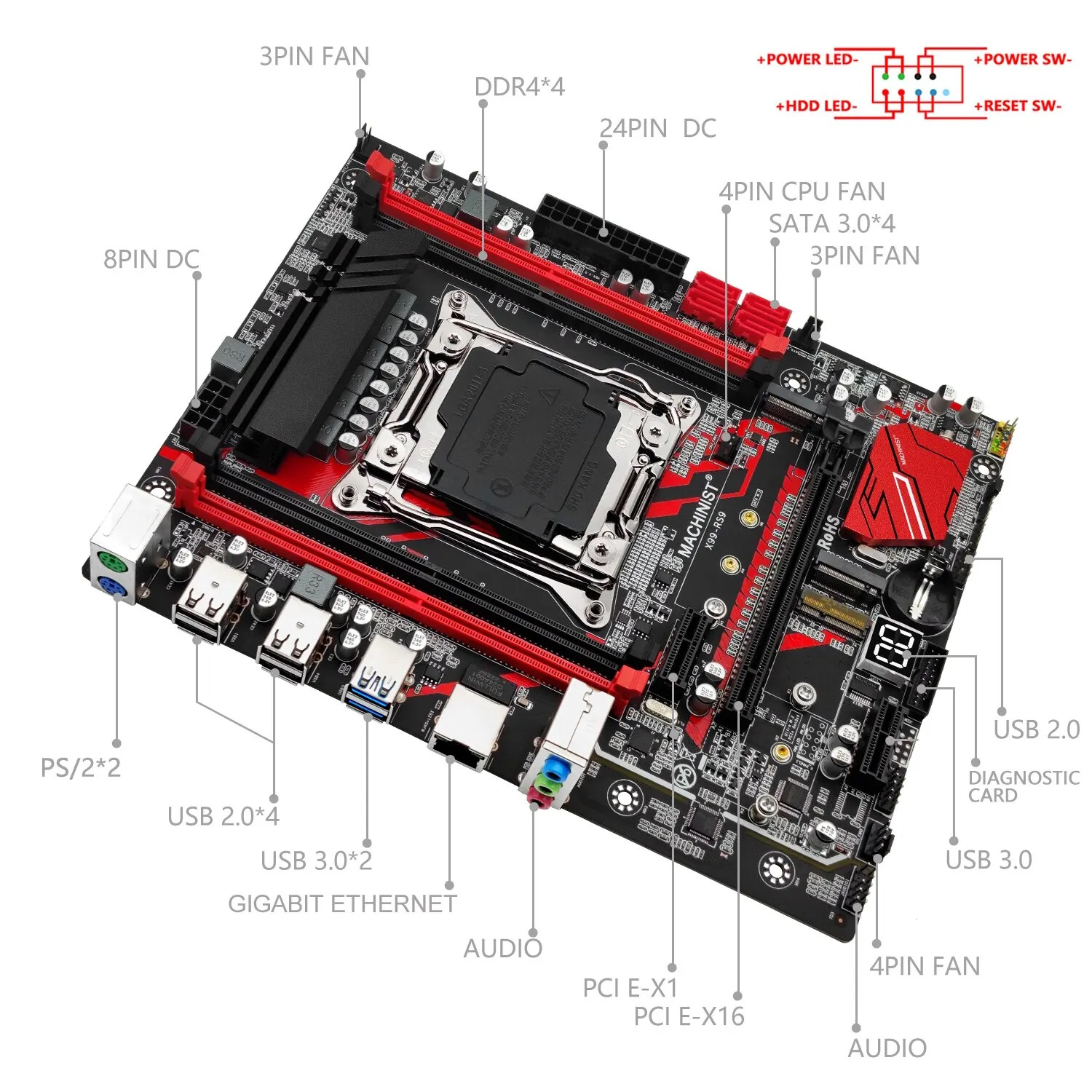
The power delivery is classic budget fare: 3 doubled phases (6 effective), each with two MOSFETs. MOSFET choices vary by revision, but most often you’ll see SM4522NHKP (110 A / 2.65 mΩ; ×6, low‑side) and SM4508NHKP (48 A / 6.8 mΩ; ×6, high‑side) MOSFETs, the uP1649Q PWM controller common on Chinese boards, and uP1961S MOSFET drivers (×3). This configuration was common in 2020–2022, but it looks a bit weak today — especially now that low‑cost boards with 8‑phase VRMs have appeared.
As for the downsides, it comes with the usual rough edges found on most Chinese LGA2011‑3 boards:
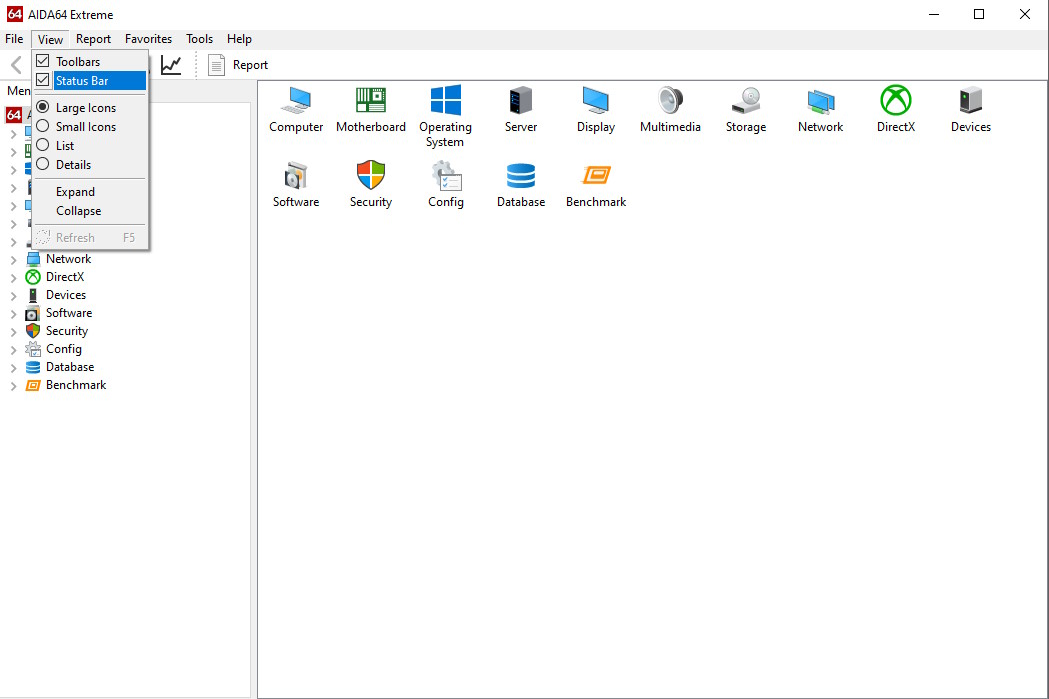
- Turn on the status bar: Go to View → Status Bar
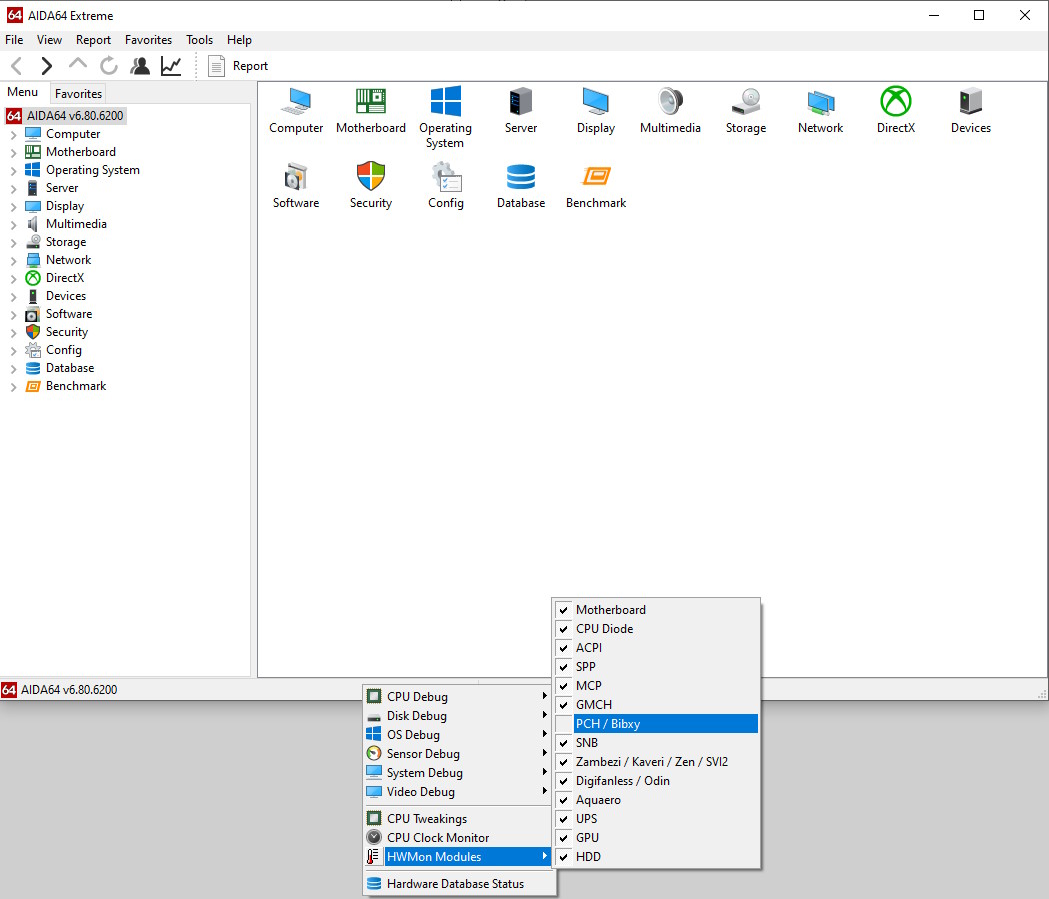
- Right-click the status bar at the bottom → HWMon Modules → uncheck PCH / Bibxy
- If this doesn’t work, disable all sensors and enable them one by one to identify the culprit.
Revisions
6‑phase revisions


Over its lifetime, the classic X99‑RS9 has received at least five revisions: rev 1.0; rev 1.11; rev 2.0; rev 3.0; and rev 3.1. Unfortunately, the manufacturer doesn’t keep a changelog, and the revision numbers don’t seem to follow a clear logic. What’s more, you may see one revision number on the PCB, another on the sticker on the back, and yet another in the BIOS. All this left us thoroughly confused, so we decided to break down the different versions of this motherboard.
By and large, all revisions are similar and differ only in details: the audio codec, the BIOS chip, and the presence of a POST code display. The most important difference we found is that some versions ship with a slightly different power stage: revision 2.0 uses Niko‑Sem MOSFETs instead of the more common Sinopower parts.
As a result, there’s no significant difference among the various 6‑phase Machinist X99‑RS9 versions. In most cases, firmware from different revisions is also interchangeable.
A note on TPM 2.0. There isn’t a dedicated TPM 2.0 header, but the board exposes a JLPC1 (LPC) header that can accept TPM 2.0 modules. You’ll need a compatible module and BIOS/UEFI firmware with TPM support; on some boards this requires third‑party or modified firmware. Learn more about TPM 2.0 on Chinese X99 motherboards — here.
8‑phase revision (X99RS9 v1.21)


This revision was introduced in 2025 and has not yet been tested. The board gets an 8‑phase VRM (4 virtual phases with doublers; two MOSFETs per phase) and active cooling. The storage layout has been reworked, and there might be other minor tweaks under the hood.
We don’t yet have complete data on the board’s specs. This article will be updated after testing.
BIOS Capabilities

There are quite a few stock firmware variants, but they’re similar and share the same shortcomings: no access to RAM timings, no way to overclock unlocked CPUs, and broken power/temperature sensors.
Fortunately, most of these shortcomings can be fixed by flashing BIOS images from third‑party vendors or other Chinese boards (100% compatibility is not guaranteed; proceed with caution).
Simple BIOS Flashing Guide (Windows)
- Download FPTW 9.1.10 from this page.
- Open Command Prompt as Administrator.
- Copy your BIOS file (
bios.binorbios.rom) into the same folder as FPTW. - In the Command Prompt, navigate to the FPTW folder using the
cdcommand. - Flash the BIOS with the following command:
fptw64 -f bios.bin
Note: Replace bios.bin with the actual name of your modded BIOS file, if it’s different. If FPT reports a lock (cannot access protected regions), reboot to BIOS and disable the BIOS lock: IntelRCSetup → PCH Configuration → Security Configuration → BIOS Lock: Disable.
After flashing, we recommend performing a settings reset.
BIOSes for 6–phase revisions
| BIOS version & date | Ram Timings | ReBAR | Unlocked CPU OC | Turbo Boost unlock | Undervolt | Notes & Link |
|---|---|---|---|---|---|---|
| X9RS9 Ver:003 03/06/2023 09:44:45 | - | - | - | - | - | Stock BIOS from revision 1.11 [Download] |
| X9RS9 Ver:003 03/06/2023 09:44:45 | + | - | - | - | - | Stock BIOS mod by Koshak1013. Ram Timings + BCLK 100.00MHz [Download] |
| X9MP2 Ver:004 12/21/2021 16:17:05 | - | - | - | - | - | Stock BIOS from revision 2.0 [Download] |
| X9MP2 Ver:004 12/21/2021 16:17:05 | + | - | - | - | - | Stock BIOS mod by Koshak1013. Ram Timings + BCLK 100.00MHz [Download] |
| X9RS9 Ver:001 06/15/2022 17:49:23 | - | - | - | - | - | Stock BIOS from revision 3.0 [Download] |
| X9RS9 Ver:001 06/15/2022 17:49:23 | + | - | - | - | - | Stock BIOS mod by Koshak1013. Ram Timings + BCLK 100.00MHz [Download] |
| X9RS9 Ver:002 07/15/2022 11:45:25 | - | - | - | - | - | Stock BIOS from revision 3.1 [Download] |
| X9RS9 Ver:002 07/15/2022 11:45:25 | + | - | - | - | - | Stock BIOS mod by Koshak1013. Ram Timings + BCLK 100.00MHz [Download] |
| 10/15/2020 14:21:26 Ver: X99MA011 | + | - | - | + | -50 mV | Mod BIOS from Huananzhi x99 8m-f. Timings + TBU + Undervolt. [Download] |
| BX99DA08 | + | + | + | - | - | Custom BIOS from iEngineer. Timings + ReBAR + Unlocked CPU overclock + TPM2.0 Support... [Link] |
BIOSes for 8-phase revisions
| BIOS version & date | Ram Timings | ReBAR | Unlocked CPU OC | Turbo Boost unlock | Undervolt | Secure Boot | Notes & Link |
|---|---|---|---|---|---|---|---|
| 10/24/2025 Ver: X99RS00D | + | + | - | - | - | + | Stock BIOS from revision 1.21 [Download] |
| 10/24/2025 Ver: X99RS00D | + | + | - | + | -50 mV | + | Stock BIOS from revision 1.11 + TBU for V3 CPUs + Undervolt -50 mV [Download] |

Frequently Asked Questions
The board won’t boot, black screen, etc. What should I do?
See our article about the most common LGA2011‑3 issues.
Where can I find drivers for this board?
You can grab the latest socket 2011‑3 drivers right here.
Where is the BIOS chip located?
On 6‑phase versions: to the right of the chipset heatsink; you can attach a programmer clip.

Written by
Senior Hardware Specialist proving you don't need top-tier gear to game. Expert in smart upgrades and budget-friendly PC restoration.