
Table of Contents
LGA1155 (also known as Socket H2) is the socket of the 2nd and 3rd generation Intel Core processors: Sandy Bridge, launched in January 2011, and Ivy Bridge, launched in April 2012. It replaced LGA1156 and quickly became Intel’s mainstream platform, covering virtually the entire CPU stack — from budget Celeron and Pentium to Core i7 and server‑grade Xeon E3 — until it was succeeded by LGA1150 in 2013.
This socket is widely considered one of Intel’s most successful. Despite its age, many LGA1155 processors still handle office and web apps with ease today and can even deliver a playable frame rate in a number of games.
Here’s what matters about LGA1155: key platform traits, supported architectures and chipsets, plus a complete list of processors for this socket.
LGA1155 CPU Architectures and Features
Sandy Bridge

In January 2011, Intel introduced its second‑gen Core processors based on Sandy Bridge, marking a shift to a new monolithic design with integrated graphics, a ring bus, and a notable boost in efficiency.
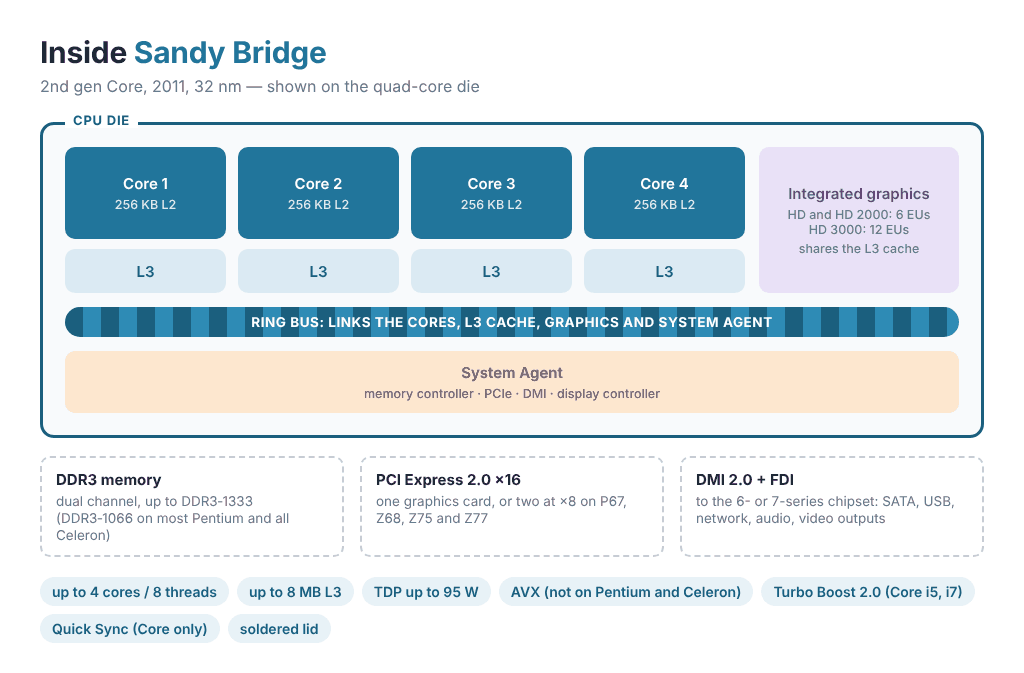
Key architectural highlights:
- Process: 32 nm; monolithic die with a shared L3 cache and a ring bus linking the cores, graphics, and on‑die controllers.
- Performance per clock: roughly 10–15% higher than Nehalem/Westmere, with better power efficiency.
- Memory controller: dual‑channel DDR3‑1333 (official), DDR3‑1066 on most Pentium and Celeron models. ECC works with Xeon E3, Pentium and Celeron when paired with C20x server chipsets.
- Interfaces: DMI 2.0 (about 2 GB/s each direction); 16 PCIe 2.0 lanes from the CPU, split ×8/×8 for two graphics cards on P67, Z68, Z75 and Z77; additional PCIe 2.0 and SATA via the chipset.
- Graphics: Intel HD Graphics 2000/3000 (Gen6) with DirectX 10.1 and Quick Sync Video (H.264 hardware encode); Pentium and Celeron get a cut‑down HD Graphics without Quick Sync. HDMI 1.4/DisplayPort 1.1a outputs depend on the motherboard. Intel never released Windows 10 drivers for these iGPUs: Windows installs an old Windows 8-era driver that runs DirectX games but exposes only OpenGL 1.1, so OpenGL apps and games won’t start. If you’re building a Sandy Bridge PC on integrated graphics, the workarounds are collected in our guide to modified Intel HD Graphics drivers.
- Core‑level additions: first‑gen AVX (Core and Xeon only, not Pentium or Celeron), AES‑NI (Core i5, i7 and Xeon), Turbo Boost 2.0 (Core i5, i7 and Xeon), a micro‑op cache and improved branch prediction. VT‑x is supported across the board, while VT‑d is limited to Xeon E3 and some non‑K Core i5/i7 models.
- Thermals and cooling: desktop Sandy Bridge chips use solder under the heatspreader, which helps temperatures and overclocking headroom.
Sandy Bridge was a major step forward and laid the groundwork for Ivy Bridge. The i5‑2500K and i7‑2600K became especially well‑known for their blend of performance, efficiency, and great temps.
Ivy Bridge

In April 2012, Intel launched its third‑gen Core lineup on Ivy Bridge — a “tick” shifting to a 22 nm process. The CPUs kept the LGA1155 socket and gained updated I/O plus much better integrated graphics. On 7‑series boards they work out of the box; H61, H67, P67, Z68 and C20x boards need a BIOS update, and boards with B65, Q65 and Q67 do not support Ivy Bridge at all.
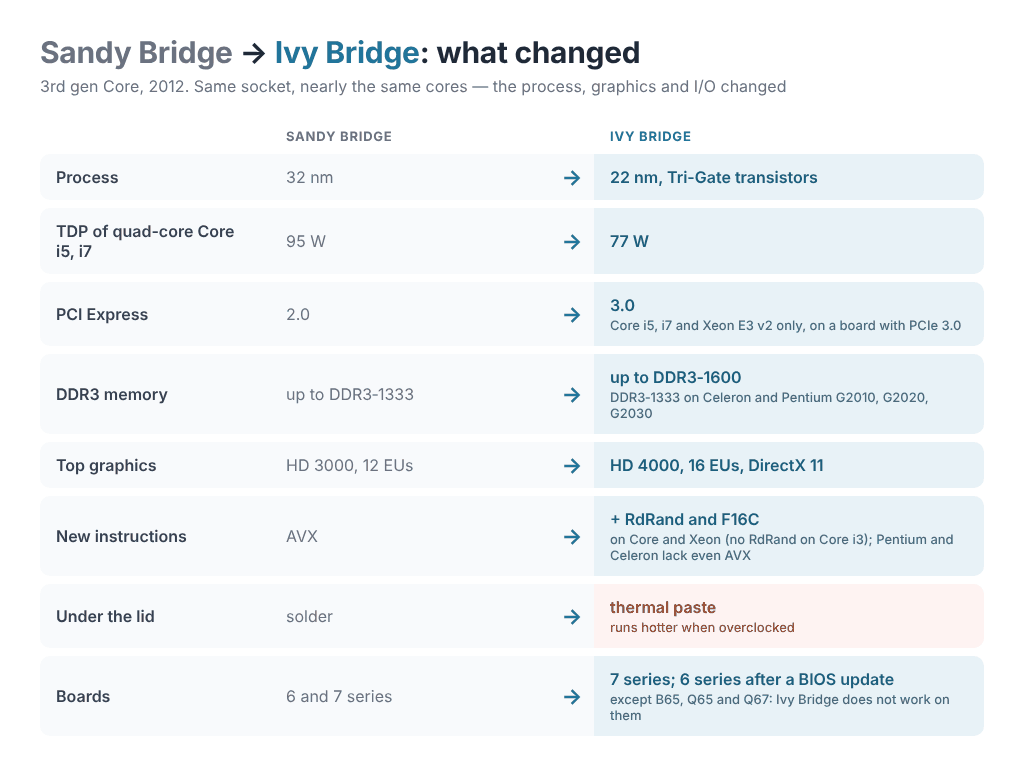
Key architectural highlights:
- Process: 22 nm Tri‑Gate FinFET; smaller die area and improved energy efficiency at similar clocks.
- Performance per clock: a small gain over Sandy Bridge with noticeably lower power draw and heat at stock speeds.
- Memory controller: dual‑channel DDR3 with official DDR3‑1600 support (DDR3‑1333 on Pentium G2010, G2020, G2030 and all Celeron); ECC works with Xeon E3, Pentium and Celeron on C20x/C216 server chipsets.
- Interfaces: 16 PCI Express 3.0 lanes from the CPU on Core i5, i7 and Xeon E3 v2 — on a board that supports PCIe 3.0; Core i3, Pentium and Celeron stay on PCIe 2.0. DMI 2.0 to the chipset with the same bandwidth; 7‑series PCH adds native USB 3.0, SATA/RAID refinements, Intel Rapid Start/Smart Connect, and Smart Response on more chipsets; Thunderbolt available via an external controller on select boards.
- Graphics: Intel HD Graphics 2500/4000 (Gen7) with DirectX 11, OpenGL 4.0, and improved Quick Sync Video; up to three simultaneous displays on 7‑series boards; some boards can output 4K via DisplayPort. Pentium and Celeron again get a cut‑down HD Graphics without Quick Sync.
- Instructions and technologies: AVX and AES‑NI carried over on the same models as before, plus F16C (half‑precision conversions) on every Core and Xeon and RDRAND (hardware RNG) on Core i5, i7 and Xeon E3 v2; Turbo Boost 2.0 on Core i5, i7 and Xeon; VT‑x on every model, VT‑d on Xeon E3 v2 and most non‑K Core i5/i7.
- Thermals and cooling: mainstream desktop models use thermal paste under the IHS (not solder), which raises temps when overclocking; delidding helps a lot.
Ivy Bridge cemented Sandy Bridge’s success: it added PCIe 3.0, improved the iGPU and efficiency, and stayed compatible with most existing boards. For LGA1155 this was the platform’s peak — Ivy Bridge chips make full use of PCIe 3.0 and DDR3‑1600, and Xeon E3 v2 chips stayed popular in budget builds for years.
All Socket 1155 Processors and Their Specifications
The list is split into two tables by architecture. Each one can be filtered by family, core count, TDP and features, and the search box takes a model number or the sSpec code from the CPU lid. OEM-only chips (Core i5-3335S, Xeon E3-1285 v2 and E3-1285L v2) are included and marked. Xeon models we have reviewed link to the review.
Sandy Bridge CPUs (Core 2000, Pentium G600/G800, Celeron G400/G500, Xeon E3 v1)
They work on every 6- and 7-series board. On 7-series boards (B75, H77, Z77 and others) they need no BIOS update, but PCIe 3.0 stays unavailable.
| Model | Launch | Cores / threads | Base / turbo | L3 cache | TDP | Graphics | Memory |
|---|---|---|---|---|---|---|---|
Core i7-2700K Unlocked multiplier sSpec SR0DG PCIe 2.0
|
Q4 2011 | 4 / 8 | 3.5 / 3.9 GHz | 8 MB | 95 W | HD 3000up to 1350 MHz | DDR3-1333 |
Core i7-2600K Unlocked multiplier sSpec SR00C PCIe 2.0
|
Q1 2011 | 4 / 8 | 3.4 / 3.8 GHz | 8 MB | 95 W | HD 3000up to 1350 MHz | DDR3-1333 |
Core i7-2600 sSpec SR00B PCIe 2.0
|
Q1 2011 | 4 / 8 | 3.4 / 3.8 GHz | 8 MB | 95 W | HD 2000up to 1350 MHz | DDR3-1333 |
Core i7-2600S sSpec SR00E PCIe 2.0
|
Q1 2011 | 4 / 8 | 2.8 / 3.8 GHz | 8 MB | 65 W | HD 2000up to 1350 MHz | DDR3-1333 |
Core i5-2550K Unlocked multiplier sSpec SR0QH PCIe 2.0
|
Q1 2012 | 4 / 4 | 3.4 / 3.8 GHz | 6 MB | 95 W | None | DDR3-1333 |
Core i5-2500K Unlocked multiplier sSpec SR008 PCIe 2.0
|
Q1 2011 | 4 / 4 | 3.3 / 3.7 GHz | 6 MB | 95 W | HD 3000up to 1100 MHz | DDR3-1333 |
Core i5-2500 sSpec SR00T PCIe 2.0
|
Q1 2011 | 4 / 4 | 3.3 / 3.7 GHz | 6 MB | 95 W | HD 2000up to 1100 MHz | DDR3-1333 |
Core i5-2500S sSpec SR009 PCIe 2.0
|
Q1 2011 | 4 / 4 | 2.7 / 3.7 GHz | 6 MB | 65 W | HD 2000up to 1100 MHz | DDR3-1333 |
Core i5-2500T sSpec SR00A PCIe 2.0
|
Q1 2011 | 4 / 4 | 2.3 / 3.3 GHz | 6 MB | 45 W | HD 2000up to 1250 MHz | DDR3-1333 |
Core i5-2450P sSpec SR0G1 PCIe 2.0
|
Q1 2012 | 4 / 4 | 3.2 / 3.5 GHz | 6 MB | 95 W | None | DDR3-1333 |
Core i5-2405S sSpec SR0BB PCIe 2.0
|
Q2 2011 | 4 / 4 | 2.5 / 3.3 GHz | 6 MB | 65 W | HD 3000up to 1100 MHz | DDR3-1333 |
Core i5-2400 sSpec SR00Q PCIe 2.0
|
Q1 2011 | 4 / 4 | 3.1 / 3.4 GHz | 6 MB | 95 W | HD 2000up to 1100 MHz | DDR3-1333 |
Core i5-2400S sSpec SR00S PCIe 2.0
|
Q1 2011 | 4 / 4 | 2.5 / 3.3 GHz | 6 MB | 65 W | HD 2000up to 1100 MHz | DDR3-1333 |
Core i5-2390T sSpec SR065 PCIe 2.0
|
Q1 2011 | 2 / 4 | 2.7 / 3.5 GHz | 3 MB | 35 W | HD 2000up to 1100 MHz | DDR3-1333 |
Core i5-2380P sSpec SR0G2 PCIe 2.0
|
Q1 2012 | 4 / 4 | 3.1 / 3.4 GHz | 6 MB | 95 W | None | DDR3-1333 |
Core i5-2320 sSpec SR02L PCIe 2.0
|
Q3 2011 | 4 / 4 | 3.0 / 3.3 GHz | 6 MB | 95 W | HD 2000up to 1100 MHz | DDR3-1333 |
Core i5-2310 sSpec SR02K PCIe 2.0
|
Q2 2011 | 4 / 4 | 2.9 / 3.2 GHz | 6 MB | 95 W | HD 2000up to 1100 MHz | DDR3-1333 |
Core i5-2300 sSpec SR00D PCIe 2.0
|
Q1 2011 | 4 / 4 | 2.8 / 3.1 GHz | 6 MB | 95 W | HD 2000up to 1100 MHz | DDR3-1333 |
Core i3-2130 sSpec SR05W PCIe 2.0
|
Q3 2011 | 2 / 4 | 3.4 GHz | 3 MB | 65 W | HD 2000up to 1100 MHz | DDR3-1333 |
Core i3-2125 sSpec SR0AY PCIe 2.0
|
Q3 2011 | 2 / 4 | 3.3 GHz | 3 MB | 65 W | HD 3000up to 1100 MHz | DDR3-1333 |
Core i3-2120 sSpec SR05Y PCIe 2.0
|
Q1 2011 | 2 / 4 | 3.3 GHz | 3 MB | 65 W | HD 2000up to 1100 MHz | DDR3-1333 |
Core i3-2120T sSpec SR060 PCIe 2.0
|
Q3 2011 | 2 / 4 | 2.6 GHz | 3 MB | 35 W | HD 2000up to 1100 MHz | DDR3-1333 |
Core i3-2105 sSpec SR0BA PCIe 2.0
|
Q2 2011 | 2 / 4 | 3.1 GHz | 3 MB | 65 W | HD 3000up to 1100 MHz | DDR3-1333 |
Core i3-2102 sSpec SR05D PCIe 2.0
|
Q2 2011 | 2 / 4 | 3.1 GHz | 3 MB | 65 W | HD 2000up to 1100 MHz | DDR3-1333 |
Core i3-2100 sSpec SR05C PCIe 2.0
|
Q1 2011 | 2 / 4 | 3.1 GHz | 3 MB | 65 W | HD 2000up to 1100 MHz | DDR3-1333 |
Core i3-2100T sSpec SR05Z PCIe 2.0
|
Q1 2011 | 2 / 4 | 2.5 GHz | 3 MB | 35 W | HD 2000up to 1100 MHz | DDR3-1333 |
Pentium G870 sSpec SR057 PCIe 2.0
|
Q2 2012 | 2 / 2 | 3.1 GHz | 3 MB | 65 W | HD Graphics | DDR3-1333 ECC |
Pentium G860 sSpec SR058 PCIe 2.0
|
Q3 2011 | 2 / 2 | 3.0 GHz | 3 MB | 65 W | HD Graphics | DDR3-1333 ECC |
Pentium G860T sSpec SR0MF PCIe 2.0
|
Q2 2012 | 2 / 2 | 2.6 GHz | 3 MB | 35 W | HD Graphics | DDR3-1333 ECC |
Pentium G850 sSpec SR05Q PCIe 2.0
|
Q2 2011 | 2 / 2 | 2.9 GHz | 3 MB | 65 W | HD Graphics | DDR3-1333 ECC |
Pentium G840 sSpec SR05P PCIe 2.0
|
Q2 2011 | 2 / 2 | 2.8 GHz | 3 MB | 65 W | HD Graphics | DDR3-1333 ECC |
Pentium G622 sSpec SR05M PCIe 2.0
|
Q2 2011 | 2 / 2 | 2.6 GHz | 3 MB | 65 W | HD Graphics | DDR3-1066 ECC |
Pentium G620T sSpec SR05T PCIe 2.0
|
Q2 2011 | 2 / 2 | 2.2 GHz | 3 MB | 35 W | HD Graphics | DDR3-1066 ECC |
Pentium G620 sSpec SR05R PCIe 2.0
|
Q2 2011 | 2 / 2 | 2.6 GHz | 3 MB | 65 W | HD Graphics | DDR3-1066 ECC |
Pentium G645 sSpec SR0RS PCIe 2.0
|
Q3 2012 | 2 / 2 | 2.9 GHz | 3 MB | 65 W | HD Graphics | DDR3-1066 ECC |
Pentium G645T sSpec SR0S0 PCIe 2.0
|
Q3 2012 | 2 / 2 | 2.5 GHz | 3 MB | 35 W | HD Graphics | DDR3-1066 ECC |
Pentium G640 sSpec SR059 PCIe 2.0
|
Q2 2012 | 2 / 2 | 2.8 GHz | 3 MB | 65 W | HD Graphics | DDR3-1066 ECC |
Pentium G640T sSpec SR066 PCIe 2.0
|
Q2 2012 | 2 / 2 | 2.4 GHz | 3 MB | 35 W | HD Graphics | DDR3-1066 ECC |
Pentium G632 sSpec SR05N PCIe 2.0
|
Q3 2011 | 2 / 2 | 2.7 GHz | 3 MB | 65 W | HD Graphics | DDR3-1066 ECC |
Pentium G630 sSpec SR05S PCIe 2.0
|
Q3 2011 | 2 / 2 | 2.7 GHz | 3 MB | 65 W | HD Graphics | DDR3-1066 ECC |
Pentium G630T sSpec SR05U PCIe 2.0
|
Q3 2011 | 2 / 2 | 2.3 GHz | 3 MB | 35 W | HD Graphics | DDR3-1066 ECC |
Celeron G555 sSpec SR0RZ PCIe 2.0
|
Q3 2012 | 2 / 2 | 2.7 GHz | 2 MB | 65 W | HD Graphics | DDR3-1066 ECC |
Celeron G550 sSpec SR061 PCIe 2.0
|
Q2 2012 | 2 / 2 | 2.6 GHz | 2 MB | 65 W | HD Graphics | DDR3-1066 ECC |
Celeron G550T sSpec SR05V PCIe 2.0
|
Q3 2012 | 2 / 2 | 2.2 GHz | 2 MB | 35 W | HD Graphics | DDR3-1066 ECC |
Celeron G540 sSpec SR05J PCIe 2.0
|
Q3 2011 | 2 / 2 | 2.5 GHz | 2 MB | 65 W | HD Graphics | DDR3-1066 ECC |
Celeron G540T sSpec SR05L PCIe 2.0
|
Q2 2012 | 2 / 2 | 2.1 GHz | 2 MB | 35 W | HD Graphics | DDR3-1066 ECC |
Celeron G530 sSpec SR05H PCIe 2.0
|
Q3 2011 | 2 / 2 | 2.4 GHz | 2 MB | 65 W | HD Graphics | DDR3-1066 ECC |
Celeron G530T sSpec SR05K PCIe 2.0
|
Q3 2011 | 2 / 2 | 2.0 GHz | 2 MB | 35 W | HD Graphics | DDR3-1066 ECC |
Celeron G470 sSpec SR0S7 PCIe 2.0
|
Q2 2013 | 1 / 2 | 2.0 GHz | 1.5 MB | 35 W | HD Graphics | DDR3-1333 ECC |
Celeron G465 sSpec SR0S8 PCIe 2.0
|
Q3 2012 | 1 / 2 | 1.9 GHz | 1.5 MB | 35 W | HD Graphics | DDR3-1066 ECC |
Celeron G460 sSpec SR0GR PCIe 2.0
|
Q4 2011 | 1 / 2 | 1.8 GHz | 1.5 MB | 35 W | HD Graphics | DDR3-1066 ECC |
Celeron G440 sSpec SR0BY PCIe 2.0
|
Q3 2011 | 1 / 1 | 1.6 GHz | 1 MB | 35 W | HD Graphics | DDR3-1066 ECC |
Xeon E3-1220 sSpec SR00F PCIe 2.0
|
Q2 2011 | 4 / 4 | 3.1 / 3.4 GHz | 8 MB | 80 W | None | DDR3-1333 ECC |
Xeon E3-1220L sSpec SR070 PCIe 2.0
|
Q2 2011 | 2 / 4 | 2.2 / 3.4 GHz | 3 MB | 20 W | None | DDR3-1333 ECC |
Xeon E3-1225 sSpec SR00G PCIe 2.0
|
Q2 2011 | 4 / 4 | 3.1 / 3.4 GHz | 6 MB | 95 W | HD P3000up to 1350 MHz | DDR3-1333 ECC |
Xeon E3-1230 sSpec SR00H PCIe 2.0
|
Q2 2011 | 4 / 8 | 3.2 / 3.6 GHz | 8 MB | 80 W | None | DDR3-1333 ECC |
Xeon E3-1235 sSpec SR00J PCIe 2.0
|
Q2 2011 | 4 / 8 | 3.2 / 3.6 GHz | 8 MB | 95 W | HD P3000up to 1350 MHz | DDR3-1333 ECC |
Xeon E3-1240 sSpec SR00K PCIe 2.0
|
Q2 2011 | 4 / 8 | 3.3 / 3.7 GHz | 8 MB | 80 W | None | DDR3-1333 ECC |
Xeon E3-1245 sSpec SR00L PCIe 2.0
|
Q2 2011 | 4 / 8 | 3.3 / 3.7 GHz | 8 MB | 95 W | HD P3000up to 1350 MHz | DDR3-1333 ECC |
Xeon E3-1260L sSpec SR00M PCIe 2.0
|
Q2 2011 | 4 / 8 | 2.4 / 3.3 GHz | 8 MB | 45 W | HD 2000up to 1250 MHz | DDR3-1333 ECC |
Xeon E3-1270 sSpec SR00N PCIe 2.0
|
Q2 2011 | 4 / 8 | 3.4 / 3.8 GHz | 8 MB | 80 W | None | DDR3-1333 ECC |
Xeon E3-1275 sSpec SR00P PCIe 2.0
|
Q2 2011 | 4 / 8 | 3.4 / 3.8 GHz | 8 MB | 95 W | HD P3000up to 1350 MHz | DDR3-1333 ECC |
Xeon E3-1280 sSpec SR00R PCIe 2.0
|
Q2 2011 | 4 / 8 | 3.5 / 3.9 GHz | 8 MB | 95 W | None | DDR3-1333 ECC |
Xeon E3-1290 sSpec SR055 PCIe 2.0
|
Q3 2011 | 4 / 8 | 3.6 / 4.0 GHz | 8 MB | 95 W | None | DDR3-1333 ECC |
No processor matches these filters. Clear one to see more.
Specs come from Intel product pages and other public sources and may contain errors. Turbo is the highest single-core clock Intel lists. Memory speed is the highest officially supported DDR3 speed, without overclocking. The sSpec under each model is the five-character code printed on the CPU lid (SR00C, SR0PL and so on); the search box finds it too. Next to it is the PCI Express version the CPU supports for the graphics card slot; PCIe 3.0 also needs a board that supports it.
Ivy Bridge CPUs (Core 3000, Pentium G2000, Celeron G1600, Xeon E3 v2)
They work on 7-series boards, and on H61, H67, P67, Z68 and C20x boards after a BIOS update. Boards with B65, Q65 and Q67 do not support them.
| Model | Launch | Cores / threads | Base / turbo | L3 cache | TDP | Graphics | Memory |
|---|---|---|---|---|---|---|---|
Core i7-3770K Unlocked multiplier sSpec SR0PL PCIe 3.0
|
Q2 2012 | 4 / 8 | 3.5 / 3.9 GHz | 8 MB | 77 W | HD 4000up to 1150 MHz | DDR3-1600 |
Core i7-3770 sSpec SR0PK PCIe 3.0
|
Q2 2012 | 4 / 8 | 3.4 / 3.9 GHz | 8 MB | 77 W | HD 4000up to 1150 MHz | DDR3-1600 |
Core i7-3770S sSpec SR0PN PCIe 3.0
|
Q2 2012 | 4 / 8 | 3.1 / 3.9 GHz | 8 MB | 65 W | HD 4000up to 1150 MHz | DDR3-1600 |
Core i7-3770T sSpec SR0PQ PCIe 3.0
|
Q2 2012 | 4 / 8 | 2.5 / 3.7 GHz | 8 MB | 45 W | HD 4000up to 1150 MHz | DDR3-1600 |
Core i5-3570K Unlocked multiplier sSpec SR0PM PCIe 3.0
|
Q2 2012 | 4 / 4 | 3.4 / 3.8 GHz | 6 MB | 77 W | HD 4000up to 1150 MHz | DDR3-1600 |
Core i5-3570 sSpec SR0T7 PCIe 3.0
|
Q2 2012 | 4 / 4 | 3.4 / 3.8 GHz | 6 MB | 77 W | HD 2500up to 1150 MHz | DDR3-1600 |
Core i5-3570S sSpec SR0T9 PCIe 3.0
|
Q2 2012 | 4 / 4 | 3.1 / 3.8 GHz | 6 MB | 65 W | HD 2500up to 1150 MHz | DDR3-1600 |
Core i5-3570T sSpec SR0P1 PCIe 3.0
|
Q2 2012 | 4 / 4 | 2.3 / 3.3 GHz | 6 MB | 45 W | HD 2500up to 1150 MHz | DDR3-1600 |
Core i5-3550 sSpec SR0P0 PCIe 3.0
|
Q2 2012 | 4 / 4 | 3.3 / 3.7 GHz | 6 MB | 77 W | HD 2500up to 1150 MHz | DDR3-1600 |
Core i5-3550S sSpec SR0P3 PCIe 3.0
|
Q2 2012 | 4 / 4 | 3.0 / 3.7 GHz | 6 MB | 65 W | HD 2500up to 1150 MHz | DDR3-1600 |
Core i5-3475S sSpec SR0PP PCIe 3.0
|
Q2 2012 | 4 / 4 | 2.9 / 3.6 GHz | 6 MB | 65 W | HD 4000up to 1100 MHz | DDR3-1600 |
Core i5-3470 sSpec SR0T8 PCIe 3.0
|
Q2 2012 | 4 / 4 | 3.2 / 3.6 GHz | 6 MB | 77 W | HD 2500up to 1100 MHz | DDR3-1600 |
Core i5-3470S sSpec SR0TA PCIe 3.0
|
Q2 2012 | 4 / 4 | 2.9 / 3.6 GHz | 6 MB | 65 W | HD 2500up to 1100 MHz | DDR3-1600 |
Core i5-3470T sSpec SR0RJ PCIe 3.0
|
Q2 2012 | 2 / 4 | 2.9 / 3.6 GHz | 3 MB | 35 W | HD 2500up to 1100 MHz | DDR3-1600 |
Core i5-3450 sSpec SR0PF PCIe 3.0
|
Q2 2012 | 4 / 4 | 3.1 / 3.5 GHz | 6 MB | 77 W | HD 2500up to 1100 MHz | DDR3-1600 |
Core i5-3450S sSpec SR0P2 PCIe 3.0
|
Q2 2012 | 4 / 4 | 2.8 / 3.5 GHz | 6 MB | 65 W | HD 2500up to 1100 MHz | DDR3-1600 |
Core i5-3350P sSpec SR0WS PCIe 3.0
|
Q3 2012 | 4 / 4 | 3.1 / 3.3 GHz | 6 MB | 69 W | None | DDR3-1600 |
Core i5-3340 sSpec SR0YZ PCIe 3.0
|
Q3 2013 | 4 / 4 | 3.1 / 3.3 GHz | 6 MB | 77 W | HD 2500up to 1050 MHz | DDR3-1600 |
Core i5-3340S sSpec SR0YH PCIe 3.0
|
Q3 2013 | 4 / 4 | 2.8 / 3.3 GHz | 6 MB | 65 W | HD 2500up to 1050 MHz | DDR3-1600 |
Core i5-3335S OEM only sSpec SR0TJ PCIe 3.0
|
Q3 2012 | 4 / 4 | 2.7 / 3.2 GHz | 6 MB | 65 W | HD Graphicsup to 1050 MHz | DDR3-1600 |
Core i5-3330 sSpec SR0RQ PCIe 3.0
|
Q3 2012 | 4 / 4 | 3.0 / 3.2 GHz | 6 MB | 77 W | HD 2500up to 1050 MHz | DDR3-1600 |
Core i5-3330S sSpec SR0RR PCIe 3.0
|
Q3 2012 | 4 / 4 | 2.7 / 3.2 GHz | 6 MB | 65 W | HD 2500up to 1050 MHz | DDR3-1600 |
Core i3-3250 sSpec SR0YX PCIe 2.0
|
Q2 2013 | 2 / 4 | 3.5 GHz | 3 MB | 55 W | HD 2500up to 1050 MHz | DDR3-1600 |
Core i3-3250T sSpec SR0YW PCIe 2.0
|
Q2 2013 | 2 / 4 | 3.0 GHz | 3 MB | 35 W | HD 2500up to 1050 MHz | DDR3-1600 |
Core i3-3245 sSpec SR0YL PCIe 2.0
|
Q2 2013 | 2 / 4 | 3.4 GHz | 3 MB | 55 W | HD 4000up to 1050 MHz | DDR3-1600 |
Core i3-3240 sSpec SR0RH PCIe 2.0
|
Q3 2012 | 2 / 4 | 3.4 GHz | 3 MB | 55 W | HD 2500up to 1050 MHz | DDR3-1600 |
Core i3-3240T sSpec SR0RK PCIe 2.0
|
Q3 2012 | 2 / 4 | 2.9 GHz | 3 MB | 35 W | HD 2500up to 1050 MHz | DDR3-1600 |
Core i3-3225 sSpec SR0RF PCIe 2.0
|
Q3 2012 | 2 / 4 | 3.3 GHz | 3 MB | 55 W | HD 4000up to 1050 MHz | DDR3-1600 |
Core i3-3220 sSpec SR0RG PCIe 2.0
|
Q3 2012 | 2 / 4 | 3.3 GHz | 3 MB | 55 W | HD 2500up to 1050 MHz | DDR3-1600 |
Core i3-3220T sSpec SR0RE PCIe 2.0
|
Q3 2012 | 2 / 4 | 2.8 GHz | 3 MB | 35 W | HD 2500up to 1050 MHz | DDR3-1600 |
Core i3-3210 sSpec SR0YY PCIe 2.0
|
Q1 2013 | 2 / 4 | 3.2 GHz | 3 MB | 55 W | HD 2500up to 1050 MHz | DDR3-1600 |
Pentium G2140 sSpec SR0YT PCIe 2.0
|
Q2 2013 | 2 / 2 | 3.3 GHz | 3 MB | 55 W | HD Graphicsup to 1050 MHz | DDR3-1600 ECC |
Pentium G2130 sSpec SR0YU PCIe 2.0
|
Q1 2013 | 2 / 2 | 3.2 GHz | 3 MB | 55 W | HD Graphicsup to 1050 MHz | DDR3-1600 ECC |
Pentium G2120 sSpec SR0UF PCIe 2.0
|
Q3 2012 | 2 / 2 | 3.1 GHz | 3 MB | 55 W | HD Graphicsup to 1050 MHz | DDR3-1600 ECC |
Pentium G2120T sSpec SR0YV PCIe 2.0
|
Q2 2013 | 2 / 2 | 2.7 GHz | 3 MB | 35 W | HD Graphicsup to 1050 MHz | DDR3-1600 ECC |
Pentium G2100T sSpec SR0UJ PCIe 2.0
|
Q3 2012 | 2 / 2 | 2.6 GHz | 3 MB | 35 W | HD Graphicsup to 1050 MHz | DDR3-1600 ECC |
Pentium G2030 sSpec SR163 PCIe 2.0
|
Q2 2013 | 2 / 2 | 3.0 GHz | 3 MB | 55 W | HD Graphicsup to 1050 MHz | DDR3-1333 ECC |
Pentium G2030T sSpec SR164 PCIe 2.0
|
Q2 2013 | 2 / 2 | 2.6 GHz | 3 MB | 35 W | HD Graphicsup to 1050 MHz | DDR3-1333 ECC |
Pentium G2020 sSpec SR10H PCIe 2.0
|
Q1 2013 | 2 / 2 | 2.9 GHz | 3 MB | 55 W | HD Graphicsup to 1050 MHz | DDR3-1333 ECC |
Pentium G2020T sSpec SR10G PCIe 2.0
|
Q1 2013 | 2 / 2 | 2.5 GHz | 3 MB | 35 W | HD Graphicsup to 1050 MHz | DDR3-1333 ECC |
Pentium G2010 sSpec SR10J PCIe 2.0
|
Q1 2013 | 2 / 2 | 2.8 GHz | 3 MB | 55 W | HD Graphicsup to 1050 MHz | DDR3-1333 ECC |
Celeron G1630 sSpec SR16A PCIe 2.0
|
Q3 2013 | 2 / 2 | 2.8 GHz | 2 MB | 55 W | HD Graphicsup to 1050 MHz | DDR3-1333 ECC |
Celeron G1620 sSpec SR10L PCIe 2.0
|
Q1 2013 | 2 / 2 | 2.7 GHz | 2 MB | 55 W | HD Graphicsup to 1050 MHz | DDR3-1333 ECC |
Celeron G1620T sSpec SR169 PCIe 2.0
|
Q3 2013 | 2 / 2 | 2.4 GHz | 2 MB | 35 W | HD Graphicsup to 1050 MHz | DDR3-1333 ECC |
Celeron G1610 sSpec SR10K PCIe 2.0
|
Q1 2013 | 2 / 2 | 2.6 GHz | 2 MB | 55 W | HD Graphicsup to 1050 MHz | DDR3-1333 ECC |
Celeron G1610T sSpec SR10M PCIe 2.0
|
Q1 2013 | 2 / 2 | 2.3 GHz | 2 MB | 35 W | HD Graphicsup to 1050 MHz | DDR3-1333 ECC |
Xeon E3-1290 v2 sSpec SR0PC PCIe 3.0
|
Q2 2012 | 4 / 8 | 3.7 / 4.1 GHz | 8 MB | 87 W | None | DDR3-1600 ECC |
Xeon E3-1285 v2 OEM only sSpec SR0PD PCIe 3.0
|
Q2 2012 | 4 / 8 | 3.6 / 4.0 GHz | 8 MB | 77 W | HD P4000up to 1250 MHz | DDR3-1600 ECC |
Xeon E3-1285L v2 OEM only sSpec SR0RD PCIe 3.0
|
Q2 2012 | 4 / 8 | 3.2 / 3.9 GHz | 8 MB | 65 W | HD P4000up to 1250 MHz | DDR3-1600 ECC |
Xeon E3-1280 v2 sSpec SR0P7 PCIe 3.0
|
Q2 2012 | 4 / 8 | 3.6 / 4.0 GHz | 8 MB | 69 W | None | DDR3-1600 ECC |
Xeon E3-1275 v2 sSpec SR0PA PCIe 3.0
|
Q2 2012 | 4 / 8 | 3.5 / 3.9 GHz | 8 MB | 77 W | HD P4000up to 1250 MHz | DDR3-1600 ECC |
Xeon E3-1270 v2 sSpec SR0P6 PCIe 3.0
|
Q2 2012 | 4 / 8 | 3.5 / 3.9 GHz | 8 MB | 69 W | None | DDR3-1600 ECC |
Xeon E3-1265L v2 sSpec SR0PB PCIe 3.0
|
Q2 2012 | 4 / 8 | 2.5 / 3.5 GHz | 8 MB | 45 W | HD 2500up to 1150 MHz | DDR3-1600 ECC |
Xeon E3-1245 v2 sSpec SR0P9 PCIe 3.0
|
Q2 2012 | 4 / 8 | 3.4 / 3.8 GHz | 8 MB | 77 W | HD P4000up to 1250 MHz | DDR3-1600 ECC |
Xeon E3-1240 v2 sSpec SR0P5 PCIe 3.0
|
Q2 2012 | 4 / 8 | 3.4 / 3.8 GHz | 8 MB | 69 W | None | DDR3-1600 ECC |
Xeon E3-1230 v2 sSpec SR0P4 PCIe 3.0
|
Q2 2012 | 4 / 8 | 3.3 / 3.7 GHz | 8 MB | 69 W | None | DDR3-1600 ECC |
Xeon E3-1225 v2 sSpec SR0PJ PCIe 3.0
|
Q2 2012 | 4 / 4 | 3.2 / 3.6 GHz | 8 MB | 77 W | HD P4000up to 1250 MHz | DDR3-1600 ECC |
Xeon E3-1220 v2 sSpec SR0PH PCIe 3.0
|
Q2 2012 | 4 / 4 | 3.1 / 3.5 GHz | 8 MB | 69 W | None | DDR3-1600 ECC |
Xeon E3-1220L v2 sSpec SR0R6 PCIe 3.0
|
Q2 2012 | 2 / 4 | 2.3 / 3.5 GHz | 3 MB | 17 W | None | DDR3-1600 ECC |
No processor matches these filters. Clear one to see more.
Specs come from Intel product pages and other public sources and may contain errors. Turbo is the highest single-core clock Intel lists. Memory speed is the highest officially supported DDR3 speed, without overclocking. The sSpec under each model is the five-character code printed on the CPU lid (SR00C, SR0PL and so on); the search box finds it too. Next to it is the PCI Express version the CPU supports for the graphics card slot; PCIe 3.0 also needs a board that supports it.
Engineering samples (ES and QS) are left out: their markings and specs differ from retail chips, and many boards refuse to run them.
LGA1155 processor naming: what the numbers and suffix letters mean

- Generation. Core models whose number starts with 2 (i5-2500K) are Sandy Bridge; with 3 (i5-3570K), Ivy Bridge. Pentium G600/G800 and Celeron G400/G500 are Sandy Bridge; Pentium G2000 and Celeron G1600 are Ivy Bridge. A Xeon E3 with “v2” is Ivy Bridge; without it, Sandy Bridge.
- No letter — standard models with typical clocks: 95 W for quad-core Sandy Bridge Core i5/i7 and 77 W for Ivy Bridge, 55–65 W for most Core i3, Pentium and Celeron (35 W for the single-core Celeron G400 series).
- K — unlocked multiplier for overclocking on P67, Z68, Z75 and Z77 boards. The i5-2550K is the only K model without integrated graphics.
- P — integrated graphics disabled, so a graphics card is required (i5-2380P, i5-2450P, i5-3350P).
- S and T — low-power versions: 65 W for S, 35 or 45 W for T, with lower clocks.
- L on a Xeon E3 — low-power server models, from 17 to 65 W.
What about the Xeon E3 lineup?

The LGA1155 Xeon E3 chips are “server‑grade” versions of the Core i5/i7, based on Sandy Bridge and Ivy Bridge (E3‑1200 and E3‑1200 v2 series) focused on stability and enterprise features.
Popular models like the E3‑1230/1240/1270 perform close to Core i7 but lack integrated graphics and don’t have unlocked multipliers. Graphics is found on the models whose number ends in 5 (E3‑1225, 1235, 1245 and 1275; in the v2 series, E3‑1225 v2, 1245 v2, 1275 v2, 1265L v2, 1285 v2 and 1285L v2), mostly as HD Graphics P3000/P4000; the low‑power E3‑1260L also has HD Graphics 2000. E3‑1220 and E3‑1225 (v1 and v2) have 4 cores without Hyper‑Threading, the low‑power E3‑1220L and E3‑1220L v2 have 2 cores and 4 threads, and from the E3‑1230 up you get 4 cores and 8 threads.
The key difference is ECC memory support, which actually works only on server chipsets C20x/C216; on consumer boards, ECC DIMMs either won’t POST or will run without error correction. Xeons typically enable VT‑x/VT‑d and TXT, with clocks and Turbo behavior similar to their consumer counterparts.
Back then Intel didn’t block server CPUs on consumer motherboards, so Xeon E3 parts quickly became popular thanks to competitive pricing at near‑i7 performance.
Performance comparison of the Xeon E3‑1230 v2 and Core i7‑3770:

What memory does LGA1155 support?
The socket works only with DDR3 in dual-channel mode; no LGA1155 board supports DDR4. The maximum is 32 GB (four 8 GB modules). H61 boards are the exception: they have only two slots, so they top out at 16 GB.
The official speed depends on the processor:
- Sandy Bridge — DDR3-1333 (DDR3-1066 on most Pentium and Celeron models)
- Ivy Bridge — DDR3-1600, except Pentium G2010, G2020, G2030 and all Celeron models (DDR3-1333)
Memory overclocking works on P67, Z68, Z75 and Z77 boards: Sandy Bridge supports memory multipliers up to DDR3-2133, Ivy Bridge up to DDR3-2800.
ECC memory is supported by every Xeon E3 as well as by Pentium and Celeron (Core i3, i5 and i7 do not support it). Error correction only works on boards with the C202, C204, C206 or C216 server chipsets. Registered memory (RDIMM) does not work on any LGA1155 board.
Is LGA1155 still relevant today?
The platform is well into its second decade, so expectations should be modest. That said, 8‑thread CPUs still provide a comfortable experience in modern browsers, office apps, and most everyday software. With some tinkering, you can even install Windows 11.
As for gaming, higher‑end models can deliver good FPS in most titles released up to roughly 2015–2017. Games from 2017–2020 are conditionally playable, and among newer releases you’ll mainly enjoy well‑optimized titles.
Synthetic benchmarks and gaming performance for the Core i7‑3770K, stock and overclocked:

Critical platform limitations to keep in mind:
- Lack of newer instruction sets (AVX2, FMA), which means some modern games and pro apps simply won’t run.
- Limited memory capacity and bandwidth. Even well‑tuned DDR3 on Z‑series boards falls far short of modern systems.
- Older I/O. No native M.2 support, older USB revisions, and so on.
- No modern hardware features such as SHA extensions, VNNI, or newer crypto instructions.
All things considered, building a brand‑new system on LGA1155 rarely makes sense today (unless it’s for nostalgia). But if you already have a decent board for this socket, you’ll find a wide selection of inexpensive CPUs and budget DDR3. Cooling won’t be an issue either: the cooler mounting pattern stayed the same for many generations after LGA1155, and there’s a huge market of compatible coolers.
Which LGA1155 CPU to buy?
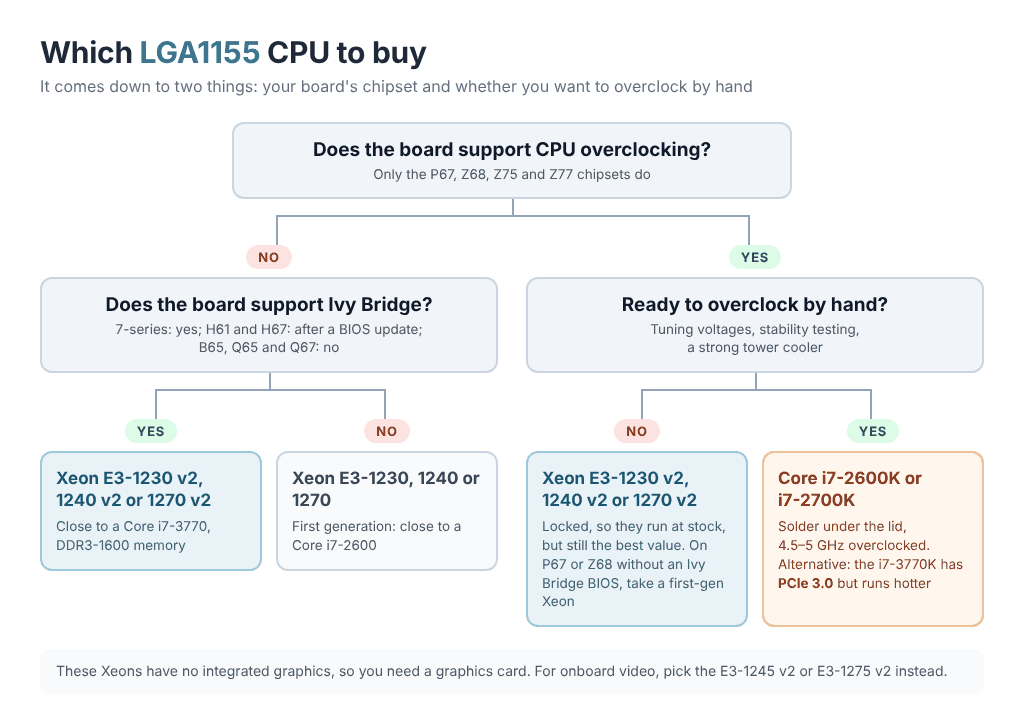
The answer depends mostly on your board’s chipset and on whether you are willing to overclock by hand.
Board without CPU overclocking (H61, H67, B65, B75, H77, Q-series). Take a Xeon E3-1230 v2, E3-1240 v2 or E3-1270 v2. They differ by 100–200 MHz, so buy whichever is cheapest: performance lands close to a stock Core i7-3770, memory runs at DDR3-1600 and PCIe 3.0 works on boards that support it. H61 and H67 boards need a BIOS with Ivy Bridge support first. If you can’t update the BIOS, or the board uses B65, Q65 or Q67, go for a first-generation Xeon E3-1230, E3-1240 or E3-1270 instead — almost a Core i7-2600 for even less money.
Overclocking board (P67, Z68, Z75, Z77), no manual overclocking. The same Xeon E3 v2 chips are still the best value, even though their multipliers are locked and they run at stock clocks. A non-K Core i5 or i7 does get limited unlocking on these chipsets — the turbo multipliers can go up by four bins, about 400 MHz — but it usually costs more than a Xeon. On a P67 or Z68 board without an Ivy Bridge BIOS, use a first-generation Xeon.
Full overclocking. The Core i7-2600K and the slightly faster i7-2700K are the classic picks: solder under the lid typically lets them reach 4.5–4.8 GHz with a good tower cooler (the best samples hit 5 GHz), and overclocked they still beat plenty of newer CPUs. The Core i7-3770K is a little faster at the same clock and adds PCIe 3.0, but thermal paste under its lid makes it run hotter, so it usually overclocks less. If you don’t need 8 threads, the legendary Core i5-2500K gives you 4 cores and great overclocking for little money.
Gaming. Four threads are no longer enough for modern games, so go for an 8-thread chip: a Core i7 or a Xeon E3 from the E3-1230 up. Core i3, Pentium and Celeron are too weak for gaming, and quad-core Core i5 models without Hyper-Threading fall clearly behind the i7 in newer titles. The fastest LGA1155 CPUs are the Xeon E3-1290 v2 at stock (up to 4.1 GHz turbo) and the K-series Core i7 once overclocked.
Home server, NAS and HTPC. A Core i3-3220 or Pentium G2020 is enough for an office PC, a media player or a simple home server. The Xeon E3-1265L v2 (4 cores, 8 threads, 45 W, HD Graphics 2500) is a good low-power pick with integrated graphics, and the 2-core, 4-thread E3-1220L and E3-1220L v2 suit an always-on NAS or router. If you want ECC memory, you need a Xeon E3, Pentium or Celeron and a board with a C202, C204, C206 or C216 server chipset.
Most Xeon E3 chips, including the E3-1230 v2, E3-1240 v2, E3-1270 v2 and E3-1290 v2, have no integrated graphics, so you need a graphics card. If you want onboard video, look at the E3-1245 v2 or E3-1275 v2 and a board with video outputs (P67, C202 and C204 cannot use integrated graphics). Intel did not lock Xeons out of desktop boards until LGA1151, so on LGA1155 they run on regular chipsets, including cheap H61 and B75 boards and Chinese boards such as the X7-VB and ZX-H61C.
LGA1155 chipsets and compatibility
LGA1155 compatibility primarily depends on your motherboard’s chipset and BIOS/UEFI version. For desktops there are two PCH families: 6‑series (Cougar Point — H61, B65, Q65, Q67, H67, P67, Z68), launched for Sandy Bridge, and 7‑series (Panther Point — B75, Q75, Q77, H77, Z75, Z77), launched for Ivy Bridge. Plus server chipsets for Xeon E3: C202, C204, C206 (6‑series) and C216 (7‑series). Sandy Bridge runs on all of them, while support for Ivy Bridge and PCIe 3.0 differs:
| Chipset | Sandy Bridge | Ivy Bridge | K-CPU overclocking | Memory overclocking | Integrated graphics output | PCIe 3.0 with Ivy Bridge |
|---|---|---|---|---|---|---|
| H61 | Yes | Yes* | No | No | Yes | Some boards |
| B65 | Yes | No | No | No | Yes | No |
| Q65 | Yes | No | No | No | Yes | No |
| Q67 | Yes | No | No | No | Yes | No |
| H67 | Yes | Yes* | No | No | Yes | Some boards |
| P67 | Yes | Yes* | Yes | Yes | No | Some boards |
| Z68 | Yes | Yes* | Yes | Yes | Yes | Some boards |
| B75 | Yes | Yes | No | No | Yes | Yes |
| Q75 | Yes | Yes | No | No | Yes | Yes |
| Q77 | Yes | Yes | No | No | Yes | Yes |
| H77 | Yes | Yes | No | No | Yes | Yes |
| Z75 | Yes | Yes | Yes | Yes | Yes | Yes |
| Z77 | Yes | Yes | Yes | Yes | Yes | Yes |
| C202 (Xeon E3) | Yes | Yes* | No | No | No | Some boards |
| C204 (Xeon E3) | Yes | Yes* | No | No | No | Some boards |
| C206 (Xeon E3) | Yes | Yes* | No | No | Yes | Some boards |
| C216 (Xeon E3) | Yes | Yes | No | No | Yes | Yes |
*Needs a BIOS with Ivy Bridge support — update it while a Sandy Bridge CPU is still installed. “Some boards” means PCIe 3.0 is available only on certain board models.
Overclocking depends on both the CPU and the chipset:
- K-series CPUs overclock by multiplier on P67, Z68, Z75 and Z77 boards.
- Limited unlocking. Non-K Core i5 and i7 can raise their turbo multiplier by up to four bins above stock on the same chipsets, which is about 400 MHz.
- BCLK only goes up by 3–7% on any chipset, so locked Core i3, Pentium and Celeron chips are practically not overclockable.
Beyond that, the 7‑series brings native USB 3.0, and RAID and Intel Smart Response SSD caching are available on the higher-end chipsets (Z68, H77, Z77 and Q77 support Smart Response).
Conclusion and Legacy

LGA1155 is among Intel’s most successful mass‑market platforms of the early 2010s. Across two generations (Sandy Bridge and Ivy Bridge) it set the tone for the mainstream and stuck around in builds used by both enthusiasts and everyday users.
Over its lifetime the platform managed to:
- Move from 32 nm to 22 nm Tri‑Gate, improving energy efficiency.
- Bring PCI Express 3.0 and native USB 3.0 to the mainstream.
- Substantially upgrade the iGPU and video stack: Quick Sync arrived and matured, and up to three displays became possible.
- Consolidate a monolithic design with a ring bus, shared L3, and a strong instruction set (AVX, AES‑NI).
- Create a “cult” of overclocking via K‑series chips (i5‑2500K, i7‑2600K, later i5‑3570K, i7‑3770K).
- Popularize Xeon E3 in home builds.
LGA1155 proved that a solid architectural base and a vast ecosystem of compatible hardware can keep inspiring builders long after official support ends.
Looking for the neighboring sockets? The predecessor is LGA1156, and the successor is LGA1150 with 4th and 5th gen Core. Higher-core-count Xeons from the same era went to LGA2011, and the generation after LGA1150 is covered in our complete LGA1151 CPU list. On the AMD side, the rivals of that era are in the AM3/AM3+ CPU list.

Written by
Senior Hardware Specialist proving you don't need top-tier gear to game. Expert in smart upgrades and budget-friendly PC restoration.