Table of Contents
The X99‑QD4 is one of Huananzhi’s most popular microATX (mATX) motherboards. The first version appeared in 2021. Since then, a DDR3 variant (Huananzhi X99‑QD3) and a new revision have been released. While not perfect, the model has earned a reputation as a solid budget board.
At present, the QD4 isn’t particularly popular, largely because its price exceeds that of similar competing boards.
Specifications
Huananzhi X99-QD4 |
||
|---|---|---|
| Revision | Old rev | New rev |
| Socket | LGA 2011-3 |
|
| Chipset | Q87 / Z87 / H87 |
|
| Supported Processors | Intel Core i7 (5000, 6000 series, Haswell-E/Broadwell-E) Intel Xeon E5-1600 v3/v4, E5-2600 v3/v4, E5-4600 v3/v4 (Haswell-EP/Broadwell-EP) |
|
| VRM Configuration | 6 phases Total MOSFETs: 12 (6 high-side + 6 low-side) |
|
| Maximum Recommended TDP | ≤120W (v3 processors) ≤130W (v4 processors) |
|
| Supported Memory | 4 x DDR4 DIMM (quad-channel) with ECC and non-ECC support Maximum capacity: 128 GB |
|
| Sleep Mode Support | No |
|
| Expansion Slots | 1 x PCI-e x16 (Gen 3.0) 1 x PCI-e x4 (Gen 3.0) 1 x PCI-e x1 (Gen 2.0) | 1 x PCI-e x16 (Gen 3.0) 1 x PCI-e x4 (Gen 2.0) |
| Storage | 6 x SATA 3.0 2 x M.2 (NVME, Gen 3.0 x4) | 6 x SATA 3.0 3 x M.2 (NVME, Gen 3.0 x4) |
| Fan Connectors | 1 x CPU cooler (4pin) 1 x Case fan (4pin) 2 x Case fan (3pin) |
|
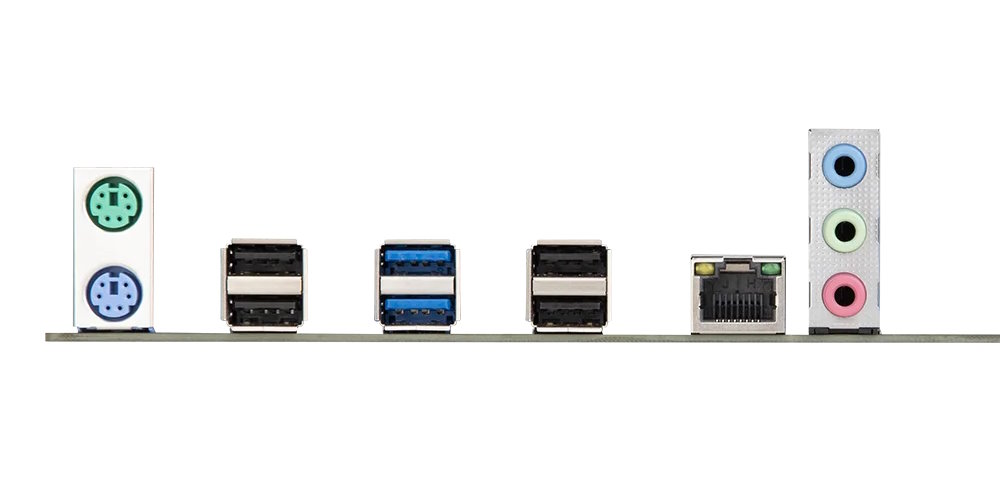
| PS/2 Ports | 2 (mouse + keyboard) |
|
| USB 3.0 Ports | 2 (+ front panel support) |
|
| USB 2.0 Ports | 4 (+ front panel support) |
|
| Network | Gigabit LAN (RTL8111 \ RTL8168) |
|
| Audio | 5.1 channel (ALC897) |
|
| Extra | - | M.2 Wi-Fi port |
| Bios Chip | W25Q128FV |
|
| JLPC1\DEBUG1 header | Yes |
|
| TPM 2.0 header | No |
|
| PCB layers | 6 |
|
| Form Factor & Dimensions | mATX 245 x 190 mm |
|
| Approximate Price | ||
The board comes in a black‑and‑blue color scheme and looks quite nice. It is built around 8‑series desktop chipsets; regardless of which chipset your board shipped with, the functionality is identical.
The QD4 offers quad‑channel memory mode, a sufficient number of ports, and decent overall quality. Highlights include four fan headers and an M.2 Wi‑Fi slot (latest revision only).
The VRM uses six true phases, each with two MOSFETs. It employs 3NA7R2 (52 A / 7.2 mΩ) on the high‑side (×6) and 3NA3R4 (75 A / 3.4 mΩ) on the low‑side (×6), driven by an ISL6376 PWM controller. This setup can handle mid‑range CPUs; if you plan on sustained heavy loads, we recommend adding airflow over the VRM area.

Unlike most budget boards, the CPU power‑consumption sensor works correctly here. However, the usual Chinese quirks remain: inaccurate temperature sensors and Smart Fan control that only recognizes the 4‑pin CPU fan header (CPU_FAN1). The main disappointment is the lack of sleep (S3) support; only hibernation (S4) is available.
Revisions
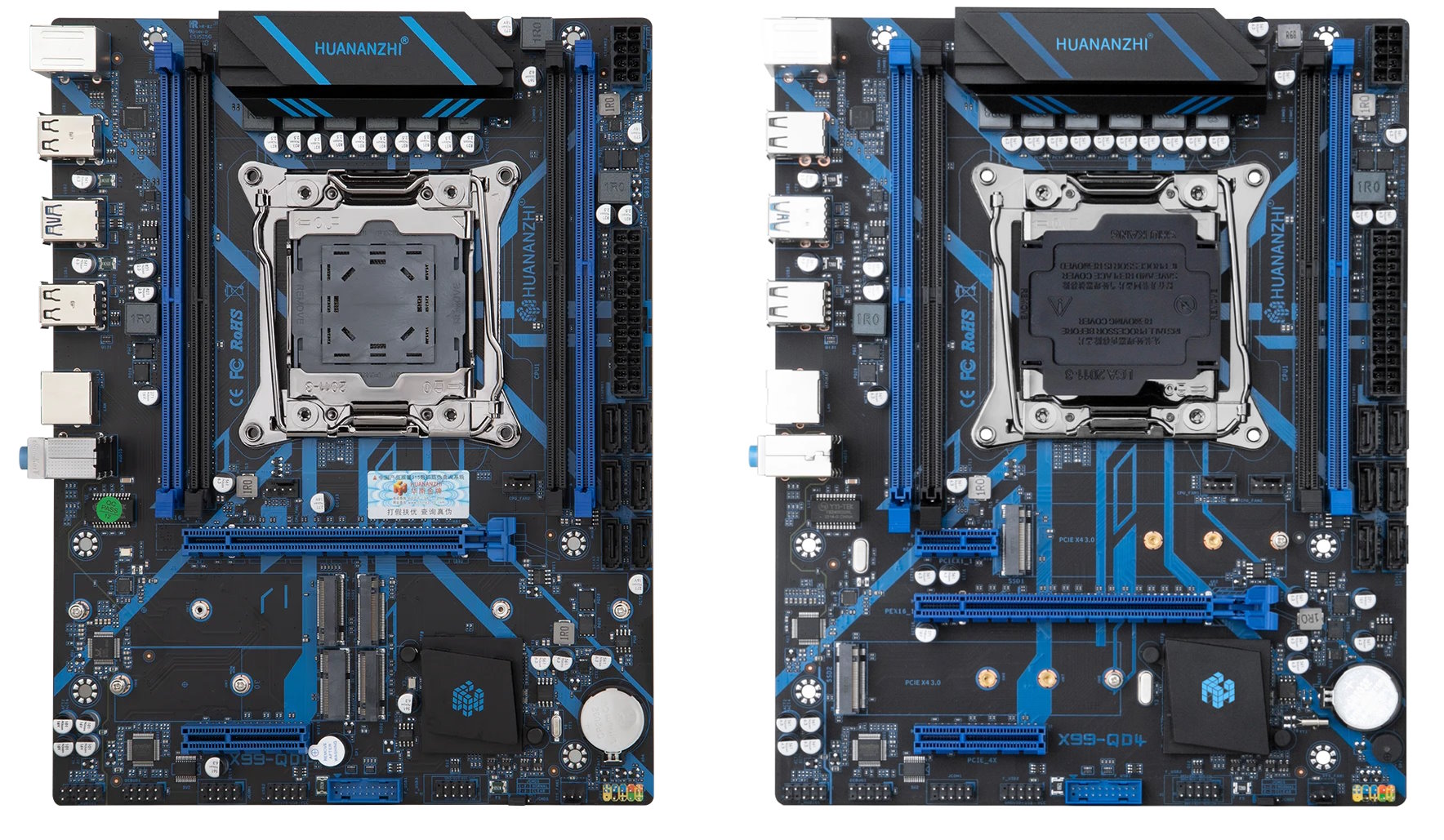
Classic X99‑QD4


Boards produced in 2021–2023 built QD4’s reputation as a quality, inexpensive model. There are no hidden pitfalls or surprise drawbacks. The first revision is still running in many LGA2011‑3 systems.
The classic QD4 carries the marking G608B ver 1.0, located just above the 24‑pin ATX connector.
Revisions with three M.2 slots


In 2024, Huananzhi released a new version of the board. It gained three M.2 slots plus an M.2 Wi‑Fi slot. A PCIe x1 slot was sacrificed, and the PCIe x4 slot now comes from the chipset, so it runs at PCIe 2.0.
Unfortunately, early units had a hardware flaw, likely related to the RAM power delivery. As a result, the board often struggled with four (and sometimes even three) memory modules. In some cases, the new revision would not start in quad‑channel at all; lowering memory frequency to 1866 MHz sometimes helped. Sadly, there is no real fix other than using dual‑ or tri‑channel configurations.
The problematic revision was labeled G693H V1.0, though we cannot guarantee that every board with this marking is affected. Still, the new revision’s reputation took a serious hit.
Later, revisions labeled G693H ver 2.0 and G693H ver 0.1 appeared, where the memory issue seems to have been fixed. All newer revisions look identical, so check the PCB markings before buying.
BIOS Capabilities

The board uses a familiar AMI BIOS. There’s no modern graphical interface, but the stock firmware exposes memory timing controls and is reasonably stable by Chinese BIOS standards. The “Restore AC Power Loss” function is available, and headless boot (without a GPU) is possible. Features like Resizable BAR, overclocking of unlocked CPUs, and more can be enabled by flashing a compatible BIOS.
Simple BIOS Flashing Guide (Windows)
| BIOS version & date | Ram Timings | ReBAR | Unlocked CPU OC | Turbo Boost unlock | Undervolt | Secure Boot | TPM2.0 Support | Notes & Link |
|---|---|---|---|---|---|---|---|---|
| 06/07/2022 23:58:08 Ver: H81X9902 | + | - | - | - | - | + | - | Stock BIOS from revision G608B ver 1.0 [Download] |
| 06/07/2022 23:58:08 Ver: H81X9902 | + | - | - | - | - | + | - | Stock BIOS mod by Koshak1013. BCLK 100.00MHz + No Beep + smartfan (<45°=30%/>80°=100%) [Download] |
| 03/09/2024 17:33:08 Ver: X99-QD4 693H | + | - | - | - | - | + | - | Stock BIOS from revision G693H ver 0.1 [Download] |
| 03/09/2024 17:33:08 Ver: X99-QD4 693H | + | + | - | - | - | + | - | Stock BIOS mod by Koshak1013. REBar + BCLK 100.00MHz + No Beep [Download] |
| 03/09/2024 17:33:08 Ver: X99-QD4 693H | + | + | - | + | -50 mV | + | - | Stock BIOS mod by Koshak1013 (REBar + BCLK 100.00MHz + No Beep) + Unlock for V3 CPUs [Download] |
| X98MF Ver:003 07/25/2022 18:02:42 | + | + | - | + | - | + | + | Based on the BIOS from Huananzhi X99-8M-F. UPT patched, timings, 100 MHz BCLK, TBU (undervolt offsets adjustable in BIOS), ReBAR, custom boot logo, TPM 2.0 and Secure Boot support. Warning: Not yet tested. [Download] |
| - | + | + | + | - | - | + / - | - | Bioses for overclocking unlocked CPUs. See readme.txt [Download] |
| BX99DA08 | + | + | + | - | - | + | + | Custom BIOS from iEngineer. ReBAR + Unlocked CPU overclock + TPM2.0 Support... [Link] |
- Download FPTW 9.1.10 from this page.
- Open Command Prompt as Administrator.
- Copy your BIOS file (
bios.binorbios.rom) into the same folder as FPTW. - In the Command Prompt, navigate to the FPTW folder using the
cdcommand. - Flash the BIOS with the following command:
fptw64 -f bios.bin
Note: Replace bios.bin with the actual name of your modded BIOS file, if it’s different. If FPT reports a lock (cannot access protected regions), reboot to BIOS and disable the BIOS lock: IntelRCSetup → PCH Configuration → Security Configuration → BIOS Lock: Disable.
After flashing, we recommend resetting settings to defaults.
FPT error 103? If FPT stops with “There are no supported SPI flash devices installed”, it usually just means your board’s flash chip is missing from FPT’s chip list. Here’s how to fix FPT error 103.

Frequently Asked Questions
Where can I find the official manual?
The official manual for the latest revisions can be downloaded here.
The board won’t boot, black screen, etc. What should I do?
See our article about the most common LGA2011‑3 issues.
Where can I find drivers for this board?
Current drivers for socket 2011‑3 boards can be found here.
Where is the BIOS chip located?
To the right of the chipset heatsink; you can attach a programmer clip.
Can I connect a TPM 2.0 module?
There isn’t a dedicated TPM 2.0 header, but the board exposes a DEBUG header that can accept TPM 2.0 modules. You’ll need a compatible module and BIOS/UEFI firmware with TPM support. Learn more about TPM 2.0 on Chinese X99 motherboards here.
Conclusion
OldRigRevive Review
3.5
4.0
4.1
4.1

Written by
Senior Hardware Specialist proving you don't need top-tier gear to game. Expert in smart upgrades and budget-friendly PC restoration.
After several many builds over the years, I currently have this QD4 mobo, as a “custom new build” and had installed Bazzite Linux (for the Steam Platform compatibility.) I just recently bought 2 nvme M.2 SSD 2 Tb drives to expand the existing 500gb SATA drive (with Linux & Steam installed). The QD4 mobo is not seeing the ssd drives. I have reset it, by removing the 3v button cell battery, and the main power, over 1 months time, repeatedly, and even tried to clear the cmos, (by changing it’s jumper on the bottom edge, and restoring it to the original position, reconnecting the power, & battery, to find this didn’t work as planned. Is there a setting within the bios to activate the NVME sockets? the nvme bios page has no options to change, and it tells me there are no NVME devices currently connected. after visually inspecting the SSD’s were fully inserted and screwed down, seeing the 2 as correctly installed and if there is no setting in the bios to make the NVME M.2 work properly, what can I do to get them functioning? I am an electronics technician with 2 yrs vocational training and many years of experience, 4 yrs as an Interior Communications Electrician in the U.S. Navy and I personally have been around computers as old as the TRS-80… yes the TRaSh-80!! Huananzhi website doesn’t have much info on the NVME subject.
What models of M.2 drives do you use? Some models may be incompatible with Chinese X99 motherboards. Unfortunately, there is very little information available on this subject.