Machinist X99 B9 Review: C612 mATX with Quad-Channel and 8-phase VRM — Worth It in 2026?
Table of Contents
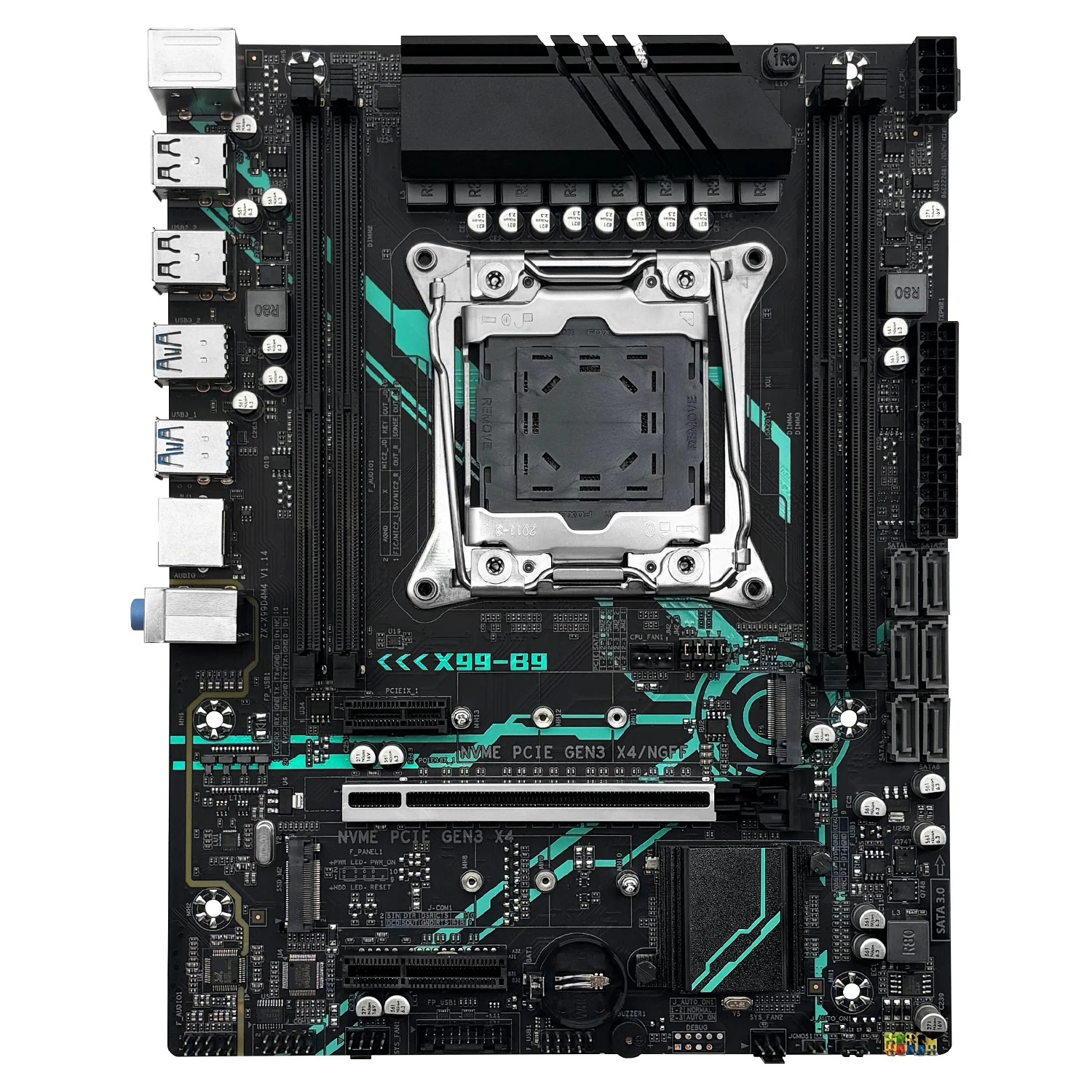
MACHINIST X99 B9 is an mATX motherboard that had everything it needed to be successful. It comes with a server chipset, quad‑channel memory support, 8 virtual phases in the power delivery, and a competitive price. However, the many rough edges keep it from being an easy recommendation.
Machinist isn’t the first maker of this board. You can also find it under other brands: Envinda X99D4M4 (this marking remains on the Machinist PCB) and Atermiter.
Envinda‑branded board
Atermiter‑branded board
There’s also a similar board with a header for TPM 2.0 modules and more stable firmware — the X99‑XD4.
The X99 B9 is built on the server‑grade C612 chipset, so there’s no shortage of ports. Visually, it doesn’t differ much from most other Chinese mATX models, aside from a reinforced PCIe x16 slot.
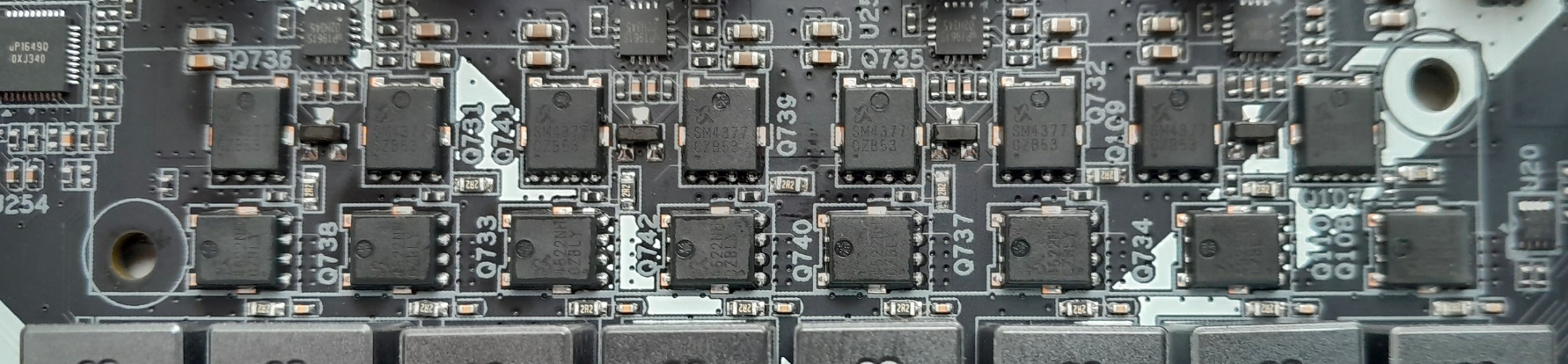
The power delivery uses 8 virtual phases, each composed of two MOSFETs. It uses SM4377NSKP (50 A / 7 mΩ) (x8, high‑side) and SM4522NHKP (110 A / 2.65 mΩ) (x8, low‑side) MOSFETs, the UP1649Q PWM controller common on Chinese boards, and uP1961S MOSFET drivers (x4). This setup can handle fairly powerful CPUs, but if you plan on sustained heavy loads, we recommend adding airflow to the VRM area.
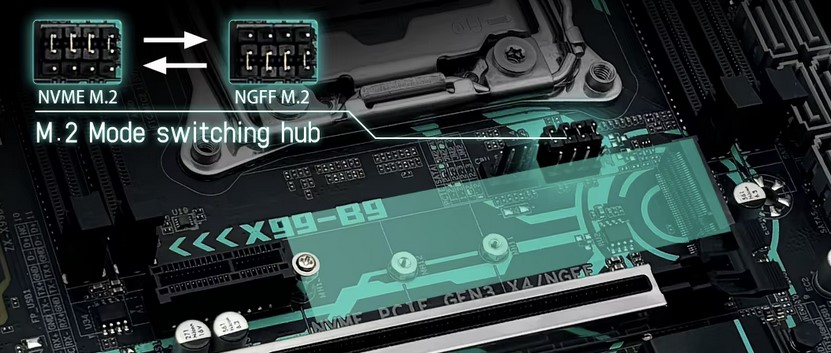
Storage is handled by 6 SATA III ports plus two M.2 slots, one of which can be switched into NGFF mode via the jumpers located next to it.
Time to talk about the drawbacks. The Machinist X99 B9 has no working sleep mode. There isn’t a dedicated TPM 2.0 header, but the board does provide a JLPC1/DEBUG header that can accept TPM 2.0 modules; however, the pins may be unpopulated, which complicates installing a module (learn more about TPM 2.0 on Chinese X99 motherboards — here). In addition, the jumper for auto power‑on after AC restore (next to the F_PANEL, labeled J_AUTO_ON1) does not work. As with many other Chinese boards, there’s no fan speed control apart from the CPU 4‑pin header, and the board underreports CPU temperature and power consumption.
Note: instead of the usual Winbond BIOS chip (though you can sometimes find that too), this board often uses a rarer XMC chip (XM25QH128C), which some SPI programmers don’t support. Fortunately, you can flash the BIOS from Windows with Intel FPT.
BIOS Capabilities
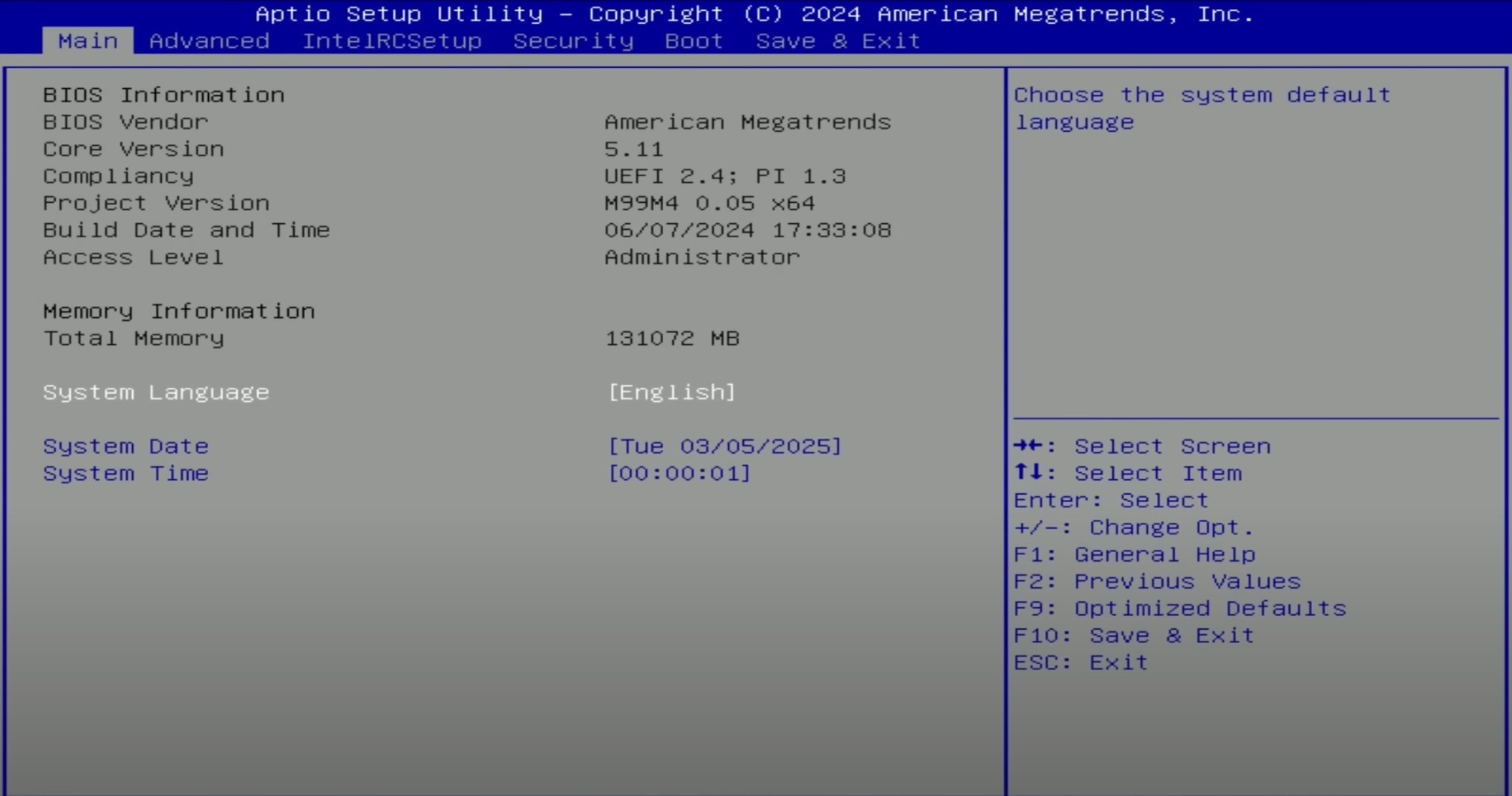
Stock firmware has never been a strong suit of Machinist boards, and the X99 B9 is no exception. There’s almost nothing you’d hope to see: no access to memory timings, no way to overclock unlocked CPUs (despite the server chipset!), and even ECC support is missing (ECC modules will work, but error correction itself does not). Even Smart Fan configuration is noticeably pared back compared to other Chinese firmwares. The only positive is the presence of Resizable BAR (REBAR).
There’s a third‑party paid BIOS for Machinist boards on the C612 chipset that may also fit the X99‑B9. Be careful — we have not tested this version. Details are available at this link.
Stock BIOS mod by OPCzão. Ram Timings + TBU + Undervolt.
Details on Youtube. [Download]
03/06/2024
+
+
+
-
-
Stock BIOS from X99D4M4 + mod (Timings, BCLK 100.00 Mhz, unlocked CPU OC).
Details here. [Download]
⚠️ WARNING: BIOS flashing carries real risks and can permanently damage your motherboard if the firmware is incompatible or the process fails. We cannot guarantee compatibility with every board revision or hardware configuration. Failed flashes typically require a hardware programmer for recovery. Make sure you understand the risks first.
The page with current drivers for socket 2011-3 boards is located here.
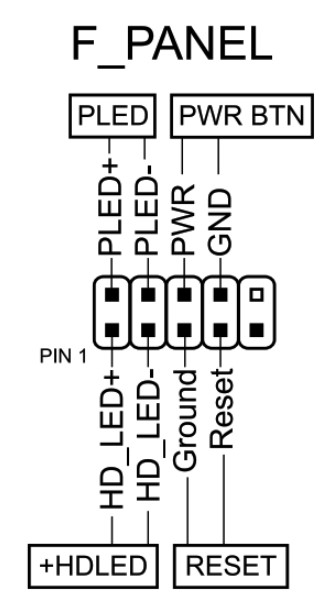
How do I connect the front panel?
Is booting without a graphics card possible?
Yes, headless boot is possible on the stock BIOS.
Where is the BIOS chip located?
To the right of the chipset heatsink, next to the F_PANEL header.
Is TBU via Ultimate Patcher Tool possible?
No — attempting this will brick the board.
Conclusion
MACHINIST X99-B9 OldRigRevive Review
Price / Value 4.5
VRM & Cooling 4.0
Features & Connectivity 4.0
BIOS & Software 3.0
3.9
★★★★☆
The Verdict
“The MACHINIST X99 B9 had everything it needed to become a hit. Unfortunately, a pile of small shortcomings spoils the overall picture. It’s a relatively new model but offers no way to add TPM 2.0. The server chipset and decent power delivery are clear positives, but there’s no overclocking for unlocked CPUs. A hardware jumper for auto power‑on is a great idea — too bad it doesn’t work. And the cherry on top is a firmware that still doesn’t even expose memory timings.
None of these are deal‑breakers. The board works, and for the price it’s far from the worst option. But if you’re not used to (or don’t want to get used to) some of the quirks of Chinese hardware, you may want to look for a more polished model.”
Senior Hardware Specialist proving you don't need top-tier gear to game. Expert in smart upgrades and budget-friendly PC restoration.
Published:
Updated:
4 thoughts on “Machinist X99 B9 Review: C612 mATX with Quad-Channel and 8-phase VRM — Worth It in 2026?”
Hi Dmitrii,
I’m planning to change my old PC for a new one, I’m reading a lot about those chinese motherboards but all of them seems to have many bios problems (ram timings, rebar, hibernation…), I would like to know if there’s a chinese mobo with these specs:
1) SATA III x 6 ports
2) USB 3.0 x 4 ports
3) NMVe x 2 (at least)
4) 4 RAM slots supporting up to 128 Gb DDR4 (quad channel)
5) X99 / C612 Server chipset
6) Working VRM
7) Working Bios (no know issues, with working rebar function)
I’m not interested in undervolting, TBU, overclocking… as I’m going to use the chosen processor at its native frequency (Intel Xeon E5 2650 V4 (If there’s a better option under 120W of TDP recommendations will be more than welcome)).
As far as I know, the Machinist X99 B9 and the Qiyida X99 H9s could meet the requirements, aren’t they?
I would like to install a 6 pipes Xuanfeng 4 pins fan, do you think this is a reliable choice?
Hi! Yes, you’re pretty close. Both the Machinist X99 B9 and Qiyida X99 H9s are decent options, but I’d personally recommend the X99-XD4. It fits all your requirements exceptionally well, and its stock BIOS is surprisingly functional and feature-complete out of the box.
Regarding the CPU and cooling: I’m not sure what your primary use case is, but I’d suggest going with something punchier than the E5-2650 v4. The VRM on the X99-XD4 can easily handle much more powerful chips, so there’s really no reason to limit yourself to a 2650 v4.
Hi Dimitri, I was wondering if you could create an installation guide for the connector required by this motherboard and specify which TPM 2.0 module is needed; naturally, a BIOS update compatible with this board would also be required. I would greatly appreciate it if you could do this, as it is very difficult to find information about this motherboard.
Unfortunately, I don’t have this board on hand right now, so I can’t be 100% sure, but if I remember correctly, the DEBUG header on the Machinist X99-B9 has no pins soldered in (unless newer revisions with the pins have come out since then). That means connecting a TPM 2.0 module will take some extra work, and the most I can help with here is the connector pinout. You can find it in this article: TPM 2.0 on Chinese X99 boards.
The BIOS is a bit easier. There’s a very similar board, the X99-XD4. Its firmware already has both TPM and Secure Boot, and it should work on the B9 without any problems. Still, I’d recommend keeping a programmer at hand and saving a dump of your original BIOS before flashing, just in case.




Hi Dmitrii,
I’m planning to change my old PC for a new one, I’m reading a lot about those chinese motherboards but all of them seems to have many bios problems (ram timings, rebar, hibernation…), I would like to know if there’s a chinese mobo with these specs:
1) SATA III x 6 ports
2) USB 3.0 x 4 ports
3) NMVe x 2 (at least)
4) 4 RAM slots supporting up to 128 Gb DDR4 (quad channel)
5) X99 / C612 Server chipset
6) Working VRM
7) Working Bios (no know issues, with working rebar function)
I’m not interested in undervolting, TBU, overclocking… as I’m going to use the chosen processor at its native frequency (Intel Xeon E5 2650 V4 (If there’s a better option under 120W of TDP recommendations will be more than welcome)).
As far as I know, the Machinist X99 B9 and the Qiyida X99 H9s could meet the requirements, aren’t they?
I would like to install a 6 pipes Xuanfeng 4 pins fan, do you think this is a reliable choice?
Thank you vey much in advance. Kind regards !!
Hi! Yes, you’re pretty close. Both the Machinist X99 B9 and Qiyida X99 H9s are decent options, but I’d personally recommend the X99-XD4. It fits all your requirements exceptionally well, and its stock BIOS is surprisingly functional and feature-complete out of the box.
Regarding the CPU and cooling: I’m not sure what your primary use case is, but I’d suggest going with something punchier than the E5-2650 v4. The VRM on the X99-XD4 can easily handle much more powerful chips, so there’s really no reason to limit yourself to a 2650 v4.
If your focus is gaming, consider the E5-2667 v4.
If you need heavy multi-threaded work, look at the E5-2690 v4 or higher.
In either case, a 6-pipe cooler will be more than enough to keep temperatures well under control. Hope this helps!
Hi Dimitri, I was wondering if you could create an installation guide for the connector required by this motherboard and specify which TPM 2.0 module is needed; naturally, a BIOS update compatible with this board would also be required. I would greatly appreciate it if you could do this, as it is very difficult to find information about this motherboard.
Hi! Thanks for the comment.
Unfortunately, I don’t have this board on hand right now, so I can’t be 100% sure, but if I remember correctly, the DEBUG header on the Machinist X99-B9 has no pins soldered in (unless newer revisions with the pins have come out since then). That means connecting a TPM 2.0 module will take some extra work, and the most I can help with here is the connector pinout. You can find it in this article: TPM 2.0 on Chinese X99 boards.
The BIOS is a bit easier. There’s a very similar board, the X99-XD4. Its firmware already has both TPM and Secure Boot, and it should work on the B9 without any problems. Still, I’d recommend keeping a programmer at hand and saving a dump of your original BIOS before flashing, just in case.
Good luck!