Table of Contents
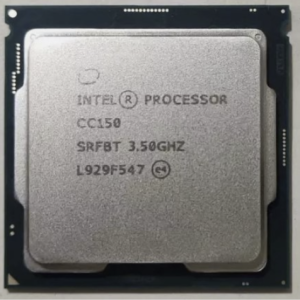
The Intel CC150 is an unusual 8-core processor built by Intel for NVIDIA’s GeForce Now cloud gaming servers.
The model was never intended for retail sale and first appeared on Chinese marketplaces in 2020. By 2024 it had become widely available, and today it is easy to find on the major online marketplaces.
Specifications
| MODEL | INTEL CC150 | Core i9-9900 |
|---|---|---|
| Architecture | Coffee Lake Refresh, 14 nm | Coffee Lake Refresh, 14 nm |
| Cores \ Threads | 8 \ 16 | 8 \ 16 |
| Memory Support | DDR4-2666, DDR3L-1600 | DDR4-2666, DDR3L-1600 |
| Base Frequency | 3500 MHz | 3100 MHz |
| Max Turbo Boost Frequency | None | up to 5 GHz |
| L3 Cache | 16 MB | 16 MB |
| TDP | 95 W | 65 W |
| Multiplier | Locked | Locked |
| Integrated Graphics | None | UHD Graphics 630 |
| Approximate Price | ~$250-$350 |

The CC150 is essentially a customized Core i9-9900 tuned for multi-tenant game streaming, with a higher sustained base frequency and the TDP raised from 65 W to 95 W. Integrated graphics, unnecessary in servers, is disabled, so a discrete graphics card is mandatory and Intel Quick Sync hardware video encoding is not available.
The CPU supports ECC Unbuffered (UDIMM) memory, but error correction only works on boards with C242/C246 workstation chipsets. On consumer 300-series boards, ECC modules run normally in non-ECC mode.
The CC150 has no Turbo Boost. The multiplier is fixed at 35x, so all cores run at a constant 3.5 GHz under any load. This relatively low frequency suits dense server racks where cooling is tight.
The fixed clock also keeps power draw low. Despite the 95 W TDP, the chip draws around 60 W under typical full load and up to about 80 W in the heaviest AVX stress tests such as Prime95 Small FFT. That is roughly the level of a six-core i5-9500, while an i9-9900K running without power limits pulls 150 W or more. As a result, the VRM doesn’t need to be anything special: the processor runs fine even on entry-level H310 boards.
How to Run the CC150 on LGA1151
Like other Coffee Lake Refresh models, the CC150 is designed for 300-series chipsets (Z370, Z390, B360, B365, H310, H370). No extra steps are required: just install the processor as usual. For an overview of the whole platform, see our LGA1151 guide.
The processor can also run on 100- and 200-series boards, but this requires modifying both the board BIOS and specific CPU contacts. These procedures are known as Coffee Mod.
The process involves two stages:
- Obtaining a BIOS dump, modifying it with the CoffeeTime utility, and flashing it back. The flashing method depends on the board and may require a programmer.
- Pin-mod: insulating and/or bridging contacts on the underside of the processor. This is usually done with Kapton and metallized tape; foil, electrical tape, or pencil graphite are sometimes used instead. The exact pads depend on the motherboard vendor.
Before attempting any modification, study detailed guides and user experiences. Useful links: linustechtips forum, techpowerup forum.


Overclocking
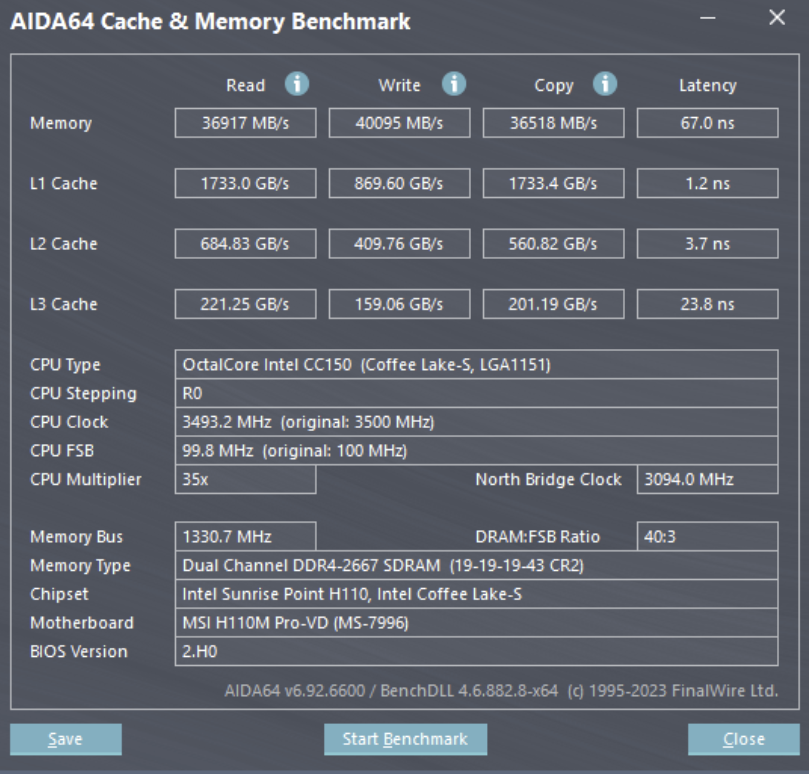
The multiplier is locked, so even Z-series boards can’t raise core clocks. A few boards allow small BCLK increases (typically to 103–105 MHz), which adds only ~100–150 MHz. That is not a meaningful uplift.
The real advantage of Z-series chipsets is memory overclocking beyond the stock 2666 MHz. The memory controller is the same as in other Coffee Lake Refresh parts, so 3,200–3,600+ MHz is realistic with good DIMMs.
Cooling
With a real power draw of 60–80 W, the processor is easy to cool. In most builds, an affordable 120 mm tower with 2–3 heat pipes keeps temperatures well under control, and there is no shortage of compatible LGA1151 coolers.
Performance and Benchmarks
Even with its fixed clock, the CC150 performs well in both synthetic and gaming tests. It trails the top retail models, but its performance is still perfectly adequate today.
Synthetic benchmarks:


It handles current games at comfortable frame rates, but with no boost its single-core performance is modest (in Cinebench R20 it scores below even the i3-9100F), so a mid-range graphics card is the sensible ceiling. Good matches are the RTX 3060 12GB, RTX 3060 Ti and RX 6700 XT: they are cheap on the used market and use a full x16 interface. The RX 6600 XT, RX 7600 and RTX 4060 work well too, but as 8 GB cards with an x8 interface they lose more performance on this PCIe 3.0 platform once their video memory runs out.
CC150 vs i9-9900K gaming comparison (DDR4-3600):

CC150 + RTX 4060/4070 Super, gaming and synthetic tests:

Who Should Buy the CC150
The CC150 makes the most sense as an upgrade for LGA1151 boards currently running entry-level or mid-range CPUs; the gain over 4-core models is substantial. If you have a solid Z-series board and are comfortable with overclocking, this socket has stronger options: the i7-9700K, the i9-9900K, or various Chinese Frankenstein CPUs. See our complete list of LGA1151 processors for all of them.
On B- and H-series boards, the i9-9900K loses much of its edge while still costing more. It can’t be overclocked there, memory is capped at 2666 MHz for both chips, and many budget boards enforce the 95 W power limit, which cuts its boost clocks under all-core load.
The CC150 won’t match the retail flagships, but for an older LGA1151 system it is one of the cheapest ways to get eight cores and sixteen threads, and it runs cool on almost any board.
Where to Buy
You can buy the CC150 on AliExpress and eBay.

Written by
Senior Hardware Specialist proving you don't need top-tier gear to game. Expert in smart upgrades and budget-friendly PC restoration.