
Table of Contents
X99‑H5 is Qiyida’s simplest and most budget‑friendly mATX motherboard for LGA2011‑3. The model is based on the H55 chipset and offers a very limited feature set.
The closest relative is the ZSUS X99‑8D4 and ZSUS X99-W.
This is an absolute bottom-tier X99 motherboard. If you're thinking of buying one, keep in mind that while the price is temptingly low, the savings rarely pay off in the long run.
Manufacturers heavily cut corners on these models, so expect hardware quirks and broken BIOS features. Some issues can be fixed, but it takes time, effort, and often an SPI programmer.
If you care about decent functionality, hassle-free BIOS flashing, and modern connectivity, you're better off spending a bit more on solid budget options like Qiyida X99 K9s, Qiyida X99 H9s, or X99-XD4.
Specifications
| Model | Qiyida X99-H5 |
|---|---|
| Socket | LGA 2011-3 |
| Chipset | H55 |
| Supported Processors | Intel Core i7 (5000, 6000 series, Haswell-E/Broadwell-E) Intel Xeon E5-1600 v3/v4, E5-2600 v3/v4, E5-4600 v3/v4 (Haswell-EP/Broadwell-EP) |
| VRM Configuration | 3 phase (6 virtual via doublers) Total MOSFETs: 12 (6 high-side + 6 low-side) |
| Maximum Recommended TDP | ≤90W (v3 processors) ≤100W (v4 processors) |
| Supported Memory | 4 x DDR4 DIMM (dual-channel) with ECC and non-ECC support Maximum capacity: 64 GB |
| S3 Sleep Mode Support | No |
| Expansion Slots | 1 x PCI-e x16 (Gen 3.0) 1 x PCI-e x1 (Gen 2.0) |
| Storage | 4 x SATA 2.0 2 x M.2 NVME (Gen 3.0 x4) |
| Fan Connectors | 1 x CPU cooler (4pin) 2 x case fans (3pin) |
| PS/2 Ports | 2 (mouse + keyboard) |
| USB 3.0 Ports | - |
| USB 2.0 Ports | 8 (+ front panel support) |
| Network | Gigabit LAN (RTL8168H \ RTL8111H) |
| Audio | 5.1 channel (ALC662 \ ALC897) |
| Super I/O | NCT5532D |
| Bios Chip | Winbond 25Q128JVSQ |
| TPM 2.0 header | No |
| JLPC1 header | Yes |
| Form Factor & Dimensions | mATX 220 x 190 mm |
| Approximate Price |
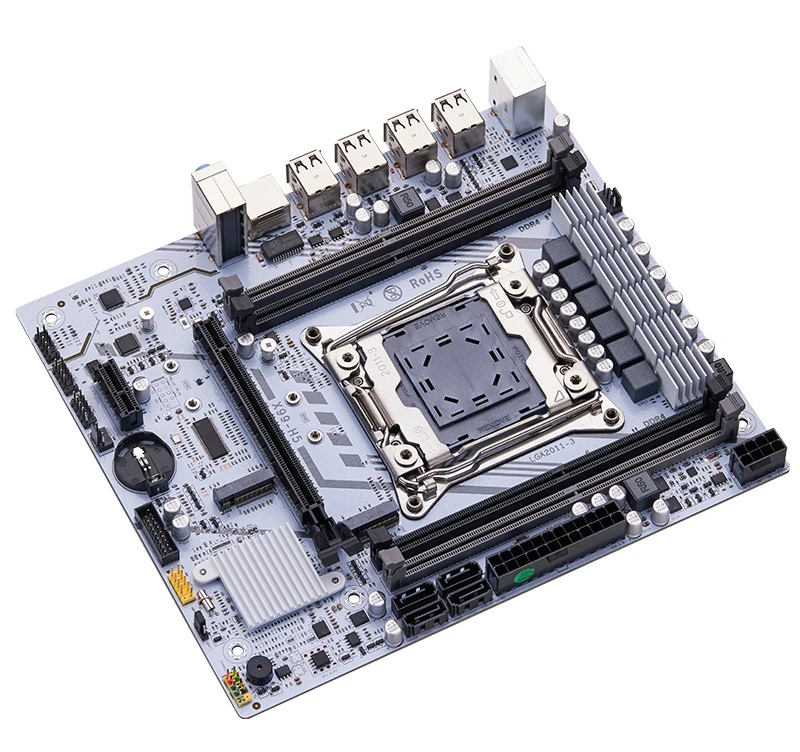

The H55 chipset this board uses was introduced back in 2010 and even then couldn’t boast modern I/O support. It’s the main reason the board is so inexpensive, but the trade‑off is the lack of both SATA III and USB 3.0. Fortunately, the manufacturer provided two M.2 NVMe slots whose lanes come directly from the CPU (so the chipset doesn’t affect them), which somewhat compensates for the absence of fast SATA. As for the missing USB 3.0, you’ll have to live without it or use the only available PCIe x1 expansion slot.
The power delivery is typical for boards in this class: three doubled phases (six “virtual” phases) with two MOSFETs per phase. We don’t recommend using CPUs with a TDP above 100 W; if you must, add extra airflow over the VRM area from the start.
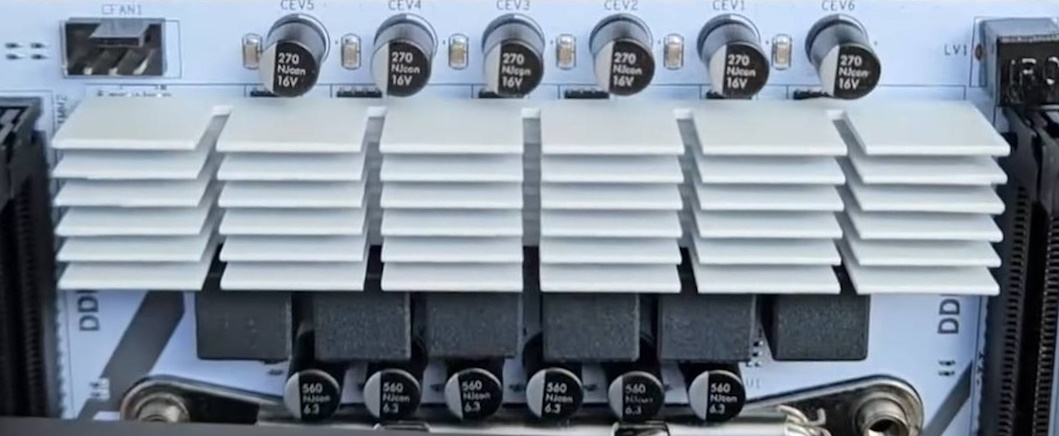
In other respects, this is a typical budget Chinese board: a thin PCB, no S3 sleep, basic audio without dedicated filtering capacitors, and only two fan headers (the 4‑pin header is the only controllable one). On the plus side, there’s a built‑in PC speaker, a Winbond BIOS chip, decent build quality, and a fairly attractive appearance.
A note on TPM 2.0: There is no dedicated TPM 2.0 header, but the board exposes a JLPC1 header that can accept LPC TPM 2.0 modules. Learn more about TPM 2.0 on Chinese X99 motherboards.
BIOS Capabilities
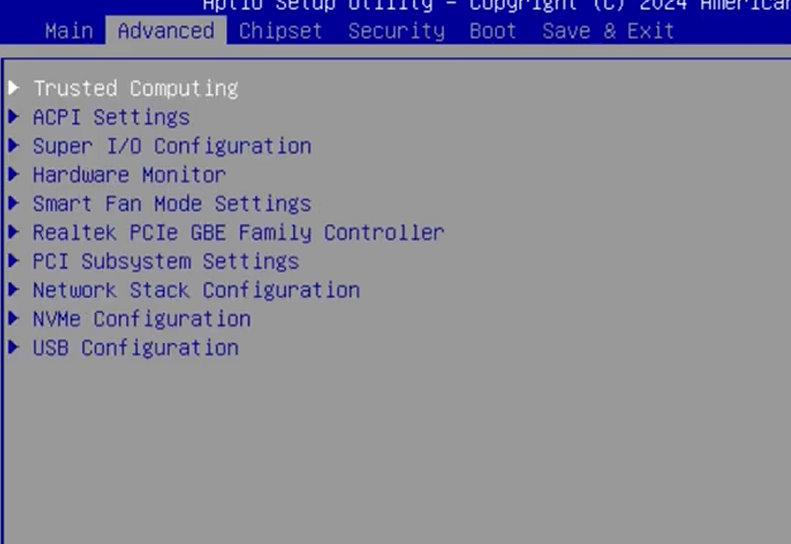
The board runs a classic Chinese UEFI/BIOS based on Aptio V. Qiyida included most basic options in the firmware: memory timing controls, ReBAR support, and TPM 2.0. A Secure Boot menu option is also present, but remains untested. The BIOS still suffers from typical flaws — incorrect motherboard temperature monitoring, inaccurate power consumption reporting, and SmartFan working only via the 4-pin header. It gets the job done for general use, but users should still keep the chipset’s limitations in mind.
Motherboards on 5-series chipsets often run into issues when disabling CSM or enabling Secure Boot. If you're facing similar problems after tweaking these settings, check out our fix guide.
Unfortunately, 5-Series chipsets create real headaches for backup and flashing. Standard tools like the Intel Flash Programming Tool don’t work with these platforms. AFUDOS / AFUWIN can dump only the BIOS region. Full flashing and full backup require a hardware programmer.

| BIOS version & date | Ram Timings | ReBAR | Unlocked CPU OC | Turbo Boost unlock | Undervolt | Secure Boot & TPM2.0 Support | Notes & Link |
|---|---|---|---|---|---|---|---|
| X99H5 Ver:002 07/09/2024 | + | + | - | - | - | + | Stock BIOS [Download] |
| X99H5 Ver:002 07/09/2024 | + | + | - | + | -50 mV | + | Stock BIOS + TBU for V3 CPUs [Download] |
Frequently Asked Questions
The board won’t boot, black screen, etc. — what should I do?
Check out our guide to the most common LGA2011‑3 issues.
Where can I find drivers for this board?
Our current driver collection for socket 2011‑3 boards is here.
Where’s the BIOS chip located?
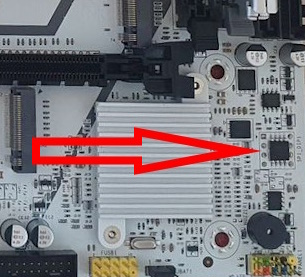
To the right of the chipset heatsink — you can clip a programmer directly onto it.
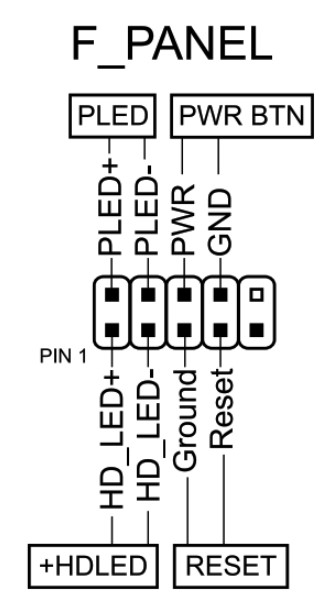
How do I connect the front panel?
Conclusion
OldRigRevive Review
5.0
3.5
2.5
3.6

Written by
Senior Hardware Specialist proving you don't need top-tier gear to game. Expert in smart upgrades and budget-friendly PC restoration.