
Table of Contents
The Qiyida E5‑A99 is a mid‑range LGA2011‑3 motherboard that went on sale in 2023. The model follows a typical configuration for its era but stands out for its stronger VRM.
Although you can still find the board for sale, it never became particularly popular. Let’s see whether it’s still worth considering in 2026.
Specifications
| Model | Qiyida E5-A99 |
|---|---|
| Socket | LGA 2011-3 |
| Chipset | C226 / B85 / Q87 |
| Supported Processors | Intel Core i7 (5000, 6000 series, Haswell-E/Broadwell-E) Intel Xeon E5-1600 v3/v4, E5-2600 v3/v4, E5-4600 v3/v4 (Haswell-EP/Broadwell-EP) |
| VRM Configuration | 3 phase (6 virtual via doublers) Total MOSFETs: 18 (6 high-side + 12 low-side) |
| Supported Memory | 4 x DDR4 DIMM (quad-channel) with ECC and non-ECC support Maximum capacity: 128 GB |
| Sleep Mode Support | No |
| Expansion Slots | 2 x PCI-e x16 (Gen 3.0) 1 x PCI-e x1 (Gen 3.0) 1 x PCI-e x1 (Gen 2.0) |
| Storage | 4 x SATA 3.0 1 x M.2 (NVME, Gen 3.0 x4) 1 x M.2 (NGFF) |
| Fan Connectors | 1 x CPU cooler (4pin) 1 x Case fan (4pin) 2 x Case fan (3pin) |
| PS/2 Ports | 2 (mouse + keyboard) |
| USB 3.0 Ports | 2 (+ front panel support) |
| USB 2.0 Ports | 4 (+ front panel support) |
| Network | Gigabit LAN (RTL8111 \ RTL8168) |
| Audio | 5.1 channel (ALC897) |
| Super I/O | NCT5532D |
| JLPC header | Yes |
| TPM 2.0 header | No |
| Extra | M2 Wi-Fi Port (non-CNVI) Metal‑reinforced X16 slots POST code display |
| Form Factor & Dimensions | mATX 258 x 190 mm |
| Approximate Price | AliExpress: $55 - $70 (Check Price) |
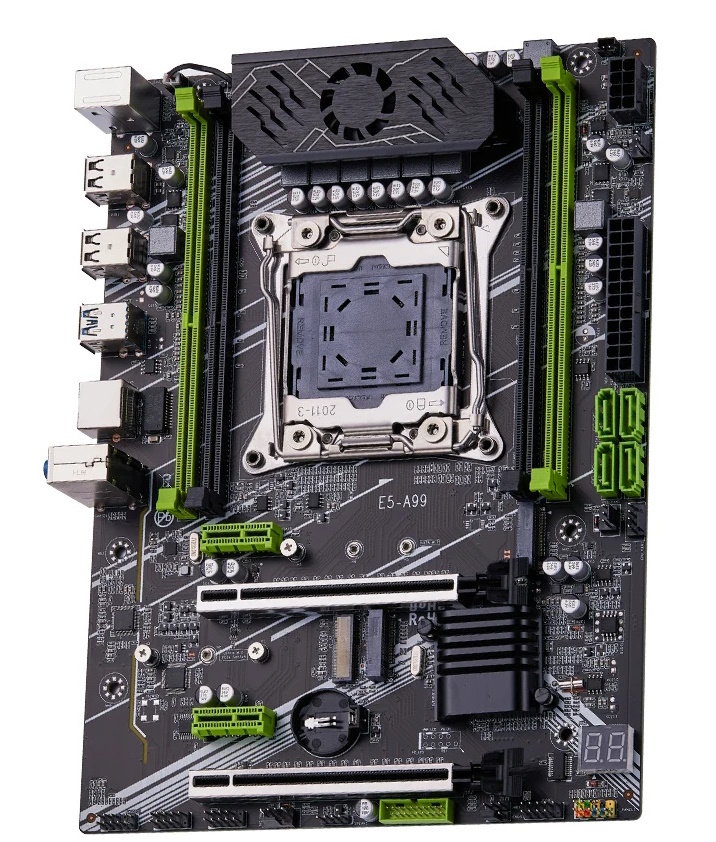
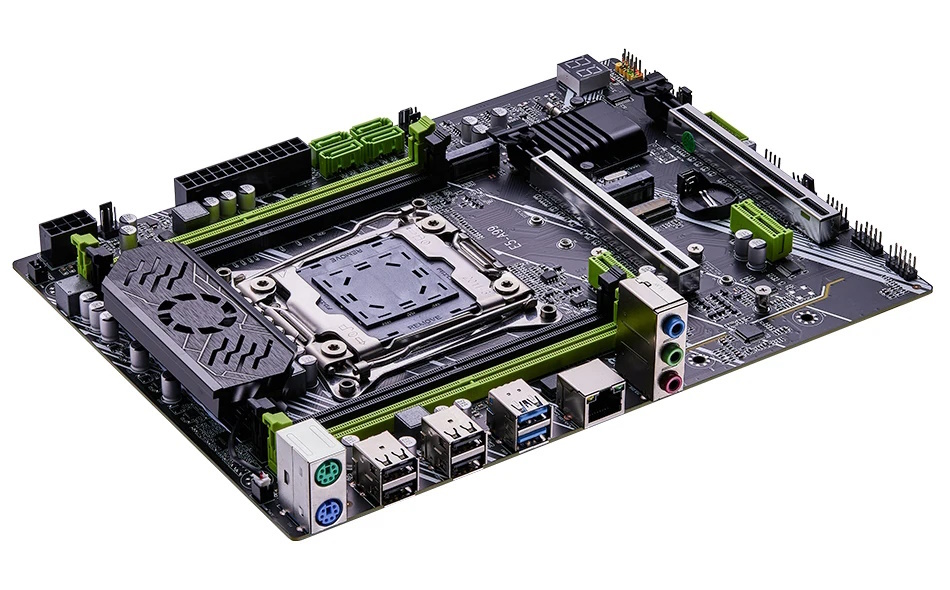
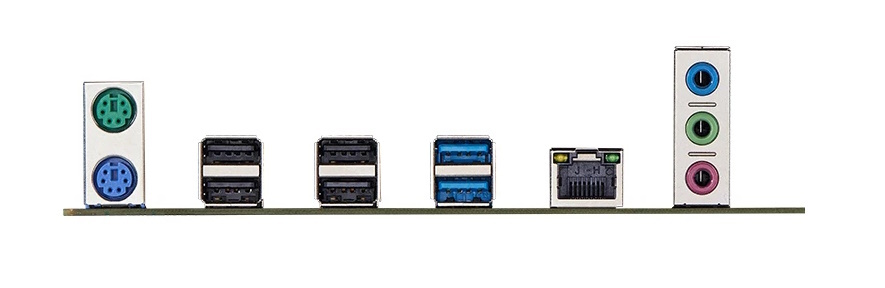
The color scheme is black, white, and green. It looks decent, though clearly short of high‑end boards. To add a premium touch, it features metal‑reinforced PCIe x16 slots, active VRM cooling, and a two‑digit POST code display.
The E5‑A99 is built on Intel 8‑series desktop chipsets (e.g., B85/Q87), though a version with the server‑grade C226 also exists. Functionality does not change between them. Storage consists of four SATA III (6 Gb/s) ports and two differently keyed M.2 slots. The upper M.2 slot is SATA (NGFF) and shares its link with one of the SATA ports; when it’s in use, only three SATA ports remain available. The lower M.2 slot is for NVMe drives, with its lanes coming from the CPU (PCIe 3.0).

There are plenty of PCIe slots for a board of this size: two x16 slots (both PCIe 3.0) and two x1 slots (top — PCIe 3.0, bottom — PCIe 2.0).
The main strength of this model is its power delivery. The VRM is built around a uP1649Q PWM controller with three uP1961S drivers and uses SM4503NHKP (high‑side, 80 A / 3 mΩ) and SM4508NHKP (low‑side, 49 A / 6.8 mΩ) MOSFETs. It implements six virtual phases, each with three MOSFETs: one high‑side SM4503 plus two low‑side SM4508 (doubled low side). This isn’t the most extreme layout we’ve seen, but it comfortably handles CPUs in the 130–140 W TDP range.

Otherwise, the feature set is typical of Chinese boards. The ubiquitous ALC897 audio codec is used, without additional filtering capacitors. There are four fan headers, but Smart Fan control is limited to the 4‑pin CPU header. Sleep (S3) mode doesn’t work, the motherboard temperature sensor reads incorrectly (don’t be alarmed if you see readings over 100°C), and CPU power telemetry reports values significantly below actual consumption.
A note on TPM 2.0: There is no dedicated TPM 2.0 header, but the board exposes a JLPC1 header that can accept LPC TPM 2.0 modules. Learn more about TPM 2.0 on Chinese X99 motherboards.
Revisions
One alternate revision is known; the only difference appears to be two additional SATA III ports (for a total of six). Otherwise, the boards are identical.

BIOS Capabilities
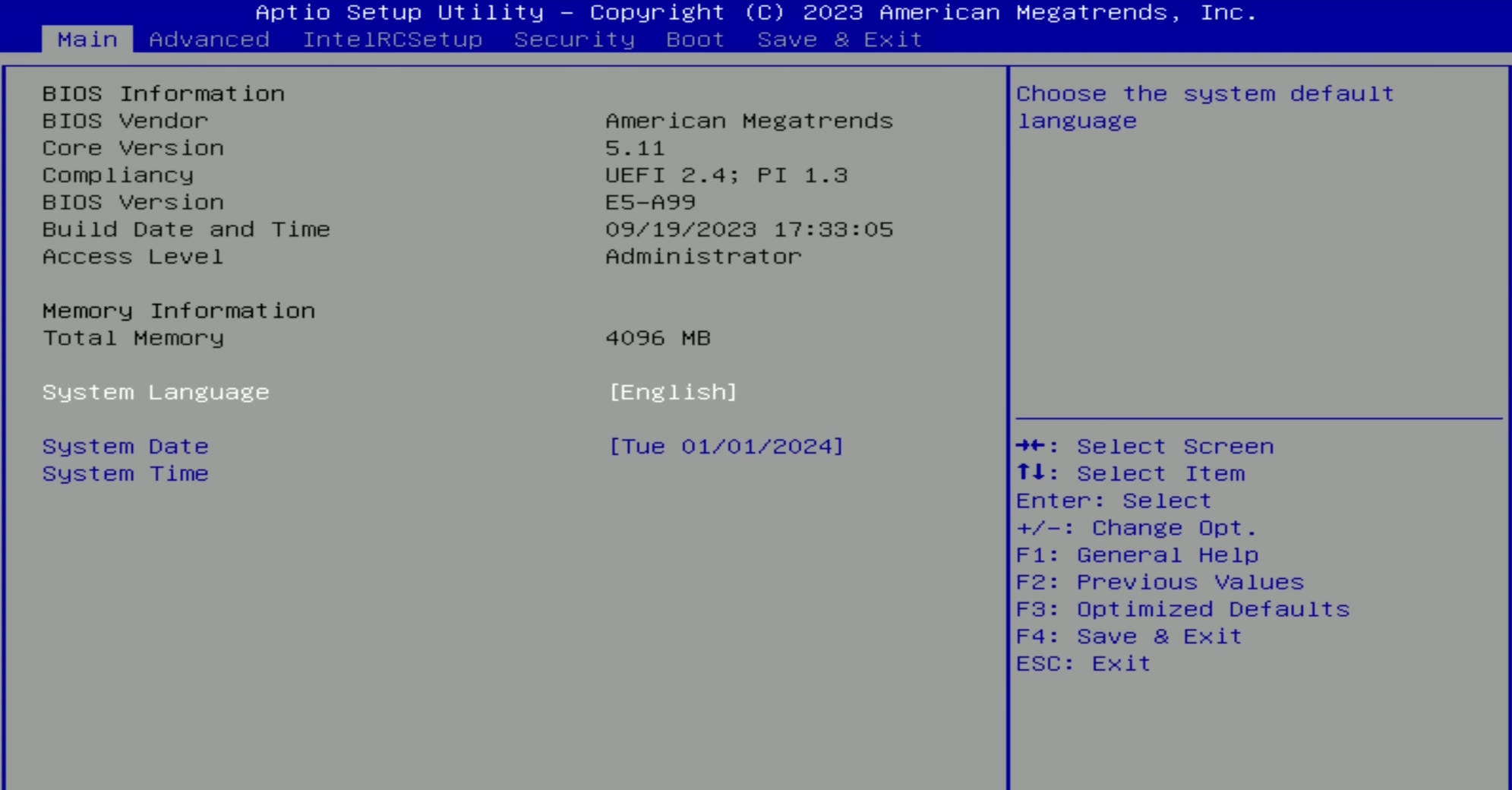
Like other Chinese LGA2011‑3 boards, the E5‑A99 runs an American Megatrends UEFI/BIOS. The stock firmware is fairly capable: access to memory timings, a working Resizable BAR, and even PCIe bifurcation. Secure Boot is available, as is functionality for TPM 2.0 modules.
As with other BIOSes from China, there are a huge number of settings, some of which don’t work. Still, the stock firmware is suitable for daily use.
Simple BIOS Flashing Guide (Windows)
Be careful: firmware for C226‑based boards may be incompatible with boards on desktop chipsets!
| Chipset | BIOS version & date | Ram Timings | ReBAR | Unlocked CPU OC | Turbo Boost unlock | Undervolt | Secure Boot & TPM2.0 | Notes & Link |
|---|---|---|---|---|---|---|---|---|
| B85 / Q87 | X9H9D Ver:003 09/19/2023 | + | + | - | - | - | + | Stock BIOS [Download] |
| B85 / Q87 | X9H9D Ver:003 09/19/2023 | + | + | - | + | -50 mV | + | Stock BIOS + TBU for V3 CPUs [Download] |
| С226 | X9H9D Ver:003 09/19/2023 | + | + | - | - | - | + | Stock BIOS (C226) [Download] |
| С226 | X9H9D Ver:003 09/19/2023 | + | + | - | + | -60 mV | + | Stock BIOS (C226) + TBU for V3 CPUs [Download] |
- Download Intel Flash Programming Tool (FPTW) 9.1.10 from this page.
- Open Command Prompt as Administrator.
- Copy your BIOS file (
bios.binorbios.rom) into the same folder as FPTW. - In Command Prompt, navigate to the FPTW folder using the
cdcommand. - Back up first:
fptw64 -d backup.bin - Flash the BIOS:
fptw64 -f bios.bin
Notes: Replace bios.bin with the actual name of your BIOS file.
After flashing, we recommend resetting settings or clearing CMOS.

Frequently Asked Questions
How do I connect the front panel?
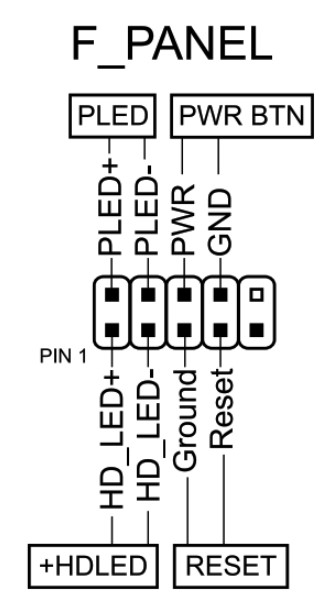
The board won’t boot, black screen, etc. What should I do?
See our article about the most common LGA2011‑3 issues.
Is Turbo Boost Unlock possible on this board?
Yes, you can perform the unlock yourself using S3TurboTool by following our guide, or wait for a ready‑made BIOS with the unlock applied.
Where can I find drivers for this board?
The page with current drivers for socket 2011‑3 boards is located here.
Where is the BIOS chip located?
To the right of the chipset heatsink; the position is convenient for a clip‑on programmer.
Conclusion
OldRigRevive Review
4.5
4.3
4.2
4.2

Written by
Senior Hardware Specialist proving you don't need top-tier gear to game. Expert in smart upgrades and budget-friendly PC restoration.