Table of Contents
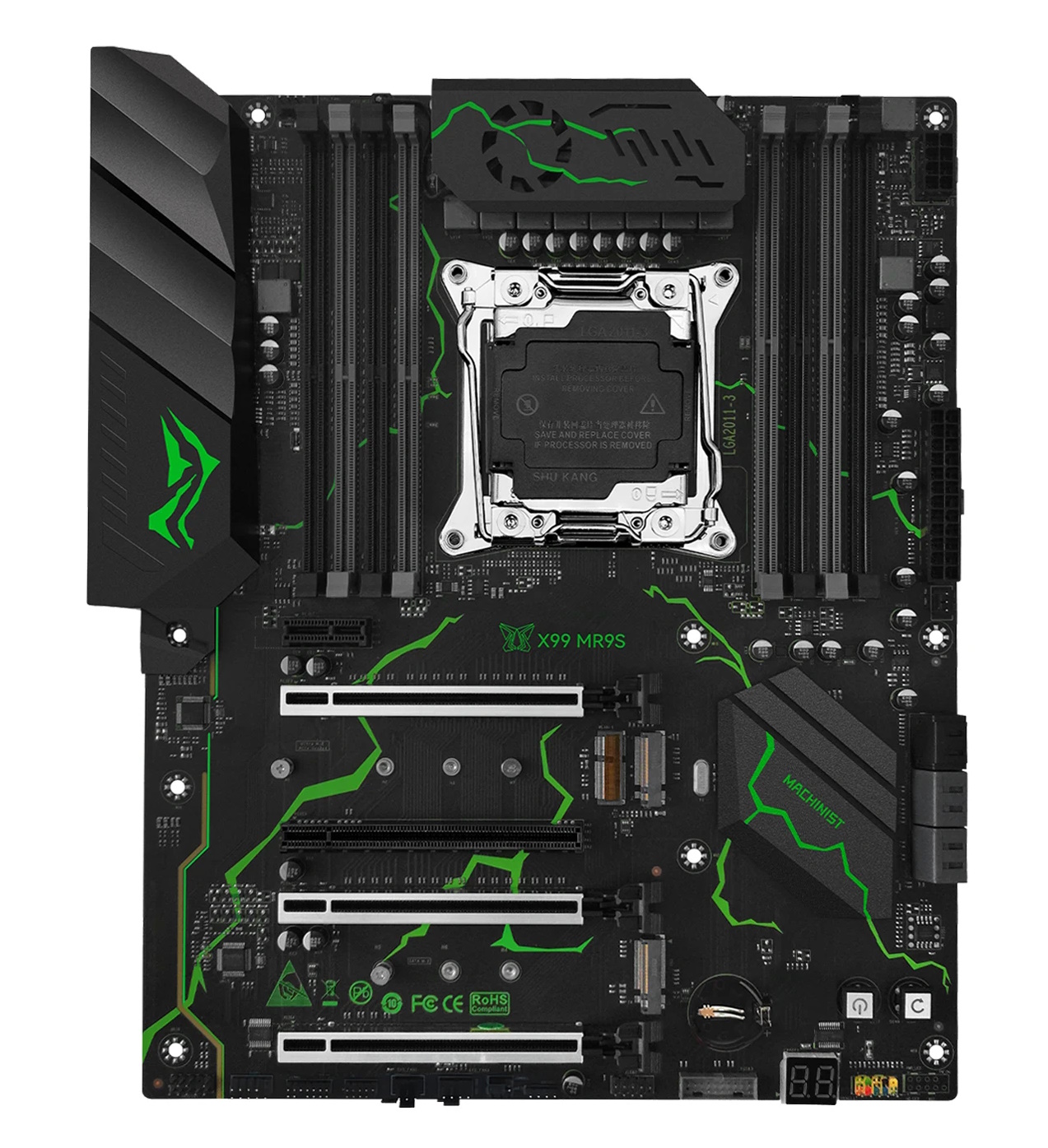
The Machinist X99‑MR9S is a full‑size ATX motherboard launched in 2022 and positioned as a high‑end option.
Since then, several new revisions have appeared, introducing improved power delivery and native TPM 2.0 support. This review looks at the current version of the board and whether it’s worth considering in 2026.
Specifications
| Model | Machinist X99-MR9S v6.0 |
|---|---|
| Socket | LGA 2011-3 |
| Chipset | B85 / Q87 / C226 |
| Supported Processors | Intel Core i7 (5000, 6000 series, Haswell-E/Broadwell-E) Intel Xeon E5-1600 v3/v4, E5-2600 v3/v4, E5-4600 v3/v4 (Haswell-EP/Broadwell-EP) |
| VRM Configuration | 4 phase (8 virtual via doublers) Total MOSFETs: 24 (8 high-side + 16 low-side) |
| Supported Memory | 8 x DDR4 DIMM (quad-channel) with ECC and non-ECC support Maximum capacity: 256 GB |
| Sleep Mode Support | Only in the latest revisions |
| Expansion Slots | 2 x PCIe X16 (Gen 3.0) 1 x PCIe X4 (Gen 3.0, full‑length) 1 x PCIe X1 (Gen 2.0, full‑length) 1 x PCIe X1 (Gen 2.0) |
| Storage | 4 x SATA 3.0 2 x SATA 2.0 1 x M.2 (NVME, Gen 3.0 x4) 1 x M.2 (NGFF) |
| Fan Connectors | 1 x CPU cooler (4pin) 1 x Case fan (4pin) 2 x Case fan (3pin) |
| PS/2 Ports | 2 (mouse + keyboard) |
| USB 3.0 Ports | 2 (+ front panel support) |
| USB 2.0 Ports | 6 (+ front panel support) |
| Network | Gigabit LAN (RTL8111 \ RTL8168) |
| Audio | 7.1 channel (ALC897) |
| Extra | M.2 Wi-Fi port Post code display Metal‑reinforced X16 slots Onboard Power/Reset buttons |
| JLPC1 header | Yes |
| TPM 2.0 header | LPC 14 Pin (Only in TPM2.0 Revision) |
| Form Factor & Dimensions | ATX 245 x 300 mm |
| Approximate Price |
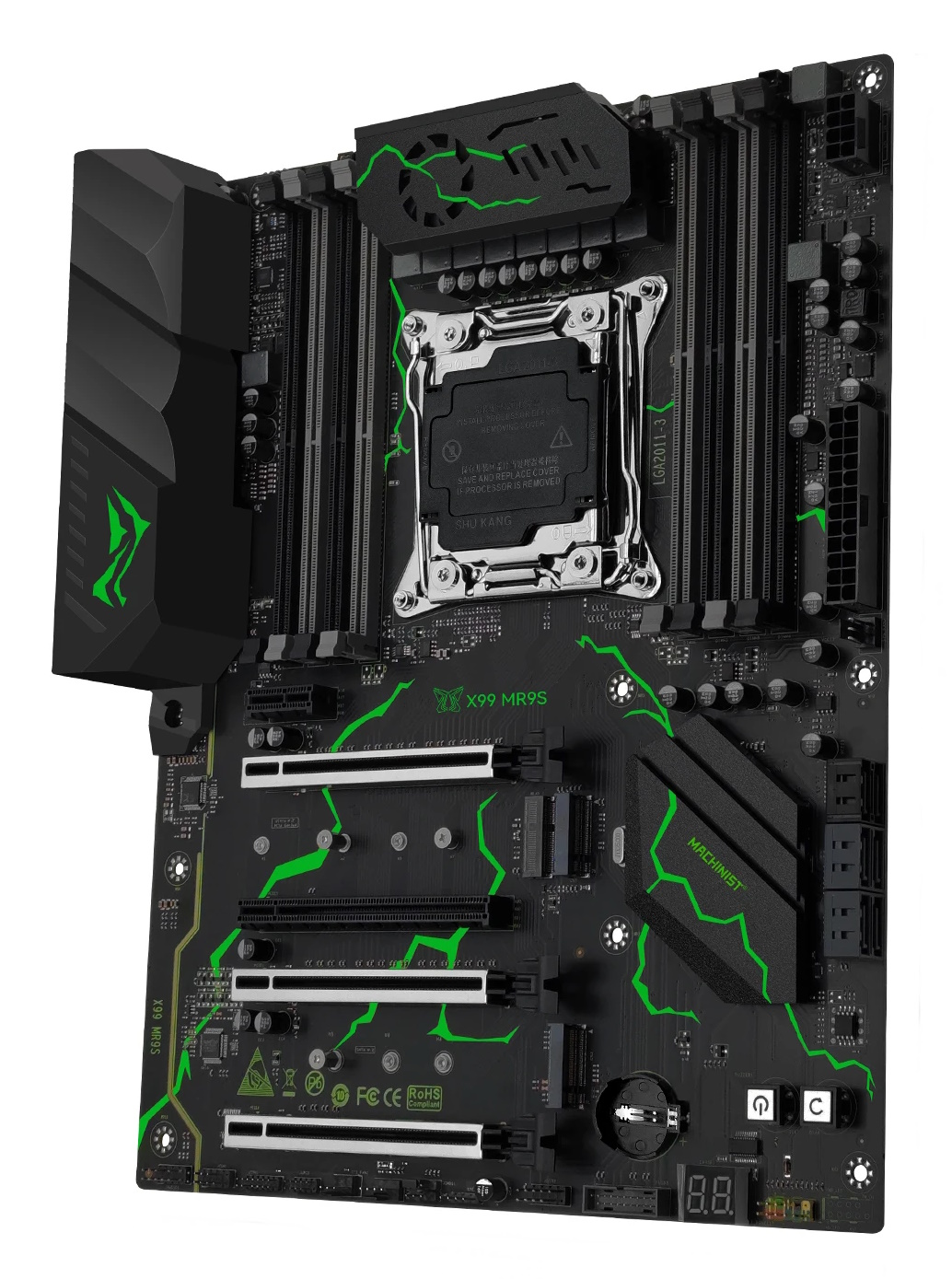
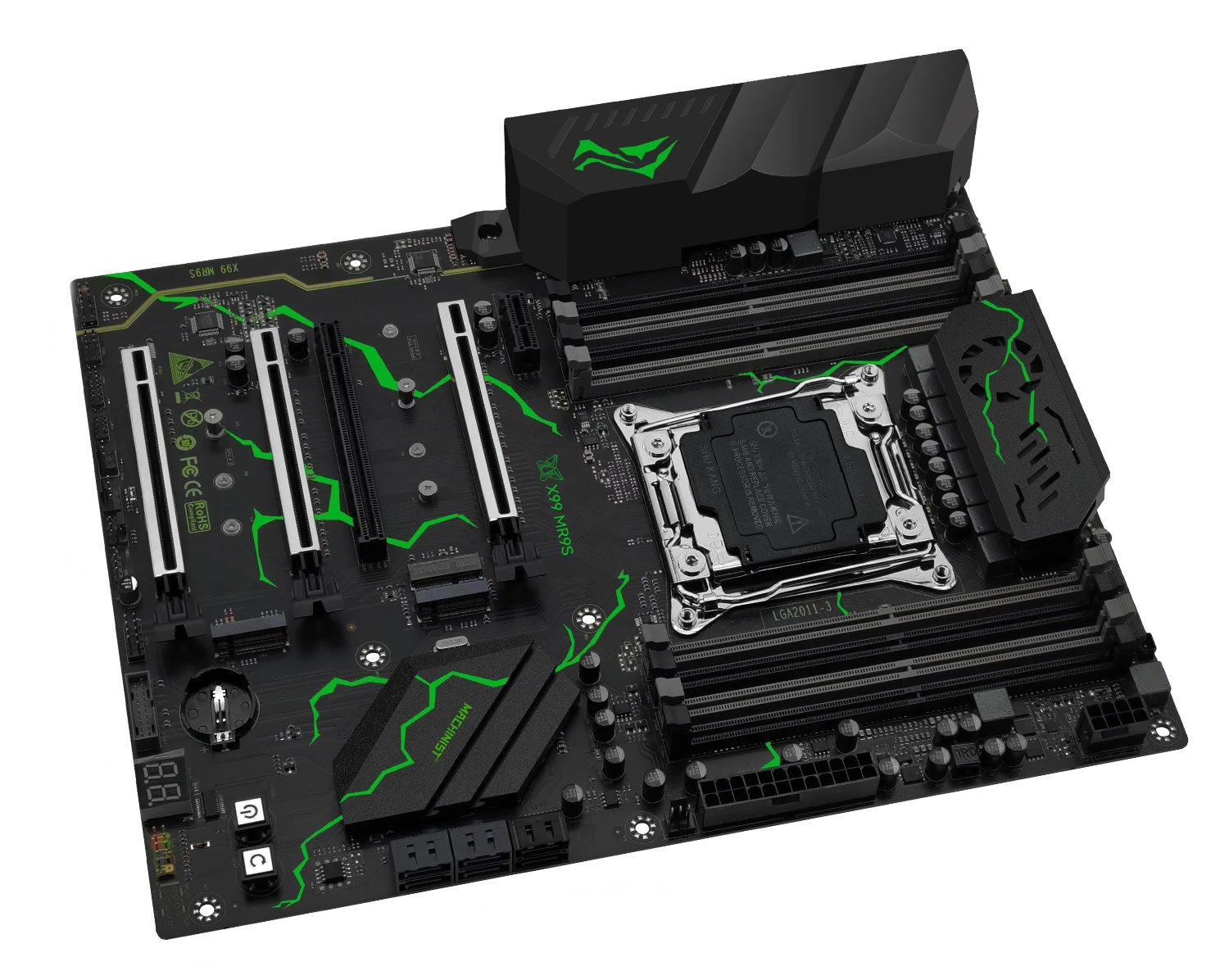

The board is available in green (a black‑and‑white variant was available earlier) and looks fairly modern. For a more premium feel, it features an integrated rear I/O shield, metal‑reinforced PCIe x16 slots, and onboard power and reset buttons.
The first key feature is immediately visible: eight DDR4 slots with quad‑channel support, allowing up to 256 GB of memory in a single‑socket configuration. That’s impressive—especially if you can actually utilize that much RAM.
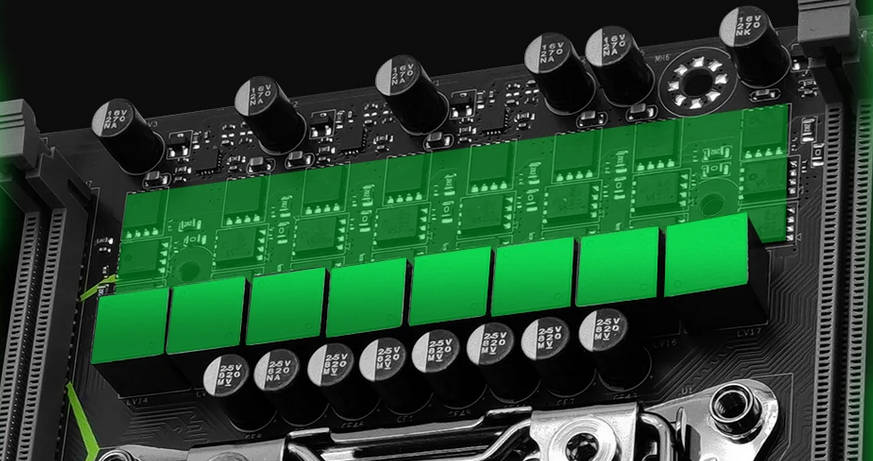
The second highlight is one of the strongest VRMs found on Chinese X99 boards. The VRM is built around a uP1649Q PWM controller with four uP1961S drivers and uses SM4503NHKP (high‑side, 80 A/3 mΩ) and SM4508NHKP (low‑side, 49 A/6.8 mΩ) MOSFETs. It implements eight virtual phases, each with three MOSFETs: one high‑side SM4503 plus two low‑side SM4508 (doubled low side). This configuration handles top‑tier CPUs with TDPs around 145 W without trouble.
The PCIe layout is also worth a closer look. Although there are four full‑length slots, only two are x16 electrically; the other two are wired as x1 and x4. There is also a short x1 slot. The actual slot order (top to bottom): x1 (Gen 2.0, short), x16 (Gen 3.0), x1 (Gen 2.0, full‑length), x16 (Gen 3.0), x4 (Gen 3.0, full‑length).
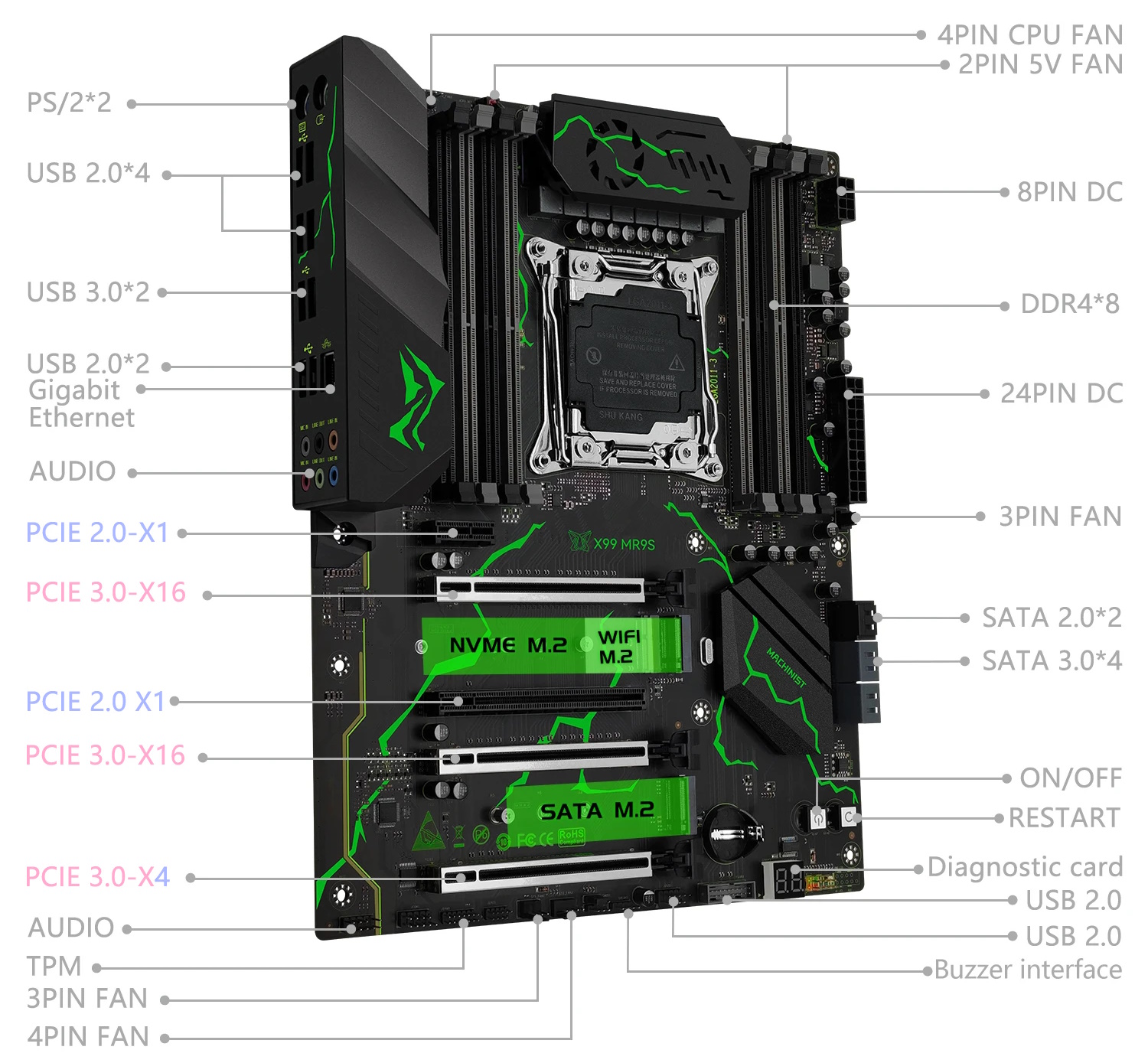
Now for the drawbacks, starting with the chipset. Unlike the usual C612 found in boards of this class, this model uses Intel 8‑series desktop chipsets (typically B85/Q87) or the server‑grade C226. That helped reduce cost, but at the expense of some modern I/O. Because of the chipset choice, you only get two USB 3.0 ports; the four SATA III ports are joined by two slower SATA II ports.
While the lack of a working sleep (S3) mode was a major downside for early revisions, recent versions of the board have reportedly fixed this issue, though it remains unclear exactly which revision first introduced fully functional S3 sleep. Other quirks include significantly understated CPU power readings and mediocre onboard audio.
Revisions
The board has been in production for several years, and during this time the manufacturer has released many revisions. Unfortunately, the vendor does not maintain a public changelog, so tracking them is difficult.
At a minimum, the X99‑MR9S exists in these revisions: 1.0 / 1.2 / 2.0 / 6.0 / 6.2, and there may be rarer variants. Revisions 1.0 and 1.2 were produced in both green and black‑and‑white colorways, but starting with version 6.0 the board appears to ship only in green.
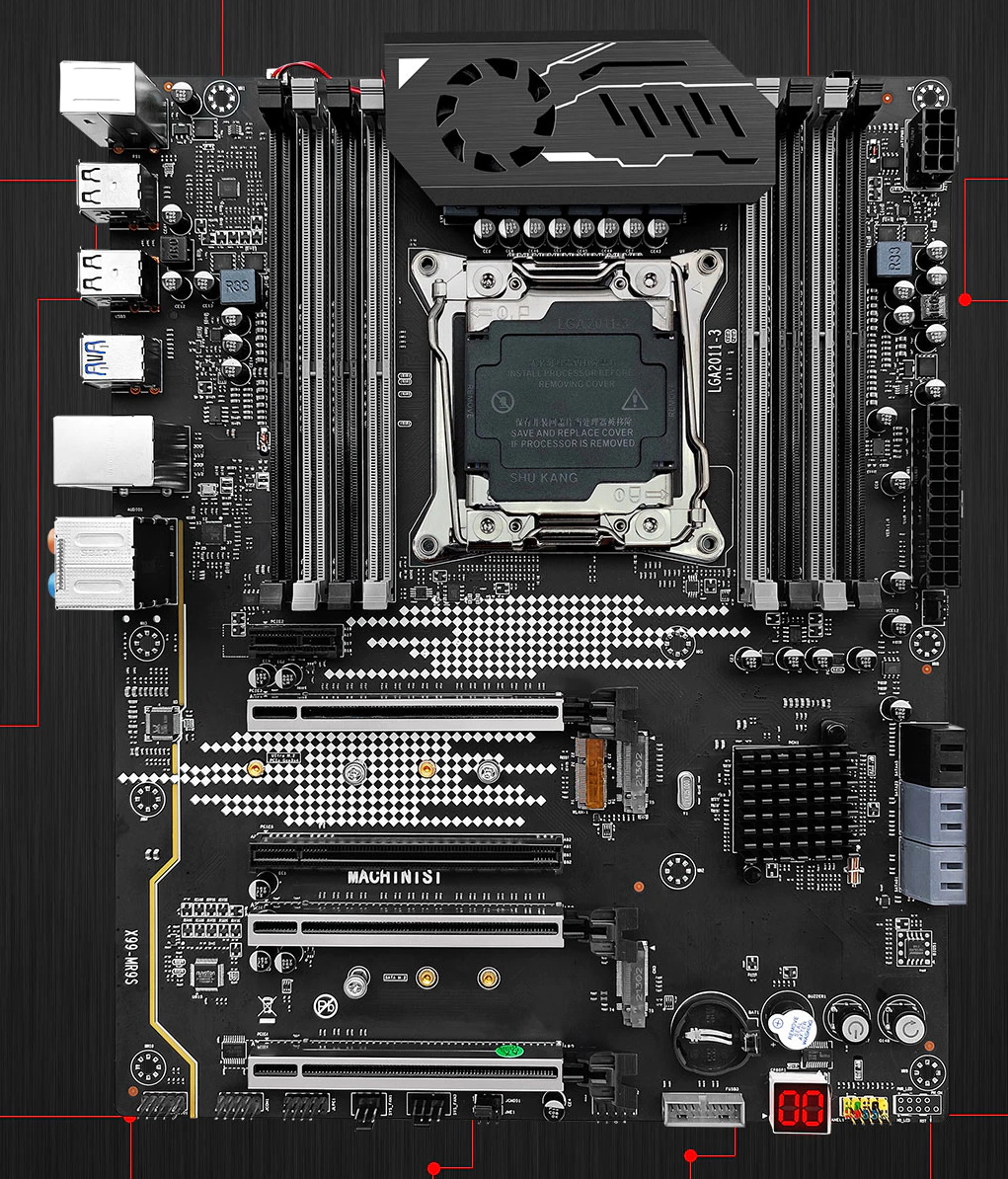

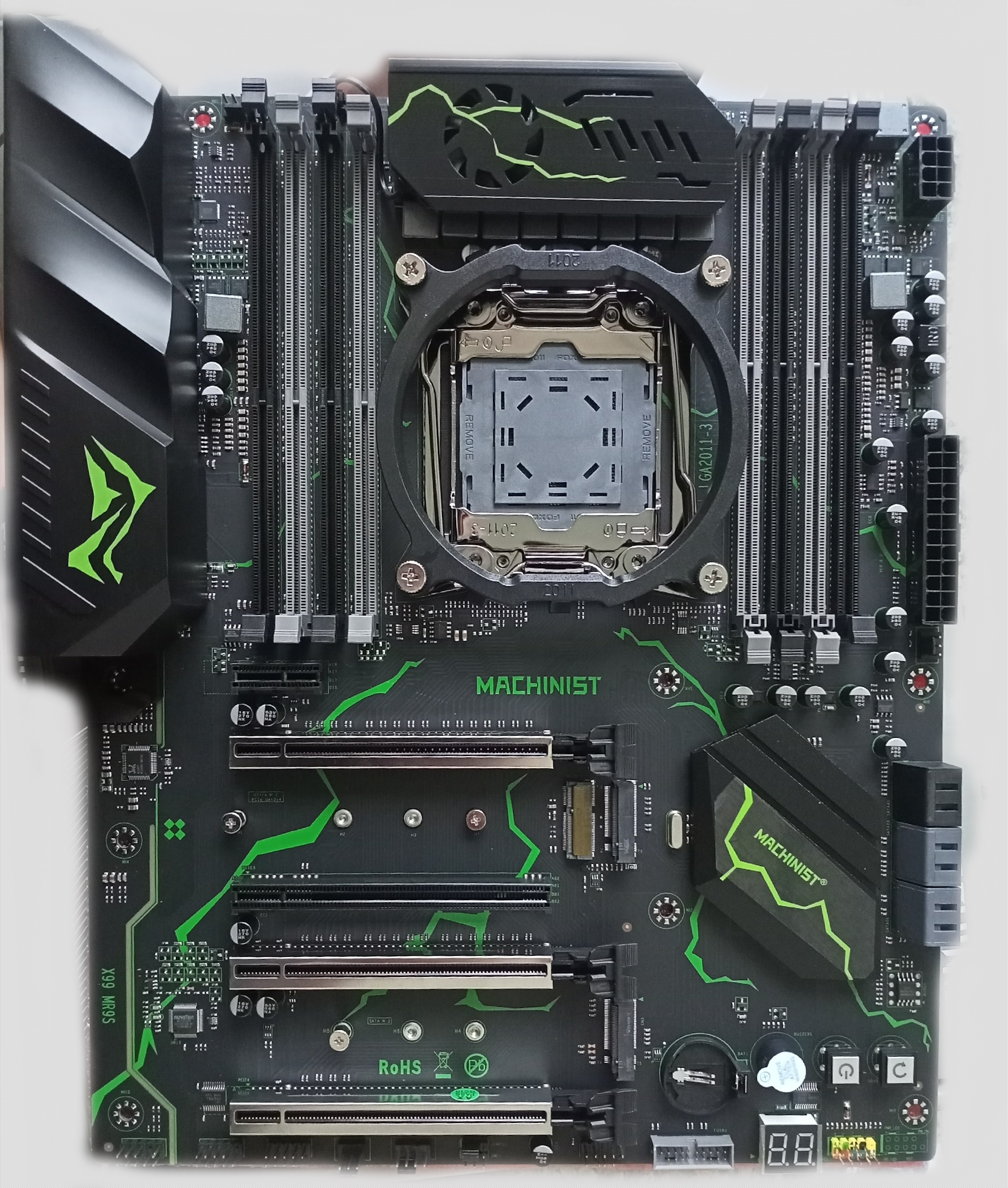
Early versions had a 6‑phase VRM (three MOSFETs per phase), sometimes used a simpler audio codec, featured differently shaped heatsinks, and often lacked the integrated I/O shield. Over time, the VRM layout was revised, before a later revision introduced native TPM 2.0 support. Key components (chipset family, super I/O, etc.) did not change.
Although early versions do not have a native TPM 2.0 header, they all expose an LPC header (JLPC1), so you can still install a working TPM 2.0 module. Learn more about TPM 2.0 on Chinese X99 motherboards.
Revisions with TPM 2.0 support
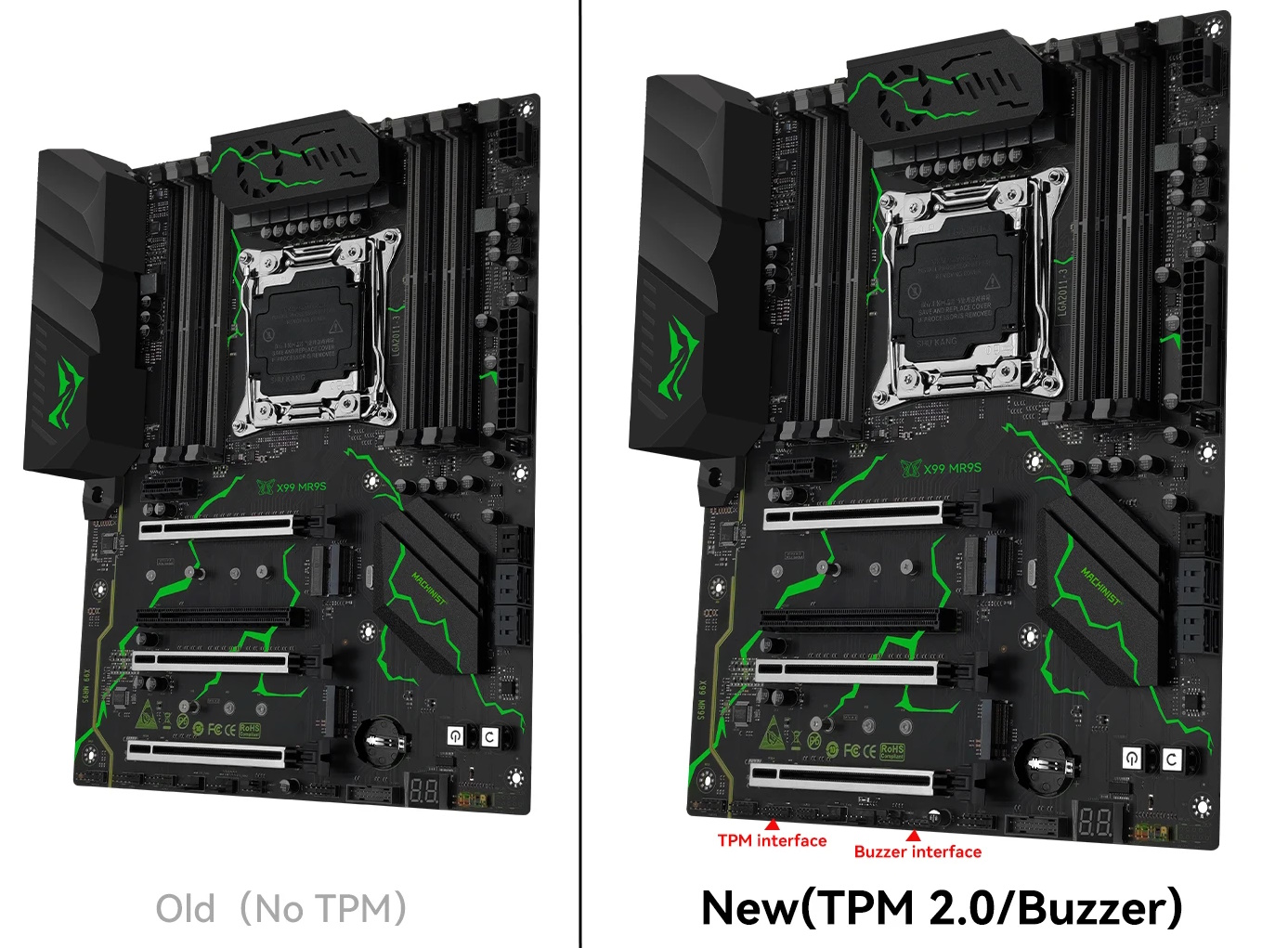
The native TPM 2.0 header was first introduced in revision 6.0 and is also present in the newer revision 6.2. Earlier revisions did not receive this update and are likely discontinued.
In addition to adding a TPM 2.0 header, these newer iterations (6.0 and 6.2) no longer feature an onboard speaker, though a header is provided for one.
BIOS Capabilities

The board runs a familiar Aptio V‑based UEFI/BIOS. For a long time, the stock firmware was a major weak point, as the vendor showed little interest in releasing meaningful updates.
For all versions prior to revision 6.2, the baseline features remain identical: while Secure Boot, TPM 2.0 configuration, and Above 4G Decoding are available, the stock BIOS completely lacks access to memory‑timing controls and Resizable BAR, though PCIe bifurcation works as intended.
Revision 6.2 finally addresses this long-standing limitation, offering out-of-the-box support for memory-timing controls and Resizable BAR (ReBAR)—features that previously required manual patching.
Are BIOS images cross‑compatible between revisions?
There is no definitive answer yet. While firmware for versions 1.0 and 1.2 is known to be interchangeable, compatibility with later revisions remains unconfirmed.
Simple BIOS Flashing Guide (Windows)
| BIOS version & date | Ram Timings | ReBAR | Unlocked CPU OC | Turbo Boost unlock | Undervolt | Secure Boot & TPM2.0 | Notes & Link |
|---|---|---|---|---|---|---|---|
| X9D43 Ver:803 03/23/2022 | - | - | - | - | - | + | Stock BIOS from 1.0 rev [Download] |
| X9D43 Ver:803 03/23/2022 | + | - | + | + | - | + | Stock BIOS from 1.0 rev. patched by UltimatePatcherTool + TBU for V3 CPUs [Download] |
| X9MRS Ver:003 07/13/2022 | - | - | - | - | - | + | Stock BIOS from 1.2 rev [Download] |
| X9MRS Ver:003 07/13/2022 | + | - | - | - | - | + | Stock BIOS from 1.2 rev + timing [Download] |
| X9MRS Ver:008 06/12/2023 | - | - | - | - | - | + | Stock BIOS from 6.0 rev [Download] |
| X9MRS Ver:008 06/12/2023 | - | - | - | + | -50 mV | + | Stock BIOS from 6.0 rev + TBU for V3 CPUs [Download] |
| X9MRS Ver:010 02/21/2025 17:00:52 | + | + | - | - | - | + | Stock BIOS from 6.2 rev [Download] |
| BX99DA14 | + | + | + | - | - | + | Custom BIOS from iEngineer. Timings + ReBAR + Unlocked CPU overclock... [Link] |
- Download FPTW 9.1.10 from this page.
- Open Command Prompt as Administrator.
- Copy your BIOS file (
bios.binorbios.rom) into the same folder as FPTW. - In Command Prompt, navigate to the FPTW folder using
cd. - Back up first:
fptw64 -d backup.bin - Flash the BIOS:
fptw64 -f bios.bin
Note: Replace bios.bin with the actual name of your BIOS file. If FPT reports that it cannot access parts of the BIOS, reboot into BIOS and disable write protection (IntelRCSetup → PCH Configuration → Security Configuration → BIOS Lock: Disable).
After flashing, we recommend resetting settings or clearing CMOS.

Frequently Asked Questions
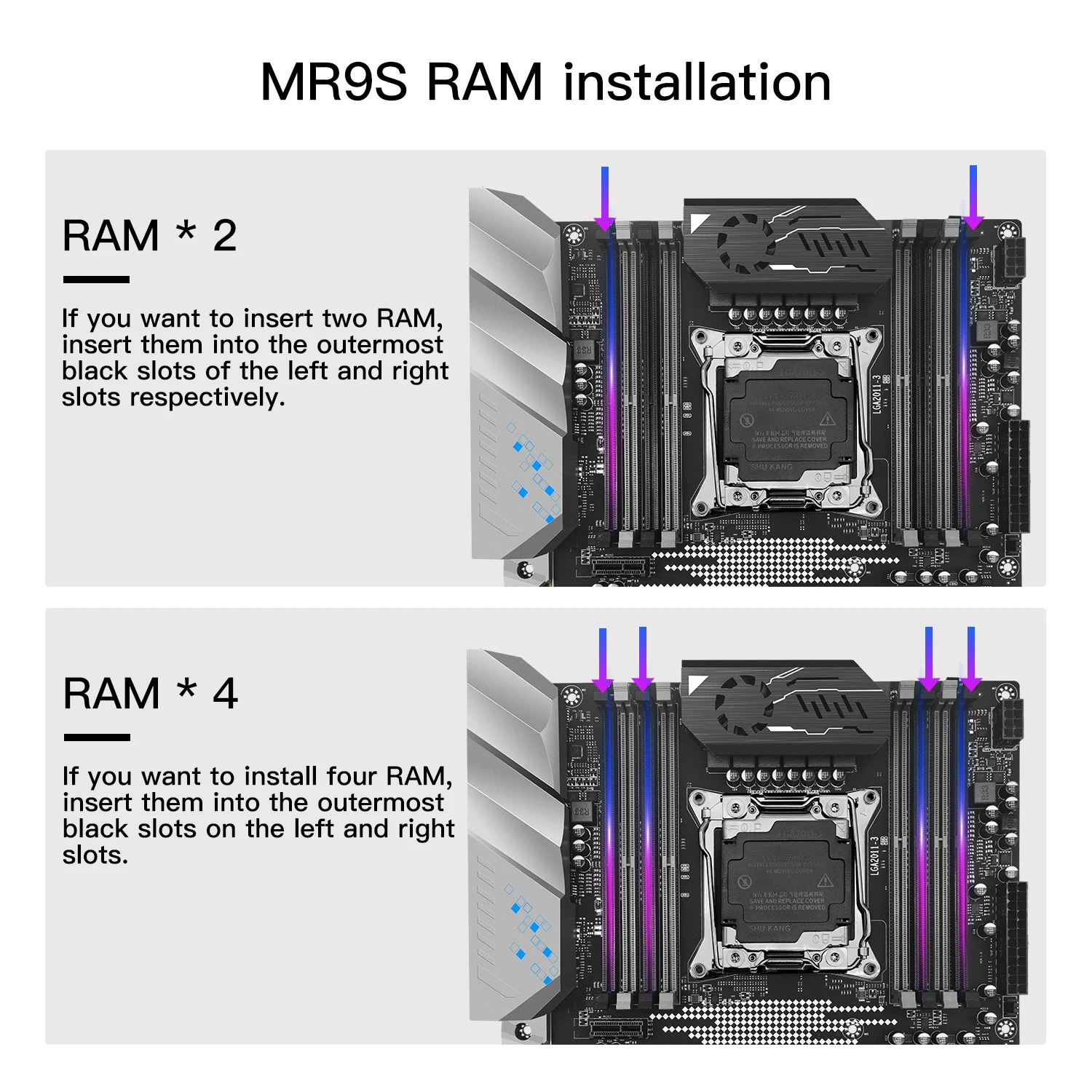
Which memory slots are primary, and which should be populated first?
The board won’t boot, black screen, etc. What should I do?
See our article about the most common LGA2011‑3 issues.
Where can I find drivers for this board?
The page with current drivers for socket 2011‑3 boards is located here.
Where is the BIOS chip located?
To the right of the chipset heatsink. A clip‑on programmer can be attached.
Which TPM 2.0 module is compatible with this board (revision with native TPM header)?
You need an MSI 14‑pin LPC TPM 2.0 module — for example, this one.

Conclusion
OldRigRevive Review
4.0
4.7
4.3
4.3
“The Machinist X99‑MR9S is a decent but unbalanced option. It’s a fairly expensive board with a strong VRM and eight DDR4 slots, yet a budget‑class desktop chipset inevitably limits its modern I/O capabilities. While later revisions have resolved many of the platform’s early hardware and firmware quirks, the motherboard remains a choice that requires a few compromises—seemingly inevitable when dealing with Chinese hardware.”

Written by
Senior Hardware Specialist proving you don't need top-tier gear to game. Expert in smart upgrades and budget-friendly PC restoration.