
Table of Contents
X99‑XD4 is a solid mATX motherboard from Angthumb. Released in 2025, it can be found under multiple brands: Machinist, KEYIYOU, Atermiter, and others. There’s also a DDR3 version with a more limited CPU support list, sold as X99‑XD3.
Judging by the layout, this board is related to Angthumb’s X99D4M4 and looks like a “fix‑up” iteration — and we like the result. Let’s take a closer look.
In this article we cover the second revision, which is indicated by the marking next to the 24‑pin connector. We don’t know whether there was an earlier “first” revision or if this is just a quirk of Chinese naming. In any case, be aware that other revisions may exist and their characteristics may differ.

Specifications
| Model | X99-XD4 V2.0 |
|---|---|
| Socket | LGA 2011-3 |
| Chipset | C612 |
| Supported Processors | Intel Core i7 (5000, 6000 series, Haswell-E/Broadwell-E) Intel Xeon E5-1600 v3/v4, E5-2600 v3/v4, E5-4600 v3/v4 (Haswell-EP/Broadwell-EP) |
| VRM Configuration | 4 phase (8 virtual via doublers) Total MOSFETs: 16 (8 high-side + 8 low-side) |
| Maximum Recommended TDP | ≤130W (v3 processors) ≤140W (v4 processors) |
| Supported Memory | 4 x DDR4 DIMM (quad-channel) with ECC and non-ECC support Maximum capacity: 128 GB |
| Sleep Mode Support | No |
| Expansion Slots | 1 x PCI-e x16 (Gen 3.0) 1 x PCI-e x4 (Gen 3.0) 1 x PCI-e x1 (Gen 2.0) |
| Storage | 6 x SATA 3.0 1 x M.2 (NVME, Gen 3.0 x4) 1 x M.2 (NVME/NGFF, Gen 3.0 x4) |
| Fan Connectors | 1 x CPU cooler (4pin) 1 x Case fan (4pin) 1 x Case fan (3pin) |
| PS/2 Ports | No |
| USB 3.0 Ports | 4 (+ front panel support) |
| USB 2.0 Ports | 4 (+ front panel support) |
| Network | Gigabit LAN (RTL8111 \ RTL8168) |
| Audio | 5.1 channel (ALC897) |
| M.2 Wi-Fi port | Yes |
| Bios Chip | W25Q128FV / FM25W128 |
| JLPC1\DEBUG header | Yes |
| TPM 2.0 header | Yes (MSI 14pin LPC) |
| PCB Layers | 6 |
| Form Factor & Dimensions | mATX 237 x 185 mm |
| Approximate Price | AliExpress: $50 - $70 (Check Price) |


Built on a server‑class chipset, the X99‑XD4 leaves a good impression. It has everything you need for a modern X99 build: sufficient I/O, quad‑channel memory, a competent VRM, a stable BIOS, and native TPM 2.0 support, making the board effectively Windows 11‑ready.
The main drawback is the non‑functional sleep mode; you’ll have to use hibernation instead. A smaller annoyance is the placement of the TPM 2.0 header: with bulky triple‑slot GPUs, there’s almost no clearance between the card and a TPM module.
BIOS Capabilities
The stock BIOS is based on AMI Aptio and, unlike most Chinese boards, includes nearly everything you need.

Out of the box you get RAM timing control, working Resizable BAR, PCIe bifurcation, and Smart Fan control on both 4‑pin fan headers. Naturally, there’s TPM 2.0 and Secure Boot support as well.
The usual Chinese quirks remain: non‑functional motherboard temperature sensors (don’t panic if you see readings around 120°C), no control for 3‑pin fan headers, no overclocking for unlocked‑multiplier CPUs, and the “Restore on AC Power Loss” option is hidden by default. Even so, the stock firmware is perfectly usable for daily operation.
One frustrating detail worth mentioning is that the manufacturer often uses FUDAN BIOS chips. Unlike the more widely supported Winbond chips, FUDAN chips are less commonly supported in BIOS firmware, which makes finding compatible BIOS files more difficult. Additionally, not all flashing utilities are able to work with these chips.
Simple BIOS Flashing Guide (Windows)
| BIOS version & date | Ram Timings | ReBAR | Unlocked CPU OC | Turbo Boost unlock | Undervolt | Notes & Link |
|---|---|---|---|---|---|---|
| X9XD4 Ver:002 05/07/2025 10:34:02 | + | + | - | - | - | Stock BIOS [Download] |
| X9XD4 Ver:002 05/07/2025 10:34:02 | + | + | + | - | - | Stock BIOS mod (Restore on AC Power Loss + overclocking through Intel XTU) [Download] |
| X9XD4 Ver:002 05/07/2025 10:34:02 | + | + | + | + | -50 mV | Stock BIOS mod + TBU (undervolt -50 mV) [Download] |
- Download FPTW 9.1.10 from this page.
- Open Command Prompt as Administrator.
- Copy your BIOS file (
bios.binorbios.rom) into the same folder as FPTW. - In Command Prompt, navigate to the FPTW folder using the
cdcommand. - Backup first:
fptw64 -d backup.bin - Flash the BIOS:
fptw64 -f bios.bin
Note: Replace bios.bin with the actual name of your BIOS file.
After flashing, load BIOS defaults or clear CMOS to reset settings.

Frequently Asked Questions
The board won’t boot, black screen, etc. What should I do?
See our article about the most common LGA2011‑3 issues.
Where can I find drivers for this board?
The page with current drivers for socket 2011‑3 boards is located here.
How do I connect the front panel?
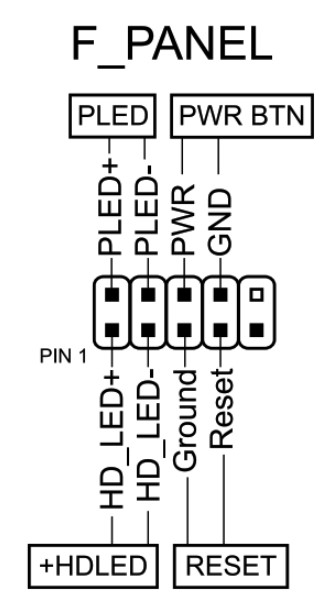
Is booting without a graphics card possible?
Yes, headless boot is possible on the stock BIOS.
Where is the BIOS chip located?
To the right of the chipset heatsink.

Which TPM 2.0 module is compatible with this board?
You need an MSI 14‑pin LPC TPM 2.0 module — for example, this one.

Conclusion
OldRigRevive Review
5.0
4.0
4.5
4.5

Written by
Senior Hardware Specialist proving you don't need top-tier gear to game. Expert in smart upgrades and budget-friendly PC restoration.