Table of Contents
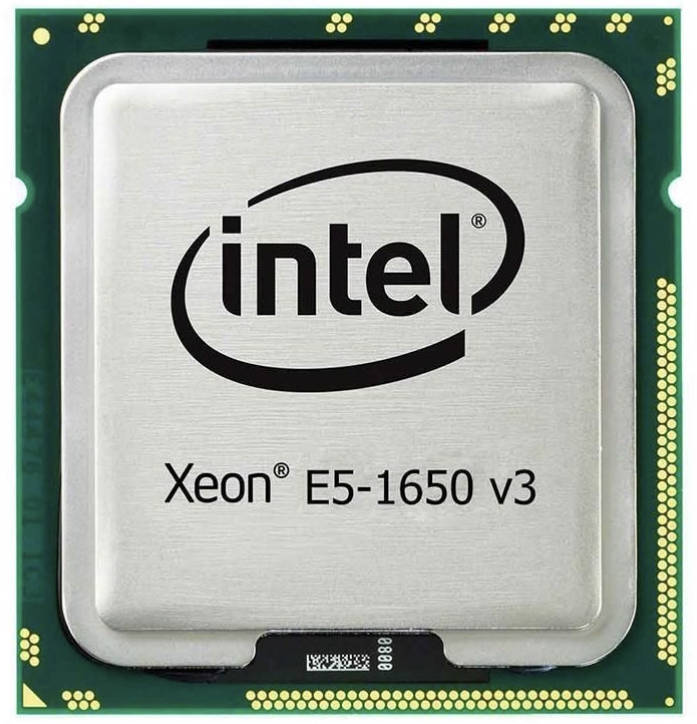
Xeon E5-1650 v3 is a 6‑core processor based on the Haswell‑EP architecture, originally intended for workstations. It’s the entry SKU in the lineup that features an unlocked multiplier.
There are two very similar models aimed at the HEDT segment: Core i7‑5820K and Core i7‑5930K.
Specifications
| Model | Xeon e5 1650 v3 |
|---|---|
| Socket | LGA2011-3 |
| Release Date | Q3 2014 |
| Architecture | Haswell-EP, 22 nm |
| Cores / Threads | 6 / 12 |
| Memory support | DDR4-2133, 4-channel |
| Base Frequency | 3500 MHz |
| Max Turbo Frequency | 3800 MHz (1-2 Cores) 3600 MHz (3+ Cores) |
| Extensions & Features | MMX instructions SSE / Streaming SIMD Extensions SSE2 / Streaming SIMD Extensions 2 SSE3 / Streaming SIMD Extensions 3 SSSE3 / Supplemental Streaming SIMD Extensions 3 SSE4 / SSE4.1 + SSE4.2 / Streaming SIMD Extensions 4 AES / Advanced Encryption Standard instructions AVX / Advanced Vector Extensions AVX2 / Advanced Vector Extensions 2.0 BMI / BMI1 + BMI2 / Bit Manipulation instructions F16C / 16-bit Floating-Point conversion instructions FMA3 / 3-operand Fused Multiply-Add instructions EM64T / Extended Memory 64 technology / Intel 64 HT / Hyper-Threading technology VT-x / Virtualization technology VT-d / Virtualization for directed I/O TBT 2.0 / Turbo Boost technology 2.0 NX / XD / Execute disable bit TXT / Trusted Execution technology Enhanced Intel SpeedStep technology |
| L3 Cache | 15 Mb |
| PCIe Lanes | 40, Gen 3.0 |
| TDP | 140 W |
| Maximum operating temperature (Tcase) | 66.7°C |
| Multiplier | Unlocked |
| Integrated Graphics | None |
| CPUID | 0x306F2 |
| Approximate Price | AliExpress: $15 - $25 (Check Price) |
Key advantages in 2025:
- Six cores; acceptable multithreaded performance for the price
- Overclocking is possible even on inexpensive Chinese boards
- Very low price
Limitations:
- Aging architecture; lower IPC versus current CPUs
- High heat output and power consumption when overclocked
Overclocking on Chinese X99 boards
CPU Overclocking
The ability to overclock is often absent by default in the BIOS of many Chinese X99 motherboards. There are two ways to restore it:
Ultimate Patcher Tool (UTP)
The utility can patch the BIOS and restore the ability to adjust multipliers, voltages, etc. As a result, overclocking can be performed from the BIOS as originally intended.
But there’s a catch — not all BIOSes patch successfully with UTP, and there’s a real risk of bricking the board.
If you decide to experiment, make sure you have an SPI programmer and a dump of the stock BIOS on hand.

Where to find the overclocking menu after flashing:
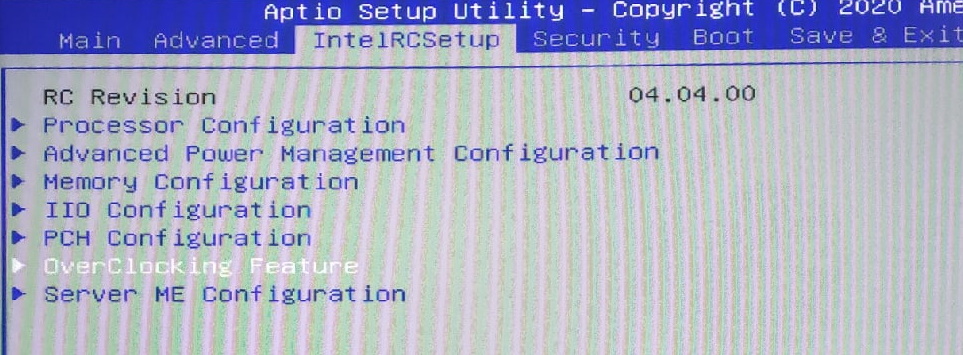
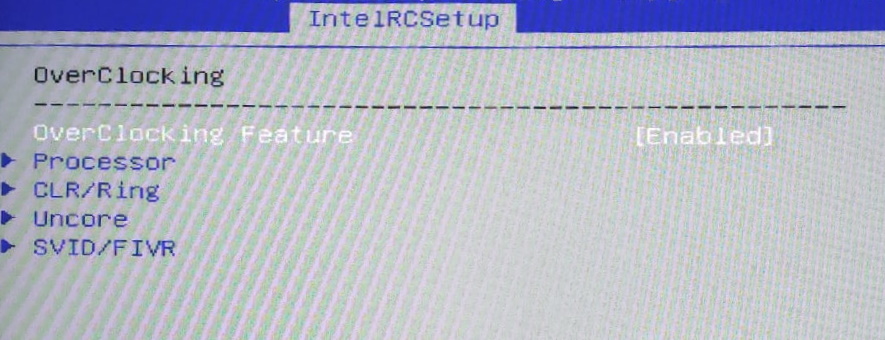
In the BIOS settings, usually under IntelRCSetup, there should be an “OverClocking Feature” menu. Set OverClocking Feature to Enabled, then adjust multipliers, voltages, etc., in the Processor, CLR/Ring, and Uncore menus.
Overclocking via utilities (Intel XTU, ThrottleStop, etc.)
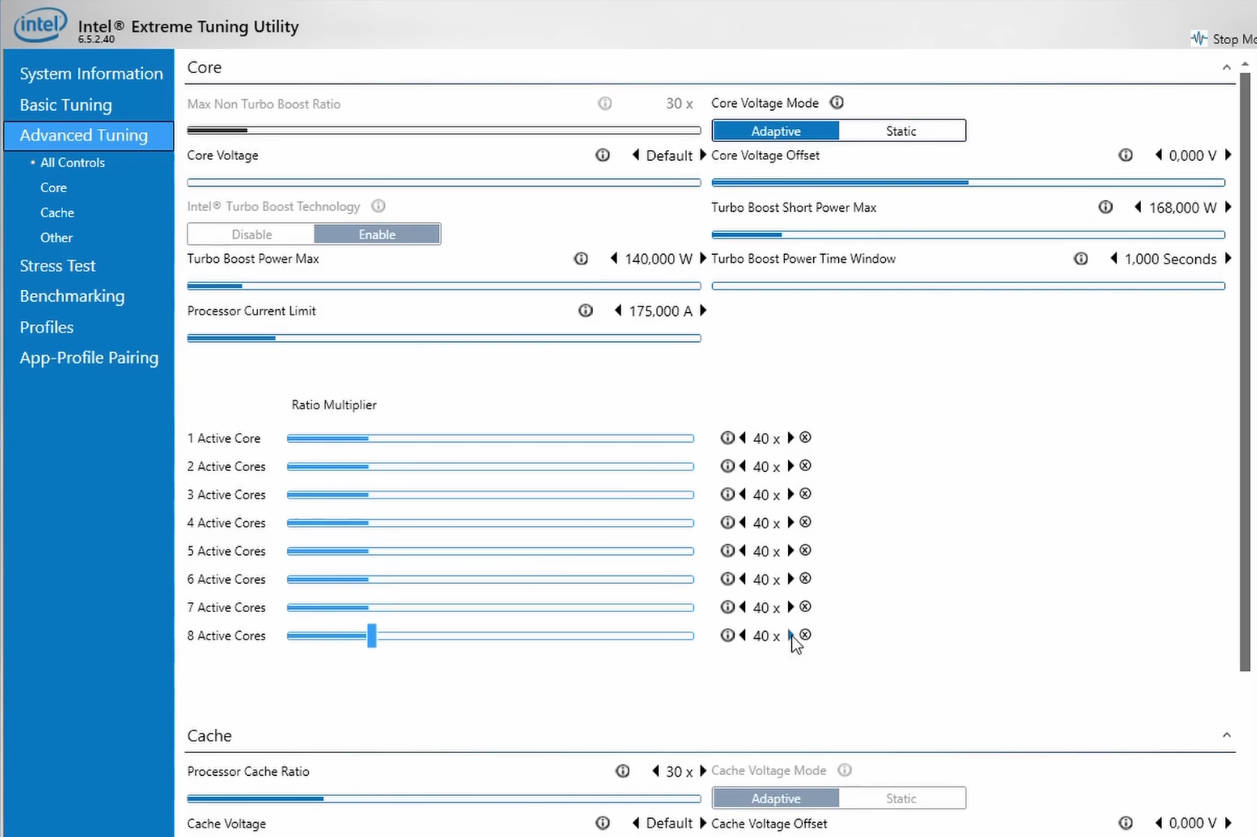
This method of overclocking is also often disabled by default, but you can unlock it on virtually any Chinese motherboard: you’ll need a BIOS dump and the AMIBCP utility.
All the necessary steps are described here. This method isn’t always as convenient as overclocking in the BIOS, but it’s available on all boards and doesn’t require a spi-programmer.
What frequency to expect

The final result will depend on your board’s VRM, CPU cooling, and silicon quality.
Most mid‑ and high‑end Chinese boards run the E5‑1650 v3 at 4.1–4.3 GHz without issues. For most users this will be a sensible ceiling, as higher clocks noticeably increase both heat and power draw.
Overclocking on budget motherboards with the classic VRM layout (3 phases with doublers, 12 MOSFETs total) isn’t recommended, but if you must, you can add +100–200 MHz. Don’t forget to monitor temperatures and stability.
Remember: 4.3 GHz isn’t a guaranteed result—it’s a gamble. Some people might get lucky and hit 4.5 GHz at a low voltage, while others might hit a wall at 4.1 GHz.
RAM Overclocking
Since the memory controller here is the same as on Core i7, in theory the CPU can comfortably hit 3000+ MHz on memory, which does happen if you install it on a quality branded board with good RAM.
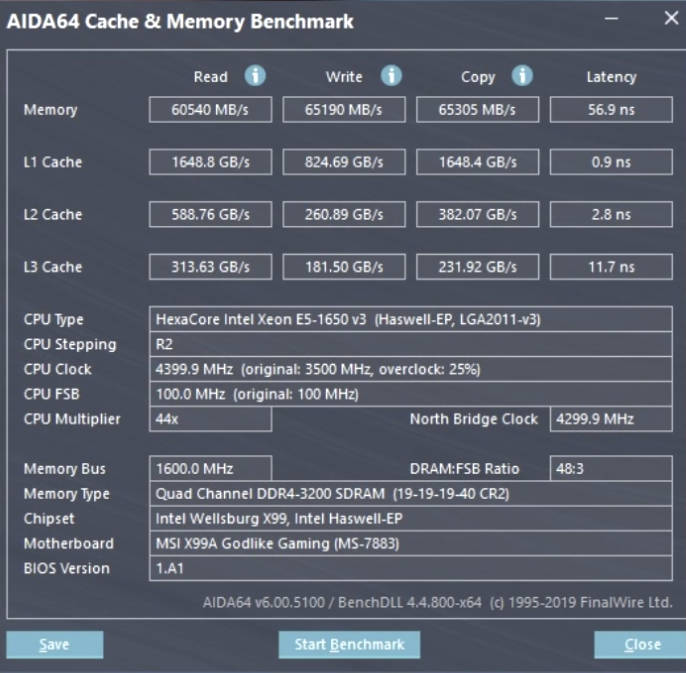
Unfortunately, things aren’t as rosy on Chinese boards. While you can set memory above the stock 2133 MHz, most boards top out around 2400 MHz, and in some cases 2666 MHz. Whether these limits are due to motherboard design or BIOS implementation isn’t fully clear, but on Chinese X99 it’s rare to surpass this threshold.
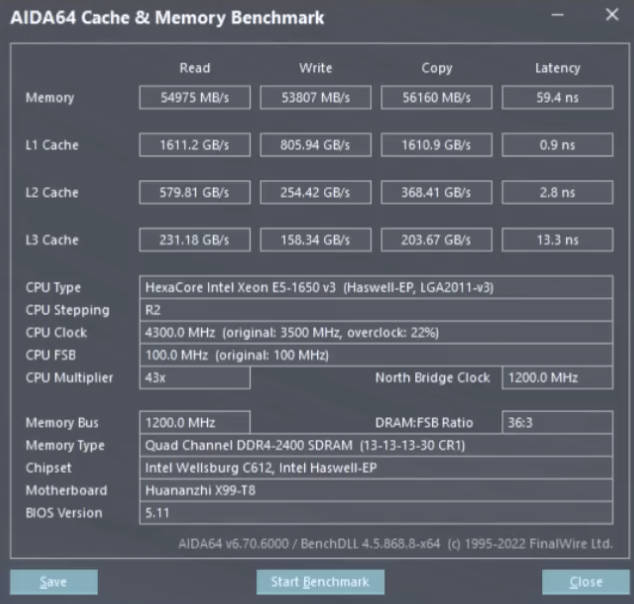
Unlike CPU overclocking, RAM overclocking is usually available out of the box and doesn’t require any modding or extra work.
Performance and Tests
Because the E5‑1650 v3 is intended to be overclocked, there are no universal test results — the final numbers will always depend on the specific system and settings.
Synthetic and gaming tests at stock paired with an RTX 2060:

Synthetic and gaming tests at 4.0 GHz:

Average test results depending on frequency
| Benchmark | Stock | 4.0–4.1 GHz | 4.2–4.3 GHz |
|---|---|---|---|
| CPU-Z Single | 380–405 | 415–445 | 455–475 |
| CPU-Z Multi | 2900–3050 | 3250–3450 | 3500–3650 |
| Cinebench R15 Multi | 1050–1120 | 1160–1230 | 1260–1310 |
| Cinebench R20 Multi | 2350–2500 | 2650–2850 | 2900–3000 |
| Cinebench R23 Multi | 5900–6300 | 6700–7100 | 7300–7650 |
| Cinebench 2024 Multi | 360–390 | 410–435 | 445–470 |
| AIDA64 CPU Queen | 63000–67000 | 70000–74000 | 75000–78000 |
| Corona 1.3 (Render Time) | ~3:20–3:30 | ~3:00–3:10 | ~2:45–2:55 |
| Geekbench 6 Single | 1050–1120 | 1150–1230 | 1250–1330 |
| Geekbench 6 Multi | 5000–5400 | 5800–6200 | 6400–6800 |
| 7-Zip Benchmark (GIPS) | 52–56 | 60–64 | 66–70 |
| V-Ray 6 (vsamples) | 4100–4400 | 4700–5100 | 5200–5550 |
Is this CPU suitable for gaming?
The high frequency (achievable through overclocking) lets the CPU handle modern games fairly confidently for its age. You shouldn’t consider it a pure gaming chip — just 6 cores and a 2014 architecture mean the E5‑1650 v3 can’t compete with modern processors. However, for its price it delivers respectable results.
- Games up to 2020: 95% run well (60+ FPS), 5% are playable (40–60 FPS)
- Games 2020–2026: 80% run well (60+ FPS), 10% are playable (40–60 FPS), 10% are unplayable (low FPS, stutter, micro‑stutter)
Best‑matched GPUs for 1080p and 1440p: NVIDIA 1660 (Super/Ti), 2060 (Super), 3060 (Ti); AMD RX 5600 XT, RX 5700 XT, RX 6600 (XT), RX 7600 (XT).
Close Alternatives
Other LGA2011‑3 processors with an unlocked multiplier.
Xeon (Haswell‑EP, workstation segment)
- Xeon E5‑1660 v3 → (8/16, 3.0 GHz base clock, 20 MB L3, 140 W TDP)
- Xeon E5‑1680 v3 → (8/16, 3.2 GHz base clock, 20 MB L3, 140 W TDP)
Core i7 (Haswell‑E, HEDT)
- Core i7‑5820K → (6/12, 3.3 GHz, 15 MB L3, 140 W)
- Core i7‑5930K → (6/12, 3.5 GHz, 15 MB L3, 140 W)
- Core i7‑5960X → (8/16, 3.0 GHz, 20 MB L3, 140 W)
Core i7 (Broadwell‑E, HEDT)
- Core i7‑6800K → (6/12, 3.4 GHz, 15 MB L3, 140 W)
- Core i7‑6850K → (6/12, 3.6 GHz, 15 MB L3, 140 W)
- Core i7‑6900K → (8/16, 3.2 GHz, 20 MB L3, 140 W)
- Core i7‑6950X → (10/20, 3.0 GHz, 25 MB L3, 140 W)
Revisions
Besides the retail version, there are engineering samples of the E5‑1650 v3. They can be identified by the S‑spec code laser‑marked on the heatspreader (IHS). The retail code is SR20J. The stepping/revision is also shown in the HWiNFO utility.
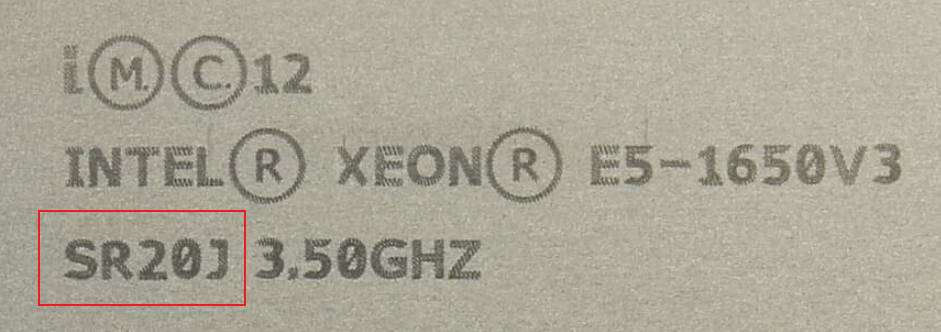
| S‑spec Code | Stepping | Version |
| QEZ0 | L0 | ES/QS |
| QFST | R2 | ES/QS |
| SR20J | R2 | Final |
Frequently Asked Questions
Is undervolting possible?
Yes, voltage control is possible on v3 processors. Some ES models may be exceptions.
Is there solder or thermal paste under the lid?
There is solder under the lid, as with the entire Xeon E5 v3/v4 lineup.
Is the processor compatible with Windows 11?
No, the Xeon E5‑1650 v3 is not officially supported by Windows 11, but it works if you bypass the CPU and TPM checks during installation.
Conclusion
The Xeon E5-1650 v3 was a great processor for its time, and even now, more than 10 years after its release, it can still surprise you. Overclocking capability partially addresses the main issue of all LGA2011-3 Xeons: weak single-core performance. Unfortunately, this comes with “side effects”—high heat output and power consumption. This requires extra spending on cooling (we recommend not skimping and choosing a cooler with 5-6 heat pipes) and puts higher demands on the motherboard’s VRM. Furthermore, in most cases, you will need to perform additional steps to unlock overclocking, and the process itself takes time for stress testing and finding the optimal multipliers and voltages.
In other words, this CPU isn’t for everyone. If you aren’t intimidated by the complexities of overclocking, you’ll get a processor with a true “overclocker” spirit. In capable hands, the 1650 v3 reveals itself as a versatile tool capable of meeting both work and gaming needs, reminding us of the days when performance was earned through knowledge and testing rather than just buying the most expensive hardware in the shop.

Written by
Senior Hardware Specialist proving you don't need top-tier gear to game. Expert in smart upgrades and budget-friendly PC restoration.