Table of Contents
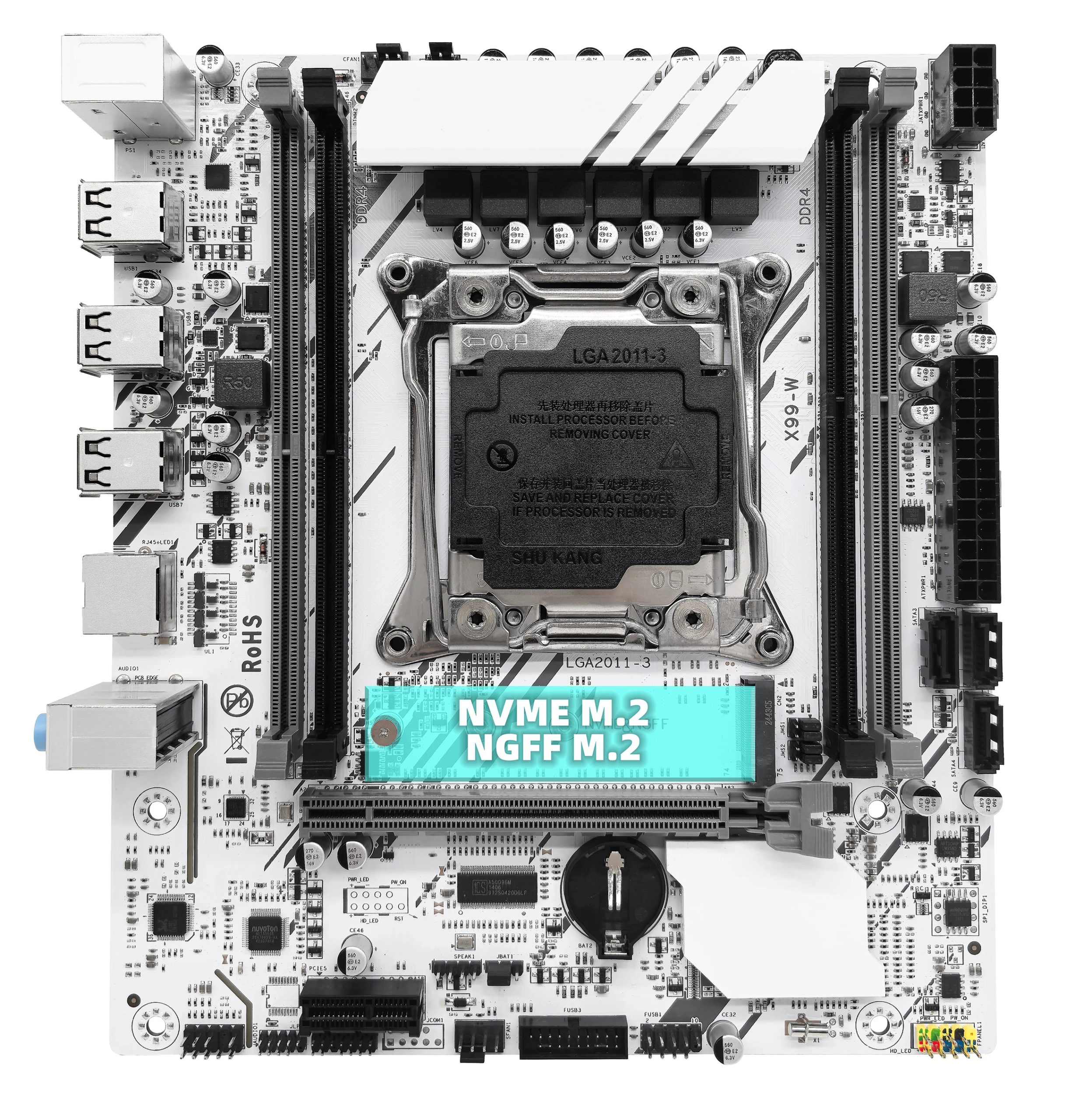
ZSUS X99‑W is one of the most budget‑friendly white LGA2011‑3 boards. It offers a bare‑minimum feature set but, unlike many competitors, includes a TPM 2.0 header.
Technically, the board is almost identical to the ZSUS X99‑8D4.
Specifications
| Model | X99-W |
|---|---|
| Socket | LGA 2011-3 |
| Chipset | HM55 / H57/ H55 |
| Supported Processors | Intel Core i7 (5000, 6000 series, Haswell-E/Broadwell-E) Intel Xeon E5-1600 v3/v4, E5-2600 v3/v4, E5-4600 v3/v4 (Haswell-EP/Broadwell-EP) |
| VRM Configuration | 3 phase (6 virtual via doublers) Total MOSFETs: 12 (6 high-side + 6 low-side) |
| Maximum Recommended TDP | ≤90W (v3 processors) ≤100W (v4 processors) |
| Supported Memory | 4 x DDR4 DIMM (dual-channel) with ECC and non-ECC support Maximum capacity: 64 GB |
| Sleep Mode Support | No |
| Expansion Slots | 1 x PCI-e x16 (Gen 3.0) 1 x PCI-e x1 (Gen 2.0) |
| Storage | 3 x SATA 2.0 1 x M.2 NGFF/NVME (Gen 3.0 x4) |
| Fan Connectors | 1 x CPU cooler (4pin) 2 x case fans (3pin) |
| PS/2 Ports | 2 (mouse + keyboard) |
| USB 3.0 Ports | - |
| USB 2.0 Ports | 6 (+ front panel support) |
| Network | Gigabit LAN (RTL8168H \ RTL8111H) |
| Audio | 5.1 channel (ALC662 \ ALC897) |
| TPM 2.0 header | LPC 14 Pin |
| JLPC1 header | Yes |
| Form Factor & Dimensions | mATX 215 x 190 mm |
| Approximate Price | AliExpress: $30 - $45 (Check Price) |
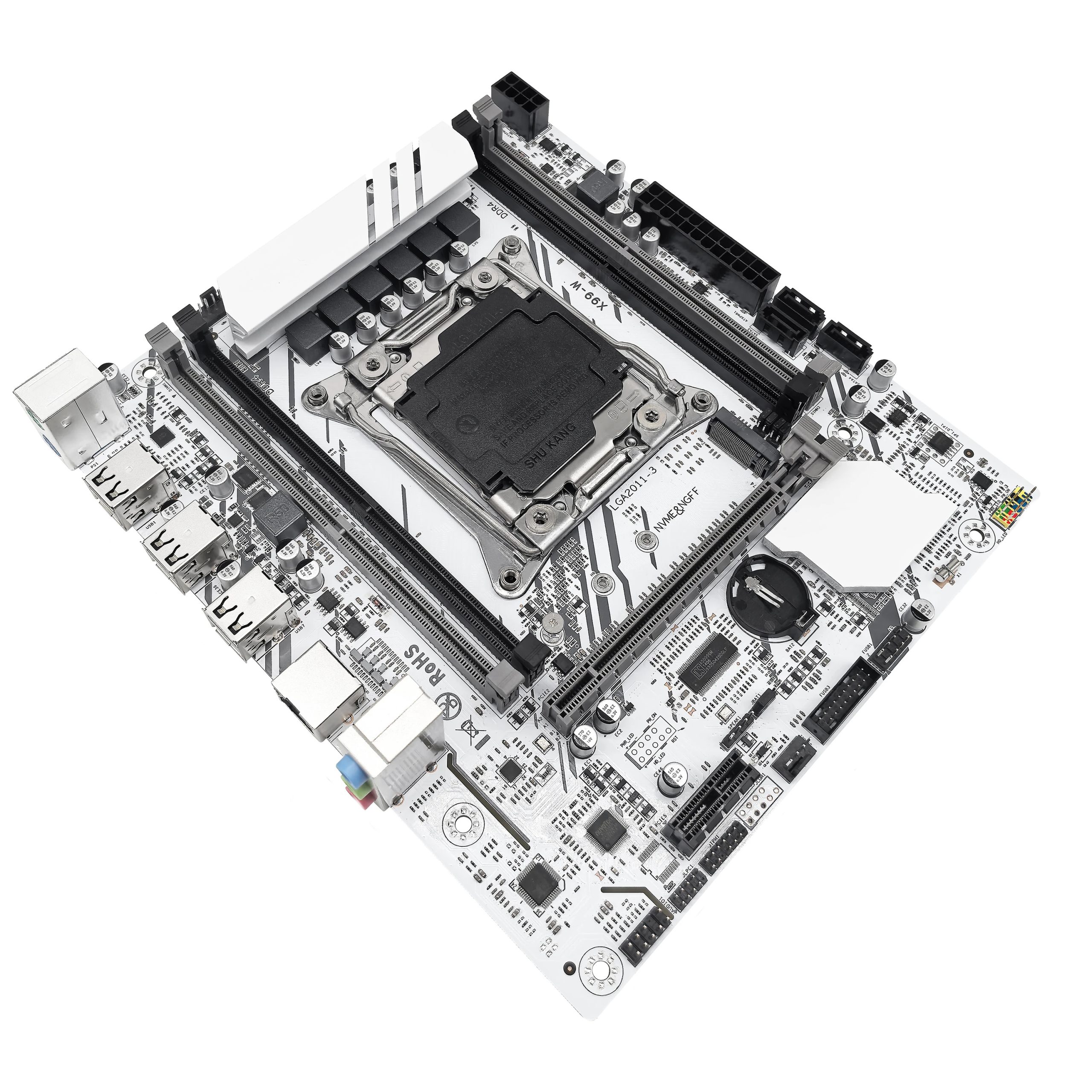
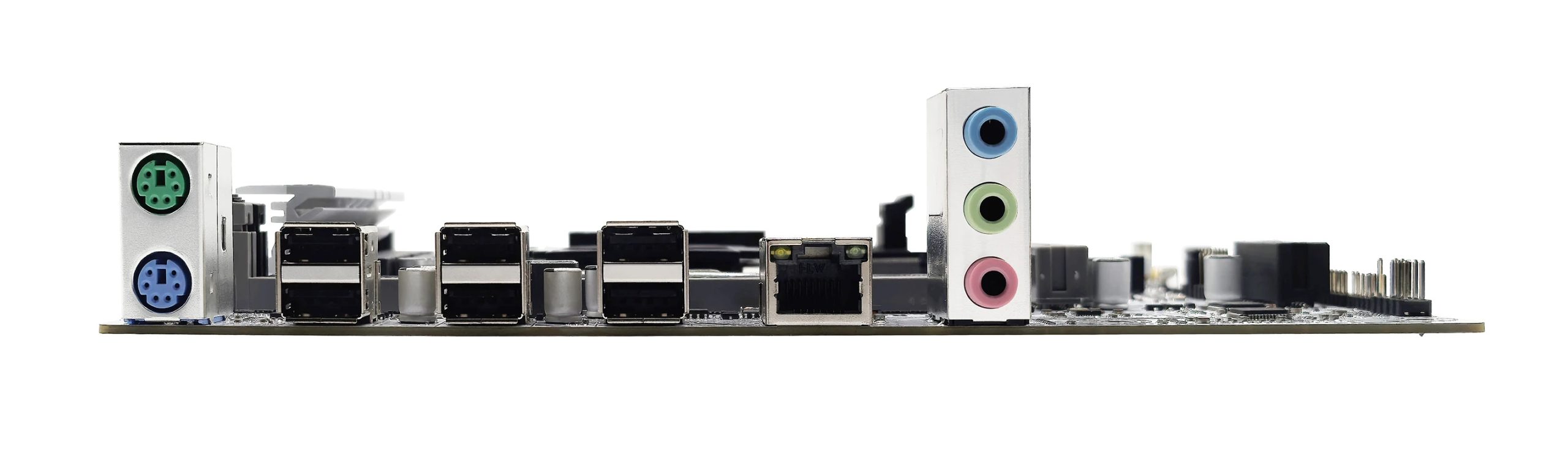
The X99‑W is built on very basic, older HM55/H57‑era chipsets, which results in a severe shortage of modern I/O. The board lacks both SATA III and USB 3.0. While the lack of faster SATA can be partially offset by a dual‑mode M.2 slot, the absence of USB 3.0 must be tolerated—or you’ll need to use the single x1 slot for a USB 3.0 expansion card.
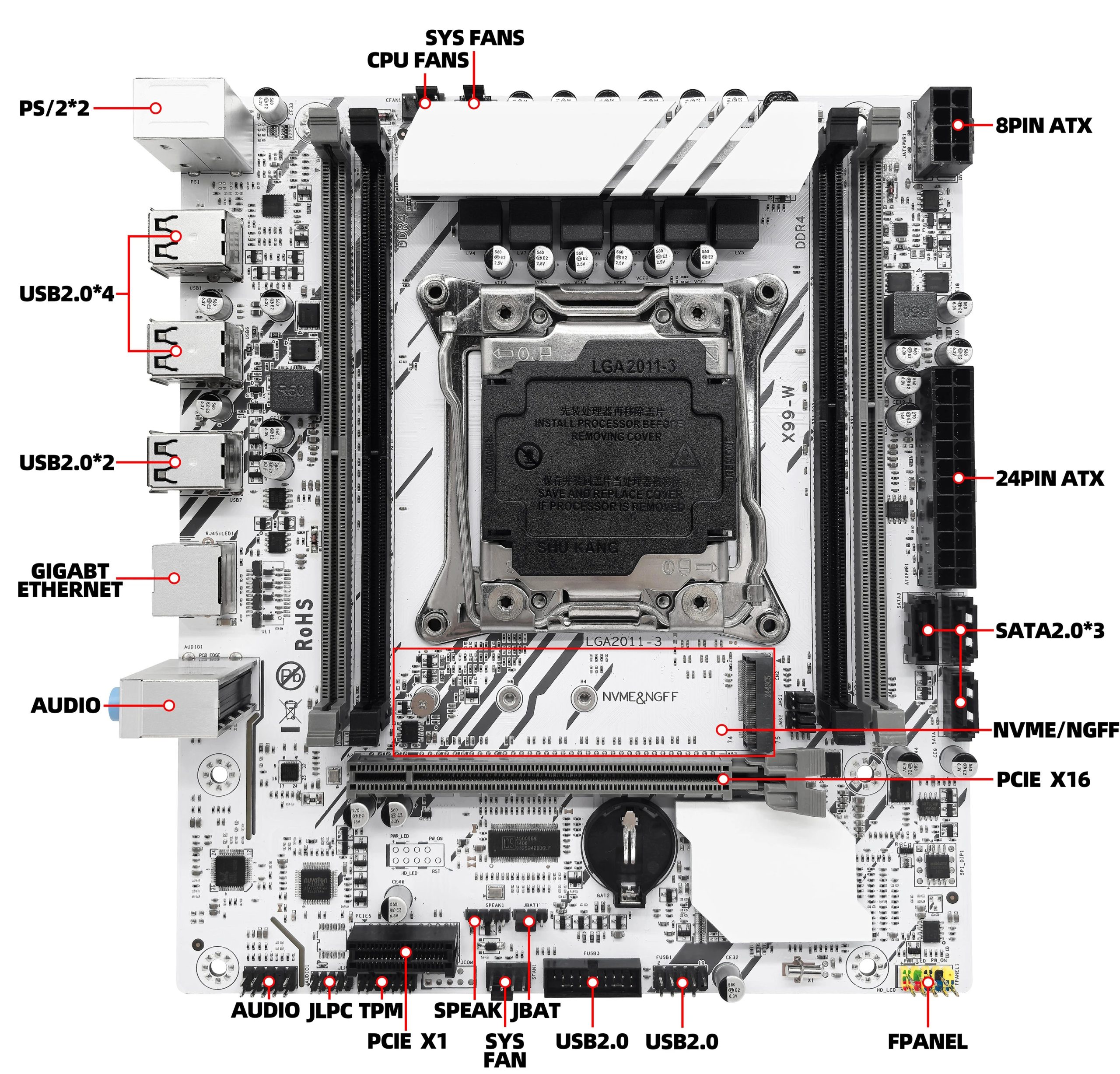
Otherwise, the board nearly mirrors the ZSUS X99‑8D4—but even this simple design has been cost‑optimized again: there’s one fewer SATA II port, the RJ45 LAN magnetics (galvanic isolation) have been simplified, and the VRM’s output capacitor bank has been reduced (though some X99‑8D4 revisions use the same number of capacitors).
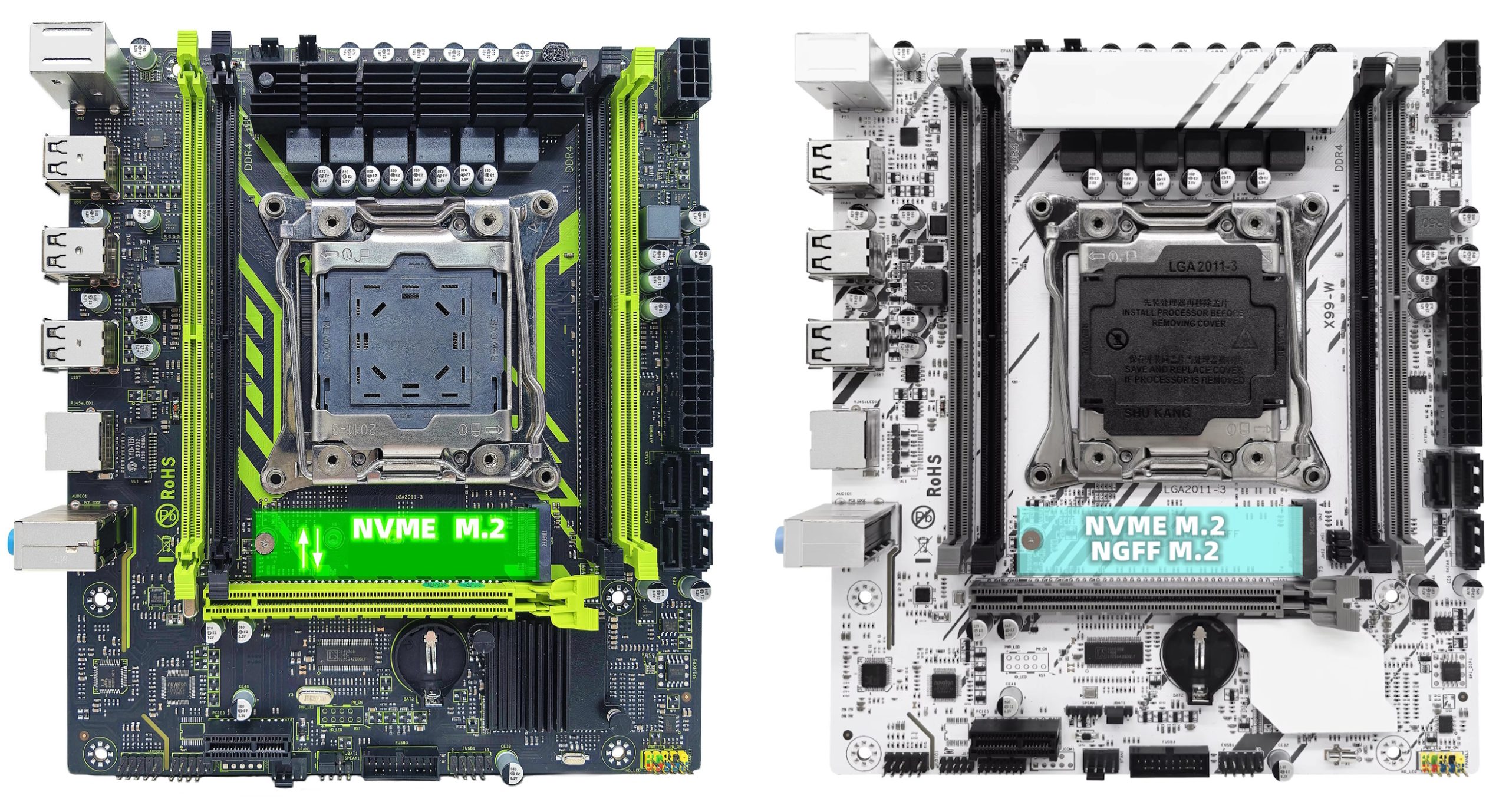
In all other respects, it’s the same “as cheap as it gets” board—now with a TPM 2.0 header and a white colorway. The familiar drawbacks are here too: a thin PCB, mediocre onboard audio, a three‑phase doubled VRM intended for entry‑level CPUs, a CPU power‑consumption sensor that reports unrealistically low values, no sleep (S3) mode, and a UEFI/BIOS with the usual rough edges.
BIOS Capabilities

The board runs an AMI Aptio V UEFI/BIOS with a very basic UI. Notable features include Resizable BAR (ReBAR), Above 4G Decoding, Secure Boot, and configuration for TPM modules. The firmware does not expose memory‑timing controls.
All the familiar shortcomings of Chinese firmware are present: a nonfunctional motherboard temperature sensor (don’t be alarmed if you see readings above 100 °C), Smart Fan control limited to 4‑pin headers, and numerous settings—some of which simply don’t work.
Unfortunately, the oddball H55 platform creates real headaches for backup and flashing. Standard tools such as the Intel Flash Programming Tool don’t support H55. AFUDOS / AFUWIN can dump only the BIOS region. Full backup and full flashing require a hardware programmer. If you have one, you may be able to cross‑flash firmware from similar boards—such as the Huananzhi X99‑P4T, Huananzhi X99E‑K4, or Qiyida X99‑H5—at your own risk.

BIOS images from technically similar models:
| Chipset | BIOS version & date | Ram Timings | ReBAR | Unlocked CPU OC | Turbo Boost unlock | Undervolt | Secure boot & TPM2.0 Support | Notes & Link |
|---|---|---|---|---|---|---|---|---|
| HM55 | X99P3 Ver:003 02/22/2024 | - | + | - | - | - | + | Stock BIOS from X99-8D3. For SPI chip programmer only. Not tested. [Download] |
| HM55 | X99E Ver:1.0 10/27/2023 | - | + | - | - | - | + | Stock BIOS from Huananzhi X99E-K4. For SPI chip programmer only. Not tested. [Download] |
| HM55 | X9PD3 Ver:001 10/31/2023 | - | + | - | + | -50 mV | + | Mod BIOS (based on Huananzhi X99-P4T). For SPI chip programmer only. Not tested. The primary RAM slots may have changed. [Download] |
| H57 | X99P4 Ver:006 04/30/2025 | + | + | - | - | - | + | Stock BIOS from X99-8D4 V9.02 board. For SPI chip programmer only. Not tested. [Download] |
Got an original BIOS or compatible firmware? Share it in the comments or send it via our contact form. You could help a lot of board owners.
Frequently Asked Questions
The board won’t boot, black screen, etc. What should I do?
Check out our guide to the most common LGA2011‑3 issues.
Where can I find drivers for this board?
Our current driver collection for socket 2011‑3 boards is here.
Is there a manual available (PDF)?
The official ZSUS manual can be downloaded here.
Where is the BIOS chip located?
To the right of the chipset heatsink—you can clip a programmer directly onto it.
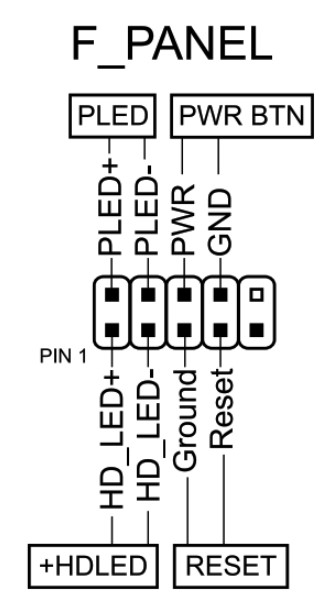
How do I connect the front panel?
Which TPM 2.0 module is compatible with this board?
You need an MSI 14‑pin LPC TPM 2.0 module—for example, this one.

Conclusion
OldRigRevive Review
5.0
3.4
2.1
2.5
“ZSUS X99‑W is an ultra‑budget board built on very basic chipsets. It works and may suit undemanding builds or very tight budgets. However, the lack of modern ports and the flashing limitations make it difficult to recommend beyond niche use cases. Proceed strictly at your own risk.”

Written by
Senior Hardware Specialist proving you don't need top-tier gear to game. Expert in smart upgrades and budget-friendly PC restoration.