Mutant Processors for LGA 1700: Complete Guide to Mobile HX Chips in Desktop Boards
Table of Contents
In 2024, “mutant” processors for the desktop LGA1700 socket appeared on the market for two generations at once: based on the Alder Lake architecture (12th gen) and the Raptor Lake architecture (13th gen).
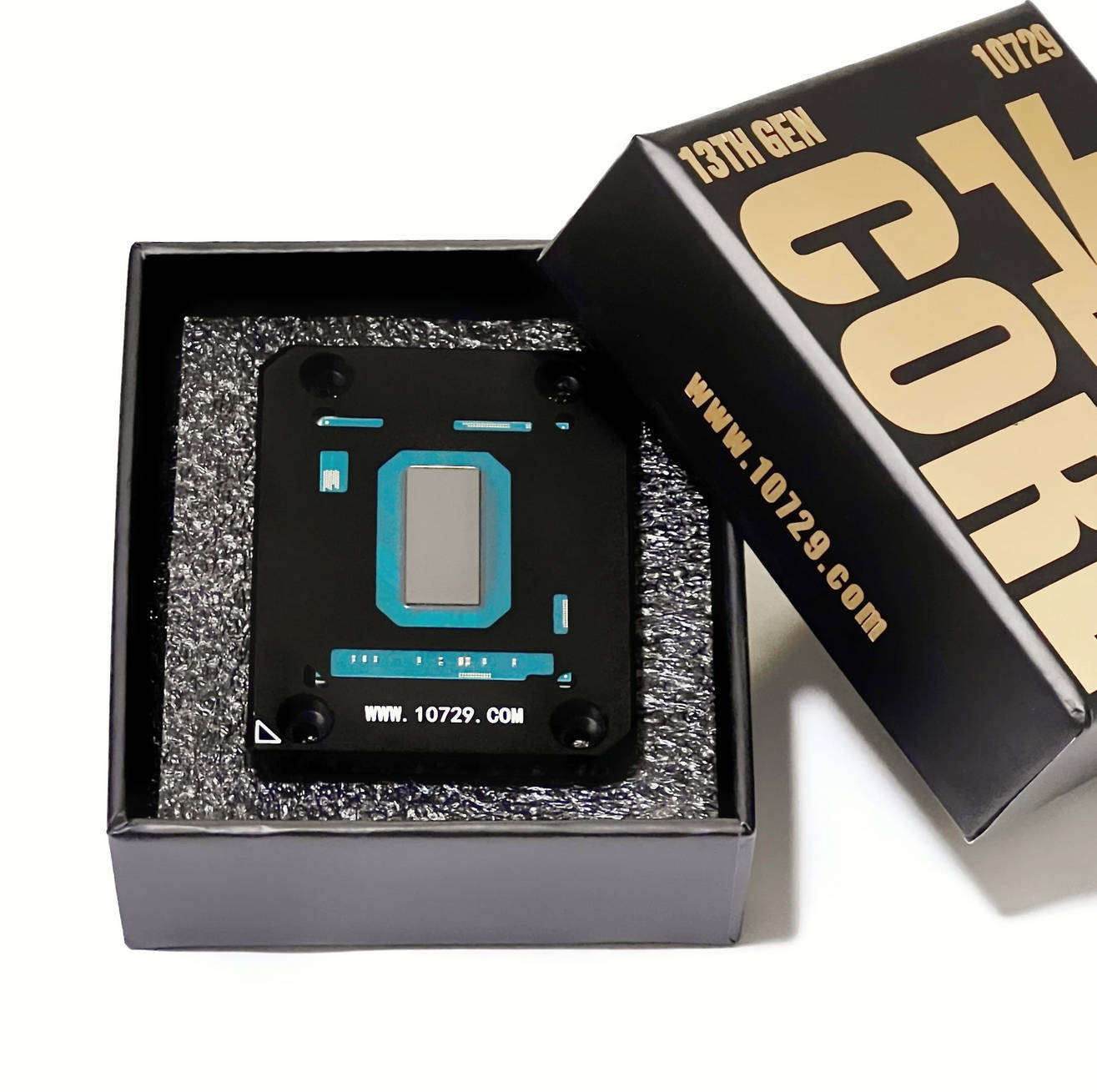
All of them are ES models originally intended for the mobile BGA1964 socket, but mounted on a special adapter board for desktop LGA1700. Such designs (in addition to “mutants” they’re also called “Frankensteins”) are nothing new — similar mobile‑to‑desktop processors were already popular back in the LGA1151 era.
Like earlier “Frankensteins”, these processors offer performance close to the original desktop SKUs, but for significantly less money. Naturally, they have some quirks and, of course, pitfalls. In this article we’ll go through all the pros and cons of these “mutants”.
Nowadays the production of such models has become less makeshift, the whole topic of modified CPUs has become more popular, and the manufacturer has even developed a design and launched an official website: 10729.com. By the way, besides mutant processors, mobile chips are also used to create motherboards with pre‑soldered CPUs, but we’ll talk about that another time.
Specifications
12th Gen (Alder Lake)
Specs
i5-12600HX (ES)
i9-12900HX (ES)
S-Spec Code
Q016
Q015
Process Technology
10 nm
10 nm
Cores / Threads
4P + 8E / 16
8P + 8E / 24
Memory Support (Stock)
DDR4-3200 / DDR5-4800
DDR4-3200 / DDR5-4800
Integrated Graphics
Intel UHD Graphics (32 EU)
Intel UHD Graphics (32 EU)
Turbo Boost Frequency
4000 MHz
4400 MHz
PCIe Lanes
x16@5.0+ x4@4.0
x16@5.0+ x4@4.0
L3 Cache
18 MB
30 MB
TDP (Stock)
55W
55W
Max Temperature
100°C
100°C
Multiplier
Unlocked
Unlocked
13th Gen (Raptor Lake)
Specs
i7-13650HX (ES)
i7-13700HX (ES)
i7-13850HX (ES)
i9-13950HX (ES)
i9-13980HX (ES)
S-Spec Code
Q1LR
Q1K3
Q1LQ
Q1LP
Q1LM
Process Technology
10 nm
10 nm
10 nm
10 nm
10 nm
Cores / Threads
6P + 8E / 20
8P + 8E / 24
8P + 12E / 28
8P + 16E / 32
8P + 16E / 32
Memory Support (Stock)
DDR4-3200 / DDR5-4800
DDR4-3200 / DDR5-4800
DDR4-3200 / DDR5-4800
DDR4-3200 / DDR5-4800
DDR4-3200 / DDR5-4800
Integrated Graphics
Intel UHD Graphics (16 EU)
Intel UHD Graphics (32 EU)
Intel UHD Graphics (32 EU)
Intel UHD Graphics (32 EU)
Intel UHD Graphics (32 EU)
Turbo Boost Frequency
4400 MHz
4600 MHz
4600 MHz
4800 MHz
5100 MHz
PCIe Lanes
x16@5.0+ x4@4.0
x16@5.0+ x4@4.0
x16@5.0+ x4@4.0
x16@5.0+ x4@4.0
x16@5.0+ x4@4.0
L3 Cache
24 MB
30 MB
30 MB
36 MB
36 MB
TDP (Stock)
55W
55W
55W
55W
55W
Max Temperature
100°C
100°C
100°C
100°C
100°C
Multiplier
Unlocked
Unlocked
Unlocked
Unlocked
Unlocked
Nuances and characteristics
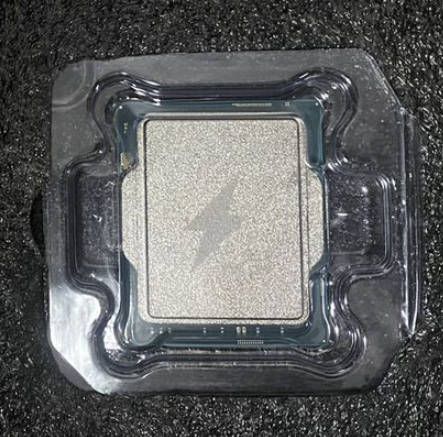
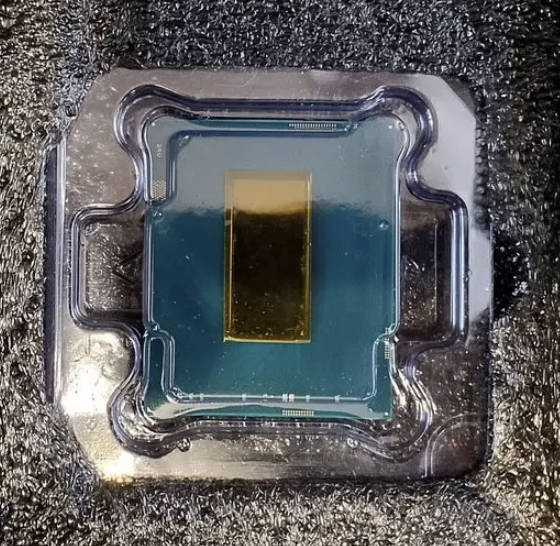
Available in versions both with a custom integrated heat spreader and with a bare die (direct die)
The memory controller supports both DDR4 and DDR5
The iGPU is fully functional
All currently existing models are based on engineering samples, but their stepping is the same as the retail chips (C0 for 12th gen and B0 for 13th gen)
Overclocking is possible on any chipset
At the moment it’s unknown whether 13th‑gen mutants are subject to the same degradation as other 13th‑ and 14th‑gen processors
Motherboard compatibility
Unlike the LGA1151 mutants, here we don’t need to mod the BIOS, change microcodes, do a pin‑mod, or perform other hardware modifications. Both generations will boot “out of the box” on all LGA1700 boards, regardless of chipset and BIOS version.
However, there are still some pitfalls, and they depend on the memory type and the number of memory slots.
DDR5 boards
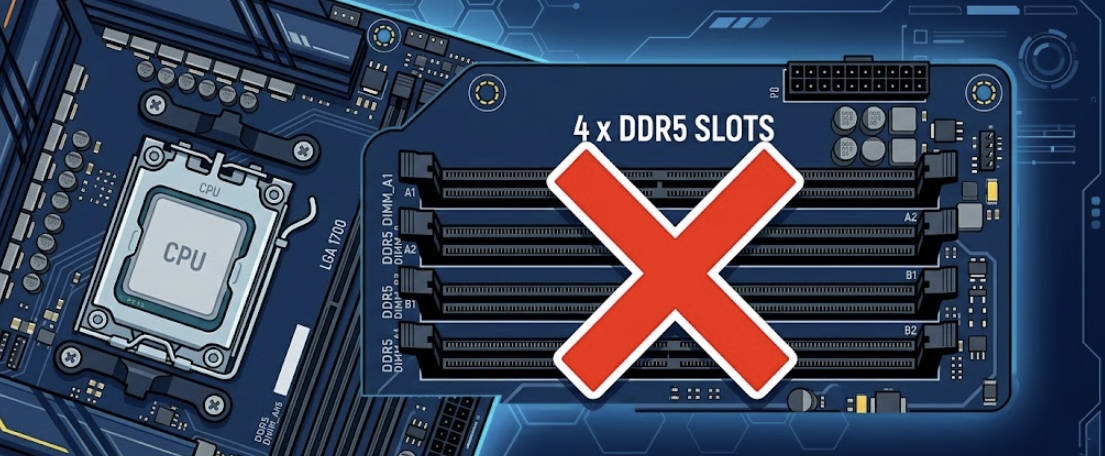
These processors are definitely not meant for boards with 4 DDR5 slots!
Most likely the mobile memory controller is to blame, but we also shouldn’t forget that we’re dealing with ES samples.
In most cases you won’t be able to use all 4 DIMM slots on such boards. Even if the board boots, stable operation will only be possible at the minimum DDR5 frequencies with huge timings. If you use only 2 modules in slots 1 and 3, you can squeeze out a bit more (usually no higher than 4400–4800 MHz with CL40+), but even then the lack of bandwidth and high latency will affect almost all resource‑intensive workloads.
The only way to get DDR5 working properly is to use boards with just two RAM slots.
DDR4 boards
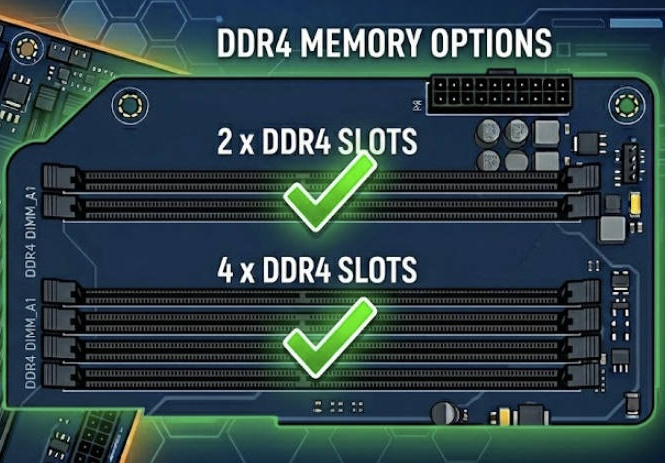
With previous‑generation memory the processors work without issues, regardless of the number of slots on the board. All DIMM slots are fully functional, but if you’re aiming for high memory frequency, use only 2 memory modules. Four DDR4 DIMMs put a heavy load on the mutant’s memory controller, dropping frequencies to 3000–3400 MHz or causing errors.
Correct installation in the socket
Since all mutants are mounted on a special adapter substrate, their height differs from regular models. The installation process also differs, as the stock socket retention bracket may simply refuse to close after installing a modified CPU.
Version with heat spreader (IHS)
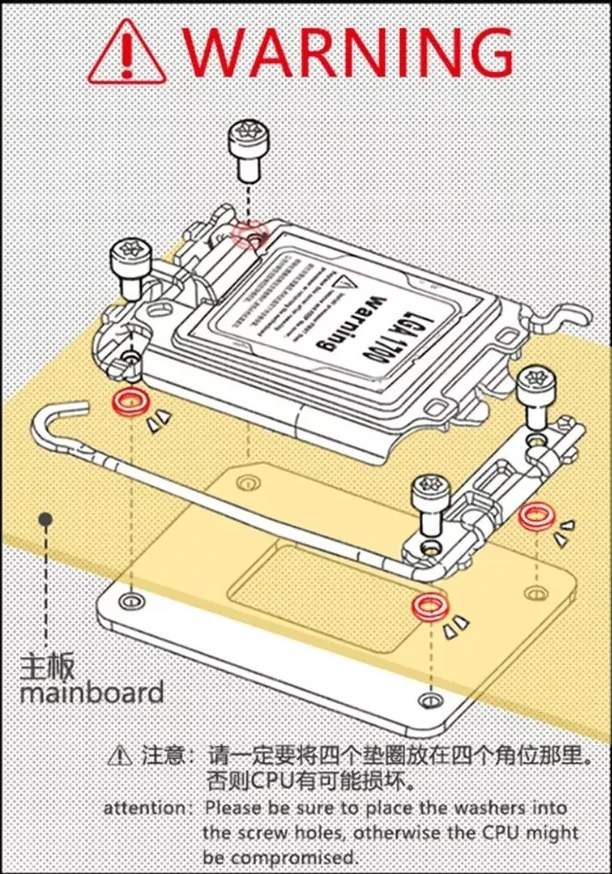
For proper installation, you’ll have to remove the socket bracket and place 2 rubber spacers (included with the CPU) under each of its mounting holes. The stock screws are meant to be replaced with longer ones, which are also included.
After that, carefully reinstall the bracket and tighten the screws, avoiding any misalignment (don’t tighten each screw all the way down immediately — screw them in sequentially to the free length and then tighten each one by a few turns in rotation).
CPU installation process for the IHS version (applies to both generations):
Cooling nuances for IHS versions:
Under the lid there is phase‑change thermal paste. It’s not solder like on original desktop processors, but it’s also not the worst possible option. With a good cooling system this TIM can dissipate 150–200 W of heat.
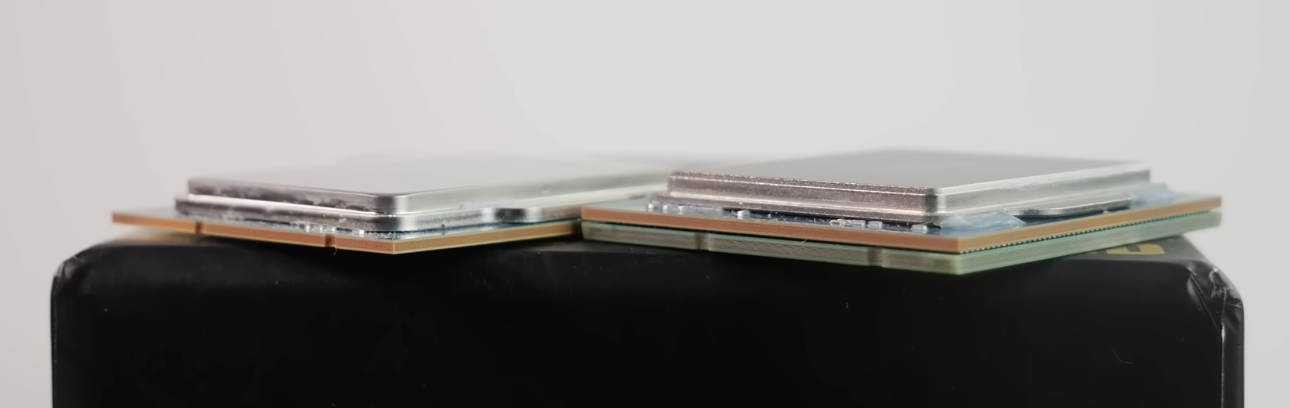
Because of the extra spacers and the interposer board, the modified CPU is slightly taller, so some coolers will have to be raised (this is usually not difficult; plastic or metal washers will do).
Difference in thickness between a mutant and an original desktop CPU
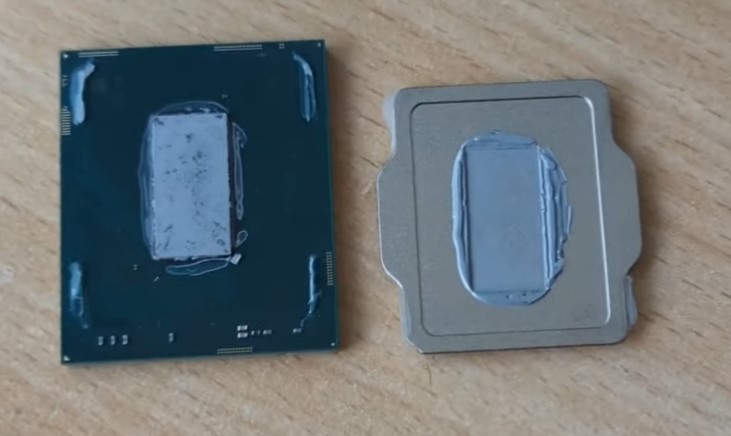
You can replace the stock thermal interface; the lid is held on by sealant and is fairly easy to remove. Replacing it with liquid metal can improve load temperatures by 15–20 degrees.
12900HX CPU with the lid removed
Direct die version
The bare‑die version has advantages in heat dissipation but is more finicky about the cooling system. In this case the stock socket bracket must be removed and replaced by its custom counterpart. Here there is no need to add spacers, and the stock screws also don’t have to be replaced.
Direct die installation process:
Cooling nuances for direct die versions:
In contrast to the IHS variants, delidded processors end up lower than retail models (by about 0.8–1.0 mm). Some coolers will have to be lowered for them, which is generally more difficult.
When mounting a cooler on a bare die, you must absolutely avoid overtightening the mounting frame or water block. Excessive pressure bends the PCB, worsening contact in the center of the die, which leads to higher temperatures and instability.
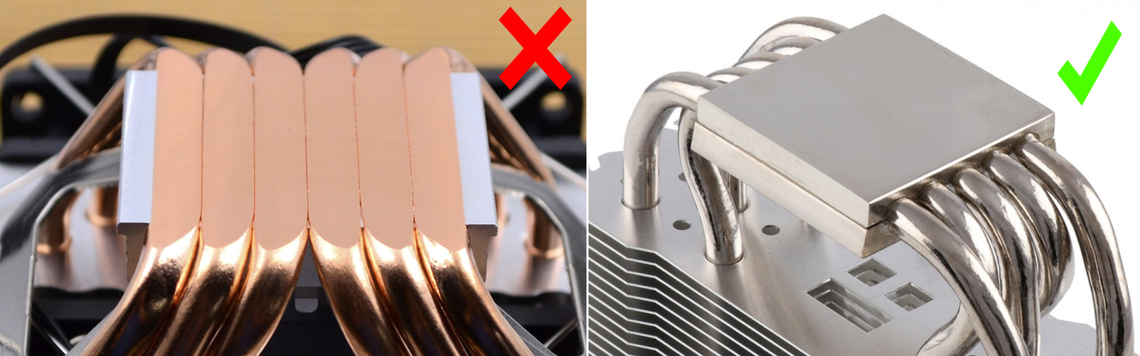
Coolers with direct‑touch heatpipes will be inefficient; it’s better to use models with a solid copper or nickel‑plated base.
You can install cooling even without the custom frame, but in that case the risk of chipping the die is very high. Example of mounting an AIO on a 12900HX with the lid removed:
Overclocking and tuning
The mutants ignore chipset limits on the motherboard, which makes overclocking (both the CPU and RAM) and voltage control possible even on H‑series chipsets. An exception for 12th‑gen mutants is the SA voltage — it is not only not adjustable, but doesn’t even appear in HWiNFO. On 13th‑gen mutants, control of all voltages is fully available.
In practice, the overclocking process doesn’t differ much from desktop K‑series CPUs of the same generations, but it does have a number of specific “workarounds” related to the adapter substrate.
Is overclocking via BIOS available?
Yes, but not always and often not fully. It heavily depends on the motherboard vendor:
MSI and ASRock: considered the most reasonable options. Power limits, voltages and LLC settings are correctly applied directly from the BIOS.
ASUS: some models ignore power limits and multipliers set in the BIOS when using mutants.
Chinese boards (Maxsun, Jginyue, etc.): often ship with cut‑down firmware. For full overclocking, enthusiasts mod the BIOS using tools like AMIBCP or UEFI‑Editor.
Overclocking via Intel XTU and similar software works in any case
Power control (Power Limit)
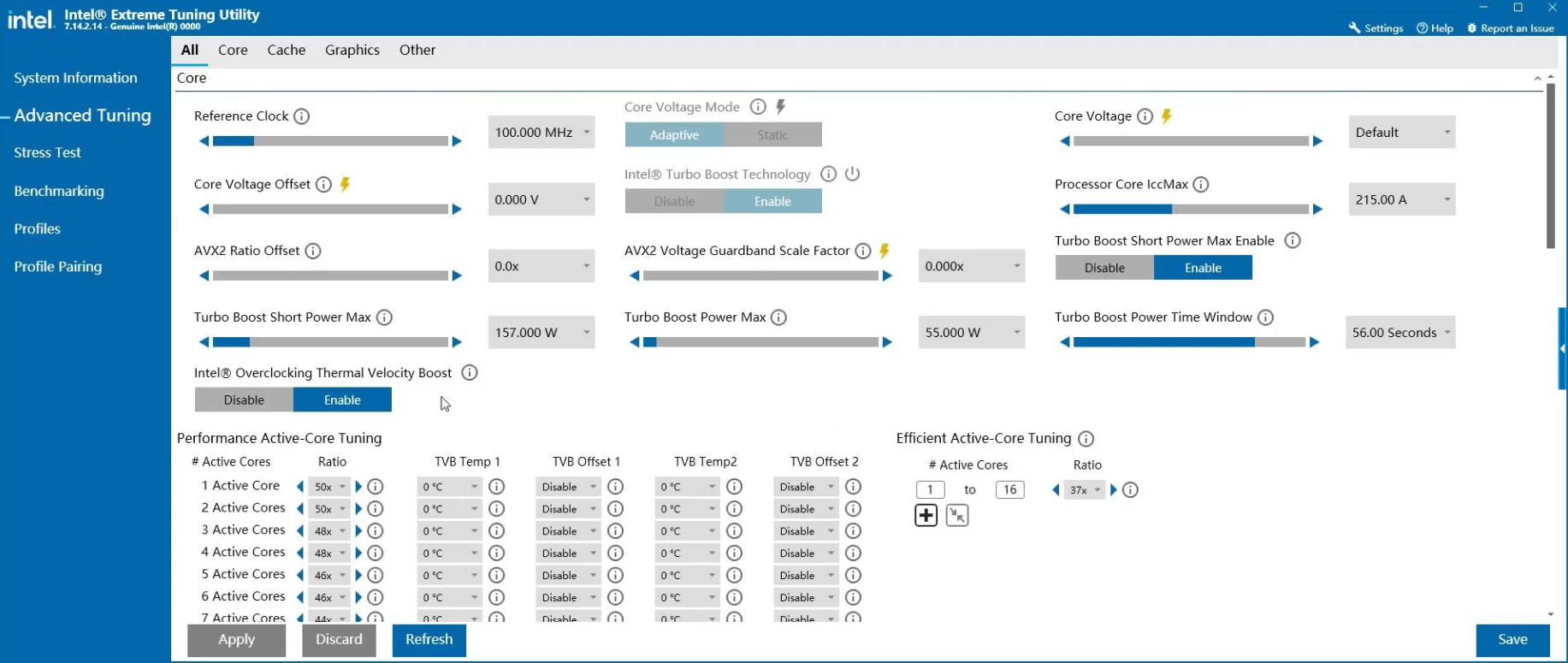
By default all mutants can’t sustain more than 55 W for long, so the first thing to do is adjust the power limits. For boards with a strong VRM you can remove the limits entirely, but in most cases it’s better to cap consumption at the level of the highest officially supported CPU. Keep in mind that some entry‑level boards have a PL1 cap (usually around ~90 W) that cannot be bypassed.
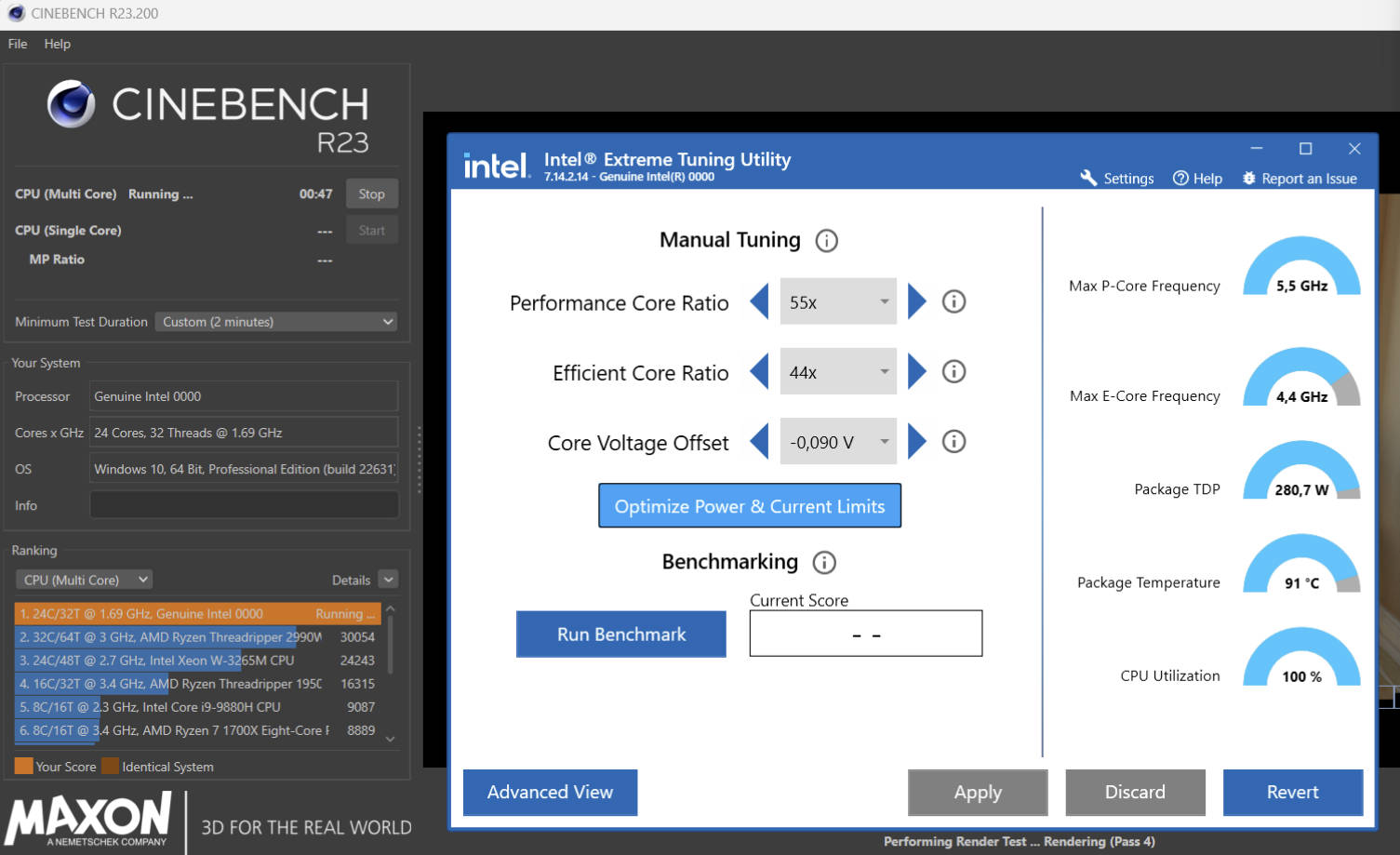
Under load, high‑end models can reach 250+ W of power draw, which can be fatal for motherboards with weak VRM. Evaluate the VRM and cooling capabilities realistically. For low‑end boards, strictly limit PL1/PL2.
13950HX ES power consumption under overclock while running Cinebench R23
Frequencies and voltages
The overclocking algorithm in general doesn’t differ from desktop K‑series CPUs of the same generation. It’s common practice to disable the E‑cores, since they share a common voltage rail with the P‑cores and often become the cause of instability at high overclocks.
12th Gen: At a reasonable voltage, the 12900HX can reach 4.7–4.9 GHz on the P‑cores and about 3.6–3.9 GHz on the E‑cores.
By disabling the E‑cores, you can enable AVX‑512 on the P‑cores, but for most modern motherboards this will require replacing the BIOS microcode with version 0x15. You can read how to do this here.
13th Gen: The maximum frequency is strictly limited by the cooling system. For direct‑die variants under a good AIO, a reasonable maximum is 5.2–5.4 GHz on the P‑cores and about 4.2–4.4 GHz on the E‑cores. Anything higher is a lottery and depends on silicon quality.
Taming the voltages: AC/DC Loadline tuning
The main problem of any LGA1700 “mutants” lies in their physical construction. Because of the extra PCB (adapter substrate), the motherboard reads the CPU’s base resistance incorrectly. Simply put, the board “thinks” it’s dealing with a worst‑case silicon sample that will be unstable, and preemptively cranks the requested voltage (VID) up to an absurd 1.45–1.55 V.
The result is predictable: instant 100°C and throttling even under a high‑end AIO. This is not solved by a simple offset, but by properly tuning the combination of LLC and AC/DC Loadline.
How does it work?
In modern motherboards, the voltage curve is controlled by two independent parameters:
AC Loadline: directly affects what voltage the CPU requests from the motherboard VRM depending on load. Lowering this parameter drastically reduces heat and power consumption.
DC Loadline: this is telemetry. It does not affect the real voltage delivered to the cores. It is only needed so the CPU can correctly calculate its power consumption (CPU Package Power) in watts. If DC is misconfigured, monitoring will be inaccurate and power limits (PL1/PL2) will work incorrectly.
Correct tuning algorithm
Step 1: Disable protection (MANDATORY)
Before lowering any voltages, go into CPU power settings and disable IA CEP (Current Excursion Protection). If you don’t, the CPU will treat the lower voltage as an error and will artificially cut performance by 2–3× while keeping high frequencies.
Step 2: Fix LLC (Load‑Line Calibration)
Leaving LLC on Auto is not acceptable. Set a medium level so that the voltage sags slightly under load (Vdroop) — this is safe for the CPU.
For MSI: Mode 4 or Mode 5.
For ASUS: Level 3 or Level 4.
For Gigabyte: Medium or High.
Step 3: Lower AC Loadline
Find the IA AC Loadline and IA DC Loadline parameters in the BIOS (on MSI this may be hidden behind the CPU Lite Load feature — it should be switched to Advanced mode).
Set AC Loadline to the minimum (usually this is value 1, which equals 0.01 mΩ).
Note: If the system is unstable or throws BSODs with AC = 1, gradually increase the value (to 5, 10, 15) until you get stability in stress tests.
Step 4: Calibrate DC Loadline (telemetry)
Now we need to align the CPU sensors with reality.
Boot into Windows and launch HWiNFO64.
Start a heavy stress test (Cinebench R23 or Prime95).
While the test is running, look in HWiNFO for two lines:
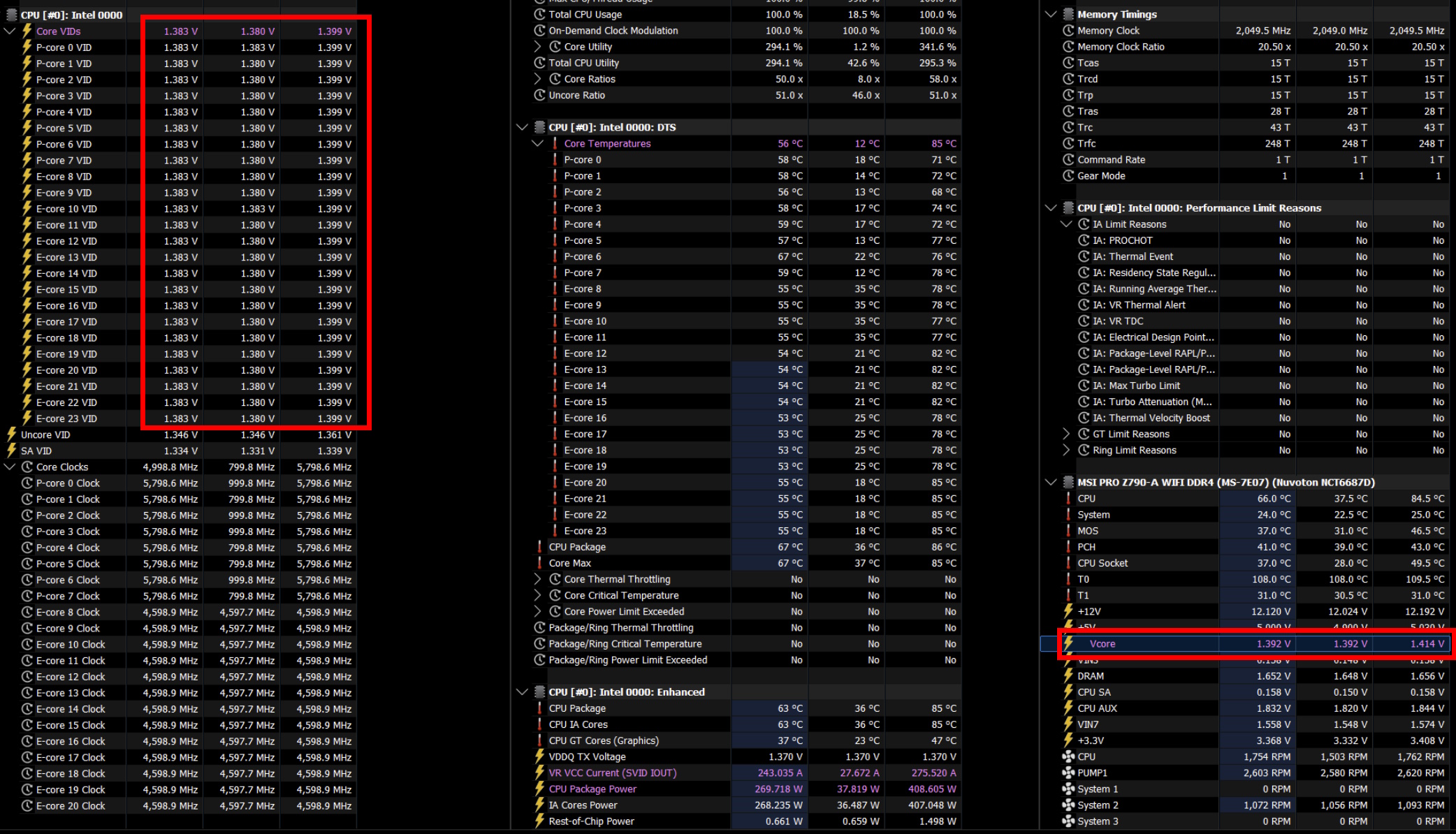
Core VID (what the CPU is requesting)
Vcore or VR VOUT (what the motherboard VRM is actually supplying)
Your goal is to make Core VID and Vcore match.
If VID is higher than Vcore — go back to the BIOS and increase DC Loadline.
If VID is lower than Vcore — decrease DC Loadline.
Example of well‑tuned AC and DC Loadline at high overclock
Tip for choosing DC Loadline: usually for a medium LLC level (Mode 4 / Level 4), the ideal DC Loadline value is in the 70–90 range (0.70–0.90 mΩ).
After synchronizing VID and Vcore, your mutant will correctly respect power limits, and temperatures will drop noticeably without any performance loss.
Memory overclocking
For both generations the approximate maximum is:
DDR4: 3600–3800 MHz (Gear 1). But only with two modules, not four.
DDR5: 6800–7600 MHz. Keep in mind that these frequencies are usually achieved with manual tuning; the practical XMP ceiling is around 6000 MHz.
Higher frequencies are possible, but depend on the specific board and memory modules, and also require time for experimentation and a bit of luck.
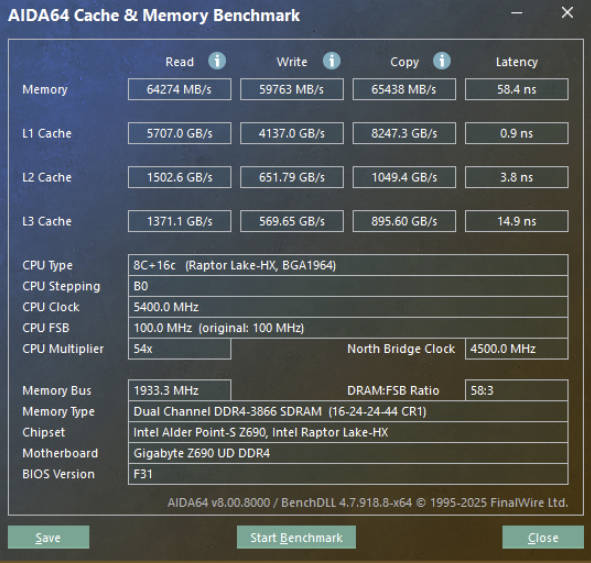
Well‑tuned DDR4 with a 13th‑gen mutant
Memory tips:
If the memory refuses to boot at frequencies above 3000 MHz at any Gear Mode setting, a manual hard lock of DRAM Reference Clock at 100 MHz often helps.
On Gigabyte boards, the “cold boot” problem or long hangs during memory training is common. Experience has shown that raising the somewhat obscure MC PLL Overvoltage parameter to +15 mV completely solves this issue.
Performance and tests: Mutant vs desktop
The main question everyone has: “How much weaker is this mobile chip than a full‑fledged 12900K or 13900K?” The short answer: not by much.
Architectural parity
It’s important to understand that the dies in, say, a Core i9‑13980HX and a Core i9‑13900K are physically identical. These are the same Raptor Cove (P‑cores) and Gracemont (E‑cores) with the same L3 cache size. Therefore, at the same fixed clock (for example 5.0 GHz) the per‑clock performance (IPC) of the mutant will be as close as possible to the desktop counterpart.
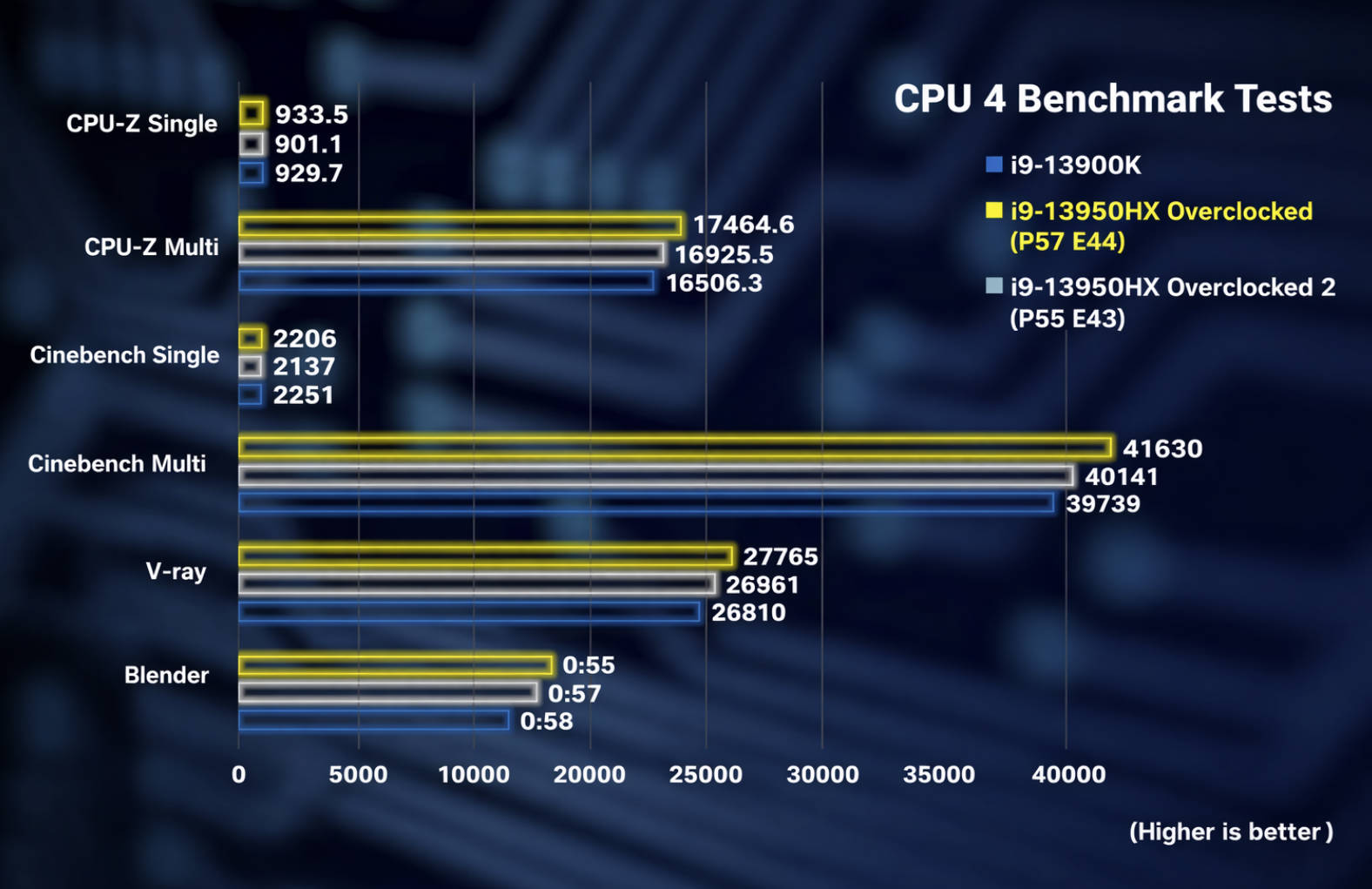
13950HX (ES) at different frequencies vs 13900K in synthetic benchmarks
Main differences and pitfalls
Despite the identical cores, there are a couple of nuances that can influence final benchmark numbers:
Ring bus: on mobile chips it often runs at slightly lower frequencies than on “full‑fat” K‑series CPUs. This can cause a symbolic 1–3% difference in synthetic tests that are sensitive to latency.
AVX‑512: if you’re hunting for AVX‑512, 12th‑gen mutants are your best bet. With older microcodes and E‑cores disabled, they can show results in compute workloads that newer desktop processors — where this instruction set is hardware‑blocked — simply can’t match.
Memory impact: as we’ve already seen, the memory controller (IMC) in mutants is a bit more capricious. If a desktop 13900K “eats” DDR5 at 8000 MHz, the mutant may top out at 7200 MHz. In workloads that depend heavily on memory bandwidth, this can translate into a small deficit.
Model quirks: since we’re dealing with ES versions, all kinds of surprises are possible. For example, Q1K3 has a 12th‑gen cache configuration, but the cores themselves belong to the 13th generation.
Benchmarks and gaming tests, overclocking and comparisons:
Synthetic tests of the i9‑13950HX (ES) from the mutant manufacturer:
Detailed video on the 12900HX (ES):
Tests, overclocking and comparisons of the i7‑13850HX (ES):
Review, overclocking and tests of the 13950HX (ES) (Korean language):
Conclusions
“Mutants” on LGA1700 are a great way to get flagship performance while saving your budget for a graphics card. However, this is not a “plug and play” situation: be prepared to manually adjust mounting pressure, tweak the BIOS, and fine-tune voltages.
If you value your time more than the potential savings, or are not ready to dive deeper than XMP settings, you are better off with standard solutions. For enthusiasts, however, this is the ultimate “DIY kit” that, with the right approach, delivers i9-level performance at an i5 price.