In most cases, additional settings are not necessary, but if problems arise, check the following:
1. Locate Your GPU Port
Navigate to the following path in your BIOS:
Check the sub-menus for ports (e.g., Port 1A, 2A, 3A). Find the one where your GPU is connected by looking at the Current Connection status:
- x4: Usually indicates an NVMe SSD (Ignore this port).
- x16 or x8: Indicates your GPU (Apply settings here).
2. Check PCIe Settings
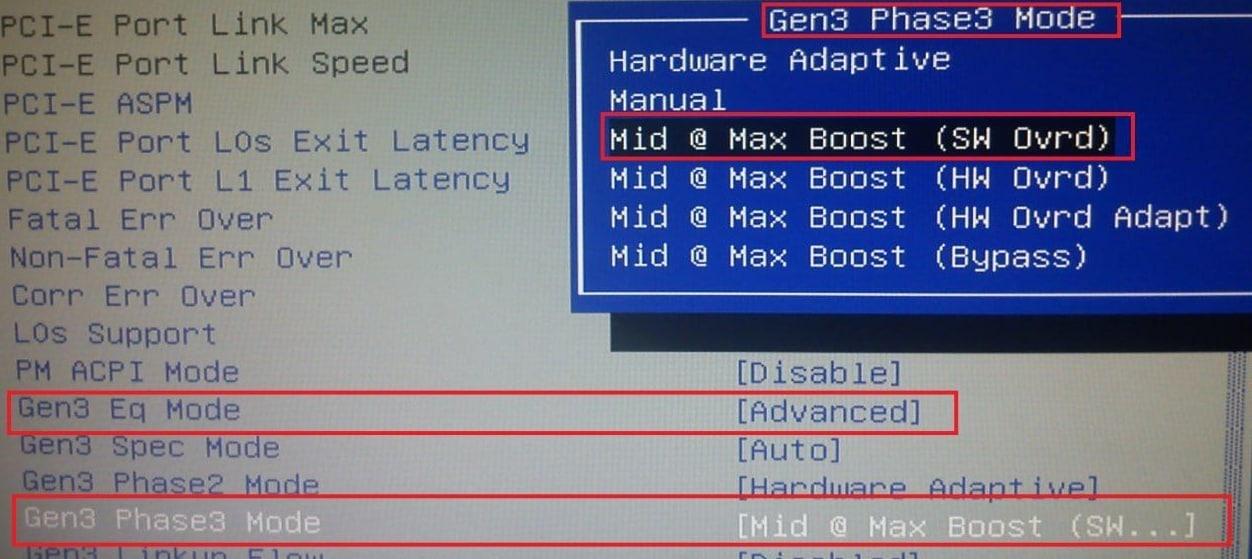
Inside the specific port menu identified above, change the following parameters:
| Parameter | Required Setting |
|---|---|
| Gen3 Eq Mode | Advanced |
| Gen3 Phase3 Mode | Mid @ Max Boost (SW Ovrd) |
| PCI-E Port Link Width | x8 (For RTX 5060) x16 (For RTX 5070 / 5080 / 5090) |
Technical Explanation: Why does this help?
Gen3 Eq Mode (Equalization): Older X99 motherboards often fail to automatically negotiate signal quality with modern GPU architectures. Setting this to Advanced enables manual control over signal processing.
Phase3 Mode (Mid @ Max Boost): This increases the signal gain (amplification) of the PCIe lane. “Mid @ Max Boost” forces the strongest equalization profile, compensating for signal degradation caused by the older electrical traces on X99 boards and preventing the GPU from disconnecting under load.