Table of Contents
Adapting LGA 771 Xeon server processors for LGA 775 consumer motherboards became an important practice for hardware enthusiasts. This mod allowed the community to bypass Intel’s marketing-driven socket restrictions and use server hardware in desktop builds, influencing PC builders for years.
The Origins of the Mod: Economics vs. Marketing
Between 2012 and 2014, a unique market situation emerged. While the LGA 775 platform was aging, its flagship Core 2 Quad Q9000 series remained highly capable and powerful, yet their market price stayed stubbornly high, making them a costly investment for most builders. At the same time, large data centers began decommissioning servers based on the LGA 771 socket.
This flooded the market with Xeon 5000 series processors. These chips, which originally cost nearly $1,000, were suddenly available for the price of a couple of coffees ($15–$20). The only obstacle was the artificial socket incompatibility created by Intel. However, where the corporation placed “fences” in the form of plastic keys, enthusiasts quickly found a workaround.
“Why pay for a Q9650 when you can get its server twin for a fraction of the cost and just modify it to fit?” — This logic drove the popularity of the mod for years.
Compatibility Principles: Why This Works
This modification was possible because of the architectural similarities between the platforms. Intel didn’t design entirely new chips for servers; instead, they used the same silicon for different market segments:
- Wolfdale (Core 2 Duo) and Wolfdale-DP (Xeon 5200) — Dual-core siblings.
- Yorkfield (Core 2 Quad) and Harpertown (Xeon 5400) — Quad-core giants with 12 MB of L2 cache, both based on the Penryn architecture.
Essentially, a Xeon E5450 is a Core 2 Quad Q9650. They share the same transistor count, 45nm process node, and cache size. The differences were limited to three specific areas:
- Key Placement: The notches on the PCB were rotated 90 degrees.
- Pinout: Two power pins were swapped.
- Microcodes: BIOS instructions that identify the processor to the motherboard.
Past Value and Current Relevance
In the past: This was the ultimate low-cost way to max out an LGA 775 system. It allowed users to run titles like GTA V or The Witcher 3 on a platform that, by market standards, should have been obsolete.
Today: Currently, the 775 Xeon mod is largely a pursuit for hardware hobbyists and retro-computing enthusiasts. However, it still serves practical purposes:
- Home Servers and NAS: Thanks to virtualization support (VT-x) and large cache sizes, these Xeons work well for file storage or media servers.
- Retro Gaming: Classic titles up to the mid-2010s run well on modified Xeons.
- Learning Platform: It’s an ideal project for learning how to flash BIOS, inject microcodes, and practice old-school overclocking without risking expensive modern hardware.
- Ultra-Budget PC: LGA 775 systems are extremely cheap and can still handle basic web browsing, YouTube, and office applications.
LGA 771 Xeon Genealogy: Series, Models, and Milestones
Several generations of processors were released for the 771 socket, differing in process node, cache size, TDP, and instruction sets.
- 65nm Generation (Core: Woodcrest / Clovertown): These are server equivalents of the original Core 2 chips. The 51xx series (Woodcrest, 2 cores) matches the Core 2 Duo (Conroe), while the 53xx series (Clovertown, 4 cores) matches the Core 2 Quad (Kentsfield, like the Q6600). In 2026, these are mainly of interest to collectors. They run hot, have smaller caches (up to 8 MB), and lack SSE4.1 support, preventing many modern applications from launching.
- 45nm Generation (Core: Harpertown / Wolfdale-DP): These are the true legends. The 54xx series (4 cores) is a direct analog to Yorkfield (Q9xxx). They feature 12 MB of L2 cache, SSE4.1 support, high overclocking potential, and relatively efficient power consumption.
| Xeon Series | Codename | Process | Cores | Desktop Equivalent | Desktop Codename |
|---|---|---|---|---|---|
| Intel Xeon 5100 | Woodcrest | 65 nm | 2 | Intel Core 2 Duo | Conroe |
| Intel Xeon 5200 | Wolfdale-DP | 45 nm | 2 | Intel Core 2 Duo | Wolfdale |
| Intel Xeon 5300 | Clovertown | 65 nm | 4 | Intel Core 2 Quad | Kentsfield |
| Intel Xeon 5400 | Harpertown | 45 nm | 4 | Intel Core 2 Quad | Yorkfield |
TDP Classification: Intel’s Letter Codes
Intel categorized these processors by power consumption, making it easier to match a CPU to a specific motherboard, from basic office boards to enthusiast-grade hardware.
- L Series (Low Power) — 40W–50W TDP: The efficiency leaders of their time. Ideal for upgrading branded PCs (HP, Dell) with weak power supplies or motherboards with basic 3-phase VRMs.
- E Series (Mainstream Efficiency) — 80W TDP: The sweet spot. This includes the legendary E5450. These processors are compatible with most mid-range boards and offer a perfect balance between clock speed and thermals.
- X Series (Performance) — 120W–150W TDP: The enthusiast’s choice. Designed for maximum performance, these chips require high-end motherboards with robust VRMs and large tower coolers. Using an X series chip on a low-end board risks damaging the VRM MOSFETs.
All Xeon 5000 Series Processors and Specifications
| Model | Series | Codename | Cores \ Threads | Base Clock (GHz) | L2 Cache (MB) | FSB | Multiplier | TDP (W) | Process (nm) | The closest equivalent |
|---|---|---|---|---|---|---|---|---|---|---|
| 5160 | 5100 | Woodcrest | 2 \ 2 | 3.00 | 4 | 1333 | 9.0 | 80 | 65 | E6850 |
| 5150 | 5100 | Woodcrest | 2 \ 2 | 2.66 | 4 | 1333 | 8.0 | 65 | 65 | E6700 |
| 5148 | 5100 | Woodcrest | 2 \ 2 | 2.33 | 4 | 1333 | 7.0 | 40 | 65 | E6550 |
| 5140 | 5100 | Woodcrest | 2 \ 2 | 2.33 | 4 | 1333 | 7.0 | 65 | 65 | E6550 |
| 5138 | 5100 | Woodcrest | 2 \ 2 | 2.13 | 4 | 1066 | 8.0 | 35 | 65 | E6420 |
| 5130 | 5100 | Woodcrest | 2 \ 2 | 2.00 | 4 | 1333 | 6.0 | 65 | 65 | E4400 |
| 5128 | 5100 | Woodcrest | 2 \ 2 | 1.86 | 4 | 1066 | 7.0 | 40 | 65 | E6300 |
| 5120 | 5100 | Woodcrest | 2 \ 2 | 1.86 | 4 | 1066 | 7.0 | 65 | 65 | E6300 |
| 5110 | 5100 | Woodcrest | 2 \ 2 | 1.60 | 4 | 1066 | 6.0 | 65 | 65 | E4300 |
| X5272 | 5200 | Wolfdale-DP | 2 \ 2 | 3.40 | 6 | 1600 | 8.5 | 80 | 45 | E8600 |
| X5270 | 5200 | Wolfdale-DP | 2 \ 2 | 3.50 | 6 | 1333 | 10.5 | 80 | 45 | E8600 |
| X5260 | 5200 | Wolfdale-DP | 2 \ 2 | 3.33 | 6 | 1333 | 10.0 | 80 | 45 | E8600 |
| L5240 | 5200 | Wolfdale-DP | 2 \ 2 | 3.00 | 6 | 1333 | 9.0 | 40 | 45 | E8400 |
| E5240 | 5200 | Wolfdale-DP | 2 \ 2 | 3.00 | 6 | 1333 | 9.0 | 65 | 45 | E8400 |
| L5238 | 5200 | Wolfdale-DP | 2 \ 2 | 2.66 | 6 | 1333 | 8.0 | 35 | 45 | E8200 |
| E5230 | 5200 | Wolfdale-DP | 2 \ 2 | 2.66 | 6 | 1333 | 8.0 | 80 | 45 | E8200 |
| E5220 | 5200 | Wolfdale-DP | 2 \ 2 | 2.50 | 6 | 1333 | 7.5 | 65 | 45 | E7200 |
| E5215 | 5200 | Wolfdale-DP | 2 \ 2 | 2.33 | 6 | 1333 | 7.0 | 65 | 45 | E6550 |
| L5218 | 5200 | Wolfdale-DP | 2 \ 2 | 2.13 | 6 | 1066 | 8.0 | 35 | 45 | E6400 |
| E5205 | 5200 | Wolfdale-DP | 2 \ 2 | 1.86 | 6 | 1066 | 7.0 | 65 | 45 | E6300 |
| X5365 | 5300 | Clovertown | 4 \ 4 | 3.00 | 8 | 1333 | 9.0 | 120 | 65 | Q6850 |
| X5355 | 5300 | Clovertown | 4 \ 4 | 2.66 | 8 | 1333 | 8.0 | 120 | 65 | Q6700 |
| E5345 | 5300 | Clovertown | 4 \ 4 | 2.33 | 8 | 1333 | 7.0 | 80 | 65 | Q6600 |
| E5335 | 5300 | Clovertown | 4 \ 4 | 2.00 | 8 | 1333 | 6.0 | 80 | 65 | QX6700 |
| E5320 | 5300 | Clovertown | 4 \ 4 | 1.86 | 8 | 1066 | 7.0 | 80 | 65 | Q6600 |
| E5310 | 5300 | Clovertown | 4 \ 4 | 1.60 | 8 | 1066 | 6.0 | 80 | 65 | Q6400 |
| L5320 | 5300 | Clovertown | 4 \ 4 | 1.86 | 8 | 1066 | 7.0 | 50 | 65 | Q6600 |
| L5310 | 5300 | Clovertown | 4 \ 4 | 1.60 | 8 | 1066 | 6.0 | 50 | 65 | Q6400 |
| L5308 | 5300 | Clovertown | 4 \ 4 | 1.60 | 4 | 1066 | 6.0 | 40 | 65 | Q6400 |
| X5492 | 5400 | Harpertown | 4 \ 4 | 3.40 | 12 | 1600 | 8.5 | 150 | 45 | QX9770 |
| X5482 | 5400 | Harpertown | 4 \ 4 | 3.20 | 12 | 1600 | 8.0 | 150 | 45 | QX9770 |
| X5472 | 5400 | Harpertown | 4 \ 4 | 3.00 | 12 | 1600 | 7.5 | 120 | 45 | QX9650 |
| X5470 | 5400 | Harpertown | 4 \ 4 | 3.33 | 12 | 1333 | 10.0 | 120 | 45 | Q9650 |
| X5460 | 5400 | Harpertown | 4 \ 4 | 3.16 | 12 | 1333 | 9.5 | 120 | 45 | Q9650 |
| X5450 | 5400 | Harpertown | 4 \ 4 | 3.00 | 12 | 1333 | 9.0 | 120 | 45 | Q9650 |
| E5472 | 5400 | Harpertown | 4 \ 4 | 3.00 | 12 | 1600 | 7.5 | 80 | 45 | QX9650 |
| E5462 | 5400 | Harpertown | 4 \ 4 | 2.80 | 12 | 1600 | 7.0 | 80 | 45 | Q9550 |
| E5450 | 5400 | Harpertown | 4 \ 4 | 3.00 | 12 | 1333 | 9.0 | 80 | 45 | Q9650 |
| E5440 | 5400 | Harpertown | 4 \ 4 | 2.83 | 12 | 1333 | 8.5 | 80 | 45 | Q9550 |
| E5430 | 5400 | Harpertown | 4 \ 4 | 2.66 | 12 | 1333 | 8.0 | 80 | 45 | Q9400 |
| E5420 | 5400 | Harpertown | 4 \ 4 | 2.50 | 12 | 1333 | 7.5 | 80 | 45 | Q9300 |
| E5410 | 5400 | Harpertown | 4 \ 4 | 2.33 | 12 | 1333 | 7.0 | 80 | 45 | Q8200 |
| E5405 | 5400 | Harpertown | 4 \ 4 | 2.00 | 12 | 1333 | 6.0 | 80 | 45 | Q8200 |
| L5440 | 5400 | Harpertown | 4 \ 4 | 2.83 | 12 | 1333 | 8.5 | 50 | 45 | Q9550S |
| L5430 | 5400 | Harpertown | 4 \ 4 | 2.66 | 12 | 1333 | 8.0 | 50 | 45 | Q9400S |
| L5420 | 5400 | Harpertown | 4 \ 4 | 2.50 | 12 | 1333 | 7.5 | 50 | 45 | Q9300S |
| L5410 | 5400 | Harpertown | 4 \ 4 | 2.33 | 12 | 1333 | 7.0 | 50 | 45 | Q8200S |
| L5408 | 5400 | Harpertown | 4 \ 4 | 2.13 | 12 | 1066 | 8.0 | 40 | 45 | Q8200S |
Key Models: From Mainstream to Extreme
While there are dozens of models, a few stand out as the most popular choices:
- Any Xeon L-series: Cheap, cool-running quad-cores. Best for low-power boards, HTPCs, or media servers.
- E5450 (3.0 GHz, 80W): The all-around champion and most popular mod choice. Most units can hit a stable 3.6–4.0 GHz with overclocking.
- X5460 (3.16 GHz, 120W): A cheaper alternative to the E5450. It costs less due to the higher TDP but features a higher multiplier (9.5 vs 9), offering better overclocking potential on capable boards.
- X5470 (3.33 GHz, 120W): The king of the socket with a 10x multiplier. This is the model used for frequency records on the LGA 775 platform.
Pro Tip: Always look for the E0 stepping. It runs cooler, is more stable, and generally reaches higher frequencies than the older C0 stepping.
Motherboard Compatibility
Xeon compatibility on LGA 775 is determined by the motherboard’s chipset capabilities.
| Chipset Series | Xeon 54xx (4-Core) | Xeon 52xx (2-Core) | Xeon 3xxx | Overclocking |
|---|---|---|---|---|
| Intel P45, P43 | YES ✅ | YES ✅ | YES ✅ | High |
| Intel G41, G43, G45 | YES | YES ✅ | YES ✅ | Low |
| Intel Q45, Q43, B43 | NO ❌ | NO ❌ | YES ✅ | None |
| Intel P35, G33, G31 | YES ✅ | YES ✅ | YES ✅ | Medium |
| Intel P31 | YES | YES | YES | Low |
| Intel X48, X38 | NO ❌ | NO ❌ | YES ✅ | High |
| Intel Q35, Q33 | NO ❌ | NO ❌ | YES ✅ | None |
| Intel P965, G965 | PARTIAL | YES | YES | Medium |
| Intel 945P, 945G | 65nm ONLY | NO ❌ | 65nm ONLY | Very Low |
| nForce 790i, 780i, 750i | YES | YES ✅ | YES ✅ | High |
| nForce 680i, 650i | 65nm ONLY | YES | YES | Medium |
| nForce 630i, GeForce 9400 | YES | YES | YES | Low |
The Best Chipsets for the Mod
The best results are usually achieved with mainstream Intel 3-series and 4-series desktop chipsets. They are mod-friendly and handle FSB (Front Side Bus) overclocking well.
- P45, P43, P35: Top choices for Xeons. Designed for enthusiasts, the P45 can easily push an E5450 to a 400–450 MHz FSB, reaching the desired 4 GHz mark.
- G41, G31, P31: Budget options. Xeons work here, but don’t expect significant overclocking, as the FSB often hits a wall around 340–350 MHz.
Problematic Chipsets
Interestingly, some of the most expensive boards from that era are poor choices for a Xeon mod.
- X38 and X48: These flagship chipsets have hardware incompatibilities with 4-core 5400 series Xeons due to how the Northbridge handles GTL signals. This usually results in a black screen or boot loops.
- Q35, Q33, Q45, Q43: Corporate chipsets. Intel implemented strict CPU ID checks via the Intel Management Engine (ME).
- nForce (6xx / 7xx): NVIDIA chipsets. They can work with Xeons but are unpredictable, often requiring manual voltage adjustments and prone to overheating.
- P965: While it may boot with a 5400 series quad-core, stability and overclocking are rarely achievable.
DDR2 vs. DDR3
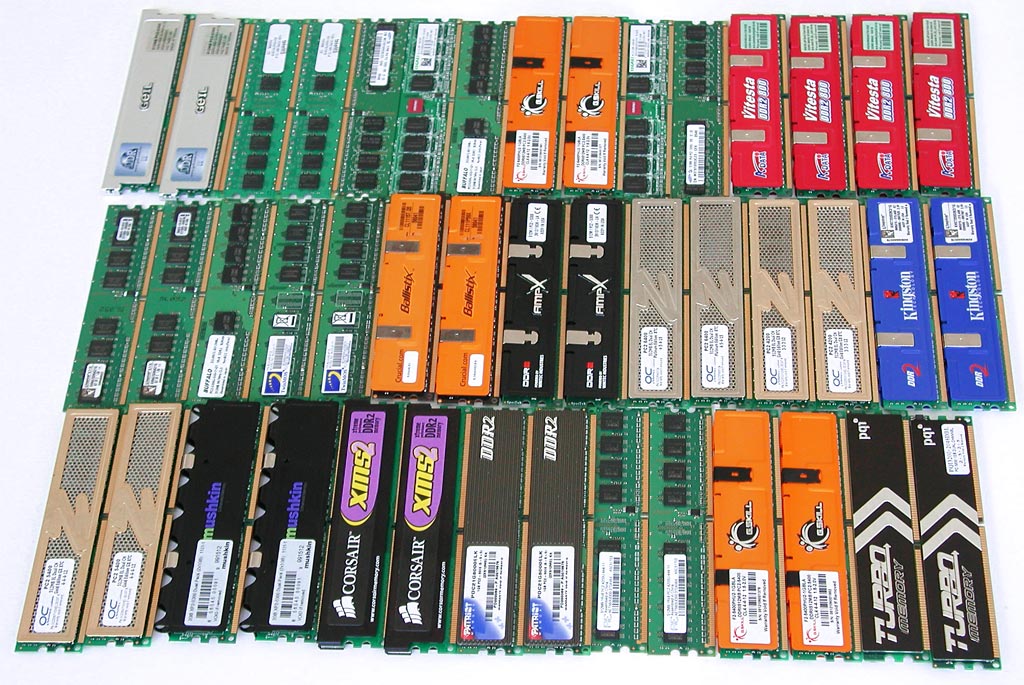
While Xeons support both memory types, there are nuances to consider:
- Avoid “combo” boards that support both DDR2 and DDR3. You can only use one type at a time, effectively halving your available slots, and these boards are known for instability.
- The performance difference between DDR2 and DDR3 is minimal, but DDR3 offers higher overclocking headroom. High-speed DDR2 (above 800 MHz) is becoming hard to find.
- LGA 775 chipsets only support double-sided DDR3 modules (chips on both sides) up to 4 GB per stick.
- 4 GB DDR2 modules are rare and expensive, and many boards don’t support more than 8 GB of DDR2 in total.
General Rule: For maximum performance, look for a P-series chipset with DDR3 support.
Verifying Motherboard Compatibility
While the chipset is the primary factor, you should also check the maximum CPU wattage the board was designed to handle.
Check the manufacturer’s website for the highest officially supported processor:
| Max Official CPU Support | Compatible Xeon Models |
|---|---|
| Core 2 Quad Q9650 | All 45nm Quad-Cores (E5450, E5470, etc.) |
| Core 2 Quad Q9550S (65W) | Low-Power 45nm models (L5430, L5420, L3360) |
| Core 2 Quad Q6700 | All 65nm Quad-Cores (X5365, X5355, X3230) |
| Core 2 Duo E8600 | All 45nm Dual-Core Xeons |
| Core 2 Duo E6850 | All 65nm Dual-Core Xeons |
We also recommend checking our motherboard compatibility table, as some boards can handle higher-end models than officially stated.
Preparation and Installation
Adapting a Xeon for LGA 775 involves physical modification of the hardware and software updates via the BIOS. Both steps are mandatory for a stable system.
Physical Modification
The main physical difference is the keying (plastic tabs). LGA 775 keys are in different positions than LGA 771. There are two ways to fix this:
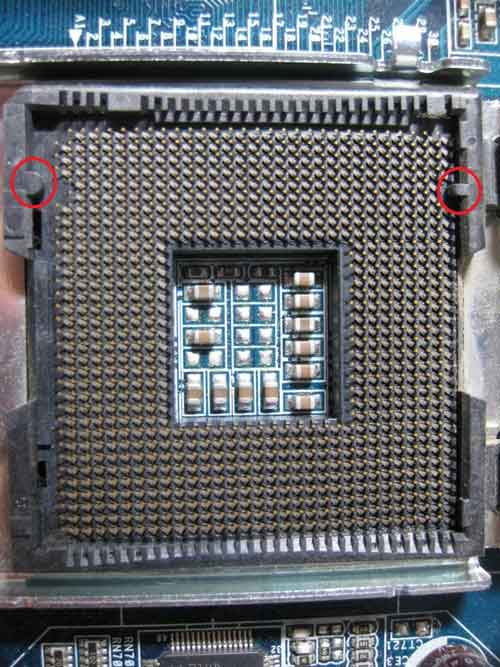
- Cutting the socket tabs: Use a sharp hobby knife or scalpel to carefully remove the two plastic protrusions inside the motherboard’s socket.
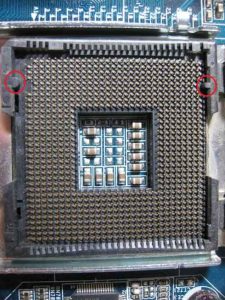
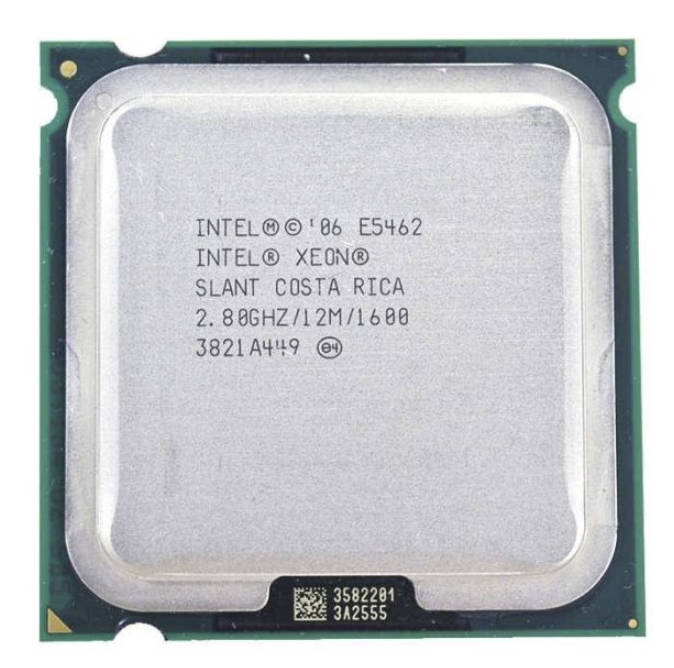
Remove the marked tabs - Modifying the CPU: Notches can be cut into the Xeon’s PCB to match the 775 socket. By 2026, most Xeons sold on platforms like AliExpress come with these notches pre-cut, which is the safest option for beginners.
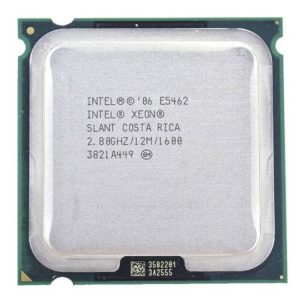
Xeon with pre-cut notches for LGA 775
The Adapter Sticker: Pin Swapping
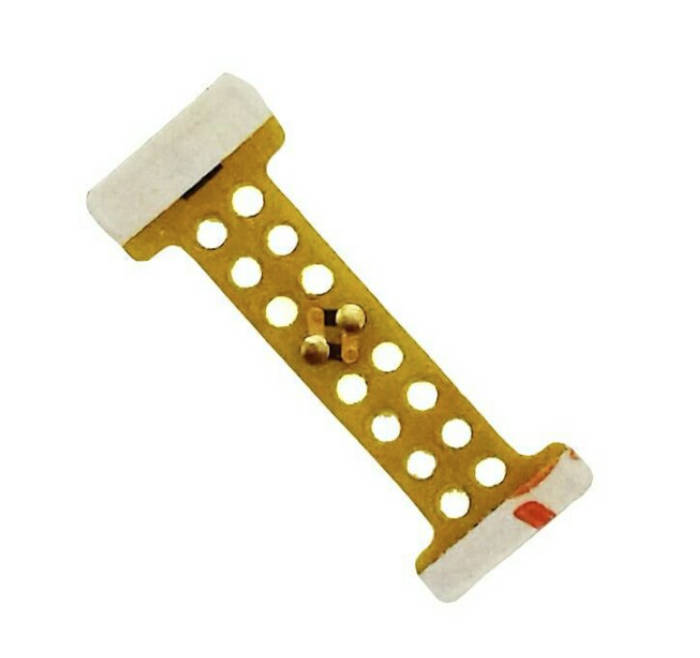
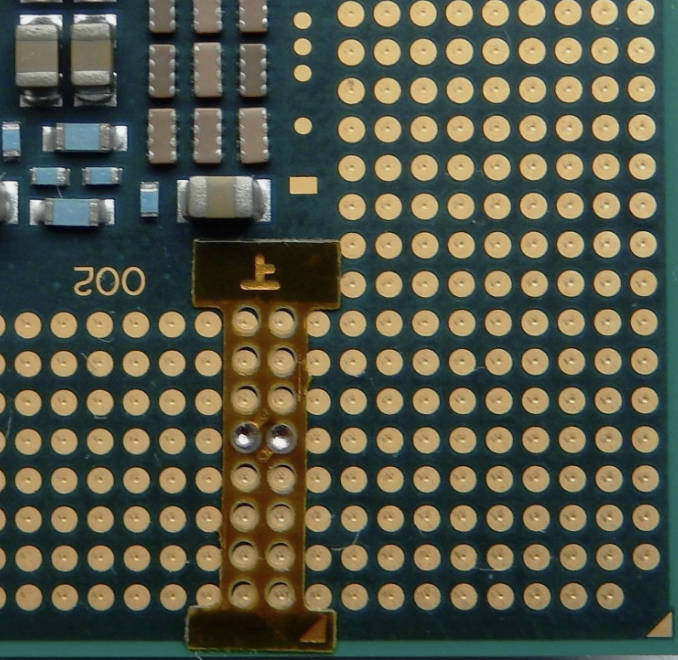
Even if the CPU fits, it won’t work without swapping certain pins. LGA 771 and 775 have two critical power management pins (G33 and C33) in swapped positions. A thin adapter sticker is used to bridge these connections.
Most Xeons sold today come with the sticker pre-applied. If you have an original LGA 771 chip, these stickers are widely available on various marketplaces.
Caution: Misaligning the sticker by even half a millimeter can cause a short circuit. Double-check the alignment before installing the CPU.
If you don’t have an adapter, it is technically possible to DIY one using foil and tape, as shown here:

BIOS Flashing and Microcodes
If the system boots but shows an “Unknown CPU Detected” error or hangs at the splash screen, the BIOS lacks the necessary microcodes.
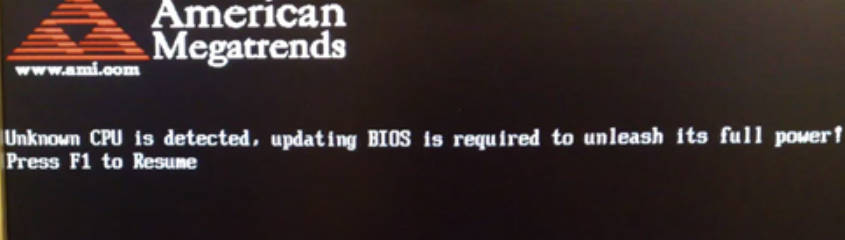
Microcodes are instructions that tell the motherboard how to manage the processor. Without them, you may face:
- Missing Instructions: The OS won’t recognize SSE4.1 or VT-x support.
- Incorrect Temperature Readings: The system may report 100°C at idle, causing the CPU to throttle.
- Power Management Issues: EIST and C1E may fail, forcing the CPU to run at max frequency constantly.
- OS Instability: Windows 10 and 11 may fail to run correctly without proper microcodes.
You must inject the Xeon microcodes (usually 10676 or 1067A) into your BIOS. Many modified BIOS collections already exist for popular boards, so you likely won’t need to do this manually.
Overclocking and Cooling: Pushing the Architecture
Leaving a Xeon at stock speeds is a missed opportunity. These processors have significant headroom, but overclocking on LGA 775 requires balancing the FSB, memory speed, and motherboard VRM capabilities.
FSB Dependence: The Art of Balancing
Unlike modern systems that overclock via the multiplier, LGA 775 systems are overclocked by increasing the Front Side Bus (FSB).
To push an E5450 (9x multiplier) to 3.6 GHz, the FSB must be set to 400 MHz. This introduces several variables:
- Chipset Limits: Budget boards (G31/G41) often hit an “FSB Wall” at 340–350 MHz. Real overclocking requires a P-series chipset.
- RAM Frequency: As the FSB increases, so does the RAM speed. Standard DDR2-800 will be pushed to its limit at a 400 MHz FSB.
- Voltage: Stability at higher clocks requires increasing the Vcore to 1.25V–1.3V, which significantly increases heat.
Basic Overclocking Steps
To maximize performance while maintaining stability, follow these steps while keeping an eye on your motherboard’s power delivery:
- Foundation: Disable power-saving features (C1E, EIST) and Spread Spectrum. Fix the PCIe bus frequency at 101 MHz to prevent SATA or GPU instability as the FSB rises.
- Memory: Set the lowest possible memory multiplier (FSB:DRAM 1:1) to ensure RAM instability doesn’t interfere with finding the CPU’s limit.
- Voltages:
- Vcore: Increase gradually based on your cooling. For 45nm E0 stepping chips, 1.35V–1.36V is generally the safe daily limit if thermals allow.
- VTT (FSB Termination Voltage): Crucial for stability above 400 MHz FSB; usually requires 1.2V–1.3V.
- NB Voltage (MCH): The Northbridge handles the increased data flow. A small boost (+0.1V–0.15V) helps when pushing quad-cores.
- Testing: Increase the FSB in 5–10 MHz increments, testing with LinX or Prime95 after each step. If it crashes, either increase voltage or you have hit the hardware limit of the board or chip.
Cooling Nuances and Sensor Errors
Users often panic seeing 90°C temps at idle. This is often due to a difference in the Tjunction Max parameter.
Consumer Core 2 Quads usually have a TjMax of 100°C, while E54xx Xeons are set to 85°C. Monitoring software often defaults to 100°C, resulting in a 15-degree reporting error.
The Fix: Manually set a TjMax Offset in your monitoring software or subtract 15°C from the reading. However, if you see 70°C+ after the correction, you likely have poor cooler contact or insufficient cooling.
Recommended Coolers
Cooling needs depend on the model and your overclocking goals:
- L Series: These 50W TDP chips work fine with standard aluminum heat sinks. For light overclocking, a copper-core stock cooler or a basic tower is sufficient.
- E Series (Stock): The 80W TDP requires a basic tower cooler with a few heat pipes.
- E5450 Overclocked (3.6+ GHz): A robust tower cooler with 3–4 heat pipes and a 120mm fan is necessary. Airflow over the motherboard’s VRM area is also recommended.
X Series Requirements and VRM Stress
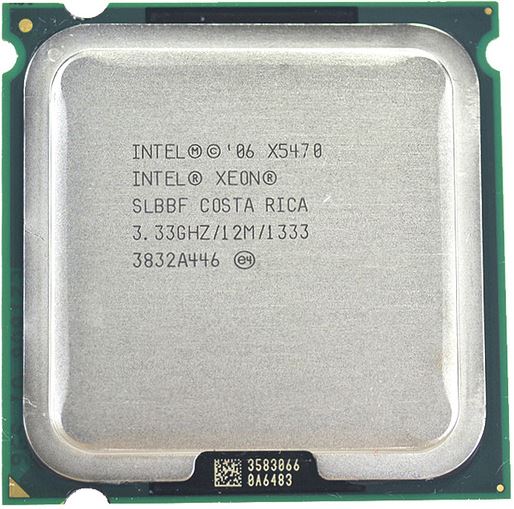
The X series (e.g., X5460, X5470) has a rated TDP of 120–150W. When overclocked to 4 GHz, power draw can exceed 180W.
- VRM: If your board has only 3 or 4 power phases without heatsinks, an X series chip is risky. These require high-end boards like the ASUS P5Q Deluxe or Gigabyte GA-EP45-UD3P with 8–16 phase VRMs. Active cooling for the VRM area is mandatory for heavy overclocking.
- Cooling: High-end air towers or liquid cooling systems are required for the X series.
Usage in 2026: What Can This Platform Actually Do?
The biggest hurdle for LGA 775 in 2026 isn’t clock speed, but missing instruction sets. 45nm Xeons support SSE 4.1, but lack SSE 4.2 and AVX/AVX2.
In 2026, these instructions are often a hard requirement:
- Gaming: Many modern AAA titles will either crash on launch or require third-party emulators that severely degrade performance.
- Professional Software: Recent versions of Adobe Photoshop (27.x+), Premiere Pro, and various 3D suites require AVX. The only workaround is using older versions of these applications.
Web Browsing and 4K Video
The modern web is resource-heavy. While a quad-core Xeon can handle basic browsing, there are limitations:
- YouTube: 1080p works fine. 4K is problematic because these CPUs lack hardware decoding for VP9/AV1. A modern GPU is needed to offload this task. Use the “h264ify” extension for smoother playback on older GPUs.
- Comfort: With an SSD and at least 8 GB of RAM, browsing is acceptable. You can’t comfortably keep 50 tabs open, but 5–10 will work fine.
Retro Gaming and Esports
The Xeon still shines in titles from the “Golden Era” (2010–2015) and light esports games.
- Classics: The Witcher 3, GTA V, and Fallout 4 represent the upper limit for an overclocked Xeon. You won’t get a locked 60 FPS, but it remains playable.
- Esports: Dota 2, World of Tanks, and League of Legends remain playable on these systems.
The reasonable GPU limit for an overclocked quad-core Xeon is something like a GTX 1060 or RX 470/480.
Gaming performance of an E5450 at ~4.0 GHz:

Pros and Cons: A Decade Later
Over a decade has passed since enthusiasts first started cutting sockets for server chips. We can now objectively evaluate this modification.
Advantages (Pros)
- Low Cost: These processors are incredibly cheap, offering a low barrier to entry for quad-core performance.
- Hobbyist Value: An excellent “DIY project” for learning about BIOS mods, overclocking, and hardware fundamentals.
- Platform Longevity: If you have a P45 board sitting around, a Xeon turns it into a capable machine for office work or a home server.
- Nostalgia: There is a unique satisfaction in making 20-year-old hardware handle modern tasks.
Disadvantages (Cons)
- Missing Instructions: The lack of SSE 4.2 and AVX is a hard wall for modern gaming and professional software.
- Power/Heat: An overclocked Xeon consumes as much power as a modern i7 while providing a fraction of the performance.
- Motherboard Scarcity: Finding high-quality LGA 775 boards in good condition is becoming increasingly difficult.
- RAM Limitations: Most boards are capped at 8 GB, and they are picky about DDR3 chip density.
Is it worth it in 2026?
Realistically, if you are building a budget PC from scratch for modern work and gaming, the 775 Xeon mod is not the best choice. The cost of a quality motherboard and cooling is comparable to buying a used LGA 2011/2011-3 setup, which will be faster, quieter, and more stable.
Who is this mod for today?
- Enthusiasts and Collectors: Those who enjoy the process of modification and tuning.
- Legacy Hardware Owners: If you already own a high-end board and RAM, a Xeon is a great way to repurpose the PC for parents or as a media box.
- Home Server Builders: As a base for a NAS or smart home server, a Xeon 5400 is still capable.
Final Verdict: The LGA 771 to 775 mod is a notable moment in PC history. In 2026, it has shifted from a practical upgrade to a hobbyist project. It’s still functional and interesting for those who enjoy working with older hardware and learning how these systems work.

Written by
Senior Hardware Specialist proving you don't need top-tier gear to game. Expert in smart upgrades and budget-friendly PC restoration.