Table of Contents
Launched in 2009, the LGA 1156 socket (Socket H1) reshaped modern PC architecture. With this platform, Intel finally abandoned the aging Northbridge and FSB (Front Side Bus) design, moving the memory controller and PCI-Express lanes directly onto the processor die. This layout drastically cut data latency and simplified motherboard design, turning the system logic (PCH) into a simple hub for peripherals.
In Intel’s lineup, the platform sat comfortably between the retiring LGA 775 and the enthusiast-grade LGA 1366, bringing Nehalem architecture to the mainstream. Yet, LGA 1156 is remembered as one of Intel’s shortest-lived sockets, lasting just over a year in the spotlight. Its quick decline into obscurity was driven by hardware limitations—like the lack of native SATA 3.0 and USB 3.0—and the rapid arrival of the stellar LGA 1155, which made upgrading to 1156 a tough sell for most users.
Let’s dive into the technical quirks of LGA 1156 and break down every processor ever released for the socket—from standard Core i7s to budget-friendly, server-grade Xeons.
Architectural Features
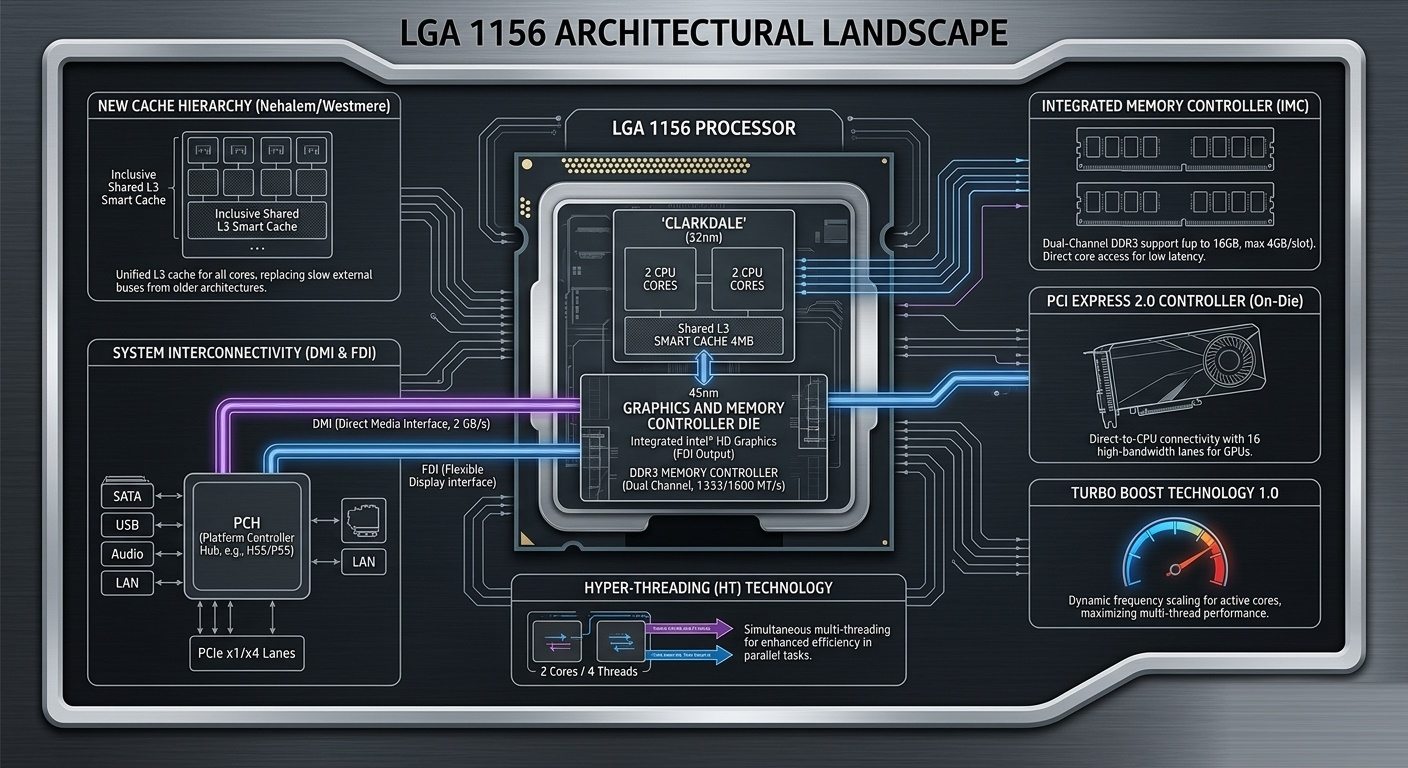
- Complete Northbridge Integration: While LGA 775 relied on a separate MCH chip to manage memory and graphics, LGA 1156 shifted these tasks straight into the CPU.
- Integrated Memory Controller (IMC): The dual-channel DDR3 controller moved onto the processor die. This gave the CPU cores direct access to system memory, slashing latency and removing the bottleneck of the older FSB bandwidth.
- On-Die PCI Express 2.0 Controller: The processor gained 16 dedicated PCIe lanes for the graphics card, enabling direct, high-speed communication between the GPU and the CPU cores.
- DMI Bus (Direct Media Interface): With the Northbridge gone, the CPU hooked up to the motherboard’s single chipset (PCH) via the DMI bus. Its 2 GB/s bandwidth was plenty for handling peripherals, storage, and USB ports.
- Turbo Boost 1.0: LGA 1156 was the proving ground for Intel’s automatic overclocking. The CPU could independently boost the clocks of active cores when others were idle, all while staying within its rated TDP envelope.
- The Return of Hyper-Threading (HT): After a long hiatus following the Pentium 4 era, Intel brought multithreading back to mainstream desktops. High-end Core i7 and Xeon chips became 4-core, 8-thread powerhouses, offering a massive leap in rendering, archiving, and multitasking.
- Smart Cache Hierarchy: Nehalem introduced an inclusive, shared L3 cache. Unlike LGA 775, where cores swapped data over a sluggish external bus, Nehalem handled data exchange internally at blazing speeds.
Nehalem Architecture (Lynnfield Core)
The 45nm Lynnfield chips were Intel’s first “true” mainstream quad-cores. This family includes the Core i5-700, i7-800, and server-grade Xeon X3400 series.
Key Characteristics:
- Monolithic Die: All four cores, the L3 cache, and the controllers are packed onto a single piece of silicon.
- Cache Layout: Processors featured 8 MB of shared L3 cache, dynamically allocated across the cores.
- No Integrated Graphics: These chips lack a built-in GPU, meaning the entire thermal envelope and die space are dedicated to pure compute horsepower.
- Power Consumption: With a standard TDP of 95W on a 45nm node, these chips demand decent cooling, especially if you plan to push the clocks.
A quick note on Xeons: Server chips from the Xeon X3400 series (like the popular X3440 or X3470) have long been the go-to budget choice for LGA 1156, serving up Core i7 performance at a fraction of the cost. Architecturally, they are identical to desktop Core i7-800 parts—sharing the same 45nm Lynnfield core, L3 cache size, and instruction sets. Best of all, they work flawlessly in consumer motherboards “out of the box” without any hardware mods, and they retain full overclocking support.
Westmere Architecture (Clarkdale Core)
Arriving a bit later, the 32nm Clarkdale chips pulled off a double move: transitioning to a smaller process node and introducing integrated graphics. This lineup includes the Core i3-500, Core i5-600 families, and the Pentium G6950.
Key Characteristics:
- Multi-Chip Module (MCM) Design: Under the integrated heat spreader (IHS) sit two distinct dies: a 32nm compute die with the CPU cores, and a 45nm companion die housing the Intel HD Graphics GPU and memory controller.
- On-Chip Graphics: This marked the first time a GPU lived on the processor package rather than the motherboard. However, it still required a motherboard with physical video outputs and a compatible chipset (H55, H57, or Q57).
- Cache Adjustments: The L3 cache was cut down to 4 MB (and a lean 3 MB for the Pentium).
- Memory Latency Penalties: Because the memory controller sat on the separate 45nm die, Clarkdale suffered from higher memory latency than Lynnfield, slightly hurting its clock-for-clock efficiency.
All LGA1156 Processors and Their Specifications
Lynnfield (45nm, Quad-Core, No iGPU)
| Model | Cores/Threads | Base Clock | Turbo Clock | L3 Cache | TDP | Hyper-Threading | Unlocked Multiplier | Memory Support |
|---|---|---|---|---|---|---|---|---|
| Core i7-880 | 4/8 | 3.06 GHz | 3.73 GHz | 8 MB | 95 W | Yes | No | DDR3-1066/1333 |
| Core i7-875K | 4/8 | 2.93 GHz | 3.60 GHz | 8 MB | 95 W | Yes | Yes | DDR3-1066/1333 |
| Core i7-870 | 4/8 | 2.93 GHz | 3.60 GHz | 8 MB | 95 W | Yes | No | DDR3-1066/1333 |
| Core i7-870S | 4/8 | 2.66 GHz | 3.60 GHz | 8 MB | 82 W | Yes | No | DDR3-1066/1333 |
| Core i7-860 | 4/8 | 2.80 GHz | 3.46 GHz | 8 MB | 95 W | Yes | No | DDR3-1066/1333 |
| Core i7-860S | 4/8 | 2.53 GHz | 3.46 GHz | 8 MB | 82 W | Yes | No | DDR3-1066/1333 |
| Core i5-760 | 4/4 | 2.80 GHz | 3.33 GHz | 8 MB | 95 W | No | No | DDR3-1066/1333 |
| Core i5-750 | 4/4 | 2.66 GHz | 3.20 GHz | 8 MB | 95 W | No | No | DDR3-1066/1333 |
| Core i5-750S | 4/4 | 2.40 GHz | 3.20 GHz | 8 MB | 82 W | No | No | DDR3-1066/1333 |
| Xeon X3480 | 4/8 | 3.06 GHz | 3.73 GHz | 8 MB | 95 W | Yes | No | DDR3-1066/1333 (ECC) |
| Xeon X3470 | 4/8 | 2.93 GHz | 3.60 GHz | 8 MB | 95 W | Yes | No | DDR3-1066/1333 (ECC) |
| Xeon X3460 | 4/8 | 2.80 GHz | 3.46 GHz | 8 MB | 95 W | Yes | No | DDR3-1066/1333 (ECC) |
| Xeon X3450 | 4/8 | 2.66 GHz | 3.20 GHz | 8 MB | 95 W | Yes | No | DDR3-1066/1333 (ECC) |
| Xeon X3440 | 4/8 | 2.53 GHz | 2.93 GHz | 8 MB | 95 W | Yes | No | DDR3-1066/1333 (ECC) |
| Xeon X3430 | 4/4 | 2.40 GHz | 2.80 GHz | 8 MB | 95 W | No | No | DDR3-1066/1333 (ECC) |
| Xeon L3426 | 4/8 | 1.86 GHz | 3.20 GHz | 8 MB | 45 W | Yes | No | DDR3-1066/1333 (ECC) |
Clarkdale (32nm, Dual-Core + iGPU)
| Model | Cores/Threads | Base Clock | Turbo Clock | L3 Cache | Integrated Graphics | TDP | Hyper-Threading | Unlocked Multiplier | Memory Support |
|---|---|---|---|---|---|---|---|---|---|
| Core i5-680 | 2/4 | 3.60 GHz | 3.86 GHz | 4 MB | Intel HD Graphics | 73 W | Yes | No | DDR3-1066/1333 |
| Core i5-670 | 2/4 | 3.46 GHz | 3.73 GHz | 4 MB | Intel HD Graphics | 73 W | Yes | No | DDR3-1066/1333 |
| Core i5-661 | 2/4 | 3.33 GHz | 3.60 GHz | 4 MB | Intel HD Graphics (900 MHz) | 87 W | Yes | No | DDR3-1066/1333 |
| Core i5-660 | 2/4 | 3.33 GHz | 3.60 GHz | 4 MB | Intel HD Graphics | 73 W | Yes | No | DDR3-1066/1333 |
| Core i5-655K | 2/4 | 3.20 GHz | 3.46 GHz | 4 MB | Intel HD Graphics | 73 W | Yes | Yes | DDR3-1066/1333 |
| Core i5-650 | 2/4 | 3.20 GHz | 3.46 GHz | 4 MB | Intel HD Graphics | 73 W | Yes | No | DDR3-1066/1333 |
| Core i3-560 | 2/4 | 3.33 GHz | — | 4 MB | Intel HD Graphics | 73 W | Yes | No | DDR3-1066/1333 |
| Core i3-550 | 2/4 | 3.20 GHz | — | 4 MB | Intel HD Graphics | 73 W | Yes | No | DDR3-1066/1333 |
| Core i3-540 | 2/4 | 3.06 GHz | — | 4 MB | Intel HD Graphics | 73 W | Yes | No | DDR3-1066/1333 |
| Core i3-530 | 2/4 | 2.93 GHz | — | 4 MB | Intel HD Graphics | 73 W | Yes | No | DDR3-1066/1333 |
| Pentium G6960 | 2/2 | 2.93 GHz | — | 3 MB | Intel HD Graphics | 73 W | No | No | DDR3-1066 |
| Pentium G6951 | 2/2 | 2.80 GHz | — | 3 MB | Intel HD Graphics | 73 W | No | No | DDR3-1066 |
| Pentium G6950 | 2/2 | 2.80 GHz | — | 3 MB | Intel HD Graphics | 73 W | No | No | DDR3-1066 |
| Celeron G1101 | 2/2 | 2.26 GHz | — | 2 MB | Intel HD Graphics | 73 W | No | No | DDR3-1066 |
| Xeon L3406 | 2/4 | 2.27 GHz | 2.53 GHz | 4 MB | No iGPU | 30 W | Yes | No | DDR3-1066 (ECC) |
Chipsets and Compatibility
The move to LGA 1156 introduced the Platform Controller Hub (PCH). Since the heavy architectural lifting moved to the CPU, motherboard features relied entirely on the chosen chipset. Crucially, the 5-series introduced the FDI (Flexible Display Interface) bus, which was mandatory for routing video signals out from Clarkdale’s integrated graphics.
Chipset Specifications Summary Table
| Feature | P55 | H55 | H57 | Q57 |
|---|---|---|---|---|
| Integrated Graphics Support (FDI) | No | Yes | Yes | Yes |
| Overclocking (BCLK / Voltages) | Full | Partial (vendor-dependent) | Limited | No |
| PCI-E Lanes (CPU) | 1×16 or 2×8 | 1×16 | 1×16 | 1×16 |
| PCI-E Lanes (PCH) | 8 lanes (2.5 GT/s) | 6 lanes (2.5 GT/s) | 8 lanes (2.5 GT/s) | 8 lanes (2.5 GT/s) |
| RAID Support (Intel Rapid Storage) | Yes | No | Yes | Yes |
| USB 2.0 / SATA 2.0 Ports | 14 / 6 | 12 / 6 | 14 / 6 | 14 / 6 |
Keep in mind that the 5-series PCH (DMI) bus runs at a legacy 2.5 GT/s (PCIe Gen 1 speeds). Running a modern NVMe drive via a PCIe adapter is highly inefficient, as the outdated bus severely bottlenecks transfer speeds.
Overclocking Realities on H-Chipsets
Contrary to popular belief, you can overclock on H55 and H57 chipsets, but there are massive catches. While the P55 was purpose-built for tuning (including PCIe lane splitting for multi-GPU setups), the video-enabled chipsets are heavily handcuffed by the BIOS. On premium boards from ASUS, Gigabyte, or EVGA, you can often push the BCLK bus, but you will likely run into locked memory multipliers or missing voltage tweaks. The corporate-focused Q57 chipset locks out overclocking entirely.
RAM: The Ultimate LGA 1156 Headache
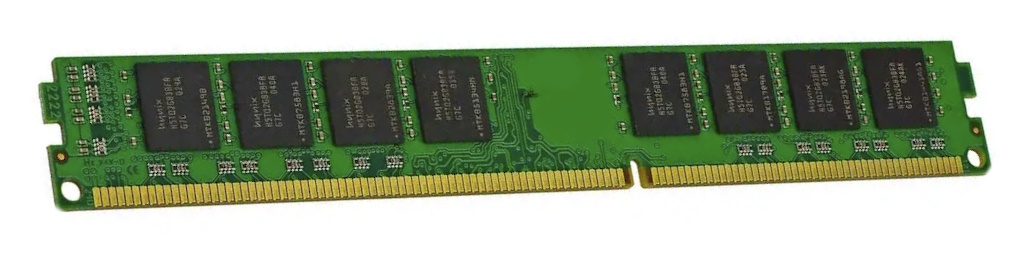
The integrated memory controller on these first-gen chips enforces strict, unforgiving limitations on DDR3 module layout and density.
- Per-Slot Capacity Limits: The platform caps out at a maximum of 4 GB per slot. That means a 4-slot board hits its limit at 16 GB, and a 2-slot board stops at 8 GB. Modern 8 GB sticks will cause a no-boot scenario 99% of the time, no matter their speed.
- Chip Density Quirks: The IMC only reads memory chips with a 256 MB density. Consequently, a 4 GB stick must be dual-sided (populated with 16 chips total—8 on each side). Modern single-sided 4 GB sticks (using 8 chips of 512 MB) simply won’t work.
- Memory Speeds: The official spec is limited to 1066/1333 MHz. Running memory at 1600 MHz or 1866 MHz requires cranking the BCLK bus, a feature missing on budget boards.
Motherboards: A Survival Guide
If you are shopping for an LGA 1156 board in 2026, remember that this platform is well over 15 years old. Age brings physical risks: budget boards often have failing electrolytic capacitors, and PCBs can develop microcracks from decades of heat cycles and flexing.
VRM Power Delivery and Thermal Demands
To keep high-end Core i7s and Xeon X3400 chips stable—which pull 95W at stock and much more when overclocked—you need a solid VRM layout.
- The Baseline: A basic 3+1 phase design works for stock use, but pushing overclocks or sustained workloads demands a quality 4+2 or 8-phase VRM.
- Heatsinks Matter: Dedicated heatsinks over the MOSFETs are non-negotiable for running a Xeon long-term. Bare VRMs on cheap boards will quickly overheat, causing severe CPU throttling or outright board failure.
The Infamous Foxconn Socket Issue
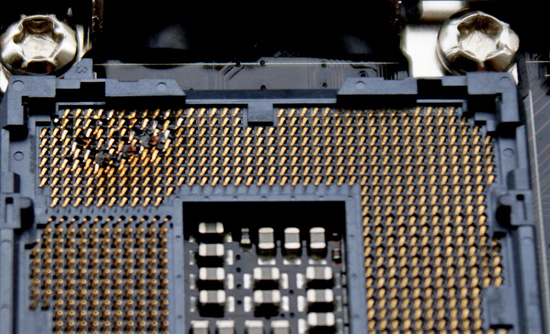
LGA 1156 suffered a major early scandal involving sockets manufactured by Foxconn. Early revisions suffered from uneven clamping pressure, resulting in poor contact on specific socket pins. Under heavy overclocking and high voltages, this poor contact led to localized arcing, literally burning out the socket pins and the contact pads on the underside of the CPU.
Sockets built by Lotes or Tyco AMP are much safer bets. When buying a used board, always peer inside the socket with a magnifying glass—any discolored plastic or warped pins mean the board was pushed past its limits.
AliExpress Boards and OEM Solutions
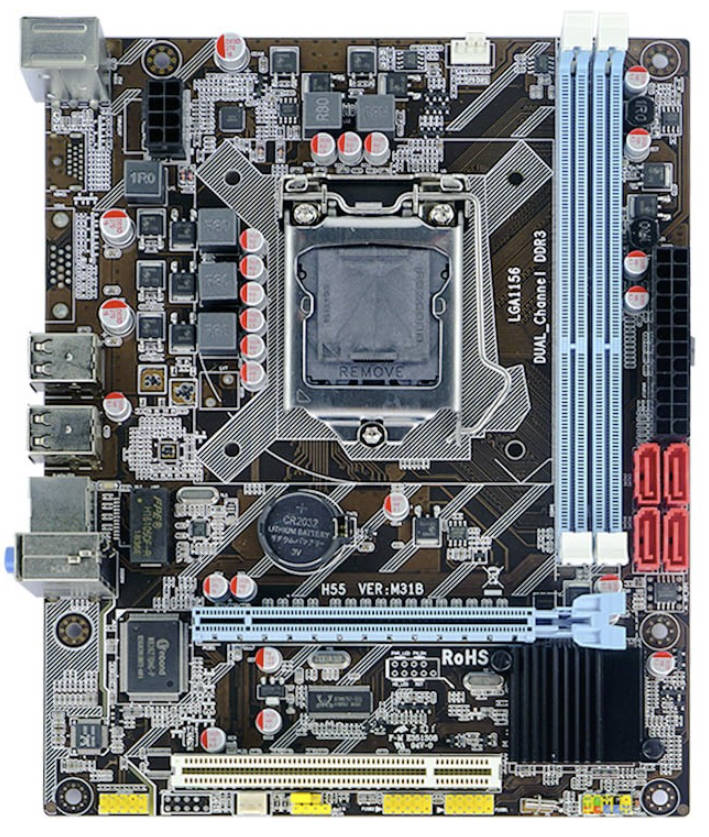
Unlike the highly popular LGA 2011 platform, generic “Chinese” motherboards for LGA 1156 are rare finds today. Their production peaked years ago, making new AliExpress inventory scarce. If you do go this route, watch out for these major issues:
- Bottom-Tier Hardware: These boards frequently use refurbished, salvaged chipsets paired with cheap capacitors and chokes.
- Anemic VRMs: Power delivery zones are almost always bare. If you drop an 8-thread chip into one, pointing a dedicated fan at the VRM area is mandatory.
- Crippled Software: The BIOS on these boards is barebones. They usually lack BCLK adjustments or voltage controls, completely killing the platform’s main selling point.
- Broken Hardware Monitoring: Buggy temperature readouts and erratic fan speed controls are incredibly common.
Be equally careful with OEM motherboards pulled from old prebuilts (HP, Dell, Lenovo). While reliable, they often feature proprietary power pinouts and non-standard cooler mounts, and their locked-down BIOS versions will likely reject server Xeons.
Overclocking and Operating Quirks
LGA 1156 represents the end of an era for Intel tuning: it was the last mainstream platform where performance was unlocked by cranking the base system clock (BCLK). Unlike modern platforms where you just slide up a CPU multiplier, here you must carefully balance processor, memory, and QPI bus frequencies in tandem.
The Fundamentals of BCLK Tuning
The default base clock for all LGA 1156 chips is 133 MHz. Since multipliers are locked on nearly every model (except the ultra-rare Core i7-875K and i5-655K Unlocked editions), increasing BCLK is your only path to more speed.
- What to Expect: Most name-brand P55 and H55 motherboards can comfortably hit a BCLK of 180–200 MHz. This lets you push a cheap Xeon X3440 from its modest 2.53 GHz base up to an impressive 3.8–4.0 GHz.
- Frequency Dependencies: Raising the BCLK simultaneously overclocks your RAM and internal CPU busses (Uncore and QPI). You must drop their respective multipliers in the BIOS as you go, ensuring your memory doesn’t overshoot its limits and crash the system.
Basic LGA1156 overclocking guide:

Safe Voltages and Thresholds
Voltage limits depend entirely on the lithography node of the core. It’s critical to separate your core voltage (Vcore) from the memory controller voltage (VTT/IMC).
| Parameter | Lynnfield (45nm) / Xeon | Clarkdale (32nm) |
|---|---|---|
| Vcore (CPU Core) | Up to 1.40 V | Up to 1.35 V |
| VTT / IMC | Up to 1.35 V | Up to 1.30 V |
| DRAM (Memory) | 1.50 – 1.65 V | 1.50 – 1.65 V |
Do not run a daily VTT above 1.35V; doing so risks permanently degrading the integrated memory controller.
Delidding: Is It Worth It?
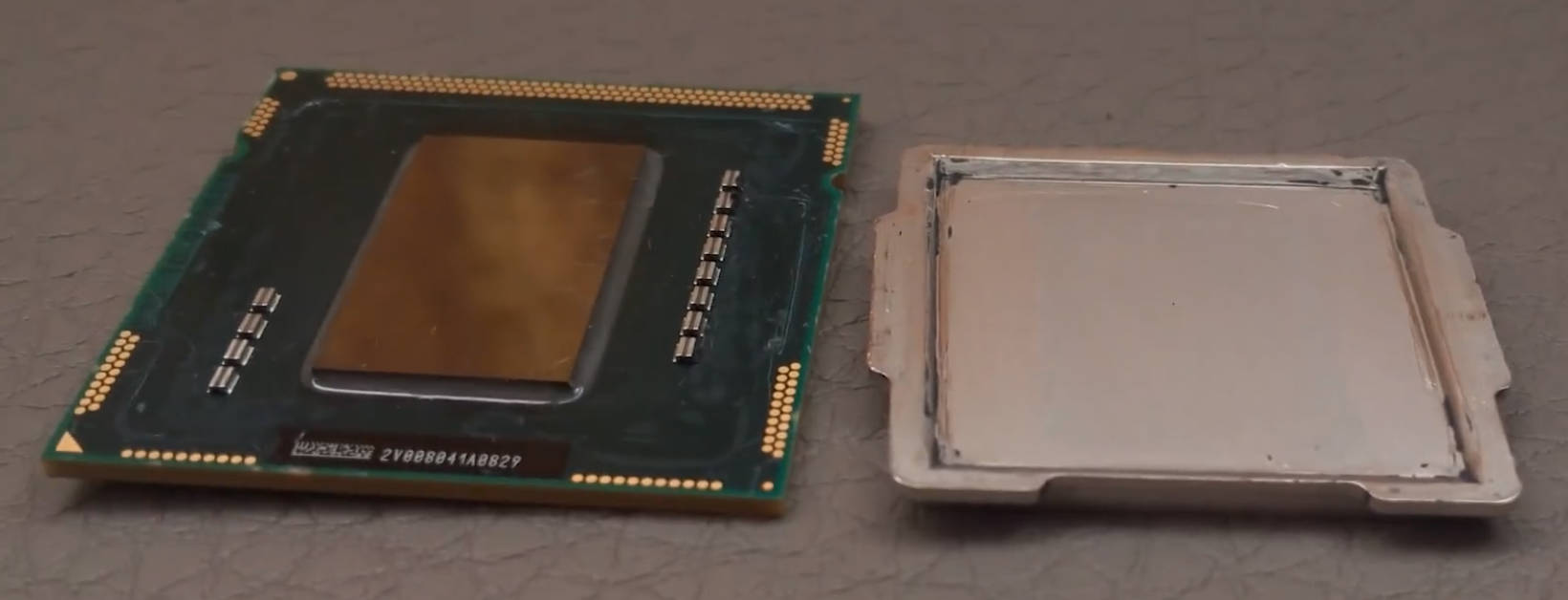
Whether you should delid your CPU depends entirely on which core architecture you are running:
- Lynnfield (Core i5-700, i7-800, Xeon X3400): These chips feature high-quality indium-based solder under the IHS. Delidding is unnecessary and highly risky, as you can easily tear the silicon off the substrate.
- Clarkdale (Core i3-500, i5-600, Pentium G6950): Intel used standard thermal paste between the 32nm compute die and the IHS. Over the last 15+ years, this paste has turned to cement. Delidding a Clarkdale chip and applying liquid metal can drop load temperatures by 15–20°C, which is a lifesaver for chasing overclocks past 4.2 GHz.
Even with high-quality solder, overclocked Lynnfield quad-cores run incredibly hot. To tame 4.0 GHz at 1.35V, a standard 3- or 4-heatpipe tower cooler will choke. You will need a massive dual-tower cooler with 5–6 pipes or a decent AIO liquid cooler to avoid thermal throttling under load.
Platform Relevance in 2026
In 2026, LGA 1156 has firmly crossed over into “retro hardware” territory. Even so, machines built around a clocked Xeon X3440–X3470 or a Core i7-870 can still hold their own in basic, non-AVX workloads.
- Daily Driving & Web Browsing: Paired with an SSD and 8 to 16 GB of RAM, these systems glide through web surfing, office suites, and 1080p video streaming without breaking a sweat.
- Home Server / NAS Duty: Thanks to the 4-core, 8-thread layout, an old LGA 1156 rig makes a fantastic, low-cost file server or lightweight local media host.
- Retro and Esports Gaming: If heavily overclocked, the platform can still drive older classics (like GTA V, The Witcher 3, and Fallout 4) or competitive esports titles.
Gaming and synthetic benchmarks, along with a head-to-head against the modern Core i3-12100F:

The Fatal Flaws of LGA 1156 Today
The biggest barrier to using LGA 1156 today isn’t its raw single-threaded speed—it’s the absolute wall of missing modern instructions and legacy IO:
The Total Lack of AVX/AVX2: This is the ultimate dealbreaker. First-gen Core architectures lack the AVX instruction sets that have become mandatory for modern applications. A growing list of recent games and professional applications will simply refuse to launch entirely.
Severe IO and Expansion Bottlenecks:
- No Native NVMe and SATA II Limits: Booting modern M.2 drives requires messy PCIe adapter workarounds, and standard SATA SSDs are permanently handcuffed to legacy 300 MB/s SATA II limits.
- No USB 3.0: Most motherboards from this era lack high-speed USB support out of the box.
- PCIe 2.0 Bandwidth Starvation: Modern graphics cards are severely choked by the older PCIe 2.0 standard.
Do not pair this platform with modern budget or mid-range GPUs that utilize cut-down PCIe configurations (like x8 or x4 lanes, such as the RX 6500 XT or RTX 4060). Running a cut-down card on an old PCIe 2.0 slot severely bottlenecks bandwidth, resulting in brutal frame drops. Stick to older cards that use a full x16 interface.
Component Degradation: Finding a fully functional, high-end motherboard is a massive challenge in 2026. Capacitors, trace lines, and power phases are reaching the end of their operational lifespans.
Conclusion: Is LGA 1156 Worth It in 2026?
The LGA 1156 platform remains a landmark milestone in PC history, completing the blueprint for modern system architecture. But in 2026, buying into it depends entirely on whether you’re building a practical computer or just scratching a hobbyist itch.
Building from Scratch? Don’t Do It.
The short answer is no. Spending hard-earned cash on both an LGA 1156 motherboard and CPU from scratch makes zero economic sense today.
Who Is This Platform For?
LGA 1156 is best treated as a fun tech playground. It is only worth your time in two specific scenarios:
- The Spare-Parts Revival: If you already have a working motherboard and a kit of DDR3 gathering dust in a drawer, grabbing a 4-core, 8-thread Xeon X3400 series chip for dirt cheap is an excellent way to spin up a functional secondary PC.
- Hardware Enthusiasts & Retro Overclockers: For builders who miss the golden age of PC tuning, LGA 1156 is the perfect playground for old-school BCLK bus overclocking. It offers the raw satisfaction of chasing a 30% performance gain through manual BIOS tweaking. It’s a fantastic, low-cost project for running 2008–2015 era games, exploring Nehalem architecture, and having pure hardware fun.

Written by
Senior Hardware Specialist proving you don't need top-tier gear to game. Expert in smart upgrades and budget-friendly PC restoration.