If Intel’s FPT/FPTW refuses to talk to the BIOS chip on your Chinese X99 (LGA2011‑3) board with “Error 103: There is no supported SPI flash devices installed”, you’re most likely dealing with an XMC XM25QH, GallopMem GM25Q, or Fudan FM25Q/FM25W series flash chip — or one of a growing list of similar budget Chinese-market parts. This is a software/database problem, not a dead chip and not a wiring fault, and it has a five-minute fix.
Besides the usual difficulties with reading and flashing, these chips (especially XMC) are frequently responsible for bricking boards after a BIOS update. This typically happens when the BIOS was designed for similar motherboards that use the more common Winbond or Macronix chips and therefore lacks the necessary support for these Chinese flash parts.
This article focuses on Chinese X99 boards specifically, since that’s where these chips turned up and where we’ve verified the details below. The underlying mechanism — a static parts database bundled with FPT — isn’t unique to this platform, so the fix will likely transfer to other boards using the same chips.
Meet the chip
Since around 2021–2022, several Chinese X99 motherboard makers quietly switched their BIOS flash chip from the usual Winbond/Macronix parts to the XMC XM25QH128AHIG, a 128Mbit (16MB) SPI NOR flash from Wuhan Xinxin Semiconductor Manufacturing Corp. Electrically it’s an ordinary 3.3V SPI flash chip — nothing wrong with the silicon. Since 2023, boards started appearing with GallopMem GM25Q128ASIG chips instead, which trip up FPT the same way. Chips from Shanghai Fudan Microelectronics have also shown up on some boards, sold under two distinct part-number families — FM25Q and FM25W. We don’t have a solid date for exactly when Fudan chips entered the mix; it’s the same pattern repeating rather than a single new event. Whenever a board maker switches to a cheaper or smaller flash vendor to save a few cents on the bill of materials, there’s a real chance the new chip simply isn’t in your flashing tool’s database yet.
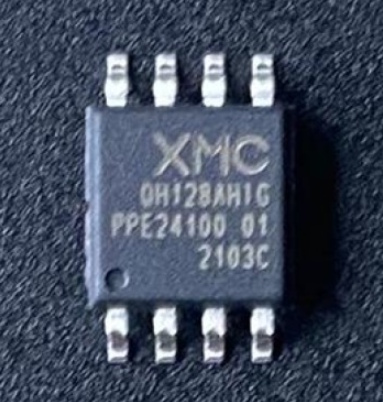
The error
Running fpt -bios -d bios.bin (or any other FPT/FPTW command that touches the flash) throws:
Error 103: There are no supported SPI flash devices installed. Please check connectivity and orientation of SPI flash device.

Why it happens
FPT doesn’t probe the chip’s SFDP (Serial Flash Discoverable Parameters) table the way a modern OS flash driver would. Instead it matches the chip’s JEDEC/RDID identifier against a plain-text list bundled with the tool, fparts.txt. If the identifier isn’t in that list, FPT treats the chip as unsupported — even though it’s talking to it just fine electrically. XMC entered the SPI flash market later than Winbond or Macronix, and GallopMem and Fudan later still, so older FPT/FPTW packages simply shipped without their IDs. Nothing is broken; the tool is just missing a lookup entry.
The fix
- Locate
fparts.txt— it lives in the same folder asfpt.exe/fptw64.exe. - Open it in a plain text editor and add the relevant line(s) at the end of the file — at minimum, one line per chip family you might actually be dealing with:
XM25QH128A, 0x207018, 0x8000000, 0x1000, 0x20, 64, 0
GM25Q128A, 0x1C4018, 0x8000000, 0x1000, 0x20, 64, 0
FM25Q128A, 0xA14018, 0x8000000, 0x1000, 0x20, 64, 0
That covers XMC XM25QH128AHIG, GallopMem GM25Q128ASIG, and the more common of the two Fudan chips, in that order. If your board turns out to use the other Fudan family, a newer XMC die revision, or a BOYA/Zbit part instead, use the fuller table below to find the right line.
Save the file and re-run FPT — it should now identify the chip correctly. If you’d rather not edit anything by hand, download our extended fparts.txt below, which already includes these plus everything in the table underneath (and a number of mainstream Winbond, Macronix, Micron, GigaDevice, EON/ESMT, Adesto, and ISSI parts besides) — drop it in next to fpt.exe, replacing the stock file.
⬇ Download the extended fparts.txt
Chips known to need this fix
These are the flash chips we’ve seen on Chinese X99 boards that a stock fparts.txt won’t recognize. All are 128Mbit (16MB) — the standard BIOS chip capacity for this platform.
| Manufacturer | Part | JEDEC ID | Notes |
|---|---|---|---|
| XMC | XM25QH128AHIG | 0x207018 | The original culprit, mass-adopted from 2021–2022 onward. |
| GallopMem | GM25Q128ASIG | 0x1C4018 | Appeared on boards from 2023 onward. |
| XMC (newer die revision) | XM25QH128C | 0x204018 | Same manufacturer, different silicon revision — the JEDEC ID changed, so a board that “uses the same chip” as an older revision can still need a separate entry. |
| Fudan Microelectronics | FM25Q128A | 0xA14018 | The more commonly reported of the two Fudan families below. |
| Fudan Microelectronics | FM25W128 | 0xA12818 | A separate Fudan family with its own JEDEC ID — if FM25Q128A doesn’t fix your board, try this line instead. Less widely reported than the four rows above; confirm against the marking on your own chip before relying on it. |
| BOYA | BY25Q128AS / BY25B128AS | 0x684018 | A second budget Chinese flash brand seen on more recent production batches. |
| Zbit Semiconductor | ZB25VQ128 / ZB25LQ128A / ZB25VQ128A | 0x5E4018 / 0x5E5018 / 0x5E6018 | Another smaller domestic fab occasionally used by budget board houses. |
My chip isn’t in any list — how do I find its fparts.txt line myself?
New flash brands keep showing up faster than any single list can track. Here’s the general process, with a worked example.
Getting the raw chip ID when nothing recognizes it by name. Both FPT and most CH341A software will print a raw JEDEC/RDID identifier even for a chip they don’t have a name for. On Linux, flashrom -p ch341a_spi is a good alternative for this — it typically prints something like Found Unknown flash chip "unknown SPI flash chip" (ID: 0x1c7018, ...) even when it can’t identify the part. That hex string is exactly what you need for the “Device ID” field — from there, search the ID (or the part number laser-marked on the chip itself) against the manufacturer’s datasheet to confirm capacity and erase parameters before writing anything.
Building an fparts.txt line from a datasheet. Say your board uses an XMC XM25QH256C — a real chip, useful here purely to show the arithmetic. Its datasheet gives:
- JEDEC ID:
0x204019 - Capacity: 256Mbit = 32MB = 0x10000000 in bits
- Erase block size: 4K =
0x1000bytes - Block erase opcode:
0x20 - Write granularity: 64 bytes (standard page-program behavior)
- Write Status Register enable: not required →
0
Put together, that’s exactly:
XM25QH256C, 0x204019, 0x10000000, 0x1000, 0x20, 64, 0This is literally how every line in fparts.txt is built — there’s no magic to it once you have the datasheet numbers. Whatever you do, dump and back up the existing BIOS content before writing anything new, and always verify a read-after-write checksum before trusting a freshly flashed chip.

Written by
Senior Hardware Specialist proving you don't need top-tier gear to game. Expert in smart upgrades and budget-friendly PC restoration.