Table of Contents
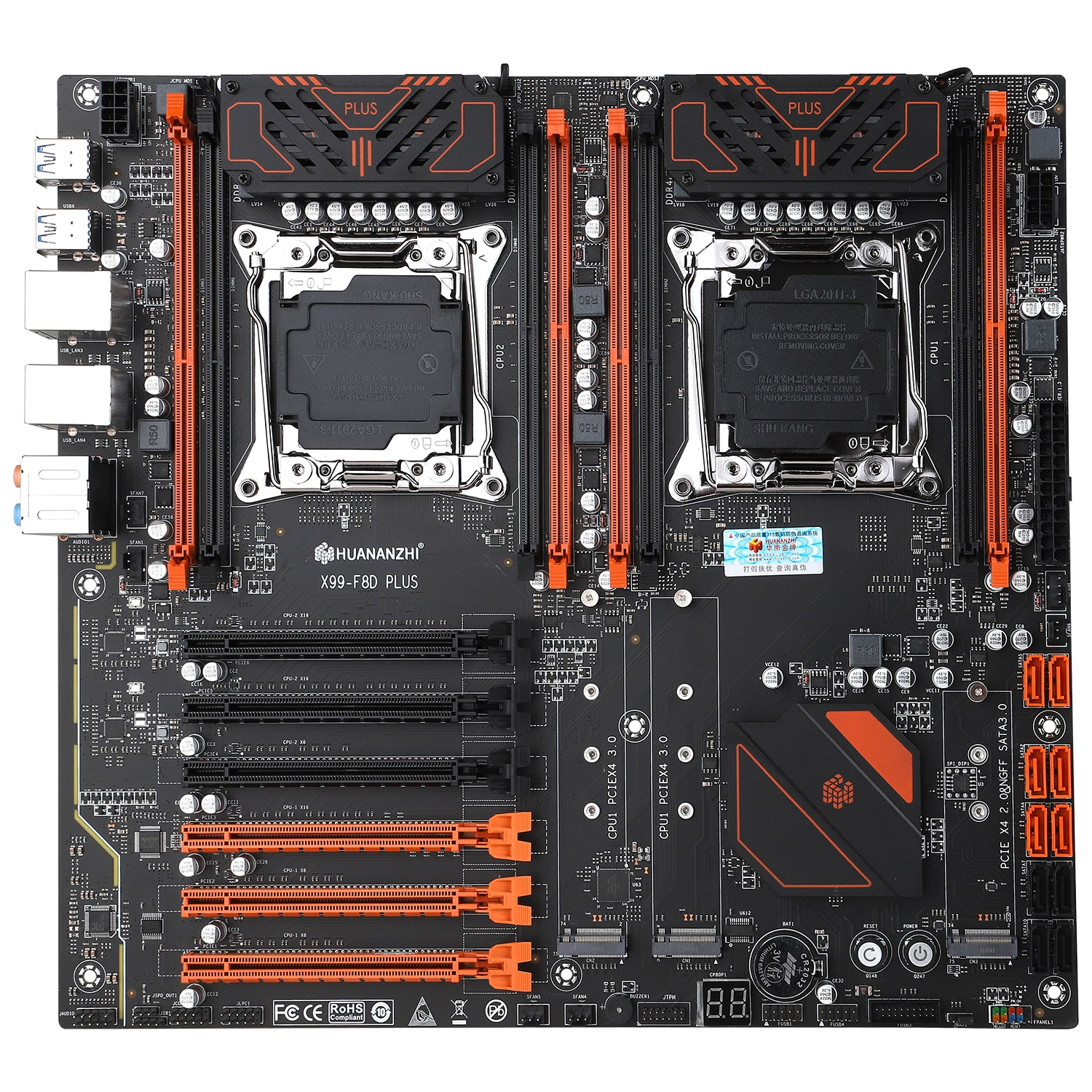
The Huananzhi X99-F8D Plus is a dual-socket motherboard for LGA2011‑3. It went on sale in the summer of 2022 as an upgraded version of the X99-F8D and has remained one of the most capable Chinese dual-CPU boards ever since. You get eight memory slots, six full-length PCIe slots, three M.2 slots, two 2.5G network ports and actively cooled VRMs.
The board costs noticeably more than budget dual-socket options like the ZX-DU99D4. In return, it doesn’t hold the platform back: all 80 CPU PCIe lanes are wired up, and each CPU runs its memory in quad-channel mode.
Specifications
| Model | Huananzhi X99-F8D Plus V1.2 |
|---|---|
| Socket | 2 x LGA 2011-3 |
| Chipset | C612 |
| Supported Processors | Intel Xeon E5-2600 v3/v4, E5-4600 v3/v4 (Haswell-EP/Broadwell-EP) |
| VRM Configuration | 4 phases per CPU (8 virtual via doublers) Total MOSFETs per CPU: 24 (8 high-side + 16 low-side) Active cooling (VRM fans) |
| Maximum Recommended TDP | ≤145W (v3/v4 processors) |
| Supported Memory | 8 x DDR4 DIMM (quad-channel per CPU) with ECC, REG ECC, LRDIMM and non-ECC support Maximum capacity: 512 GB |
| Sleep Mode (S3) Support | Yes |
| Expansion Slots | 3 x PCI-e x16 (Gen 3.0) 3 x PCI-e x8 (Gen 3.0) |
| Storage | 6 x SATA 3.0 4 x sSATA 3.0 2 x M.2 (NVMe, Gen 3.0 x4) 1 x M.2 (NVMe Gen 2.0 x4 / NGFF SATA) |
| Fan Connectors | 2 x CPU cooler (4pin) 4 x Case fan (3pin) |
| PS/2 Ports | No |
| USB 3.0 Ports | 4 (+ front panel support) |
| USB 2.0 Ports | 4 (+ front panel support) |
| Network | 2 x 2.5G LAN (RTL8125BG) |
| Audio | 7.1 channel (ALC897) |
| Super I/O | NCT5532D |
| JLPC header | Yes |
| TPM 2.0 header | 14-pin LPC |
| Extra | POST code display Power / Reset buttons PC speaker COM header |
| PCB Layers | 12 |
| Form Factor & Dimensions | EATX 305 x 330 mm |
| Approximate Price |
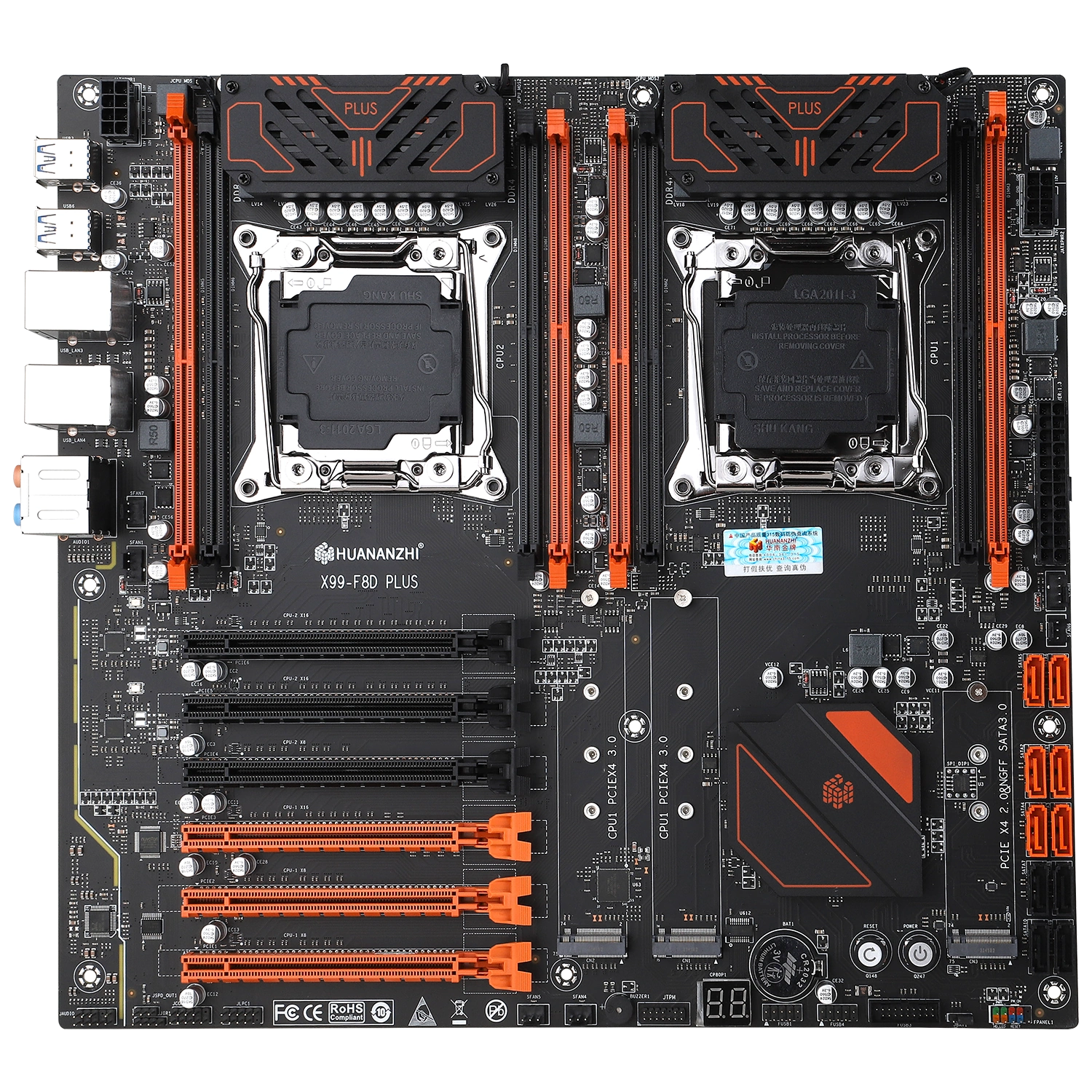
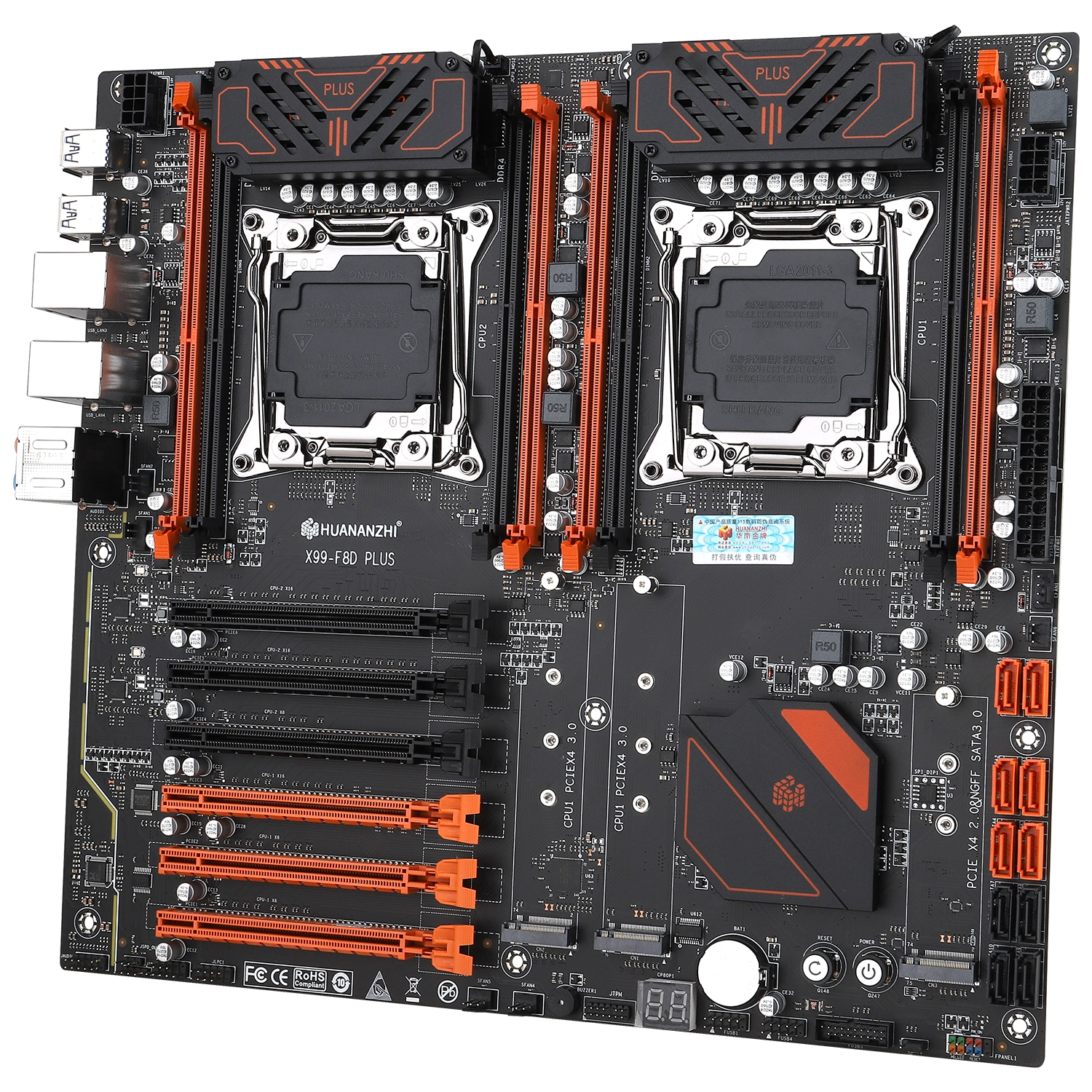
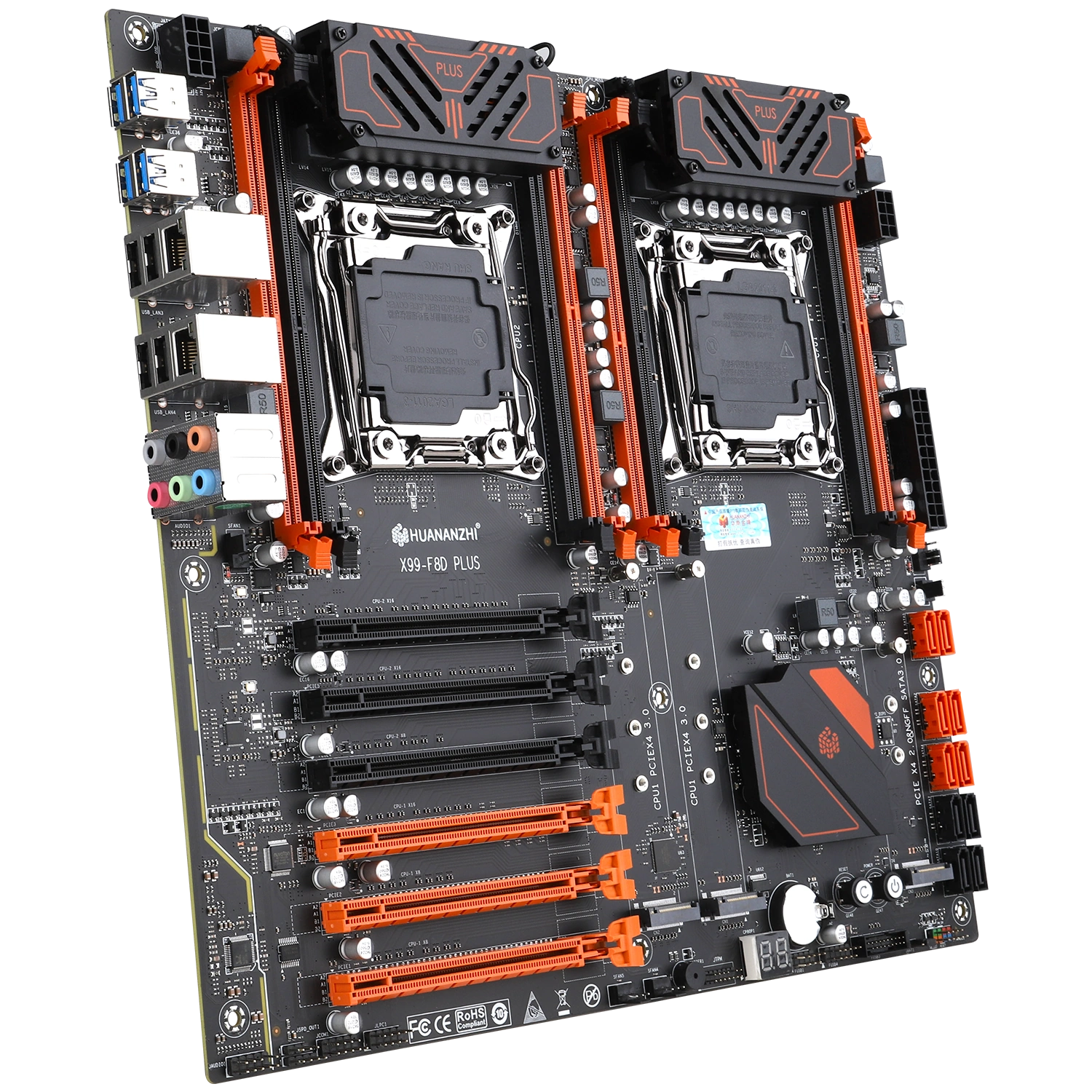
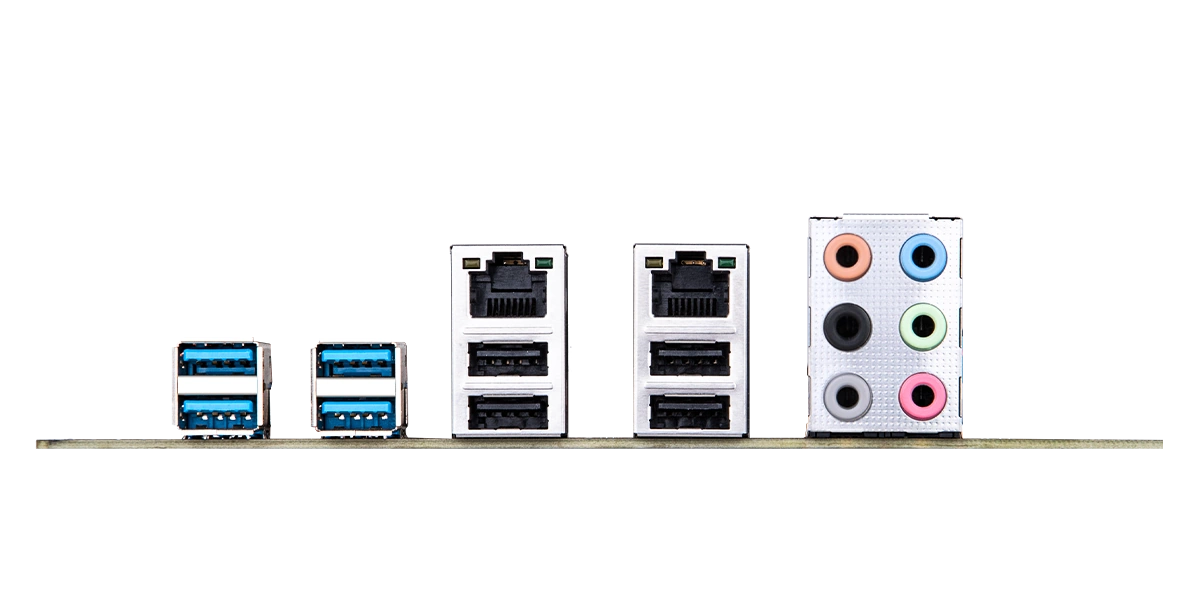
Like every dual-socket model, the F8D Plus is built on the server-grade C612 chipset. Visually, the board looks quite solid. It doesn’t have reinforced PCIe slots or an integrated I/O shield, but it does have the extras you’d expect from a top-tier Chinese board: active VRM cooling, power and reset buttons, and a POST code display. The fairly thick 12-layer PCB adds to the feeling that this is a proper product rather than a cheap knockoff.
Huananzhi officially lists support for up to 512 GB of RAM (8 x 64 GB). We didn’t have a suitable kit to test that, but we can at least confirm that 8 x 32 GB Samsung LRDIMMs work. Keep in mind that the full 512 GB requires 64 GB LRDIMMs: 64 GB RDIMMs won’t boot, and mixing memory types is a bad idea. Regular desktop memory (UDIMM) works too. The manufacturer also warns that the more memory you install, the more current your power supply has to deliver on the 3.3 V rail.
Turning on NUMA (IntelRCSetup > Common RefCode Configuration > Numa) can speed up memory and cut latency. Each Xeon E5 controls only its own four slots, and reaching the other CPU’s memory means going over the QPI link, which is noticeably slower. NUMA tells the operating system which memory belongs to which CPU, so Windows and Linux try to keep a program’s data close to the cores it runs on. With NUMA off, roughly half of all memory accesses go over QPI, latency rises and write speed drops dramatically. NUMA matters most for virtual machines and rendering. To get the full benefit, use identical modules for each CPU.
Each CPU gets a 4-phase VRM with doublers (8 virtual phases). It uses uP1961S drivers, with SM4508NHKP MOSFETs on the high side (48 A / 6.8 mΩ) and two SM4503NHKP per phase on the low side (80 A / 3 mΩ). The VRMs are covered by heatsinks with fans. This is Huananzhi’s first dual-socket board with actively cooled power delivery: its predecessor, the F8D, had passive heatsinks and only six phases per CPU. The VRM can handle any Xeon E5 v3/v4, including chips with a Turbo Boost unlock.
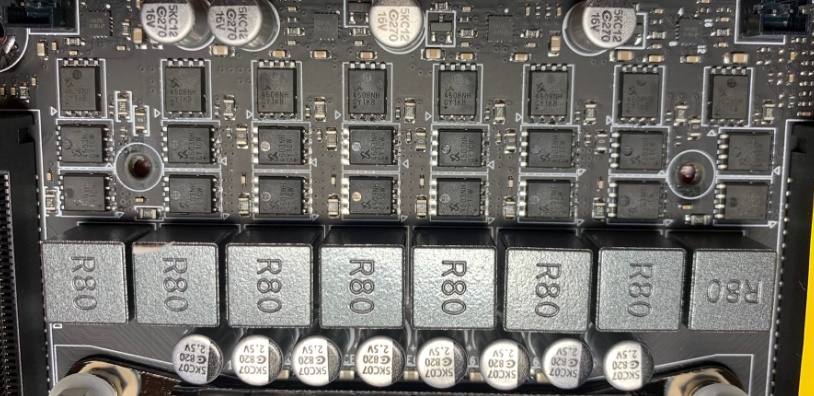
Another quirk: the CPU power sensor doesn’t work properly. The board reports lower power draw to the CPUs than they actually use, so the TDP limits effectively never kick in under load (the EDP limit still applies). In multithreaded workloads this means extra performance, but you pay for it with more heat and higher power consumption.
Storage options are among the most extensive you’ll find on a Chinese X99 board. There are 10 SATA ports (6 SATA + 4 sSATA) and three M.2 slots. Two of the M.2 slots run at PCIe 3.0 x4, with lanes coming straight from CPU1. The third slot takes both NVMe and NGFF (SATA) drives. In SATA mode it disables one of the sSATA ports, and in NVMe mode it’s limited to PCIe 2.0 x4 from the chipset.
Here’s how the PCIe lanes are split between the CPUs (each slot on the board is labeled with the CPU it belongs to):
| Lane source | PCIe 3.0 x16 | PCIe 3.0 x8 | M.2 NVMe |
|---|---|---|---|
| CPU1 | 1 | 2 | 2 (PCIe 3.0 x4) |
| CPU2 | 2 | 1 | — |
| C612 chipset | — | — | 1 (PCIe 2.0 x4 or SATA) |
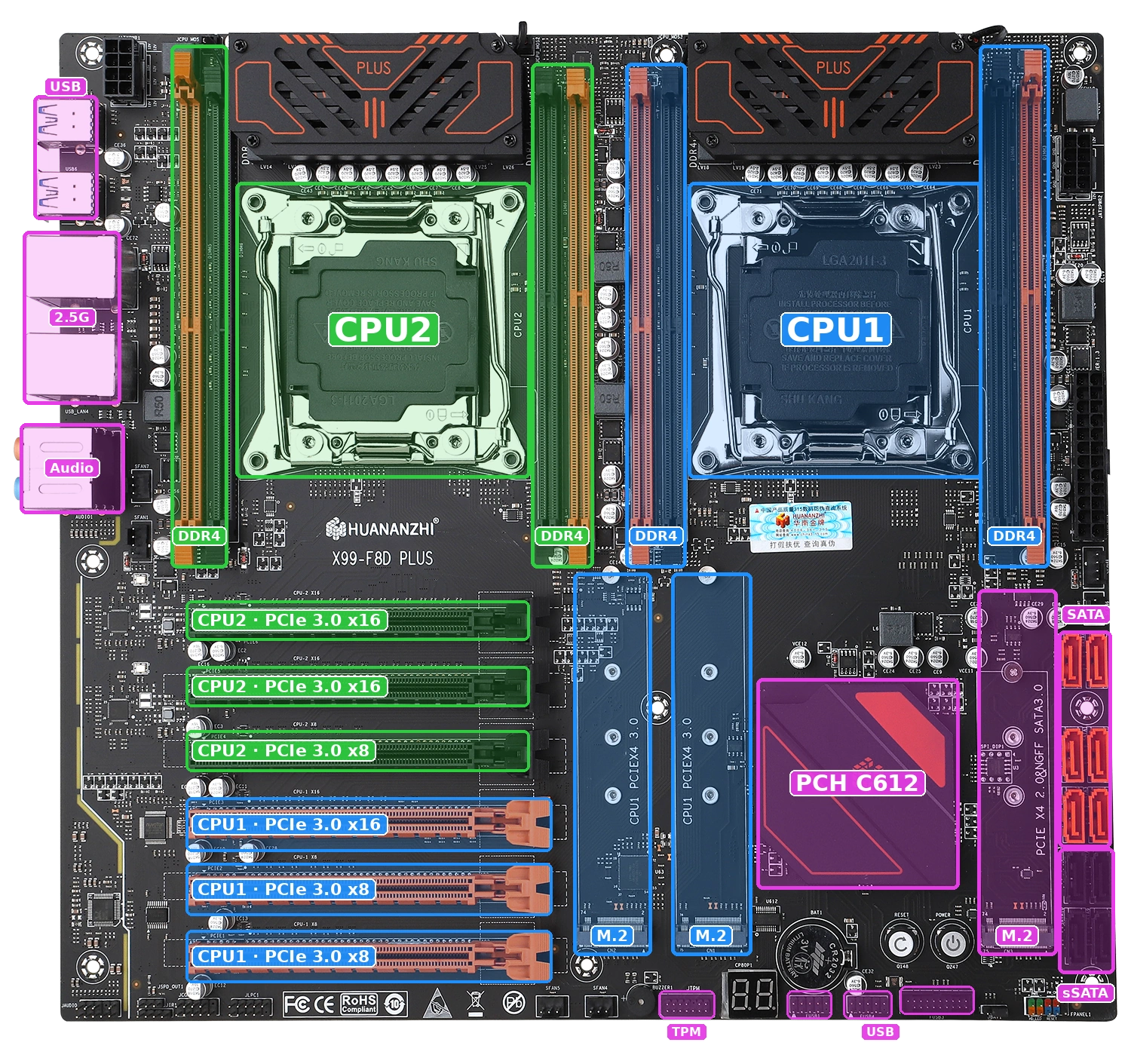
Key features of the Huananzhi X99-F8D Plus:
- All 80 CPU PCIe lanes are put to use: three x16 slots, three x8 slots and two fast M.2 slots.
- Two 2.5G network ports are rare on Chinese X99 boards and a nice bonus for a home server or NAS.
- The board runs with a single CPU in the CPU1 socket. In that mode you keep half the RAM slots, one x16 slot, two x8 slots and all three M.2 slots, which is more than enough for a single-CPU build.
- The sockets sit close to the memory slots. The adapter frame used with AMD-style coolers nearly blocks the nearest slots, so you’re better off with coolers that have native LGA2011‑3 mounting and a raised heatsink. For 145 W CPUs, go for towers with six heat pipes. There’s enough room between the sockets for two 120 mm towers blowing upward, so hot air from one cooler doesn’t end up in the other.
- Smart Fan only works on the two 4-pin CPU fan headers. CFAN1 (CPU1 cooler) is configured in BIOS as Smart Fan 1 and shows up in monitoring software as CPUFAN. SFAN1 (CPU2 cooler) is Smart Fan 2 / SYSFAN. The 3-pin headers SFAN4–7 have no speed control or RPM readout. You can also control the 4-pin headers with FanControl.
- The mounting holes follow the E-ATX layout, but whether all nine line up depends on the case: in the DeepCool CC560 and Montech AIR 903, every hole matched; in the Zalman Z10, only five did.
- M.2 drives with tall heatsinks can get in the way of a graphics card.
TPM 2.0 turned out to be the biggest letdown. The board has a native 14-pin LPC header, but the manufacturer publishes neither a pinout nor a list of compatible modules, and we haven’t found a single report online of anyone getting it to work. There’s also a JLPC header that can take some TPM 2.0 modules, but we have nothing to report there yet either. TPM may still work on this board, but for now nobody has confirmed it.
Revisions
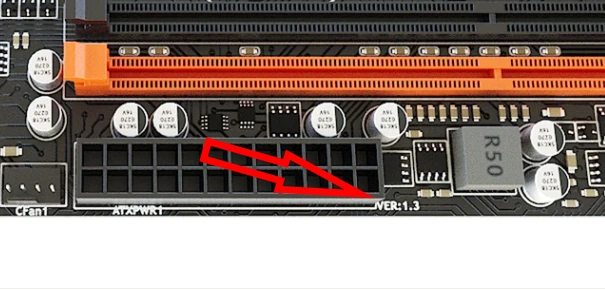
The first version came out four years ago, and Huananzhi has released several revisions since then. We don’t have a changelog, so we can’t trace every change, but the components have stayed largely the same. The revision number is printed next to the 24-pin power connector.
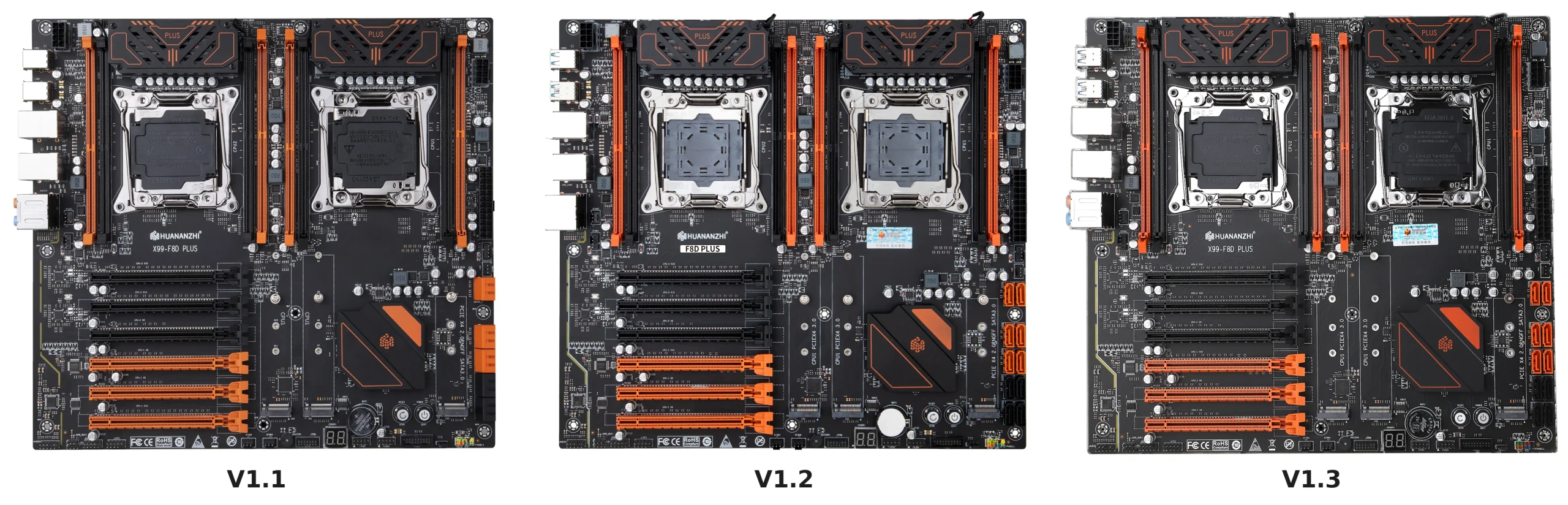
- V1.1 (2022): the first version.
- V1.2 (2023–2026): reworked PCIe layout, with the CPU1 x16 slot moved from the bottom position to the top. The SATA ports are no longer angled, and the routing on the upper part of the board changed slightly. This is still the most common revision.
- V1.3 and V1.32 (2024–2026): less common than V1.2, with no visible differences from it.
- V1.4 (2025 onward): the latest revision of the board.
BIOS Capabilities
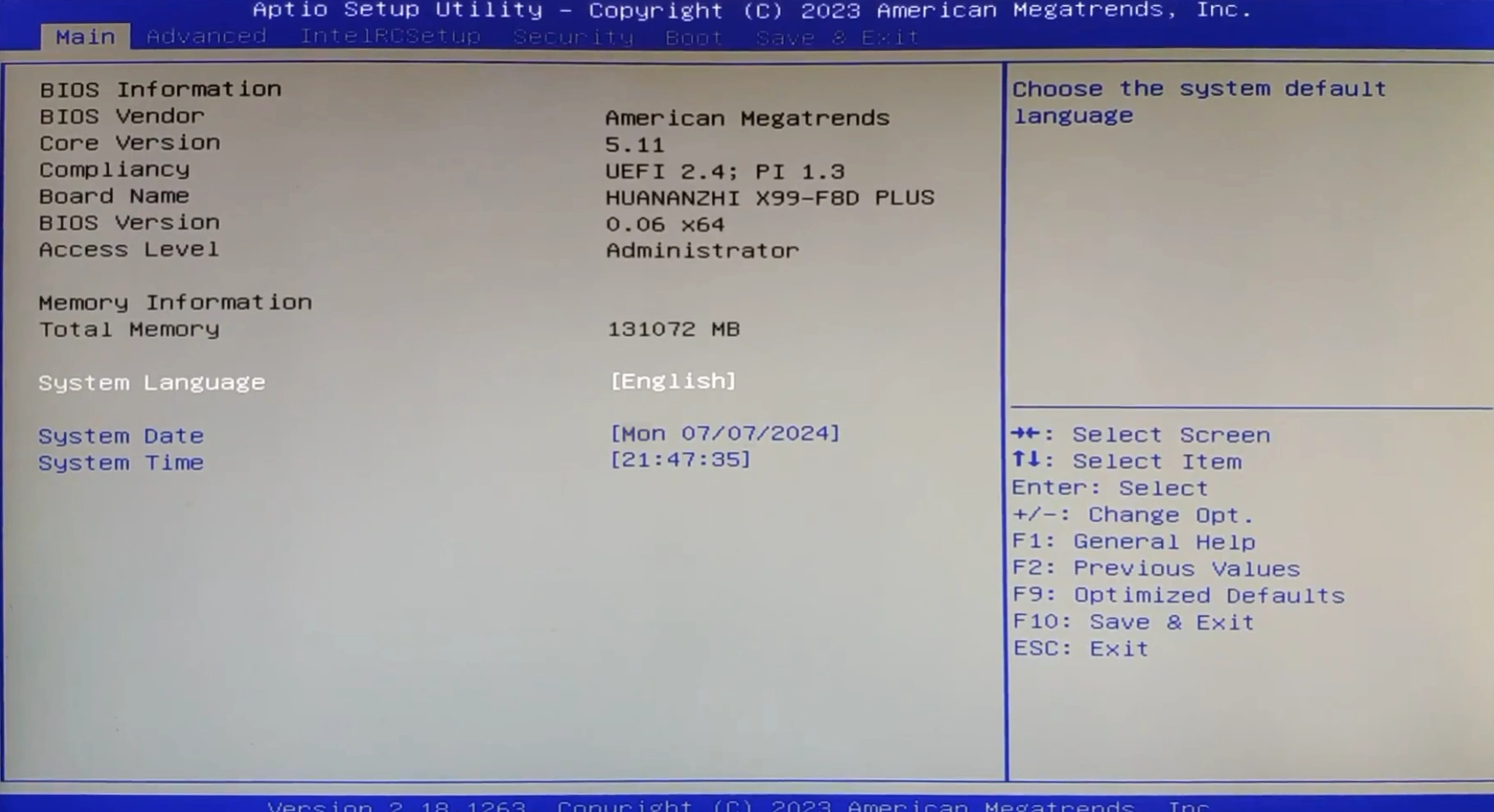
The board runs the familiar AMI Aptio V. Early 2022 firmware didn’t give access to memory timings, but the BIOS dated December 12, 2023, added timings and Resizable BAR, and the April 7, 2025, release lists PCIe Hot Plug support. Smart Fan works on the 4-pin headers, and bifurcation is available out of the box. Legacy (CSM) boot is enabled by default, so the board will start with any graphics card, even an old one without UEFI support.
The usual Chinese rough edges are all here: the onboard temperature sensors are inaccurate, and Smart Fan settings can reset after waking from sleep. There’s also the traditional mountain of options, not all of which actually work.
The F8D Plus firmware differs in one important way: instead of the standard ME 9.x, it ships with SPS 3.x, the server version of the ME firmware. Intel FIT can’t open an image like that. This has two consequences:
- Overclocking unlocked-multiplier CPUs from BIOS doesn’t work (though hardly anyone needs that on a dual-socket board).
- The factory base clock is about 99.8 MHz (Spread Spectrum 0.02%), and our usual method for setting exactly 100.00 MHz won’t work on the stock image.
Enthusiasts have found a way around this by replacing the ME region with ME 9.x, but modded images like these are best flashed with a programmer.
Apart from that, the stock firmware is fine for everyday use.
| BIOS message & date | BIOS version | RAM Timings | ReBAR | Turbo Boost unlock | Undervolt | Secure Boot & TPM 2.0 | Notes & Link |
|---|---|---|---|---|---|---|---|
| (07/13/2022)X9F8P | 003 | - | - | - | - | + / ? | Stock BIOS (shipped with rev. V1.1) [Download] |
| (07/13/2022)X9F8P | 003 | + | - | - | - | + / ? | Koshak1013 mod of the stock BIOS (RAM timings unlocked) [Download] |
| (12/12/2023)X9F8P | 009 | + | + | - | - | + / ? | Stock BIOS for rev. V1.2–V1.3 (adds Resizable BAR) [Download] |
| (04/07/2025)X9F8P | 012 | + | + | - | - | + / ? | Stock BIOS for rev. V1.4 (adds PCIe Hot Plug) [Download] |
| (07/13/2022)X9F8P / (04/07/2025)X9F8P | 003 / 012 | + | -/+ | - | - | + / ? | Community mods by yadrik: SPS region replaced with ME 9.0.30 / 9.1.37 / 9.1.40. Untested by us — flash with an SPI programmer only. [Download] |
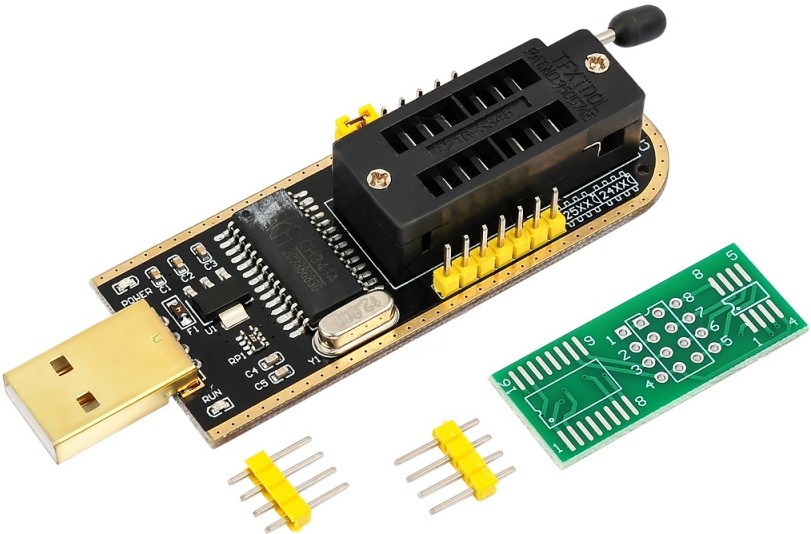
How to flash: Intel FPT / AFUDOS / SPI programmer.
Note: whichever method you use, load default settings or clear CMOS after flashing. Mods with a replaced ME region require a programmer.
Are BIOS versions compatible across revisions?
Mostly yes, but nobody can give a 100% guarantee. If in doubt, keep a programmer and a backup of the original firmware on hand. A BIOS from the regular X99-F8D will most likely boot on the Plus as well, but full functionality isn’t guaranteed.
Can you unlock Turbo Boost?
Yes, on v3 CPUs. There are several ways to do it:
- S3TurboTool, following our guide. A dual-CPU board needs the DXE driver. Voltage offsets are baked into the BIOS, but you can set them separately for each CPU.
- Ultimate Patcher Tool by Nalex. The patcher also fixes Smart Fan and unlocks the Overclocking menu, where you can set the undervolt right in BIOS for both CPUs at once. Important: UPT was mostly tested on early BIOS versions, so it may not work on every firmware release.
- Flashing a modded BIOS with the Turbo Boost unlock already built in.
Frequently Asked Questions
Where can I find the official manual?
You can download the board manual as a PDF (1 MB).
How do I connect the front panel?
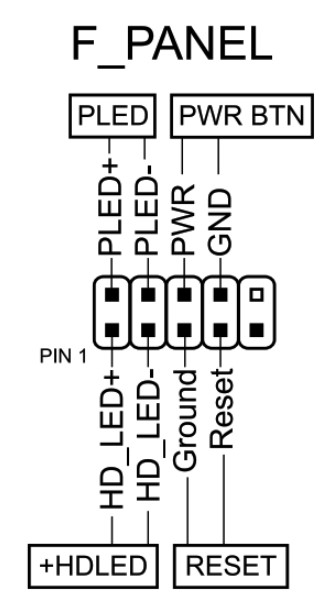
The board won’t start, shows a black screen, etc. What should I do?
Check out our article on the most common LGA2011‑3 problems.
Where can I get drivers?
Up-to-date drivers for LGA2011‑3 boards are collected on this page. The RAID driver (Intel RSTe/VROC) is available on the official Huananzhi website.
Where is the BIOS chip?
Between the chipset heatsink and the SATA ports. If there’s a drive in the third M.2 slot, you’ll have to remove it to get to the chip. On the plus side, you can attach a programmer clip right here.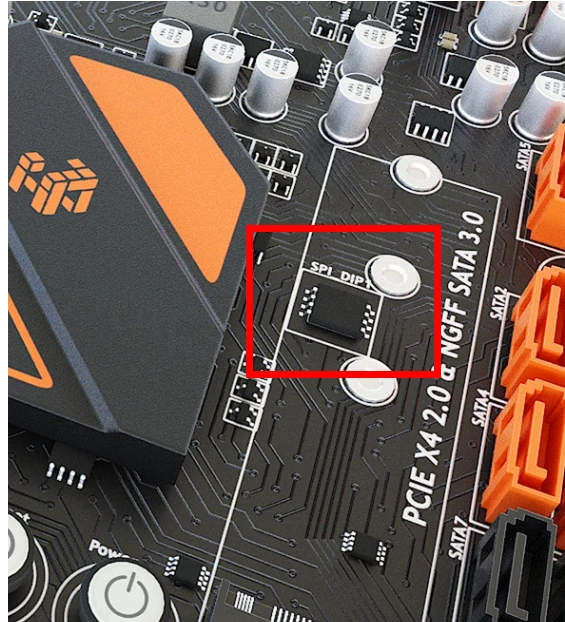
Can the board run with a single CPU?
Yes. Install the CPU in the CPU1 socket and the memory in the CPU1 slots. Without the second CPU, two x16 slots and one x8 slot are disabled, but both fast M.2 slots keep working.
How do I enable Wake-on-LAN and automatic power-on after a power outage?
Both options are in BIOS, and each of them appears in two places: Advanced > NCT5532D SSIO Configuration and IntelRCSetup > PCH Configuration > PCH Devices (the Restore AC after Power Loss option). Which one actually works depends on the BIOS version, so try them one at a time.
Will the board boot without a graphics card?
Yes. At startup it beeps and shows POST code D6, but then boots into the OS anyway.
Will 64 GB modules work?
Yes, if they’re LRDIMMs. 64 GB RDIMMs won’t boot on this platform.
How do I set up PCIe bifurcation?
In BIOS, go to IntelRCSetup > IIO Configuration and choose the mode for the port you need (for example, x4x4x4x4 for passive quad-NVMe adapters).
What if a PCIe expansion card isn’t detected or shows Code 43?
In IntelRCSetup > IIO Configuration, find the settings for the port the card is plugged into and change Override Max Link Width from x16 to Auto.
Can I power the second 8-pin CPU connector with a PCIe (GPU) cable?
Not directly: PCIe power connectors have a different pinout, and you could damage the board. You need a dedicated PCIe-to-EPS 8-pin adapter.
Can I install a Wi-Fi card in an M.2 slot?
No. All three M.2 slots are designed for drives (M-key). A Wi-Fi adapter won’t work in them, and the board will stop at POST code 94. Use a PCIe Wi-Fi card instead.
Conclusion
OldRigRevive Review
4.0
4.5
4.8
4.0

Written by
Senior Hardware Specialist proving you don't need top-tier gear to game. Expert in smart upgrades and budget-friendly PC restoration.