 The CMP 50HX is NVIDIA’s mining card built on TU102, the chip of the RTX 2080 Ti, released in 2021. It has 3584 CUDA cores and 10 GB of GDDR6 on a 320-bit bus. NVIDIA locked it out of gaming four ways: the official driver doesn’t enable DirectX or Vulkan, there are no video outputs, the PCIe bus is wired for four lanes at PCIe 1.1 speed, and the chip’s FP32 throughput is throttled to about 1/32. The last lock is the one that matters. Even with the driver patched and every PCIe lane soldered, the card played like a mid-range GPU from years earlier, far below what its chip can do.
In August and September 2026 enthusiasts got past it. An open-source unlock for Linux and Windows restores full compute speed, from 0.43 to 13.5 TFLOPS of FP32 in the project’s measurements, and raises the bus to PCIe 2.0. Nothing is flashed. By its cores and memory bandwidth the unlocked 50HX sits between an RTX 2080 and an RTX 2080 Ti.
Table of Contents
CMP 50HX vs RTX 2080 Ti and RTX 2080 Super: What’s Different
The CMP 50HX is a cut-down TU102 with 56 of the chip’s 72 SMs enabled. It isn’t a mining RTX 2080: that card uses the smaller TU104.
| CMP 50HX | RTX 2080 Ti | RTX 2080 Super | |
|---|---|---|---|
| GPU | TU102 | TU102 | TU104 |
| CUDA cores | 3584 | 4352 | 3072 |
| Tensor cores | 448, throttled until unlocked | 544 | 384 |
| RT cores | disabled by a fuse | 68 | 48 |
| Clocks (base / boost) | 1350 / 1545 MHz | 1350 / 1545 MHz | 1650 / 1815 MHz |
| Memory | 10 GB GDDR6, 320-bit, 14 Gbps (560 GB/s) | 11 GB GDDR6, 352-bit, 14 Gbps (616 GB/s) | 8 GB GDDR6, 256-bit, 15.5 Gbps (496 GB/s) |
| FP32 | 0.43 TFLOPS stock; unlocked 11.1 TFLOPS on paper, 13.5 TFLOPS measured at about 1900 MHz | 13.4 TFLOPS on paper | 11.2 TFLOPS on paper |
| Bus | PCIe 1.1 x4 (~1 GB/s), PCIe 2.0 with the unlock, x16 after soldering | PCIe 3.0 x16 (~16 GB/s) | PCIe 3.0 x16 (~16 GB/s) |
| Video outputs | none | yes | yes |
| NVENC / NVDEC | disabled in hardware | yes | yes |
| Power | 225 W | 250 W | 250 W |
| Device ID | 10DE:1E09 | 10DE:1E04, 10DE:1E07 | 10DE:1E81 |
The rated clocks match the 2080 Ti, and in practice an unlocked 50HX holds about 1900 MHz under load, as a 2080 Ti does. So the 2080 Ti keeps about a fifth more shaders and a tenth more memory bandwidth. That puts the 50HX’s chip a little above an RTX 2080 Super and below a 2080 Ti, but only once it’s unlocked, and only as far as its bus lets it.
No hardware ray tracing. The developers of the Linux unlock made the driver report all 56 RT cores, and the first ray tracing instruction still crashed: the cores are disabled by a fuse in the chip, below anything software can reach. Even so, one Windows owner reports that ray-traced effects run in games, only slowly.
No NVENC either. The video encoder and decoder are disabled in hardware, so OBS and ShadowPlay can’t use the card for recording or streaming. Here the 50HX loses to the CMP 40HX, whose NVENC works.
Other CMP Mining Cards
| Card | Chip | CUDA cores | Memory | Closest GeForce | For gaming |
|---|---|---|---|---|---|
| CMP 30HX | TU116 | 1408 | 6 GB GDDR6, 192-bit | GTX 1660 Super | yes, the budget option |
| CMP 40HX | TU106 | 2176 | 8 GB GDDR6, 256-bit | RTX 2060 Super | the best of the family |
| CMP 50HX | TU102 | 3584 | 10 GB GDDR6, 320-bit | between RTX 2080 and 2080 Ti | only with a 2026 unlock, barely tested |
| CMP 70HX | GA104 | 6144 | 8 GB GDDR6X, 256-bit | RTX 3070 Ti | no |
| CMP 90HX | GA102 | 6400 | 10 GB GDDR6X, 320-bit | cut-down RTX 3080 | experimental |
| CMP 170HX | GA100 | 4480 | 8 or 10 GB HBM2e | A100 (compute card) | no |
All of them ship with PCIe 1.1 x4. On the 30HX, 40HX, 50HX and 90HX the missing lanes can be soldered in; the difference is in what NVIDIA locked in firmware on top of that.
- CMP 30HX and 40HX play games once the driver is patched and the lanes are soldered; neither has its FP32 cut. Our CMP 40HX guide and CMP 30HX guide cover them, with plenty of game tests.
- CMP 70HX is capped in 3D by software: one owner measured 13 FPS in Cyberpunk 2077 at 1080p, and a shunt mod didn’t help.
- CMP 90HX is locked the same way as the 50HX and got its own Windows unlock in August 2026. It’s early days for it too, and even its author calls it a compute card first.
- CMP 170HX is built on the A100 data center chip and runs in compute-only mode, so games are out of the question.
What the 2026 Unlock Does
The FP32 lock isn’t in the driver. NVIDIA set protected registers in the chip that make FP32 math (FFMA) and INT8 dot products (DP4A) run at about 1/32 of their normal rate, and the tensor cores are held back too. The unlock uses a bug in NVIDIA’s own signed firmware loader to rewrite those registers before the driver starts. Nothing is flashed, so it has to run again on every boot.
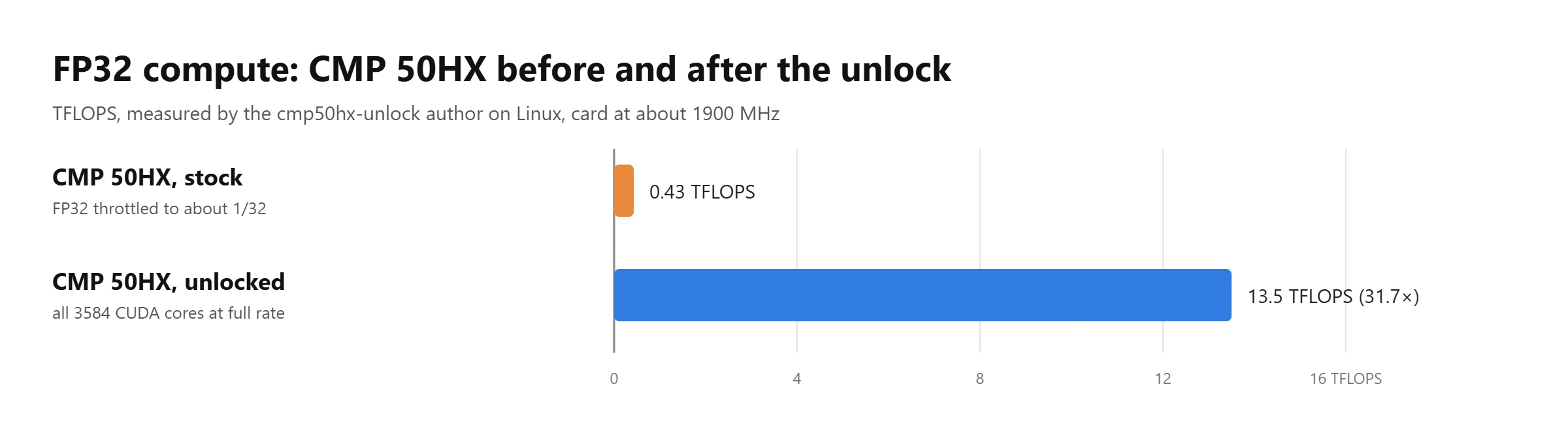
| Stock | Unlocked | |
|---|---|---|
| FP32 | 0.43 TFLOPS | 13.5 TFLOPS (31.7×) |
| INT8 (DP4A) | 1.7 TIOPS | 48 TIOPS (28.4×) |
| Tensor cores (FP16) | throttled | about 107 TFLOPS, DLSS works |
| PCIe speed | 1.1 (2.5 GT/s) | 2.0 (5 GT/s), depending on the board |
| BAR1 (Resizable BAR) | small window | 16 GiB on Linux, experimental on Windows |
| Not changed | RT cores, NVENC/NVDEC, video outputs, number of CUDA cores, memory size | |
The figures are from the cmp50hx-unlock project, measured on Linux against NVIDIA’s stock driver.
Where the Unlock Comes From
The first compute unlock for CMP cards was pearlfortune/cmpunlocker, a Linux tool published in July 2026 for the 170HX and 90HX, with 50HX support added later. The project most people use today is xrip/cmp50hx-unlock, started on August 19, 2026: patched NVIDIA 610.43.03 open kernel modules for Linux, plus a Windows installer ported from the UEFI program written for the CMP 40HX. It has dozens of forks, and most of them change nothing. The projects that add something, forks and independent ones, are aimed at Linux and AI servers:
| Project | System | What it adds |
|---|---|---|
| xrip/cmp50hx-unlock | Linux, Windows | the main project: one-click installers, compute, PCIe 2.0, Resizable BAR, 20 GB cards |
| rjohny55/cmp50-unlock | Linux | 20 GB cards, a 32 GiB BAR1 and P2P between several cards |
| e1magic/cmp30hx-cmp40hx-cmp50hx-unlock | Linux | an independent patch for the 30HX, 40HX and 50HX, with PCIe 2.0 |
Smaller forks add multi-card fixes (alexxttss), P2P transfers (MefixRU) and extra boot options (UzixLS). For gaming on Windows only the main project matters.
What You Need to Game on a CMP 50HX
Five things: a device that sends the picture to the monitor, Windows 10 or 11, a modified driver, the unlock, and a motherboard that boots in UEFI mode. Ideally also a card with all 16 lanes soldered. As with the other CMP cards, the 50HX renders the frame and the integrated graphics or a second card displays it, just like a laptop with switchable graphics.
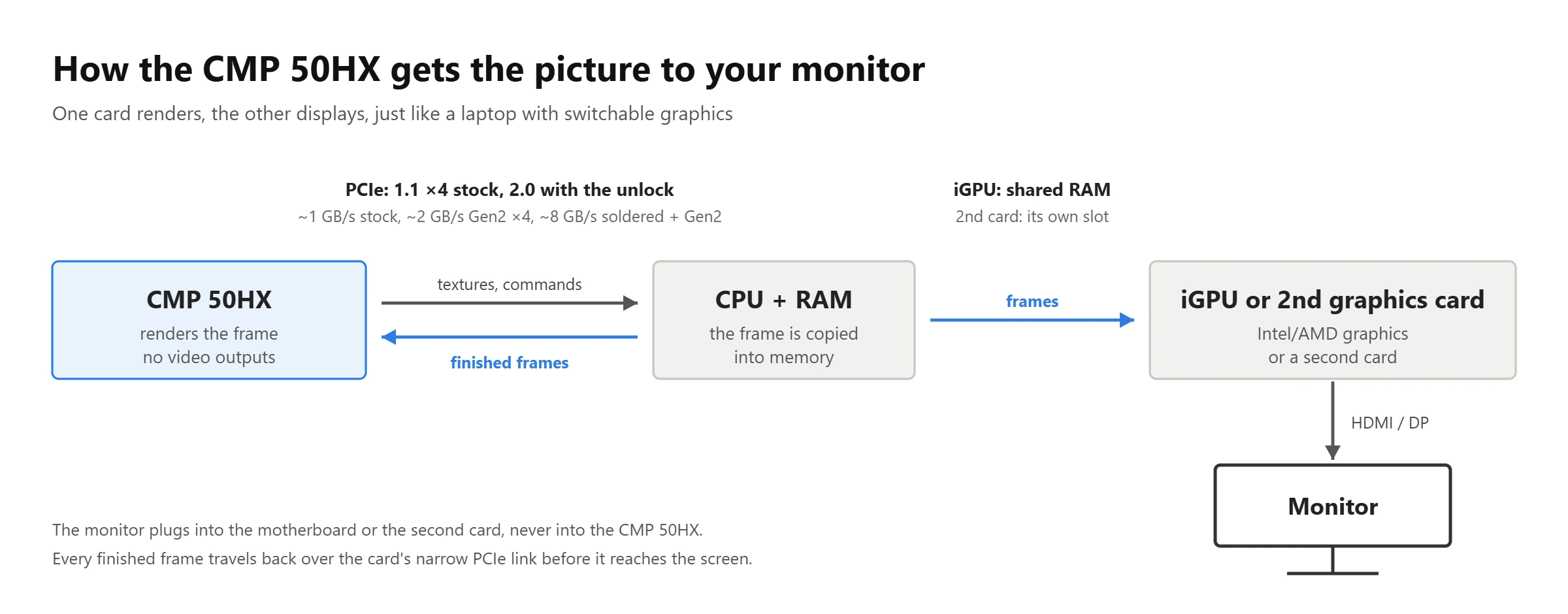
Windows 11 handles this setup best: you pick the GPU for each game in the system settings, and that also works with a second discrete card. On Windows 10 the usual way is the NVIDIA Control Panel (Manage 3D settings → Preferred graphics processor → High-performance NVIDIA processor), which works with integrated graphics but less reliably.
If a game still runs on the wrong GPU, try select_default_GPU. This small open-source script (GitHub) turns on the hidden default-GPU setting in Windows 10, registers the mining card as the high-performance DirectX adapter, and moves OpenGL programs onto the NVIDIA driver.
Which Platforms Work
| Platform | Verdict | Notes |
|---|---|---|
| Intel 6th–14th gen with iGPU (LGA1151, 1200, 1700) | best option | current iGPU drivers, DirectX 12 works |
| Intel Haswell (LGA1150) | works | DirectX 12 only with Intel driver 15.40.42.5063 or older |
| Intel Ivy Bridge (LGA1155) | at your own risk | Windows 11 recommended, the iGPU has no DirectX 12 |
| Intel Sandy Bridge (LGA1155) | not recommended | can be made to work, with serious limitations |
| AMD AM4 with an APU (Ryzen G) | works | some APUs give the graphics slot only x8, so a soldered card runs at PCIe 1.1 x8 (~2 GB/s), or 2.0 x8 (~4 GB/s) with the unlock |
| X79, X99 and any CPU without iGPU | works with a second card | how to pick the display card is in our CMP 40HX guide |
The power supply needs two 8-pin PCIe cables. The card draws up to 225 W; a good 600–650 W unit is enough for a typical build.
Driver and Unlock on Windows
Two things have to work together on Windows: a modified driver that enables DirectX and Vulkan, and the unlock that removes the FP32 throttle. With the driver alone the card runs games, but far below what its chip can do: in a 2023 YouTube test a locked MSI card averaged about 25 FPS in Cyberpunk 2077.
Step 1: The Modified Driver
The official NVIDIA driver enables only compute on the CMP 50HX. NVIDIA-patcher by dartraiden covers the 50HX along with the other CMP cards, and RainCandy Technology Special Edition is a ready-made alternative with its own installer, signed with leaked certificates that anti-cheat systems may not trust. The version depends on the card that drives your monitor; data from the patcher’s Windows guide as of November 2026:
| Display output through | Driver version |
|---|---|
| Intel or AMD integrated graphics, AMD card, NVIDIA GTX 16 / RTX | 621.14 |
| NVIDIA GTX 900/10 series, GT 1030 | 581.94 |
| NVIDIA Kepler (GT 710/730) | 472.12 |
Take the regular patched build, not the one prefixed “NVENC-NvFBC”: the patcher’s guide warns that on a card without hardware NVENC that package makes NVENC apps crash. Installation is the same as for the other CMP cards: unpack the official driver with 7-Zip, replace the files with the patched ones, remove the old driver with DDU offline and run setup.exe. If Windows 11 says the driver “has been blocked” because it doesn’t pass the driver policy, run CiTool.exe --remove-policy "{8F9CB695-5D48-48D6-A329-7202B44607E3}" in Terminal (Admin) and reboot on a PC with the July 2026 update or newer; on older builds follow Microsoft’s steps. The full walkthrough and fixes for Code 43, blue screens and antivirus false positives are in our CMP 40HX guide.
Step 2: Firmware Settings
The unlock runs as a UEFI program before Windows starts, so the board has to boot that way:
- Windows installed in UEFI mode on a GPT disk, CSM off.
- Above 4G Decoding on, Resizable BAR on or Auto if the board has it.
- Fast Boot off, or the firmware skips the unlock.
- Secure Boot off, unless you sign the unlock with your own key and enroll it in the firmware (supported since version 1.1.22, described in the project’s guide).
- If the board lets you, set the CMP 50HX’s slot to Gen2 instead of Auto. On several boards that’s what makes PCIe 2.0 stick.
Step 3: Install the Unlock
- Finish Step 1 first. The installer looks for a CMP 50HX with the driver installed, and without it there’s nothing to install.
- Download
cmp50hx-unlock-windows.zipfrom the project’s Releases page (v1.1.22 as of November 2026) and unpack it. Besides the installer it holds50HXCheck.exe,50HXUninstaller.exeand the two Gen2 drivers. - Right-click
50HXInstaller.exe→ Run as administrator. It scans the system and ticks what’s missing; look through the ticks and click Install selected components. If Windows Defender’s real-time protection is on, the installer also ticks “Disable Defender real-time protection”. The Gen2 driver component already adds Defender exclusions for its two drivers, so you can untick that option and turn Defender off only if it still removes the drivers. On a 20 GB card that’s detected as 10 GB, also tick “Force 20 GB geometry”. - Restart. From now on the unlock runs before Windows on every boot, and PCIe 2.0 is applied by a task after you log in.
- Run
50HXCheck.exeas administrator. A working unlock shows✓ Full unlockin the Compute line and Gen2 in the PCIe line; at idle the link may drop to Gen1 to save power, which is normal. If the check says the “50HX Unlock” boot entry isn’t first, move it to the top of the boot order in the BIOS.
What the installer changes in your system:
- Boot order. It writes the unlock to the EFI partition, adds a “50HX Unlock” boot entry and puts it first; the unlock then hands over to Windows Boot Manager. Windows’ own boot entry stays untouched.
- NVIDIA driver settings. It turns on the GPU’s firmware mode in the driver (EnableGpuFirmware=1), which the unlock needs to survive into Windows.
- PCIe 2.0. A scheduled task at logon loads two signed kernel drivers with known vulnerabilities (WinRing0 and ThrottleStop), writes the card’s PCIe registers, retrains the link and unloads the drivers again. The installer offers to add Windows Defender exclusions for them. If Memory Integrity (Core Isolation), the vulnerable driver blocklist or Smart App Control is on, Windows may block these drivers, and then PCIe 2.0 won’t come up.
- Power settings. It turns off Windows Fast Startup and PCIe power saving (ASPM) and switches to the High performance plan.
To remove the unlock, run 50HXUninstaller.exe as administrator. It removes the boot entry, the drivers, the scheduled task, the Defender exclusions and the EnableGpuFirmware setting, but leaves Fast Startup, ASPM, the power plan and Defender’s real-time protection as they were; switch those back by hand if you want. If the computer ever hangs at boot, pick Windows Boot Manager in the firmware’s boot menu: it’s always there.
Known Problems
- Only one card. The Windows version unlocks the first CMP 50HX it finds; multi-card setups aren’t supported yet.
- PCIe 2.0 often doesn’t come up. The card accepts the switch once per power cycle, so after a failed attempt power off completely, not just restart. Setting the slot to Gen2 in the BIOS may help.
- Boot hangs. Versions before 1.1.17 (September 2026) hung on many boards while handing over to Windows; use the latest release. Some X99 boards still give trouble.
- AMD AM5. On AM5 boards no one has yet reported PCIe 2.0 working together with the compute unlock under Windows; the compute unlock itself works.
- Anti-cheat and Secure Boot. With Secure Boot off, games that require it won’t start, the same trade-off as with the 40HX unlock described in our CMP 40HX guide.
Despite the one-click label, this is still experimental. The author describes the boot-time unlock as the route for Windows users. Try it on a machine you can recover.
PCIe: Gen2 x4 or Solder It to x16
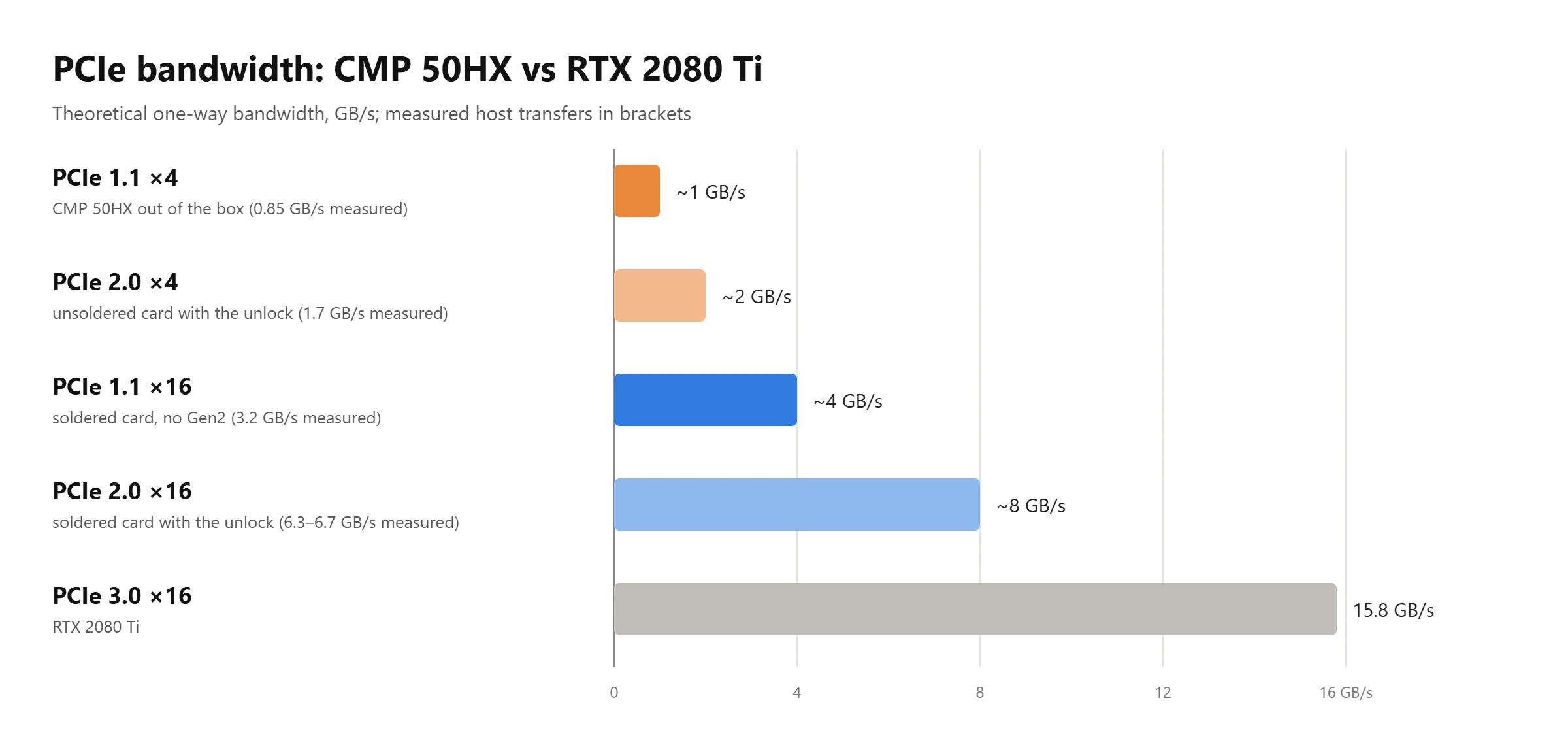
A stock CMP 50HX talks to the system over PCIe 1.1 x4: a nominal 1 GB/s and about 0.85 GB/s measured. The unlock raises the speed to PCIe 2.0, which doubles that to 1.7 GB/s, but doesn’t add lanes. To get more lanes, solder the missing capacitors next to the PCIe connector, the same mod as on the 30HX and 40HX.
- What to solder is the same as on the 30HX and 40HX: 0402 ceramic capacitors of 220 nF on the empty pads along the lanes.
- Many 20 GB cards come with x16 already: the lanes are often soldered during the memory rework, and owners of 20 GB cards mostly report x16 links.
- How to check: in GPU-Z, the part of the Bus Interface line after the @ is the link you actually have: x4 on a stock card, x16 on a soldered one. 50HXCheck shows the link too.
CMP 50HX with 20 GB
Some CMP 50HX cards have had their memory chips replaced with ones of twice the capacity, the same rework that produces 22 GB RTX 2080 Ti cards. The Device ID stays 10DE:1E09, and the unlock supports them: its author confirmed 20,480 MiB on four cards.
- How to tell: GPU-Z shows 20480 MB in the Memory Size line. Ask the seller for a screenshot, and check the Bus Interface line at the same time.
- Test the memory right after buying with memtest_vulkan.
- For games, 20 GB gives no real advantage. Such cards exist for local language models, where 20 GB fits a 27B model.
CMP 50HX in Games: What We Know So Far
The honest answer is: not much yet. Here’s everything we found, from oldest to newest.
Locked card, x4. A poor fit for games: it’s held back by both the narrow bus and the compute lock.
Locked card, soldered to x16. Playable, but still well below what the chip can deliver.
Unlocked card, x16. Since late August 2026 owners have been posting results in the project’s issue tracker:
- On Linux (Proton), the owner of an unlocked 20 GB card at x16 got 12–28 FPS in the Cyberpunk 2077 benchmark (16 on average) in late August, up from 5–8 FPS before any patches, and suspected that some other 3D throttle remains. The project has since added an optional Vulkan patch for Linux, ported from the CMP 40HX work, but no new figures have been posted.
- A soldered card ran FurMark (OpenGL, 1080p) at 137 FPS on average with the unlock, against about 25 FPS before it. The owner adds that in games it’s faster than his CMP 40HX, that DLSS works and that ray tracing runs, but slowly.
- Another owner on an X99 board (link width not stated) reports that the frame rate rose a lot, without figures.
There’s still too little data for a firm verdict on an unlocked, soldered card in games. On paper it should come fairly close to an RTX 2080 Ti as long as the bus doesn’t hold it back, but the first reports are mixed, and it isn’t yet clear whether some 3D limit remains.
Power, Heat and Noise
The CMP 50HX is rated at 225 W, and that’s also the highest power limit the driver allows. It takes two 8-pin connectors.
- Noise. MSI’s version has a single-fan blower cooler, which is loud under load by design. Cards with two-fan coolers are quieter.
- After years of mining, replace the thermal paste and memory pads and check the fans.
CMP 50HX for AI and Local LLMs
This is where the unlocked 50HX has proven itself, and the main reason the card became popular in 2026. With full FP32, INT8 and tensor speed it’s an RTX 2080 Ti-class compute card with 10 GB, or 20 GB on reworked cards.
- Speed. The project author ran a 35B mixture-of-experts model in 2-bit quantization on a 10 GB card at about 48 tokens per second in llama-bench, with part of the 12 GB model in system RAM. On a 20 GB card with PCIe 2.0 x16, one owner measured 24 tokens per second generation and about 640 tokens per second prompt processing with a dense 27B model at 4-bit.
- Linux is the main platform: several cards in one machine, P2P transfers and a 32 GiB BAR1 work there, not on Windows.
The same unlock also made the card popular with Pearl miners in 2026.
CMP 50HX, 40HX or 30HX?
| CMP 30HX | CMP 40HX | CMP 50HX | |
|---|---|---|---|
| Chip class | GTX 1660 Super | RTX 2060 Super | between RTX 2080 and 2080 Ti |
| Memory | 6 GB | 8 GB | 10 GB (20 GB on reworked cards) |
| Games with just the driver | yes | yes | runs, but far below its chip |
| Best link | PCIe 2.0 x16 (soldered + unlock) | PCIe 2.0 x16 (soldered + unlock) | PCIe 2.0 x16 (soldered + unlock) |
| Secure Boot with the unlock | stays on | off or a self-signed EFI | off or a self-signed EFI |
| NVENC | owners report it doesn’t work | yes | no |
| Ray tracing games | won’t start | start | no RT cores; one owner reports it runs, but slowly |
| Power | 125 W | 185 W | 225 W |
| Game tests | plenty | plenty | almost none |
- Against the CMP 40HX, the 50HX has the much stronger chip and more memory, and loses NVENC, games that require ray tracing and, above all, certainty. A soldered 40HX is a known quantity; an unlocked 50HX is a bet that the bus and the Windows unlock will cooperate on your board.
- Against the CMP 30HX, the 30HX wins on simplicity: no compute lock, a PCIe 2.0 unlock that leaves Secure Boot on, and half the power draw.
Buying a Used CMP 50HX
- Check the Device ID. In GPU-Z the CMP 50HX is 10DE:1E09; with a modified driver the name may read “RTX 2080 Ti” or something else.
- x16 or x4. Ask for a GPU-Z screenshot with “x16” after the @ in the Bus Interface line, and a photo of the capacitor pads next to the PCIe connector.
- 10 or 20 GB. The Memory Size line in the same screenshot. For gaming, pay for x16, not for 20 GB.
- Fans and thermal pads are usually worn after years of 24/7 mining. The blower fan on MSI cards is the part to listen to.
- Memory. Run memtest_vulkan right after buying.
Verdict: Who Should Buy a CMP 50HX
- Buy it if you want a card for local AI on Linux, or you enjoy tinkering and accept that gaming results on your system are a gamble for now. A soldered card helps a lot.
- Think twice if you just want a cheap card that plays games: a soldered CMP 40HX is proven and needs no unlock.
- Skip it for games that require ray tracing, for streaming with NVENC, for online games that require Secure Boot unless you’ll sign the unlock yourself, and for boards without UEFI boot.
Useful Links
- cmp50hx-unlock on GitHub and its Releases page: the main unlock for Windows and Linux.
- NVIDIA-patcher on GitHub and its Windows guide: the patch and the driver version table.
- RainCandy Technology Special Edition: a ready-made modified driver with an installer.
- cmp90hx-unlock-for-windows: the CMP 90HX unlock.
- select_default_GPU: sets the default GPU for DirectX and OpenGL on Windows 10.
- Display Driver Uninstaller (DDU): clean removal of the old driver before installing.
- memtest_vulkan: a quick video memory test.

Written by
Senior Hardware Specialist proving you don't need top-tier gear to game. Expert in smart upgrades and budget-friendly PC restoration.