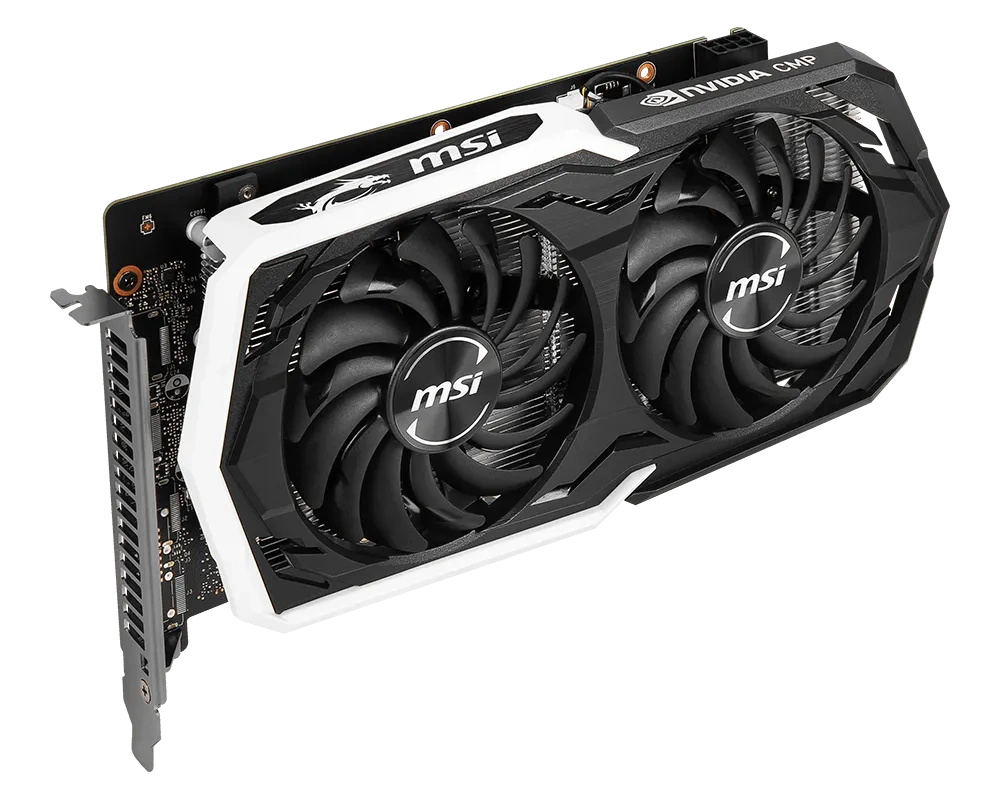
The CMP 30HX is NVIDIA’s mining version of the GTX 1660 Super, released in 2021. It has the same TU116 chip with 1408 CUDA cores, the same 6 GB of GDDR6 on a 192-bit bus and the same clocks. NVIDIA locked it out of gaming in three ways: the official driver doesn’t enable DirectX or Vulkan on it, it has no working video outputs, and its PCIe bus is wired for four lanes at PCIe 1.1 speed.
As with the bigger CMP 40HX, the first two locks are easy to get around: a modified driver unlocks 3D, and the CPU’s integrated graphics or a second card sends the picture to the monitor. The bus is what holds the card back. Out of the box it gets about 1 GB/s, a sixteenth of what a GTX 1660 Super has. Most of the good-looking game footage online comes from cards that have had the missing lanes soldered in.
What makes the CMP 30HX interesting is the price. Used cards sell for around $40–100, it needs only 125 W and one 8-pin connector, and in some markets most cards are already sold with the soldering done. This guide covers the platform, the driver, the x16 mod, a new PCIe 2.0 unlock that works without turning off Secure Boot, real game tests, and when it’s worth paying more for a CMP 40HX instead.
Table of Contents
CMP 30HX vs GTX 1660 Super: What’s Different
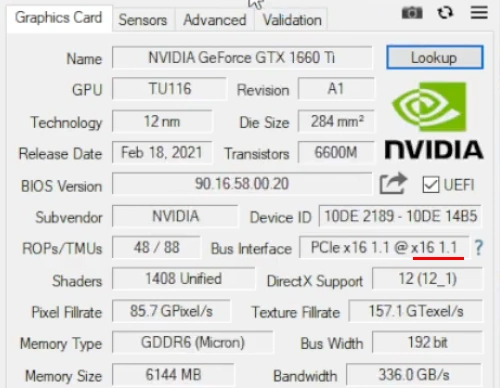
Every CMP 30HX we’ve found has 1408 CUDA cores in 22 SMs, the same configuration and clocks as a GTX 1660 Super. With the modified driver, GPU-Z can show it under a GeForce name, such as the GTX 1660 Ti in the screenshot further down; the Device ID 10DE:2189 stays the same.
| CMP 30HX | GTX 1660 Super | |
|---|---|---|
| GPU | TU116 | TU116 |
| CUDA cores | 1408 | 1408 |
| Clocks (base / boost) | 1530 / 1785 MHz | 1530 / 1785 MHz |
| Memory | 6 GB GDDR6, 192-bit, 14 Gbps | 6 GB GDDR6, 192-bit, 14 Gbps |
| Bus | PCIe 1.1 x4 (~1 GB/s), x16 after soldering (~4 GB/s) | PCIe 3.0 x16 (~16 GB/s) |
| Video outputs | none that work | yes |
| NVENC | owners report it doesn’t work | yes |
| RT and tensor cores | none | none |
| Power | 125 W, one 8-pin | 125 W, one 8-pin |
| Device ID | 10DE:2189 | 10DE:21C4 |
On paper the CMP 30HX is a complete GTX 1660 Super. In games it loses only to the bus and to what NVIDIA locked in firmware.
TU116 has no RT or tensor cores, like every GTX 16 card, so DLSS and hardware ray tracing are off the table, and no unlock will change that. This matters more every year: games that require hardware ray tracing, such as Indiana Jones and the Great Circle, won’t even start on a CMP 30HX, while they do on a 40HX.
CMP 30HX Models
Unlike the 40HX, which was made almost only by ASUS, the 30HX came from at least eight board designs. The chip, memory and clocks are the same on all of them; what differs is size and cooling.
| Card | Length | Cooling | Notes |
|---|---|---|---|
| ASUS CMP30HX-6G | 242 mm | two fans, 2.7 slots | cooler from the GTX 1660 Super Dual EVO, ARGB lighting; DVI, HDMI and DisplayPort on the bracket, none of them working |
| Gigabyte CMP 30HX D6 6G (GV-N30HXD6-6G) | 224.5 mm | Windforce 2X, two fans | |
| MSI CMP 30HX MINER | 244 mm | two TORX 2.0 fans | styled after MSI’s Armor cards |
| MSI CMP 30HX MINER XS | 206 mm | two fans | twin of the GTX 1660 Ventus XS, the shortest 30HX |
| Palit CMP 30HX | — | two fans | |
| Manli CMP 30HX | — | — | the card in the second test video below |
| Colorful, EVGA | — | — | listed, but rarely seen for sale |
All of them take one 8-pin connector.
Other CMP Mining Cards
| Card | Chip | CUDA cores | Memory | Closest GeForce | For gaming |
|---|---|---|---|---|---|
| CMP 30HX | TU116 | 1408 | 6 GB GDDR6, 192-bit | GTX 1660 Super | yes, the budget option |
| CMP 40HX | TU106 | 2176 | 8 GB GDDR6, 256-bit | RTX 2060 Super | the best of the family |
| CMP 50HX | TU102 | 3584 | 10 GB GDDR6, 320-bit | between RTX 2080 and 2080 Ti | only with a 2026 unlock |
| CMP 70HX | GA104 | 6144 | 8 GB GDDR6X, 256-bit | RTX 3070 Ti | no |
| CMP 90HX | GA102 | 6400 | 10 GB GDDR6X, 320-bit | cut-down RTX 3080 | experimental |
| CMP 170HX | GA100 | 4480 | 8 or 10 GB HBM2e | A100 (compute card) | no |
All of them ship with PCIe 1.1 x4. On the 30HX, 40HX, 50HX and 90HX the missing lanes can be soldered in; the difference is in what NVIDIA locked in firmware on top of that.
- CMP 40HX is the same idea one class higher: a mining RTX 2060 Super with 8 GB. It needs the same driver and the same soldering, but its NVENC works, games that require ray tracing start, and an experimental unlock brings back DLSS. Details are in our CMP 40HX guide.
- CMP 50HX has its FP32 throughput cut to 1/24, so out of the box games crawl no matter how many lanes you solder. Unlocks published in 2026 restore full compute speed; there are few game tests yet.
- CMP 70HX is capped in 3D by software: one owner measured 13 FPS in Cyberpunk 2077 at 1080p, and a shunt mod didn’t help.
- CMP 90HX got an EFI unlock for Windows in August 2026 (cmp90hx-unlock-for-windows). It’s early days, and even its author calls the card a compute card first.
- CMP 170HX is built on the A100 data center chip and runs in compute-only mode, so games are out of the question.
What You Need to Game on a CMP 30HX
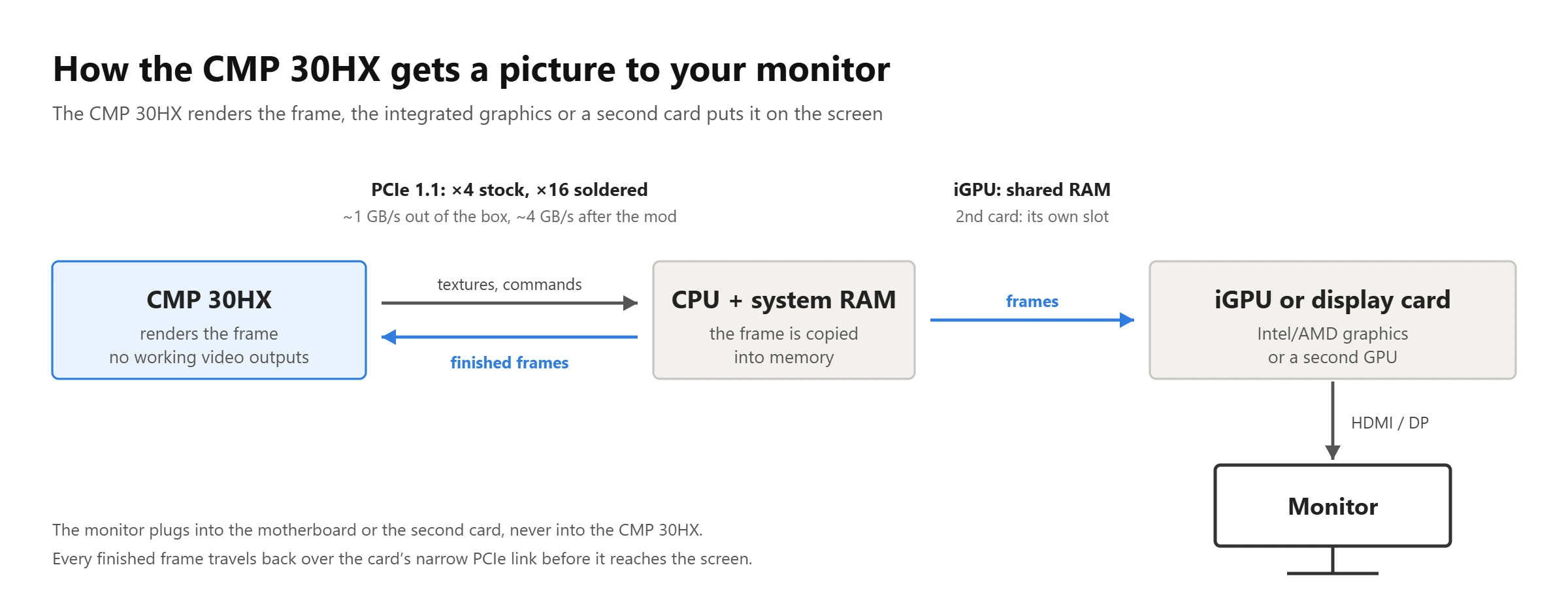
Four things: a device that sends the picture to the monitor, Windows 10 or 11, a modified driver and, ideally, a card with all 16 lanes soldered. The CMP 30HX renders the frame and the integrated graphics or a second card displays it, just like a laptop with switchable graphics.
Windows 11 handles this setup best: you pick the GPU for each game in the system settings, and that also works with a second discrete card. On Windows 10 the usual way is the NVIDIA Control Panel (Manage 3D settings → Preferred graphics processor → High-performance NVIDIA processor). It works with integrated graphics, though not as reliably as on Windows 11: some games ignore the setting, and with a second discrete card it often doesn’t work at all.
If a game still runs on the wrong GPU, try select_default_GPU. This small open-source script (GitHub) turns on the hidden default-GPU setting in Windows 10, registers the mining card as the high-performance DirectX adapter, and moves OpenGL programs onto the NVIDIA driver. We describe each option in the CMP 40HX guide; on the 30HX it works the same way.
Which Platforms Work
| Platform | Verdict | Notes |
|---|---|---|
| Intel 6th–14th gen with iGPU (LGA1151, 1200, 1700) | best option | current iGPU drivers, DirectX 12 works |
| Intel Haswell (LGA1150) | works | DirectX 12 only with an older Intel driver, see Pitfalls |
| Intel Ivy Bridge (LGA1155) | at your own risk | Windows 11 recommended, the iGPU has no DirectX 12 |
| Intel Sandy Bridge (LGA1155) | not recommended | can be made to work, with serious limitations |
| AMD AM4 with an APU (Ryzen G) | works | some APUs give the graphics slot only x8, so a soldered card runs at PCIe 1.1 x8 (~2 GB/s) |
| X79, X99 and any CPU without iGPU | works with a second card | see “No Integrated Graphics” below |
A soldered card needs a slot that is x16 electrically. Budget boards often wire the second long slot as x4, and then the soldering gains you nothing. Use the top slot connected to the CPU.
Your CPU needs AVX. Pentium and Celeron chips up to 10th gen (G4560, G5400, G6400 and the like) and first-gen Core i3/i5/i7 lack it, and many modern games won’t start on them, whatever the graphics card. Core i3/i5/i7 from Sandy Bridge on, every Xeon E3 and the Xeon E5 chips for X79 and X99 are fine.
CMP 30HX Driver
The official NVIDIA driver installs on the CMP 30HX but only enables compute; DirectX and Vulkan stay locked. The lock is purely in software, and there are two ways around it.
- NVIDIA-patcher by dartraiden (GitHub) patches a few bytes in the official driver files. It’s open source and well documented. Take the regular build, not the one prefixed “NVENC-NvFBC”: the patcher’s guide warns that on a card without working NVENC that package makes NVENC apps crash.
- RainCandy Technology Special Edition (GitHub) is a ready-made installer that adds its own root certificate. It also has a special old 460.89 build made only for the CMP 30HX and 40HX, which works better with Easy Anti-Cheat and Riot Vanguard games (see Pitfalls).
NVIDIA still supports Turing in its current driver branches, so unlike the P106-100, the CMP 30HX keeps getting new drivers.
Which Version to Install
The version depends on what drives your monitor. Data from the patcher’s Windows guide as of November 2026:
| Display output through | Driver version |
|---|---|
| Intel or AMD integrated graphics, AMD card, NVIDIA GTX 16 / RTX | 621.14 |
| NVIDIA GTX 900/10 series, GT 1030 | 581.94 |
| NVIDIA Kepler (GT 710/730) | 472.12 |
| Two CMP cards in SLI | not supported |
Step-by-Step Installation
- Install the driver for your integrated graphics (or the second card) and make sure the picture comes through it.
- Download the official NVIDIA driver of the right version, the matching patched files and DDU.
- Unpack the driver with 7-Zip, replace the original files with the patched ones and add the patcher’s certificate as its Windows guide describes.
- Disconnect from the internet so Windows Update doesn’t slip in its own driver, remove the old NVIDIA driver with DDU and reboot.
- Run
setup.exefrom the unpacked folder, reconnect, and set the CMP 30HX as the high-performance GPU.
If the installer doesn’t see the card, point Device Manager at the unpacked folder (Update driver → Browse my computer). A blue screen right after installing usually goes away once you turn off hardware-accelerated GPU scheduling (it also causes black screens and crashes on Windows 10), and if the antivirus deletes the driver files, add C:\Windows\System32\DriverStore to its exclusions. A more detailed walkthrough is in our P106-100 guide.
No Integrated Graphics: Second GPU, X79 and X99
The CMP 30HX works on X79 and X99, but Xeon E5 chips have no integrated graphics, so a second card has to drive the monitor. The same goes for Intel F-series CPUs and Ryzen without a G.
- The display card sets the driver version. An AMD card or an NVIDIA GTX 16/RTX card lets the 30HX run the newest driver; a GTX 900/10 card holds it at 581.94; a GT 710/730 drags it down to 472.12. Owners with that Kepler combo report low frame rates and games starting on the wrong card.
- AMD is the least trouble. Something like an RX 550 avoids two NVIDIA cards fighting over one driver.
- Give the display card at least an x4 slot. Every finished frame passes through it, and an x1 riser on PCIe 2.0 caps 1080p at roughly 40 FPS.
How to pick a display card, fix the EnableMsHybrid registry setting and choose slots is covered in detail in the CMP 40HX guide.
Bottom line for X79 and X99: a CMP 30HX plus a second card often costs as much as a used GTX 1660 Super. It makes sense only if a suitable card is already in a drawer.
PCIe x4 Out of the Box: Why the Bus Decides Everything
A GTX 1660 Super talks to the system over PCIe 3.0 x16, about 16 GB/s. A stock CMP 30HX gets PCIe 1.1 x4: a nominal 1 GB/s and about 0.8 GB/s in practice. The chip supports 16 lanes and the board has traces for all of them, but the capacitors on 12 lanes were left off. Fitting them gives PCIe 1.1 x16, about 4 GB/s, the same as a P106-100 has from the factory.
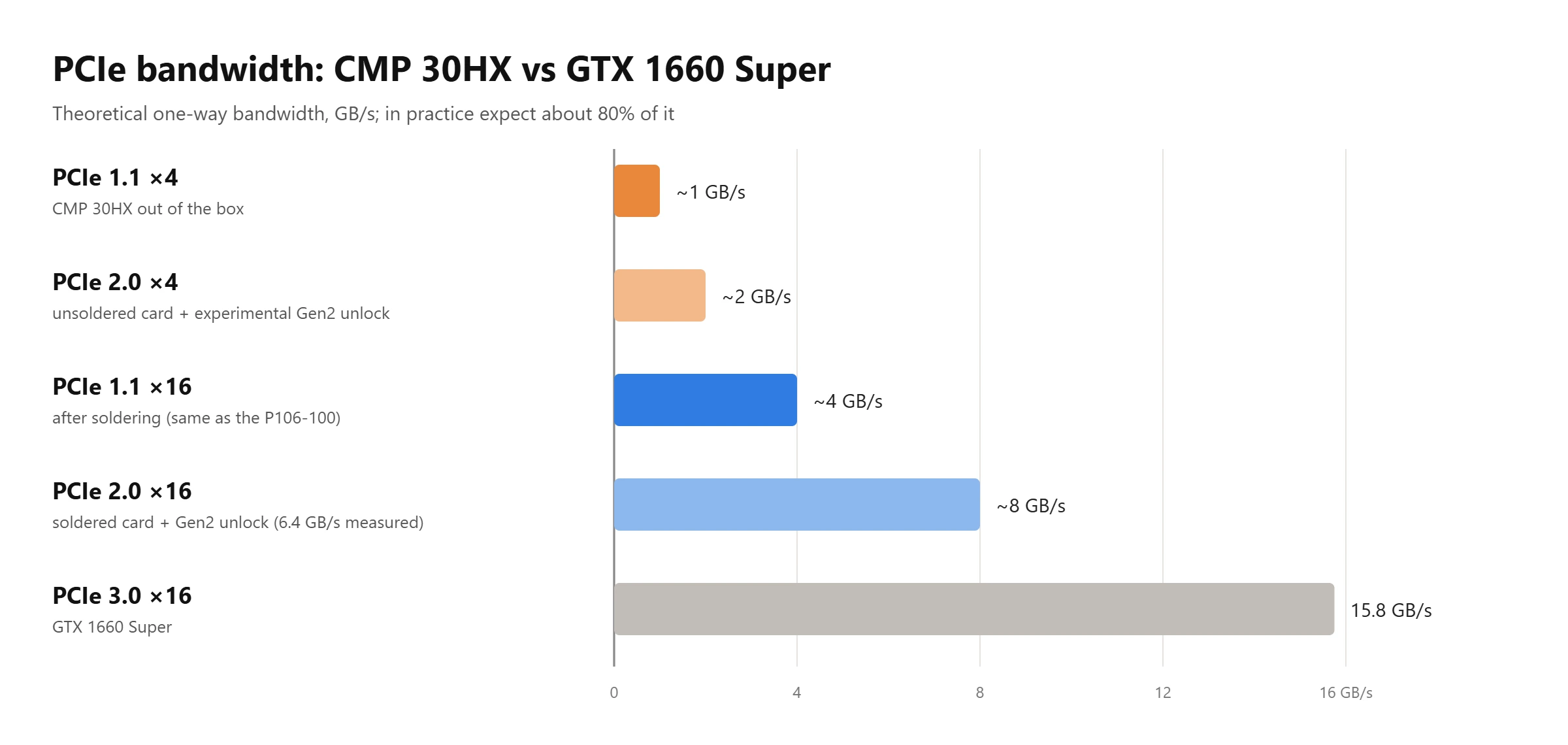
Two kinds of traffic share that link, and a narrow one slows down both:
- Frames going out. With no working outputs, the card sends every finished frame back over the bus to the integrated graphics or the display card. At 4 bytes per pixel a 1080p frame is about 8.3 MB, so 60 FPS needs 0.5 GB/s and 144 FPS needs 1.2 GB/s.
- Data coming in. Games keep streaming textures and geometry while you play. When a new area loads, or a game streams textures all the time, as most Unreal Engine 5 games do, the card sits waiting for data. That shows up as stutters and poor 1% lows more than as a lower average FPS.
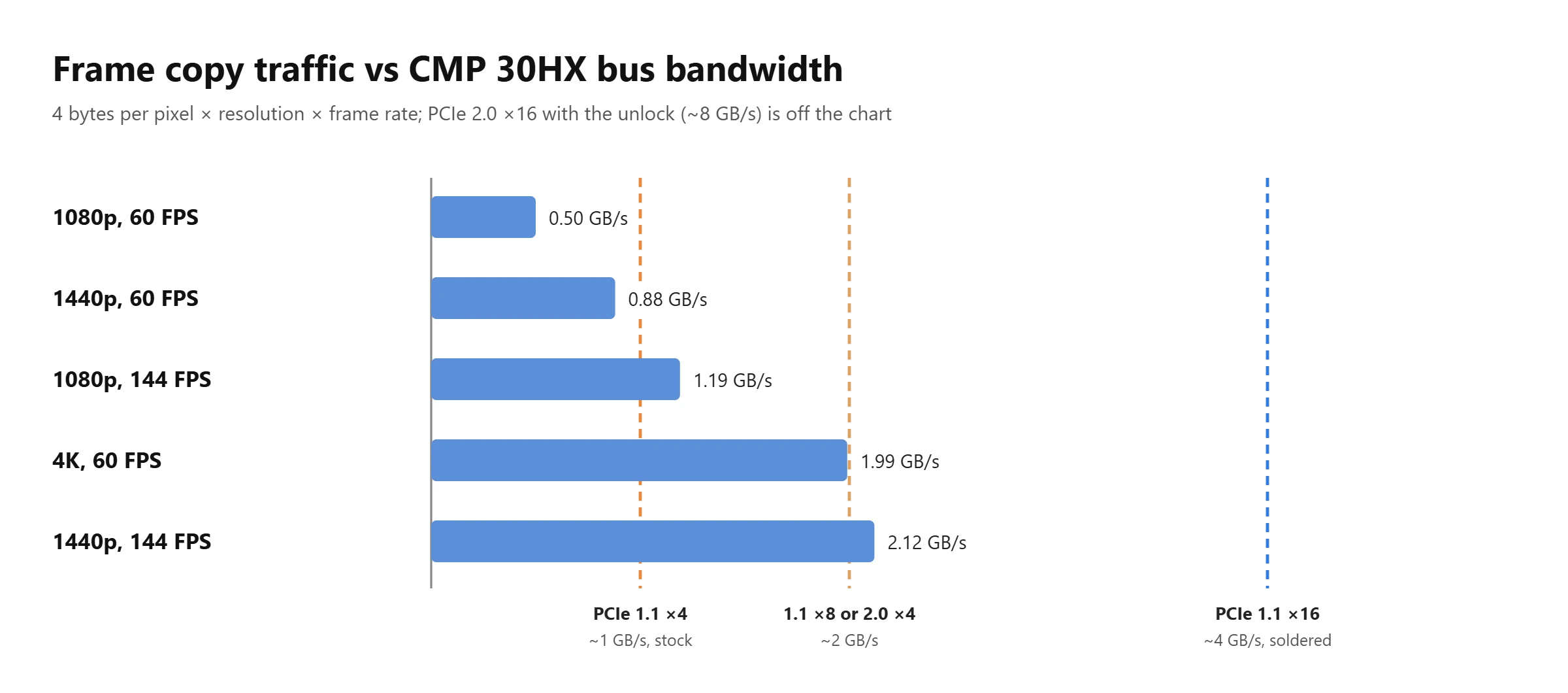
On a stock card the bus sets a hard ceiling: even in the lightest game it can’t send more than about 100 frames per second to the display at 1080p, or about 55 at 1440p. That’s the limit, not what you’ll see. In modern games the card also waits for data, so real frame rates are lower and less even. How much the bus costs shows up even at x8: in a side-by-side test, a soldered 30HX limited to PCIe 1.1 x8 trailed a GTX 1660 Super by 20–30% in most games and by almost half in Horizon. A stock card has only half of that bandwidth.
Without soldering, the CMP 30HX is a weak gaming card: the chip spends much of its time waiting for the bus. Plan for the mod, or buy a card that already has it.
Soldering the CMP 30HX to PCIe x16
This mod is what turns the 30HX into a proper GTX 1660 Super substitute. Owners and repair shops have been doing it since at least 2024, and in some markets cards are sold already modified as a matter of course. You only add parts to the signal lines between the connector and the chip; the power circuits and the firmware stay untouched.
What to Solder
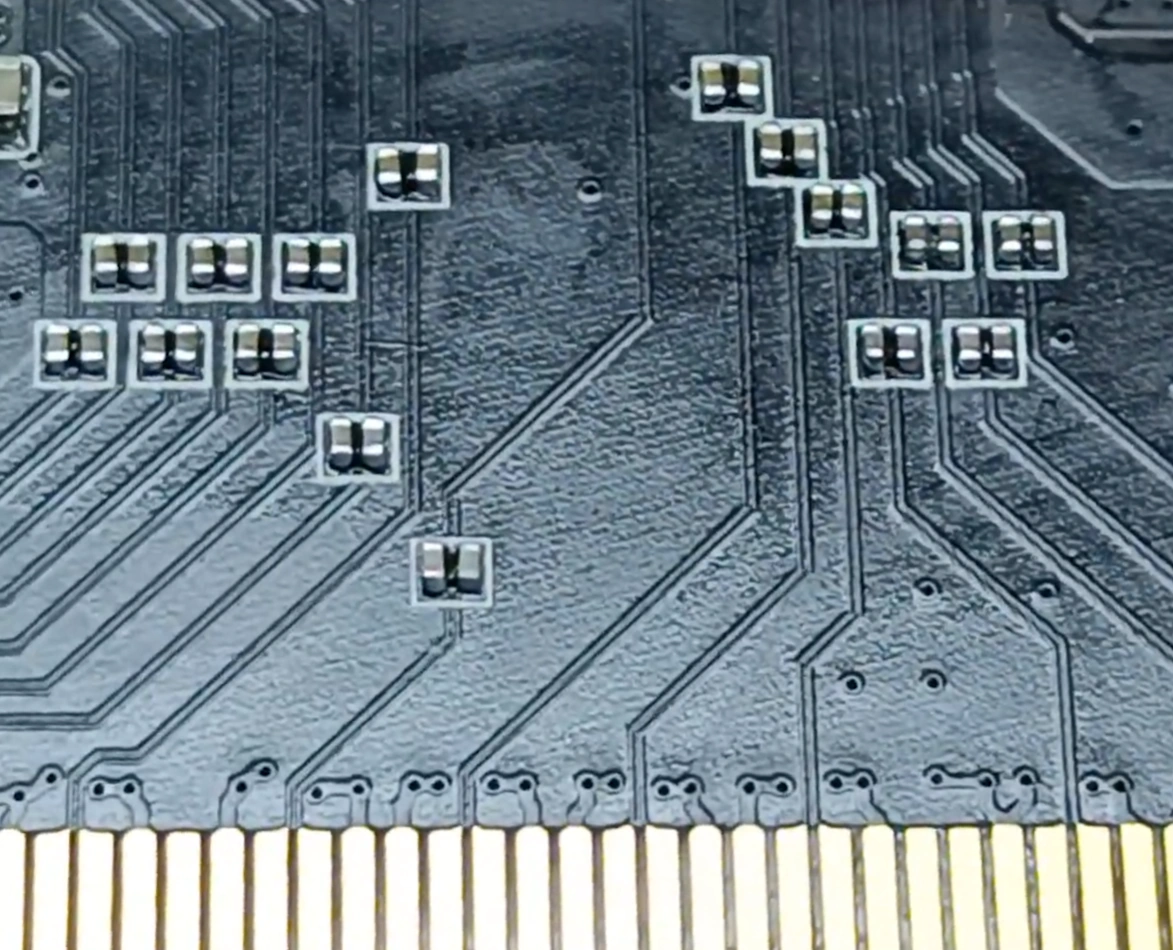
Each PCIe lane needs small AC coupling capacitors on its signal lines, and the CMP 30HX has them only on the first four lanes. The empty pads for the rest sit next to the PCIe connector, along the traces running toward the chip.
- Fill every empty pad along the lanes.
- Size 0402, 220 nF (0.22 µF), X7R ceramic. Buy them from a proper electronics supplier, and get a few spares: parts this small get lost easily. A wrong value is a common reason a card stays at x4: one owner fitted 200 pF parts and got no change.
- Tools: a fine-tip soldering iron or a hot air station, flux, fine tweezers and some magnification. Don’t keep the board under hot air for long.
If you’ve never soldered SMD parts, don’t learn on this card. Any shop that repairs phones or laptops can do it. The only really bad outcome is a pad torn off the board, so don’t overheat and don’t pull on parts. If the card trains at x8 or x4 after the mod, one or more joints aren’t making contact; reflow them and check again.
How to Check the Result
Open GPU-Z and look at the Bus Interface line. The part after the @ is the link you actually have. A stock card shows x4 1.1 there; a soldered one in a full-width slot shows x16 1.1. Don’t be confused if GPU-Z shows 2.0 or 3.0 before the @, or if AIDA64 reports PCIe 2.0 support on some 30HX cards: that’s the supported mode, sometimes reported wrongly. Only the link after the @ counts.
Buying a Card That’s Already Soldered
Ask the seller for a GPU-Z screenshot with “x16 1.1” after the @ and for a close-up of the pads next to the PCIe connector: every pad along the lanes should be populated, with neat joints and no burn marks or leftover flux. A modified card should cost only a little more than a stock one.
Experimental: PCIe 2.0 Unlock
The CMP 40HX got an EFI unlock that brings back its tensor cores and PCIe 2.0. That tool doesn’t support the 30HX, and the 30HX has no tensor cores to unlock anyway. What it does have since September 2026 is a separate PCIe 2.0 unlock: CMP30HXmodtoGEN2 by ngthaihoc, an open-source tool for Windows and Linux (v3.1.1 as of November 2026).
- What it does. After Windows starts, it rewrites the card’s PCIe link registers, retrains the link at PCIe 2.0 and raises the PCIe read request size so the link reaches its real throughput. Nothing is flashed.
- What you get. On a soldered card GPU-Z shows “x16 2.0”, and the author measured 6.3–6.4 GB/s in AIDA64. An unsoldered card can only go to PCIe 2.0 x4, about 2 GB/s. The readme is written for soldered cards, but owners report it works at x4 too, and games run better there as well.
- In games. Owners report smoother frame rates in Cyberpunk 2077 and S.T.A.L.K.E.R. 2 and a small FPS gain. Nobody has published proper side-by-side tests yet.
- Secure Boot stays on. This is the big difference from the 40HX unlock: there’s no EFI program, so it doesn’t lock you out of games that require Secure Boot.
What it changes in Windows:
- Security settings. To reach the registers, it loads the WinRing0 and ThrottleStop kernel drivers, which have known vulnerabilities, and turns off Memory Integrity (Core Isolation) and Windows’ vulnerable driver blocklist. Antivirus software may flag it. The author says Vanguard, EAC and BattlEye games still work; we haven’t seen independent confirmation, and anti-cheat rules change often.
- Power saving. It turns off PCIe power saving (ASPM) and Fast Startup, which would otherwise drop the link back to 1.1.
- A background task. The driver can reset the link to 1.1, so a scheduled task reapplies the unlock after boot, logon and sleep.
Requirements: the monitor on the integrated graphics or a second card, the NVIDIA driver already working, and the card in an x16 slot connected to the CPU. If GPU-Z shows x16 2.0 but AIDA64 gets only about 2.5 GB/s, the read request size has fallen back to the default; the tool’s readme explains how to raise it again. An uninstaller is included.
On Linux there’s also cmp30hx-unlock, a patch for NVIDIA’s open kernel modules that enables PCIe 2.0 on the 30HX, 40HX and 50HX. On the 40HX and 50HX it also lifts NVIDIA’s compute limits (the 40HX’s tensor cores, the 50HX’s FP32), while on the 30HX its author reports no big gain.
Pitfalls
Most problems come from the “one card renders, another displays” setup and the modified drivers, not from the card itself.
- Games that require ray tracing won’t start. Indiana Jones and the Great Circle refuses to launch, and more games will follow. This is a hardware limit of TU116.
- A game runs at a few FPS. That means it’s running on the integrated graphics; owners have seen it in CS2 and Rust, among others. Set the CMP 30HX for that game in the Graphics settings and try select_default_GPU. If it still won’t move, one owner fixed it in the BIOS: set the primary display to PCIe and enable iGPU Multi-Monitor.
- DirectX 12 on Haswell graphics (LGA1150). Intel disabled DirectX 12 on Haswell iGPUs from driver 15.40.44.5107 on, and since the iGPU displays the frame, DirectX 12 games fail on the 30HX too. Roll back to 15.40.42.5063 or older, at the price of an unpatched vulnerability.
- Exclusive fullscreen sometimes hangs a game or sends it to the integrated graphics. Use borderless windowed.
- Anti-cheat. The modified drivers are signed with certificates that anti-cheat systems don’t trust, so EAC, BattlEye or Vanguard games may refuse the card or, in the worst case, ban the account. RainCandy’s builds since May 29, 2026 have experimental Easy Anti-Cheat support, and its old 460.89 build for the 30HX and 40HX gets along better with EAC and Vanguard, at the price of a 2020 driver. Owners still report blue screens in some EAC games, so check your particular game.
- Windows 11 driver policy. Since the April 2026 updates, Windows 11 24H2 and newer can block modified NVIDIA drivers on a fresh install. Both the patcher’s guide and RainCandy describe how to remove the policy.
- Driver keeps changing back. If the card shows up as “CMP 30HX” again and games lose it, Windows Update has installed the official driver over yours. Turn off driver updates.
CMP 30HX Gaming Performance
How a CMP 30HX plays depends on three things: whether it’s soldered, which slot it sits in, and how much data a game pushes over the bus. Roughly how far behind a GTX 1660 Super each configuration falls at 1080p:
| Configuration | PCIe link | Behind a GTX 1660 Super |
|---|---|---|
| Stock card | 1.1 x4, ~1 GB/s | about 40–50%, and never more than ~100 FPS |
| Stock card + Gen2 unlock | 2.0 x4, ~2 GB/s | about 20–30% |
| Soldered, slot wired as x8 | 1.1 x8, ~2 GB/s | 20–30% in most games, up to half in games that stream a lot of data |
| Soldered | 1.1 x16, ~4 GB/s | about 10–15% |
| Soldered + Gen2 unlock | 2.0 x16, ~6.4 GB/s measured | up to about 5% |
Only the x8 row comes from a direct comparison: a soldered 30HX limited to PCIe 1.1 x8 against a GTX 1660 Super on the same platform. The other rows are our estimates. We took PCIe scaling tests of regular graphics cards and adjusted them for what a mining card has to do on top: send every finished frame back over the same narrow link. The stock-card figures are a typical average: in heavy games that run around 60 FPS anyway the gap shrinks, and it grows with frame rate and in games that stream a lot of data.
The two videos below are Chinese, with no English audio or subtitles, but all results are shown in charts with plain numbers.
The first one compares a P106-100, a CMP 30HX, a CMP 40HX and two RX 580s on a Ryzen 5 9600X, in 3DMark and six games at 1080p. The 30HX beats the P106-100 by 12–38% depending on the game, about a quarter on average, which is what a soldered card should do: the two then run on the same PCIe 1.1 x16 link, and the TU116 chip is that much faster. Examples of average FPS for the P106-100, 30HX and 40HX: Shadow of the Tomb Raider at the highest preset 57, 65 and 83; Cyberpunk 2077 at Ultra with FSR 3 Quality 36, 48 and 65; CS2 at High 94, 126 and 153.

The second video puts a Manli CMP 30HX against an ASUS CMP 40HX. GPU-Z shows both soldered to x16 at PCIe 1.1, and the test system is a Ryzen 7 9700X on B650 with driver 581.57 and Windows 11. In the games’ built-in benchmarks at high presets the 30HX gets 118 FPS in CS2, 63 in Forza Horizon 5, 69 in Shadow of the Tomb Raider, 64 in Red Dead Redemption 2 and 148 in Naraka: Bladepoint. The 40HX is 20–35% faster everywhere. The author’s conclusion: with soldered cards selling for about 160 and 310 yuan, the 30HX is the better value.

Put together: a soldered CMP 30HX plays like a somewhat slower GTX 1660 Super at 1080p. It handles esports games easily and most titles at high settings around 60 FPS, falls further behind in games that stream a lot of data, and can’t run games that require ray tracing at all.
Power, Heat and Noise
The CMP 30HX is rated at 125 W, 60 W less than a CMP 40HX, and takes one 8-pin connector. MSI and Gigabyte specify a 450 W power supply, and any decent unit of that size with a real 8-pin PCIe cable is enough.
- Temperatures. Owners report 60–75 °C in games, depending on the cooler and how dusty the card is.
- After years of mining, replace the thermal paste and the memory pads, and check the fans. Replacement fans for the Gigabyte model are easy to find.
- Undervolting. MSI Afterburner has no voltage curve on the CMP 30HX, but the power limit slider works, and it’s the easiest way to make the card cooler and quieter at a small cost in FPS. Owners who want a real undervolt lock a lower voltage point with NVIDIA Inspector’s command line.
CMP 30HX for AI and Local LLMs
Compute on the CMP 30HX doesn’t seem to be cut at all: the 50HX has its FP32 throttled and the 40HX its tensor cores, while the 30HX has no tensor cores and the Linux unlock gives it no big gain. FP32 and FP16 work as on a GTX 1660 Super, and Ollama and llama.cpp run on CUDA, which is available even with the official driver. The limits are elsewhere.
- 6 GB of memory. 3–4B models fit easily, and 7–8B models at 4-bit quantization fit with a short context. Anything bigger spills into system RAM, and over a PCIe 1.1 link that’s painfully slow.
- No tensor cores. Prompt processing is slower than on an RTX card of the same class, and there’s no unlock for it.
- The bus matters for loading. A model loads noticeably faster at x16 than at x4, one more reason to solder.
Buying a Used CMP 30HX
- Price. $40–100 in November 2026. Soldered cards cost a little more, and in some markets they’re the norm. Compare with a used GTX 1660 Super, which needs no tricks at all.
- Soldered or not. Check the GPU-Z screenshot and a photo of the capacitor pads, as described above.
- Don’t confuse it with the CMP 40HX. The 40HX has 8 GB and a bigger chip. In GPU-Z the CMP 30HX’s Device ID is 10DE:2189.
- Fans and thermal pads are usually worn after years of 24/7 work. Budget for maintenance.
- Memory. Run memtest_vulkan right after buying, once the modified driver is in place; a few minutes without errors is a good sign.
- If you can, buy where the card can be returned. Some board and card combinations misbehave in ways that are hard to predict.
CMP 30HX, CMP 40HX or P106-100?
All three run on the same idea, and once soldered, the two CMP cards end up on the same PCIe 1.1 x16 link that the P106-100 has from the factory. So the chip, the memory and the price decide.
| P106-100 | CMP 30HX | CMP 40HX | |
|---|---|---|---|
| Chip class | GTX 1060 6 GB | GTX 1660 Super | RTX 2060 Super |
| Speed of the full GeForce card | 78% | 100% | 131% |
| Memory | 6 GB | 6 GB | 8 GB |
| Bus from the factory | PCIe 1.1 x16 | PCIe 1.1 x4 | PCIe 1.1 x4 |
| PCIe 2.0 unlock | port exists, not tested on the P106-100 | yes, Secure Boot stays on | yes, needs Secure Boot off or a self-signed EFI |
| Drivers | 580 branch, the last for Pascal | current | current |
| NVENC | no | owners report it doesn’t work | yes |
| Ray tracing games | won’t start | won’t start | start |
| Power | 120 W | 125 W | 185 W |
Relative speed is TechPowerUp’s rating of the full GeForce cards, with the GTX 1660 Super at 100%. All three mining cards lose some of that to the bus, and once the CMP cards are soldered, about the same share, so they stay in roughly the same order. An unsoldered CMP card stuck at x4 falls well below these figures.
- Against the P106-100, a soldered CMP 30HX is the better card: about a quarter faster chip on the same bus, current drivers and an unlock that doesn’t fight Secure Boot. An unsoldered 30HX is a different matter: the P106-100’s factory x16 matters more than the faster chip, and the P104-100 shows what living with an x4 link is like.
- Against the CMP 40HX, the 30HX gives up about a quarter of the speed, 2 GB of memory, NVENC and every game that requires ray tracing. In return it costs roughly half as much, draws 60 W less and runs cooler. If you can stretch to a soldered 40HX, it’s the better buy; the 30HX makes sense when the budget or the power supply is tight.
Verdict: Who Should Buy a CMP 30HX
- Buy it if you can get one already soldered to x16 for well under the price of a used GTX 1660 Super, your CPU has integrated graphics, and you play at 1080p.
- Think twice if the card is unsoldered and you can’t mod it, or if you’re on X79 or X99, where a second card eats the savings.
- Skip it for streaming, for games that require ray tracing, and on CPUs without AVX. If you can pay a bit more, look at the CMP 40HX.
Useful Links
- NVIDIA-patcher on GitHub and its Windows guide: the patch and the driver version table.
- RainCandy Technology Special Edition: a ready-made modified driver with an installer and builds for anti-cheat games.
- CMP30HXmodtoGEN2: the experimental PCIe 2.0 unlock for Windows and Linux.
- select_default_GPU: sets the default GPU for DirectX and OpenGL on Windows 10.
- Display Driver Uninstaller (DDU): clean removal of the old driver before installing.
- memtest_vulkan: a quick video memory test.
- Intel: DirectX 12 on 4th gen graphics: why DirectX 12 disappeared on Haswell.

Written by
Senior Hardware Specialist proving you don't need top-tier gear to game. Expert in smart upgrades and budget-friendly PC restoration.