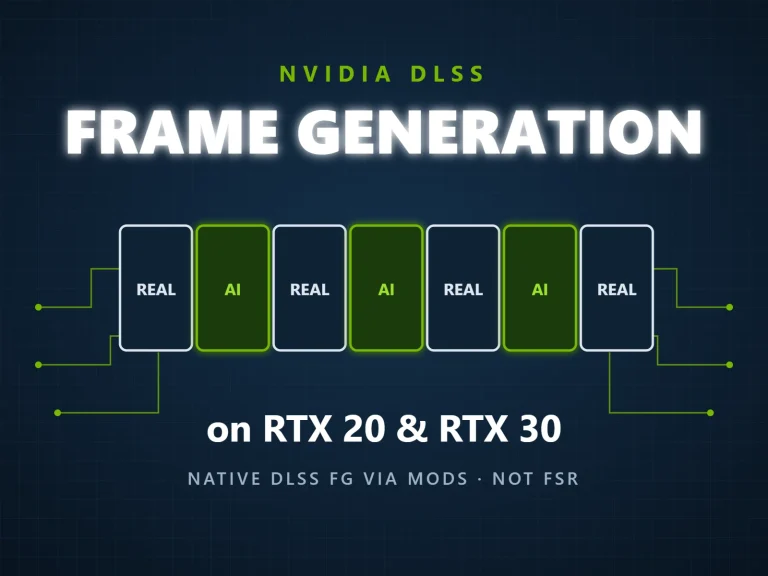
 For four years NVIDIA kept frame generation off RTX 20 and RTX 30 cards, saying they couldn’t handle it properly. In the fall of 2026, modders got NVIDIA’s own DLSS Frame Generation running on them. Not FSR 3 dressed up as DLSS, like the old mods, but NVIDIA’s actual runtime.
Below: which mods exist, what they need, how many frames they actually add, and who should bother.
The short version:
- RTX 30 (3050 to 3090): DLSS Frame Generation works through Universal MFG Unlocker or DLSSG SM86, including 3X and 4X modes. On RTX 30 it is already usable day to day.
- RTX 20 (2060 to 2080 Ti): it works, but it is experimental. 2X starts; higher modes are hit and miss, and on a 2060 it is not always faster than FSR frame generation.
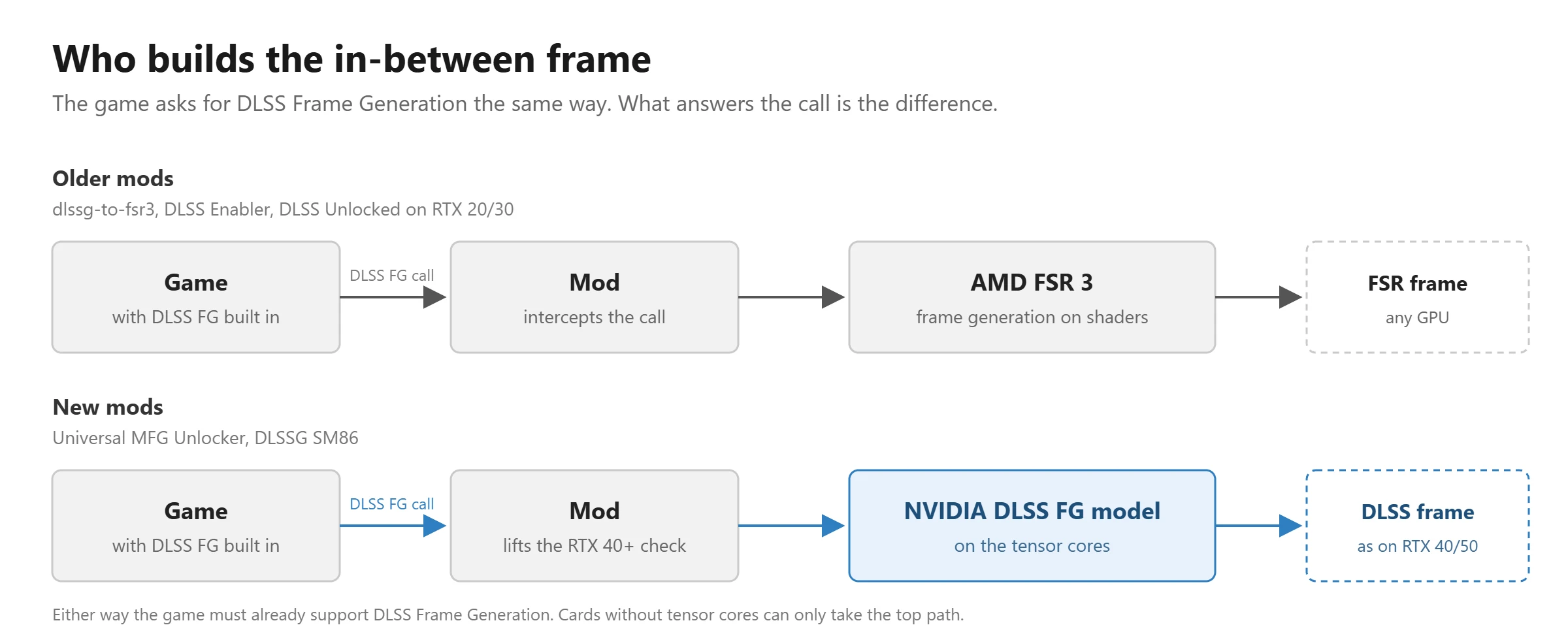
- The game has to support DLSS Frame Generation on its own. The mod does not add frame generation to games that lack it. It only removes the check for your GPU generation.
- GTX 16, GTX 10, P106-100, P104-100 and CMP 30HX will not get real DLSS FG: they have no tensor cores. For them it is FSR or XeSS frame generation.
- These are unofficial mods. Keep them away from online games with anti-cheat.
Table of Contents
Why NVIDIA Kept Frame Generation Off RTX 20 and 30
DLSS 3 Frame Generation launched in 2022 for RTX 40 only. NVIDIA pointed to the Optical Flow Accelerator in Ada chips: on RTX 30, it said, frame generation would bring more latency, worse image quality and no real FPS gain.
With DLSS 4 in January 2025 that argument stopped holding. The hardware optical flow was replaced by a neural network that runs on regular tensor cores, and RTX 20 and RTX 30 both have those. NVIDIA’s Bryan Catanzaro left the door open at the time, calling it a question of optimization, but promised nothing.
Officially nothing changed: Frame Generation is RTX 40 and newer, Multi Frame Generation (3X to 6X) is RTX 50 only. So the modders took over.
| When | What happened |
|---|---|
| November 2026 | Universal MFG Unlocker 1.7.x and DLSSG SM86 0.4.x: RTX 30 stable, RTX 20 experimental |
| October 2026 | MFG Unlocker 1.5.0 declares RTX 30 support stable and adds the lighter Preset C |
| September 2026 | DLSSG SM86 runs DLSS FG on RTX 30; the dlssg_for_sm75 fork brings it to RTX 20 |
| January 2025 | DLSS 4 moves frame generation onto the tensor cores |
| December 2023 | dlssg-to-fsr3: the game thinks DLSS FG is on, FSR 3 actually builds the frames |
| 2022 | DLSS 3 Frame Generation launches for RTX 40 only |
Which Mods Exist and How They Differ
The key question is who draws the in-between frames. In the older mods the game believes it is running DLSS FG, while AMD FSR 3 builds the frames. In the new ones, NVIDIA’s own neural network does it, the same one RTX 40 and 50 cards use. In NoobFeed’s side-by-side at 2X, an RTX 3090 with the mod and an RTX 5090 with official FG looked practically the same, down to artifacts in the same spots.
| Mod | Who builds frames on RTX 20/30 | RTX 30 | RTX 20 | API | Notes |
|---|---|---|---|---|---|
| Universal MFG Unlocker (dashdogy) | NVIDIA DLSS FG | yes, up to 6X | experimental | DX12; Vulkan on RTX 30 | single DLL, in-game overlay menu, plus XeSS frame generation for any GPU |
| DLSSG SM86 (sdli1995) | NVIDIA DLSS FG on its own optimized kernels | yes, up to 4X (6X where the game supports it) | experimental | DX12 only | open source, detailed measurements, INT8 speed-up for regular DLSS upscaling |
| dlssg_for_sm75 (Coldwood1026) | NVIDIA DLSS FG | — | yes, tested in Witcher 3 only | DX12 | the first RTX 20 port, not updated since September |
| DLSS Unlocked (ShyVortex) | FSR 3.1 | yes | yes | DX12 | real DLSS FG only on RTX 40 |
| DLSS Enabler, OptiScaler, dlssg-to-fsr3 | FSR 3 / XeSS | yes | yes | DX12 | DLSS Enabler and OptiScaler also work on GTX and Radeon cards |
Which one to pick. Start with Universal MFG Unlocker: it has the widest game compatibility and a menu right inside the game. If a game won’t run with it, try DLSSG SM86. The FSR-based mods only make sense for cards without tensor cores, or for games that have no DLSS FG at all.
There is also NVIDIA MFG Bridge on Nexus Mods, which runs native DLSS FG on RTX 20/30, but there is much less data on it. Smooth Motion mods are a different thing: driver-level frame generation that needs no game support and usually shows more artifacts.
What You Need
- A GeForce RTX 20 or RTX 30 card, laptop GPUs included.
- Windows 10 or 11, 64-bit.
- An NVIDIA driver from the R580 branch or newer. DLSSG SM86 also starts on older ones, but takes longer to compile its kernels on the first frame.
- A DirectX 12 game with built-in DLSS Frame Generation: Cyberpunk 2077, Black Myth: Wukong, The Witcher 3 (DX12), Alan Wake 2 and so on. If the game shows a DLSS Frame Generation option on an RTX 40 card, it qualifies.
- No CUDA Toolkit or Python needed.
Installation Overview
Both mods install the same way: files go next to the game’s executable, and the driver and system are left alone. Delete the files and the game is back to stock. The exact file names for each game are in the mods’ own compatibility lists.
Universal MFG Unlocker
- Download the archive from the Releases page on GitHub or from Nexus Mods.
- Rename
MFGUnlocker.dlltoversion.dllorwinmm.dll, depending on the game. - Put it next to the game’s own executable, not the launcher.
- Turn on Frame Generation in the game. Backspace opens the mod’s menu, where you pick the multiplier.
DLSSG SM86
- Copy
version.dll,dlssg_sm86.iniand thedlssg_sm86folder into the game’s executable folder. Back up any files with the same names first. - Turn on DLSS Frame Generation in the game.
- If the mod doesn’t load, try the other names from the
alternativesfolder one at a time: winmm, dbghelp, dinput8, dxgi, d3d12. Only one of them should be in the game folder. - In
dlssg_sm86.ini,MaxGeneratedFrames=3gives 4X and5gives 6X (if the game supports it).Preset=Cswitches to the lighter FG Lite.
Windows SmartScreen may warn about an unknown publisher: the mods’ DLLs are self-signed by their authors. Download only from the authors’ GitHub pages and Nexus Mods, never from random sites.
This video walks through installing Universal MFG Unlocker. It’s recorded on an RTX 4070 Ti Super, but the steps are the same on RTX 20 and 30 cards.

How Many Frames You Actually Gain
On RTX 30, 2X mode adds roughly 40–75% to your frame rate, not 100%. Independent tests are still scarce; here is everything we found:
| GPU | Game and settings | FPS without FG | FPS with FG | Tested by |
|---|---|---|---|---|
| RTX 3080 | AC Black Flag Resynced, 3440×1440, DLSS Quality | 79 | 119 (2X) | XDA |
| RTX 3080 | Resonance: A Plague Tale Legacy, 3440×1440, DLSS Quality | 77 | 110 (2X) | XDA |
| RTX 3080 | Cyberpunk 2077 | ~42 | 74 (2X), 120 (4X) | user report via TechPowerUp |
| RTX 3080 Ti | Black Myth: Wukong | 50 | 150 (4X) | DLSSG SM86 author |
| RTX 3080 Ti | Cyberpunk 2077, path tracing | 35 | 100 | DLSSG SM86 author |
Here is DLSSG SM86 running Cyberpunk 2077 on an RTX 3060 12 GB:

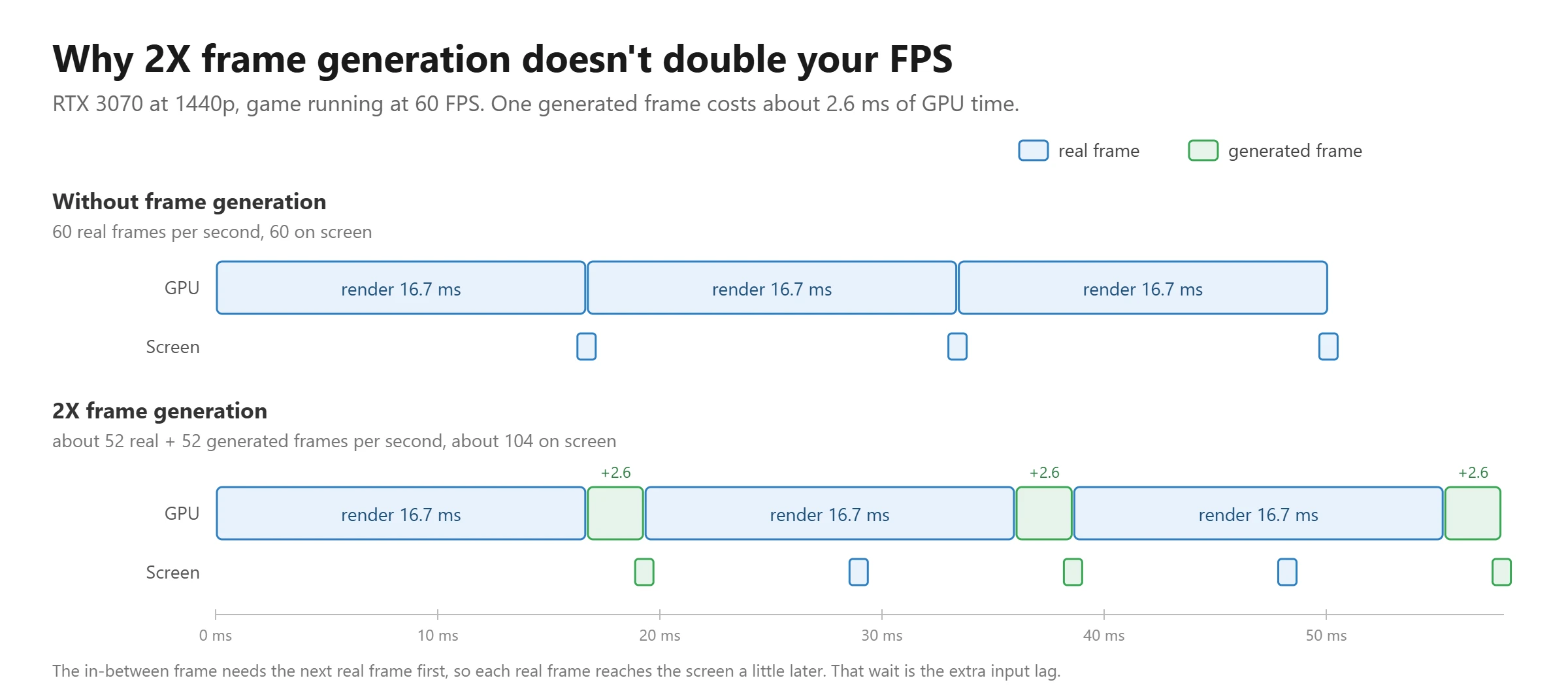
Why not double. Every generated frame costs time on the same GPU, so you get fewer real frames. According to the DLSSG SM86 author’s measurements, one generated frame at 2X costs:
- RTX 3070: about 2.6 ms at 1440p and 3.6–3.8 ms at 4K;
- RTX 3080 Ti: about 1.7 ms at 1440p and 2.2 ms at 4K;
- Preset C (FG Lite) cuts that by 30–37% for slightly worse image quality.
For example: an RTX 3070 at 1440p runs a game at 60 FPS. With 2X generation the real frame rate drops to about 52, and you see about 104 on screen. The weaker the card and the higher the resolution, the more generation costs.
VRAM
Frame generation eats extra video memory, and the amount depends on resolution, not on the multiplier. DLSSG SM86 lists about 350 MB at 1080p, 540 MB at 1440p and 810 MB at 4K. On a 6 GB RTX 2060 or an 8 GB 3060 Ti or 3070, those few hundred megabytes can be the last ones you had, and textures will have to come down.
Latency and Artifacts
Nobody has published latency measurements for these mods yet. Any frame generation adds latency: to draw an in-between frame, the GPU has to wait for the next real one. The picture gets smoother, the mouse gets a little floatier.
In practice:
- Frame generation makes sense when you already have at least 50–60 FPS without it. It won’t turn 20 FPS into a playable 80: at a low base frame rate artifacts creep in, and the higher the multiplier, the more visible they get.
- 4X–6X modes are for 144–240 Hz monitors. In NoobFeed’s test on an RTX 3090 at 6X, the base frame rate fell to around 20 FPS.
- Great for single-player games on a controller, not for competitive shooters.
RTX 20: It Works, but It’s Still an Experiment
RTX 20 is in a weaker spot than RTX 30: the mods either label it experimental or have barely tested it, and user reports are few.
- dlssg_for_sm75 ran on a laptop RTX 2060 Max-Q in The Witcher 3 (DX12). 2X worked, 3X showed ghosting, 4X didn’t start. One user reported it was slower than FSR frame generation on the same card.
- Universal MFG Unlocker has enabled DLSS FG on cards from the RTX 2060 to the RTX 2080 Ti since version 1.6.0, the same way as on RTX 30, labelled experimental.
- DLSSG SM86 lists RTX 20 support, but its author only checked that it starts on an RTX 2080 Ti. The newer 310.9 kernels haven’t been run on real Turing hardware yet.
The reason is the hardware: Turing’s second-generation tensor cores are slower than Ampere’s third-generation ones, so every generated frame costs more. On an RTX 2080 Ti or 2080 Super generation will most likely pay off; on an RTX 2060 it’s an open question.
Tip for RTX 2060 and 2070 owners: in the same game, compare DLSS FG through the mod with FSR FG through OptiScaler, and keep whichever gives more FPS with an acceptable image. And watch your VRAM: the regular 2060 has only 6 GB.
GTX, P106/P104 Mining Cards and CMP
Cards without tensor cores won’t get real DLSS Frame Generation from any mod: NVIDIA’s neural network simply has nothing to run on.
| Card | Tensor cores | DLSS FG via mod | What’s left |
|---|---|---|---|
| GTX 10, GTX 16 | no | no | FSR FG and XeSS FG via OptiScaler or DLSS Enabler |
| P106-100, P104-100 | no | no | same |
| CMP 30HX (TU116, same chip as the GTX 1660) | no | no | same |
| CMP 40HX, CMP 50HX | yes, throttled until unlocked | in theory yes, untested | FSR FG and XeSS FG work even without the unlock |
FSR frame generation helps GTX cards too, but image quality and frame pacing are worse than with DLSS FG.
CMP 40HX and 50HX are the interesting case. They use the same Turing chips as the RTX 2060 Super/2070 and the RTX 2080 Ti. Once the tensor cores are unlocked, regular DLSS already works on them, so the RTX 20 mods should see them as ordinary Turing. Nobody has tried it yet, though.
There is a catch. CMP cards have no video outputs, so finished frames reach the monitor through a second GPU over a PCIe x4 link. With frame generation there are two to four times as many frames to send, and we expect the narrow bus may eat most of the gain. If you’ve tried it, let us know and we’ll add your results.
Risks
- Anti-cheat. The mod loads its own DLL into the game. In online games with anti-cheat that is a road to a ban, and the MFG Unlocker author says outright that such games are not supported. Single-player only.
- Crashes. Some games crash on launch with the mod: XDA ran into this with Forza Horizon 6. A different DLL name or the other mod sometimes helps, sometimes nothing does.
- Updates. A game patch, driver or NVIDIA App update can break the mod. So far modders have fixed such breakages within hours or days, but there are no guarantees.
- Sources. The mods’ DLLs aren’t officially signed. Get them only from the authors’ GitHub pages and Nexus Mods.
Verdict: Who Is This For
- RTX 3060 to 3090 with a 144 Hz or faster monitor. Definitely try it: it’s free, undone by deleting files, and adds 40–75% smoothness in heavy games.
- RTX 2080, 2080 Super, 2080 Ti. Worth a try, knowing it’s an experiment.
- RTX 2060, 2070. Compare with FSR FG in the same game and keep the better one.
The main thing the mods proved is that RTX 30 tensor cores are enough for Frame Generation. Don’t hold your breath for official support from NVIDIA, though.
Useful Links
- Universal MFG Unlocker on GitHub and on Nexus Mods
- DLSSG SM86 on GitHub (README in Chinese; the archive includes an English MANUAL.en.html)
- dlssg_for_sm75 on GitHub

Written by
Senior Hardware Specialist proving you don't need top-tier gear to game. Expert in smart upgrades and budget-friendly PC restoration.